นำ AI มาใช้ในโรงเรียน โดยข้อมูลนักเรียนไม่ออกนอกรั้ว Bringing AI into your school — without sending student data away
AI ช่วยการเรียนการสอนได้จริง แต่ต้องระวังเรื่องข้อมูลนักเรียน หน้านี้อธิบายความเสี่ยง กฎหมาย PDPA และทางเลือกที่ปลอดภัยกว่า — แบบเข้าใจง่าย AI genuinely helps teaching — but student data needs care. A plain-language guide to the risks, the PDPA, and a safer path.
AI ช่วยได้จริงAI really does help
งานวิจัยในไทย (KMITL) พบว่านักเรียนที่ใช้ผู้ช่วย AI ฝึกภาษาอังกฤษมีคะแนนการฟัง คำศัพท์ ไวยากรณ์ และการออกเสียงดีขึ้นอย่างชัดเจน และพึงพอใจสูง เพราะได้ฝึกในจังหวะของตัวเอง ไม่จำกัดเวลา A Thai study (KMITL) found students using an AI English tutor scored significantly higher on listening, vocabulary, grammar, and pronunciation — with high satisfaction, because they practice at their own pace, anytime.
ความเสี่ยงของ AI บนคลาวด์The risk with cloud AI
เมื่อนักเรียนใช้ ChatGPT หรือ AI ต่างชาติ ข้อมูลที่พิมพ์หรือพูดจะถูกส่งออกนอกประเทศ: When students use ChatGPT or other foreign AI, what they type or say is sent abroad:
- นำไปฝึกโมเดล — ข้อมูลอาจถูกใช้พัฒนาโมเดลของบริษัทต่างชาติTraining — the data may be used to improve a foreign company's models.
- เก็บนานเท่าไรก็ไม่รู้ — เก็บบนเซิร์ฟเวอร์ต่างประเทศ เสี่ยงรั่วไหลRetention — stored on foreign servers, with breach risk.
- เขตอำนาจกฎหมาย — เมื่อข้อมูลออกนอกไทยแล้ว ตรวจสอบได้ยากว่าถูกนำไปทำอะไรJurisdiction — once it leaves Thailand, you can't audit what happens to it.
- การทำโปรไฟล์ของผู้เยาว์ — ข้อมูลของเด็กควรได้รับการคุ้มครองเป็นพิเศษProfiling minors — children's data deserves special protection.
PDPA เกี่ยวข้องอย่างไรHow PDPA applies
พ.ร.บ. คุ้มครองข้อมูลส่วนบุคคล (PDPA) บังคับใช้เต็มรูปแบบตั้งแต่มิถุนายน 2565 โรงเรียนที่ประมวลผลข้อมูลนักเรียนต้องปฏิบัติตาม: Thailand's PDPA has been fully in force since June 2022. Schools handling student data must comply:
- การส่งข้อมูลข้ามประเทศ (มาตรา 28) — ต้องมีกลไกที่ได้รับการรับรอง (เช่น SCCs) หรือความยินยอมCross-border transfer (§28) — needs an approved mechanism (e.g. SCCs) or consent.
- การตัดสินใจอัตโนมัติ (มาตรา 34) — ผู้เรียนมีสิทธิ์คัดค้าน ต้องมีคนตรวจสอบได้Automated decisions (§34) — the right to object; a human must be able to review.
- ข้อมูลเด็ก — ความเสี่ยงสูง ควรทำการประเมินผลกระทบ (DPIA)Children's data — high-risk; a Data Protection Impact Assessment (DPIA) is expected.
- บทลงโทษ — ปรับทางปกครองสูงสุด 5 ล้านบาท และมีโทษอาญาPenalties — administrative fines up to ฿5M, plus criminal liability.
หมายเหตุสำคัญ: PDPA ไม่ได้บังคับให้เก็บข้อมูลไว้ในประเทศ แต่การส่งข้อมูลออกนอกประเทศสร้างภาระการปฏิบัติตามกฎและความเสี่ยง การเก็บข้อมูลไว้ในเครื่องที่โรงเรียนจึงช่วยให้ "ง่ายและปลอดภัยกว่า" Important: PDPA does NOT mandate keeping data in-country — but sending it abroad creates compliance burden and risk. Keeping it on a box at the school is simply the simpler, safer path.
ทางออก: AI ในเครื่องของโรงเรียนThe answer: AI on your own box
- ข้อมูลนักเรียนอยู่ในโรงเรียน ไม่ส่งออกไปไหน — คุณควบคุมได้เองStudent data stays in the school — under your control.
- ทำงานได้แม้ไม่มีอินเทอร์เน็ต และไม่มีค่าใช้จ่ายต่อการใช้งานแต่ละครั้งWorks offline, with no per-query cost.
- มีโมเดลภาษาไทยที่รันในเครื่องได้ (เช่น Typhoon, OpenThaiGPT) — เข้าใจภาษาไทยได้ดีThai-capable models (e.g. Typhoon, OpenThaiGPT) run locally — they understand Thai well.
- กลายเป็นคลังความรู้ของโรงเรียนที่เก็บเอกสารและบทเรียนของคุณเอง (ข้อมูลไม่ออกนอกเครื่อง)Becomes a school knowledge base over your own documents (it never leaves the box).
ได้อะไรตั้งแต่วันแรกWhat you get on day one
สามบริการที่รันบนเครื่องในโรงเรียน — ข้อมูลไม่ออกไปไหน ภาพหน้าจอจากเครื่องของเราเอง Three services running on the box at your school — data never leaves. Screenshots from our own development box.
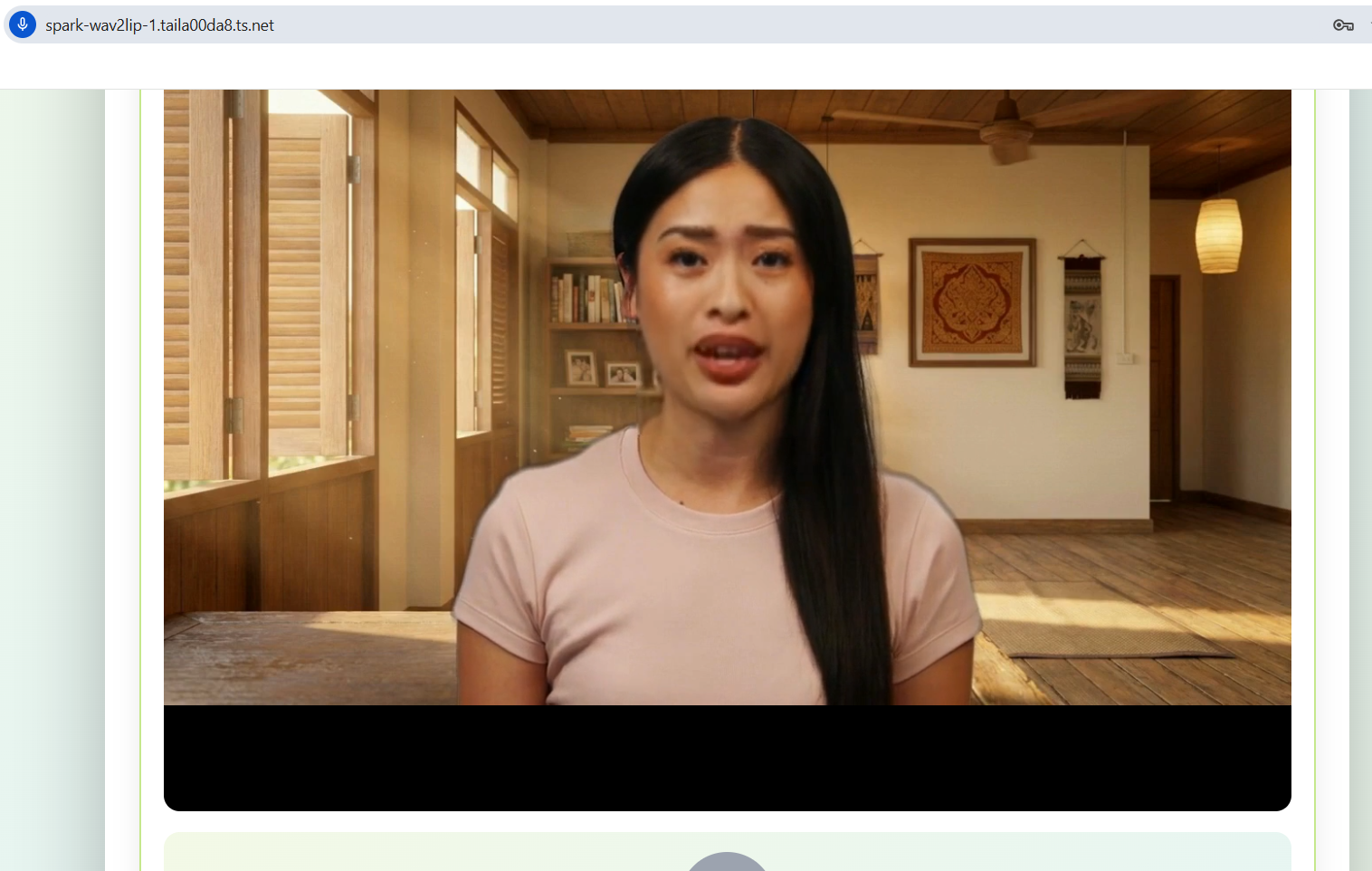
ติวเตอร์ AI พูดได้A talking AI tutor
นักเรียนฝึกพูดภาษาอังกฤษกับติวเตอร์ AI ได้นอกเวลาเรียน — 1:1 ตลอดเวลา Students get 1:1 spoken-English practice on demand, outside class hours.
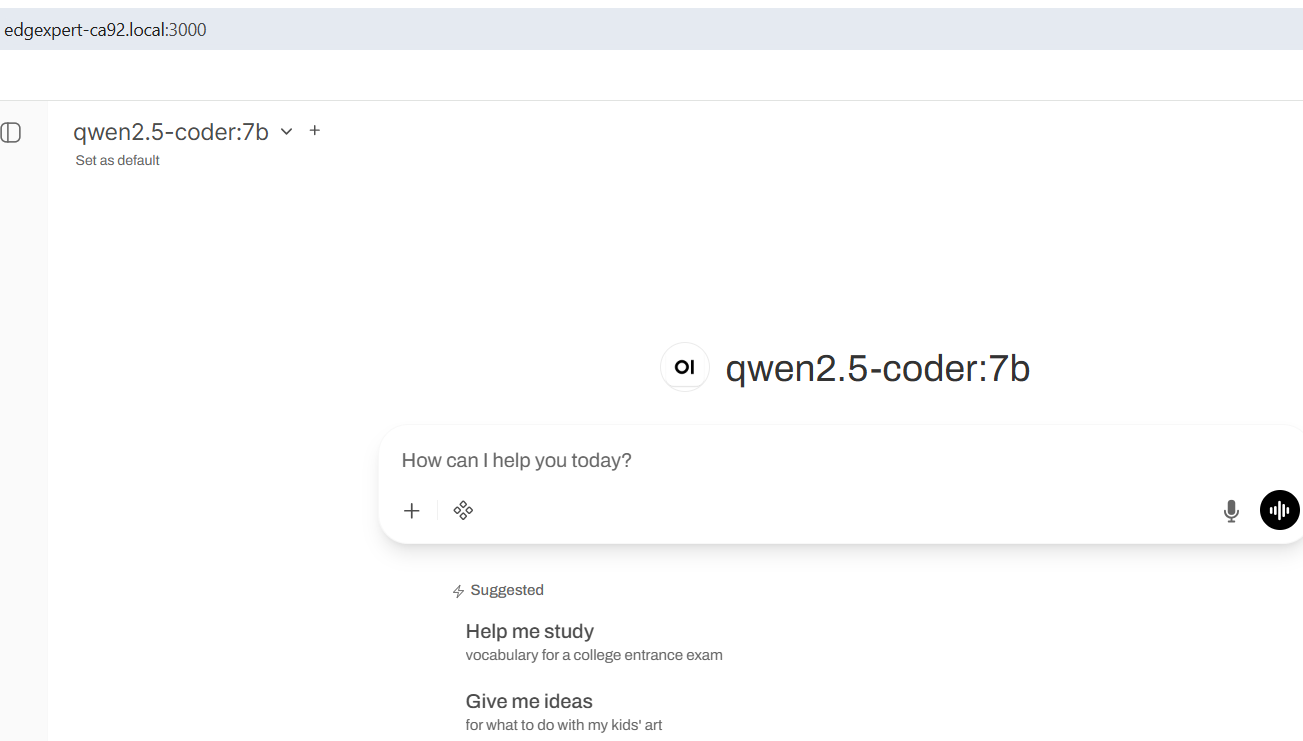
ผู้ช่วย AI สำหรับครูและเจ้าหน้าที่An AI assistant for teachers & staff
เตรียมแผนการสอน ตรวจการบ้าน ร่างเอกสารธุรการ — เหมือน ChatGPT แต่ข้อมูลอยู่ในรั้วโรงเรียน Lesson planning, marking help, admin doc drafting — like ChatGPT, with the data kept on campus.
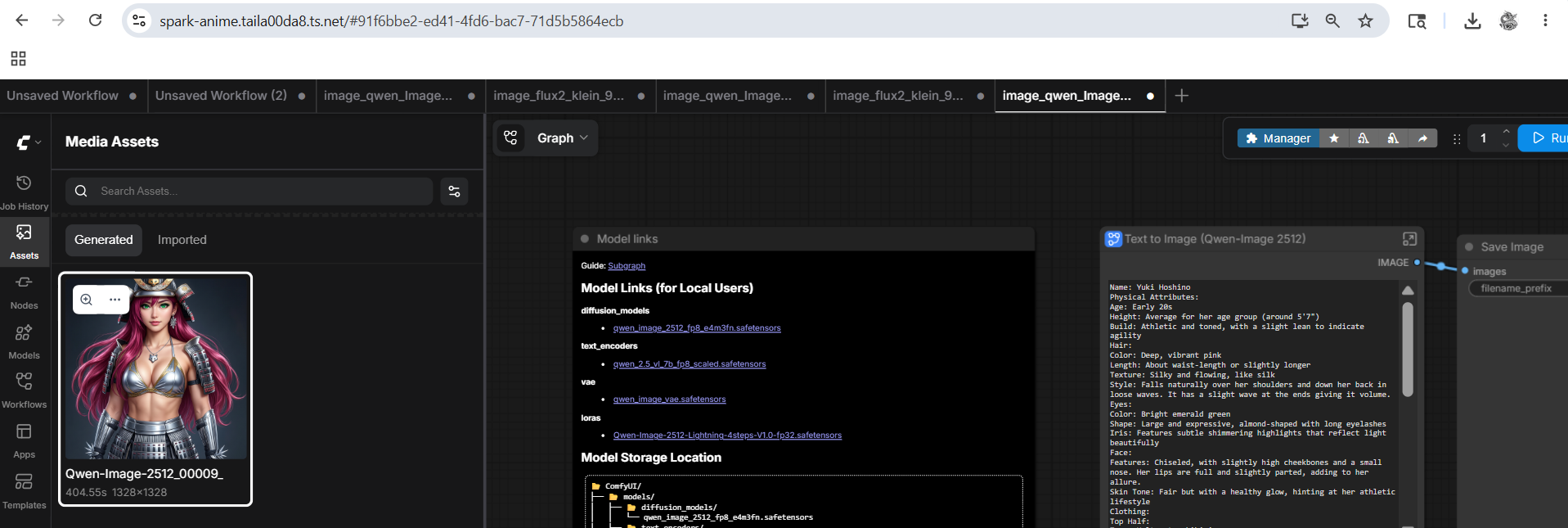
สร้างภาพประกอบบทเรียนLesson-illustration generator
โปสเตอร์ในห้องเรียน บัตรคำศัพท์ ภาพประกอบใบงาน — ไม่มีค่าใช้จ่ายต่อภาพ ไม่ต้องสมัครสมาชิกบริการต่างชาติ Classroom posters, vocab cards, worksheet illustrations — no per-image fees, no foreign subscription.
หมายเหตุ: ภาพหน้าจอแสดง URL ของเครื่องทดสอบของเรา (Tailscale) เครื่องที่ติดตั้งให้โรงเรียนจะเข้าถึงได้เฉพาะในเครือข่ายของโรงเรียนเท่านั้น (ไม่มี URL สาธารณะ) ตามค่าเริ่มต้น Note: these screenshots show our development box. The default ship for schools is LAN-only — no public URL — so nothing on the box is reachable from outside campus.
ปรับให้เป็น “ของโรงเรียนคุณ”Make it your school's own
เครื่องที่ส่งให้ไม่ใช่ AI ทั่วไป — เราตั้งค่าให้เรียนรู้จากหลักสูตรและเอกสารของโรงเรียนคุณเอง และให้ติวเตอร์ AI มีบุคลิกและแนวการสอนที่คุณกำหนด ทั้งหมดนี้ทำตอนติดตั้ง โรงเรียนไม่ต้องเขียนโค้ดเอง และข้อมูลไม่ออกนอกเครื่อง The box we ship isn't a generic AI — we tune it to learn from your school's own curriculum and documents, and we give the AI tutor a personality and teaching approach you choose. All of it is done at setup, with no coding by the school, and nothing leaves the box.
① อัปโหลดหลักสูตร + เอกสารการสอน① Upload curriculum & teaching documents
วางไฟล์หลักสูตร แผนการสอน ใบงาน คู่มือครู หรือระเบียบโรงเรียน (PDF, Word, ข้อความ) ลงในเครื่อง ระบบจะอ่านและทำดัชนีในเครื่องด้วย LlamaIndex ติวเตอร์จะตอบโดยอิงเนื้อหาของโรงเรียนคุณ พร้อมอ้างอิงว่ามาจากเอกสารไหน Drop in your syllabus, lesson plans, worksheets, teacher handbooks, or school policies (PDF, Word, text). The box reads and indexes them locally with LlamaIndex, so the tutor answers from your material — and can cite which document it came from.
② ตั้งบุคลิกและแนวการสอนของติวเตอร์② Give the tutor a personality & guidance
ตั้งชื่อ น้ำเสียง และวิธีสอนของอวตาร เช่น “ครูใจดี ค่อย ๆ ใบ้ทีละขั้น ไม่เฉลยทันที พูดไทยปนอังกฤษกับเด็กเล็ก” แนวทางนี้กลายเป็น system prompt ของโมเดล Ollama ในเครื่อง Set the avatar's name, tone, and how it teaches — e.g. “a patient teacher who scaffolds hints step-by-step, never gives the answer outright, and mixes Thai with English for younger learners.” This becomes the system prompt for the local Ollama model.
ตอนติดตั้ง: รัน docker compose up ครั้งเดียว เครื่องจะสตาร์ตคอนเทนเนอร์ทั้งหมด เมานต์โฟลเดอร์ไฟล์ของโรงเรียนเข้าไป แล้ว LlamaIndex อ่านและทำดัชนีในเครื่อง — ไม่มีไฟล์ออกนอกรั้ว
At setup, one docker compose up starts every container, mounts your school's file folder in, and LlamaIndex indexes it locally — no file ever leaves campus.
สองสายมาบรรจบที่อวตาร: เนื้อหา ผ่าน RAG (เอกสารโรงเรียน → LlamaIndex → ดัชนีเวกเตอร์) และ บุคลิก ผ่าน system prompt ของ Ollama ทำให้ติวเตอร์ทั้ง “รู้จักโรงเรียน” และ “สอนแบบที่คุณต้องการ” Two streams meet at the avatar: content via RAG (your docs → LlamaIndex → vector index) and character via the Ollama system prompt — so the tutor both knows your school and teaches the way you want.
ชื่อ: ครูนารี · ใจดี อดทน · ใบ้ทีละขั้น ไม่เฉลยทันที · พูดไทยปนอังกฤษกับ ป.1–ป.6 · อ้างอิงเฉพาะหลักสูตรของโรงเรียน
Example persona we configure at setup (editable anytime): name: Kru Naree · warm, patient · scaffold hints step-by-step, never reveal · mix Thai+English for grades 1–6 · cite only the school's curriculum
รายละเอียดเชิงเทคนิคของสถาปัตยกรรม (Ollama + RAG + LlamaIndex/ChromaDB) อยู่ใน แผนงานบอตในเครื่อง — โรงเรียนไม่ต้องทำเอง เราตั้งค่าและส่งมอบให้พร้อมใช้ The technical architecture (Ollama + RAG + LlamaIndex/ChromaDB) is detailed in the local-bot roadmap — the school does none of this; we configure and hand it over ready to use.