Prepare Once, Animate Foreverเตรียมครั้งเดียว สร้างได้ตลอดไป准备一次,永远开拍
If you write down who, where, and how it looks — as plain markdown files and reference images — before the story begins, then turning a script into animated episodes becomes a mechanical loop a machine can run for you.
ถ้าคุณจดไว้ว่า ใคร ที่ไหน และหน้าตาเป็นอย่างไร — ในรูปไฟล์ Markdown ธรรมดาและภาพอ้างอิง — ก่อน ที่เรื่องจะเริ่ม การเปลี่ยนบทเป็นตอนแอนิเมชันก็จะกลายเป็นวงจรอัตโนมัติที่เครื่องทำแทนคุณได้
只要在故事开始之前,把「谁、在哪里、长什么样」写成普通的 Markdown 文件和参考图,那么把剧本变成一集集动画,就成了一台机器能替你跑的机械循环。
Why front-load the metadata?ทำไมต้องเตรียมข้อมูลไว้ก่อน为什么要提前准备好元数据?
The hard part of an AI cartoon is not generating one pretty frame. It's making frame #800 show the same girl, in the same village, drawn in the same style, as frame #1.
ส่วนที่ยากของการ์ตูน AI ไม่ใช่การสร้างภาพสวย ๆ หนึ่งเฟรม แต่คือการทำให้เฟรมที่ 800 แสดงเด็กผู้หญิงคนเดิม ในหมู่บ้านเดิม วาดด้วยสไตล์เดิม เหมือนเฟรมที่ 1
AI 卡通的难点不在于生成一张漂亮的画面,而在于让第 800 帧里出现的,仍是第 1 帧那个同样的女孩、同样的村庄、同样的画风。
Image and video models have no memory between calls. Every shot is a fresh roll of the dice. The only thing that carries consistency from shot to shot is the text and reference images you feed in. So a series lives or dies on its reference layer — and the smartest time to build that layer is up front, once, before you animate anything.
โมเดลภาพและวิดีโอไม่มีความจำระหว่างการเรียกแต่ละครั้ง ทุกช็อตคือการทอยลูกเต๋าใหม่ สิ่งเดียวที่ส่งความสม่ำเสมอจากช็อตหนึ่งไปอีกช็อตคือข้อความและภาพอ้างอิงที่คุณป้อนเข้าไป ดังนั้นซีรีส์จะอยู่หรือไปขึ้นกับชั้นข้อมูลอ้างอิงของมัน — และเวลาที่ฉลาดที่สุดในการสร้างชั้นนี้คือทำให้เสร็จตั้งแต่ต้น ครั้งเดียว ก่อนลงมือทำแอนิเมชันใด ๆ
图像和视频模型在每次调用之间没有记忆,每个镜头都是重新掷一次骰子。唯一能把一致性从一个镜头带到下一个镜头的,就是你喂进去的文字和参考图。所以一部剧集的成败取决于它的参考层——而搭建这一层最聪明的时机,是在开拍之前一次性做好。
Think of it like a real studio's show bible: character turnarounds, location maps, a style guide, a script. The animators never re-invent the character — they look it up. We do the same, except our "animators" are animagine-xl for stills and Wan 2.2 for motion, running locally on the Spark.
ลองนึกถึงคัมภีร์เรื่องของสตูดิโอจริง: ภาพหมุนตัวละคร แผนที่สถานที่ คู่มือสไตล์ และบท นักวาดไม่ต้องคิดตัวละครใหม่ทุกครั้ง — เขาเปิดดู เราก็ทำแบบเดียวกัน เพียงแต่ "นักวาด" ของเราคือ animagine-xl สำหรับภาพนิ่ง และ Wan 2.2 สำหรับการเคลื่อนไหว ซึ่งรันบนเครื่อง Spark ในเครื่องเอง
可以把它想成真实工作室的「设定集」:角色转面图、场景地图、风格指南、剧本。动画师从不重新发明角色——他们查阅设定。我们也一样,只不过我们的「动画师」是负责静帧的 animagine-xl 和负责动态的 Wan 2.2,都在本地的 Spark 上运行。
Once the bible is complete, every later step — pick a scene, assemble its prompt, render the still, animate it, add voice, stitch — reads from files. That's exactly the shape a script can automate. Preparation is the creative work; production is plumbing.
เมื่อคัมภีร์เรื่องเสร็จสมบูรณ์ ทุกขั้นตอนถัดไป — เลือกฉาก ประกอบพรอมป์ เรนเดอร์ภาพนิ่ง ทำให้เคลื่อนไหว ใส่เสียง ต่อคลิป — ล้วนอ่านจากไฟล์ นั่นคือรูปแบบที่สคริปต์ทำอัตโนมัติได้พอดี งานเตรียมคืองานสร้างสรรค์ ส่วนงานผลิตคือระบบท่อ
一旦设定集完成,之后的每一步——挑场景、拼提示词、渲染静帧、让它动起来、配音、拼接——都只是在读取文件。这正是脚本可以自动化的形态。准备才是创意工作,生产只是接管道。
The project folderโครงสร้างโฟลเดอร์ของโปรเจกต์项目文件夹
Everything is just text files and images in a predictable tree. Predictable is the point: a human and a script read the same paths.
ทุกอย่างเป็นแค่ไฟล์ข้อความและภาพในโครงสร้างต้นไม้ที่คาดเดาได้ ความคาดเดาได้คือหัวใจ: ทั้งคนและสคริปต์อ่านพาธเดียวกัน
一切只是排列在可预测目录树里的文本文件和图片。可预测正是关键:人和脚本读取的是同一组路径。
Two kinds of files, two jobs:
ไฟล์สองชนิด สองหน้าที่:
两类文件,两种职责:
- Markdown = the intent — words a model (or person) can read to know what to make.
- Markdown = เจตนา — ถ้อยคำที่โมเดล (หรือคน) อ่านแล้วรู้ว่าต้องสร้างอะไร
- Markdown = 意图 — 模型(或人)读了就知道该做什么的文字。
- Images = the ground truth — the actual look, locked in, that later shots point back to for consistency.
- ภาพ = ความจริงตั้งต้น — หน้าตาจริงที่ถูกล็อกไว้ ให้ช็อตหลัง ๆ อ้างกลับมาเพื่อความสม่ำเสมอ
- 图像 = 基准事实 — 被锁定的真实外观,后续镜头都回头参照它来保持一致。
The core markdown filesไฟล์ข้อความหลัก核心 Markdown 文件
Each file has one job. The "once / per-shot" tag tells you how often it changes — the once files are the metadata you front-load.
แต่ละไฟล์มีหน้าที่เดียว ป้ายกำกับ "ครั้งเดียว / ต่อช็อต" บอกว่ามันเปลี่ยนบ่อยแค่ไหน — ไฟล์ ครั้งเดียว คือเมตาดาทาที่คุณเตรียมไว้ล่วงหน้า
每个文件只负责一件事。「一次/每镜头」标签告诉你它多久变一次——一次类文件就是你要提前准备的元数据。
style.md — the look, defined oncestyle.md — กำหนดหน้าตาครั้งเดียวstyle.md — 一次定义全局外观
This is the single most leveraged file. The render_tokens line gets pasted into every still prompt, so every frame inherits the same look automatically.
นี่คือไฟล์ที่ให้พลังทดมากที่สุด บรรทัด render_tokens จะถูกแปะลงในทุกพรอมป์ภาพนิ่ง ทุกเฟรมจึงสืบทอดหน้าตาเดียวกันโดยอัตโนมัติ
这是杠杆最大的一个文件。render_tokens 那一行会被粘进每一条静帧提示词,于是每一帧都自动继承同样的外观。
characters/ploy.md — a character sheetcharacters/ploy.md — ใบประวัติตัวละครcharacters/ploy.md — 一张角色设定表
The look_tokens field is sacred. Copy it verbatim into every prompt featuring this character and she stays recognizable across hundreds of shots. Change one word and she drifts.
ฟิลด์ look_tokens คือสิ่งศักดิ์สิทธิ์ คัดลอกมันแบบคำต่อคำลงในทุกพรอมป์ที่มีตัวละครนี้ แล้วเธอจะคงหน้าตาให้จำได้ตลอดหลายร้อยช็อต เปลี่ยนแค่คำเดียวเธอก็เพี้ยน
look_tokens 字段是神圣不可改的。把它一字不差地复制进每一条出现该角色的提示词,她就能在数百个镜头里保持可辨认。改动一个词,她就走样。
scenes/scene_01.md — one shot, one filescenes/scene_01.md — หนึ่งช็อต หนึ่งไฟล์scenes/scene_01.md — 一个镜头,一个文件
A scene file is pure metadata. It names references instead of repeating descriptions — so it stays short and the look/character can't drift out of sync with the bible.
ไฟล์ฉากคือเมตาดาทาล้วน ๆ มันอ้างถึงไฟล์อ้างอิงแทนการเขียนคำบรรยายซ้ำ — จึงสั้นกระชับ และหน้าตา/ตัวละครไม่หลุดจากคัมภีร์เรื่อง
场景文件是纯粹的元数据。它引用参考文件,而不是重复描述——所以它很短,外观/角色也不会和设定集脱节。
The scene says cast: [ploy], not the 40-word look description. The assembler looks up ploy.md and pastes the locked tokens. Update Ploy's hairpin once in her sheet and every scene gets it — no find-and-replace across 200 files.
ฉากเขียนว่า cast: [ploy] ไม่ใช่คำบรรยายหน้าตา 40 คำ ตัวประกอบพรอมป์จะเปิด ploy.md แล้วแปะโทเคนที่ล็อกไว้ แก้ปิ่นปักผมของพลอยครั้งเดียวในใบประวัติ ทุกฉากก็ได้ตาม — ไม่ต้องค้นหา-แทนที่ทั่ว 200 ไฟล์
场景里写的是 cast: [ploy],而不是 40 个词的外观描述。组装器会查阅 ploy.md 并粘贴锁定的 token。在设定表里改一次 Ploy 的发夹,每个场景都会跟着变——不必在 200 个文件里查找替换。
Reference images — the ground truthภาพอ้างอิง — ความจริงตั้งต้น参考图 — 基准事实
Words drift; pictures don't. For each character and location you generate a small set of reference images from multiple angles, pick the best, and lock them. Those become the anchor every future shot is matched against (via image-to-image, IP-Adapter, or just as the seed frame for video).
คำพูดเพี้ยนได้ แต่ภาพไม่เพี้ยน สำหรับตัวละครและสถานที่แต่ละอย่าง คุณสร้างชุดภาพอ้างอิงเล็ก ๆ จากหลายมุม เลือกอันที่ดีที่สุด แล้วล็อกไว้ ภาพเหล่านั้นกลายเป็นหมุดยึดที่ทุกช็อตในอนาคตถูกจับคู่ด้วย (ผ่าน image-to-image, IP-Adapter หรือเป็นเฟรมตั้งต้นของวิดีโอ)
文字会走样,图像不会。为每个角色和地点生成一小组多角度参考图,选出最好的并锁定。它们成为之后每个镜头的锚点(通过 image-to-image、IP-Adapter,或直接作为视频的种子帧来对齐)。
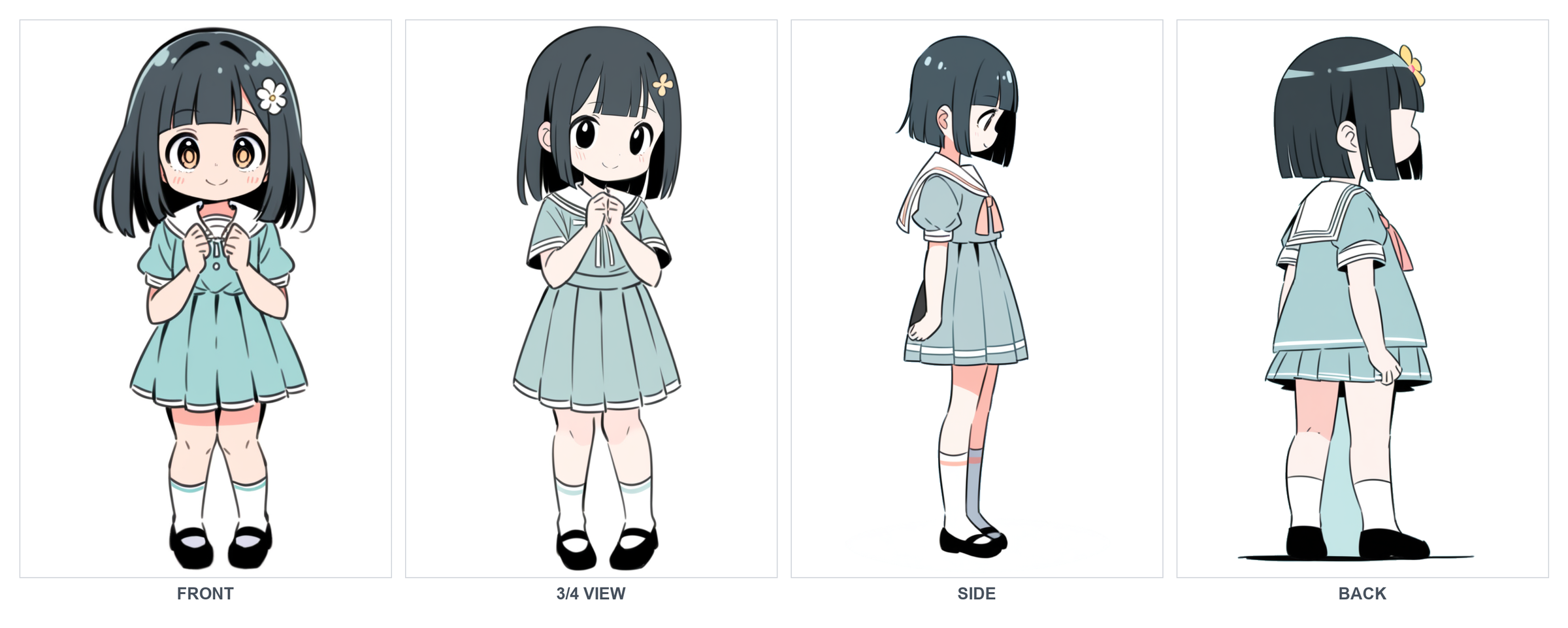
Character sheet — a turnaroundใบตัวละคร — ภาพหมุนตัว角色设定表 — 转面图
Front, side, and back in one image. This is what a model "studies" to keep her on-model from any camera angle.
หน้า ข้าง และหลัง ในภาพเดียว นี่คือสิ่งที่โมเดล "ศึกษา" เพื่อรักษาให้เธอตรงแบบจากทุกมุมกล้อง
正面、侧面、背面合在一张图里。这就是模型用来「研习」、好让她在任何机位都不走形的依据。
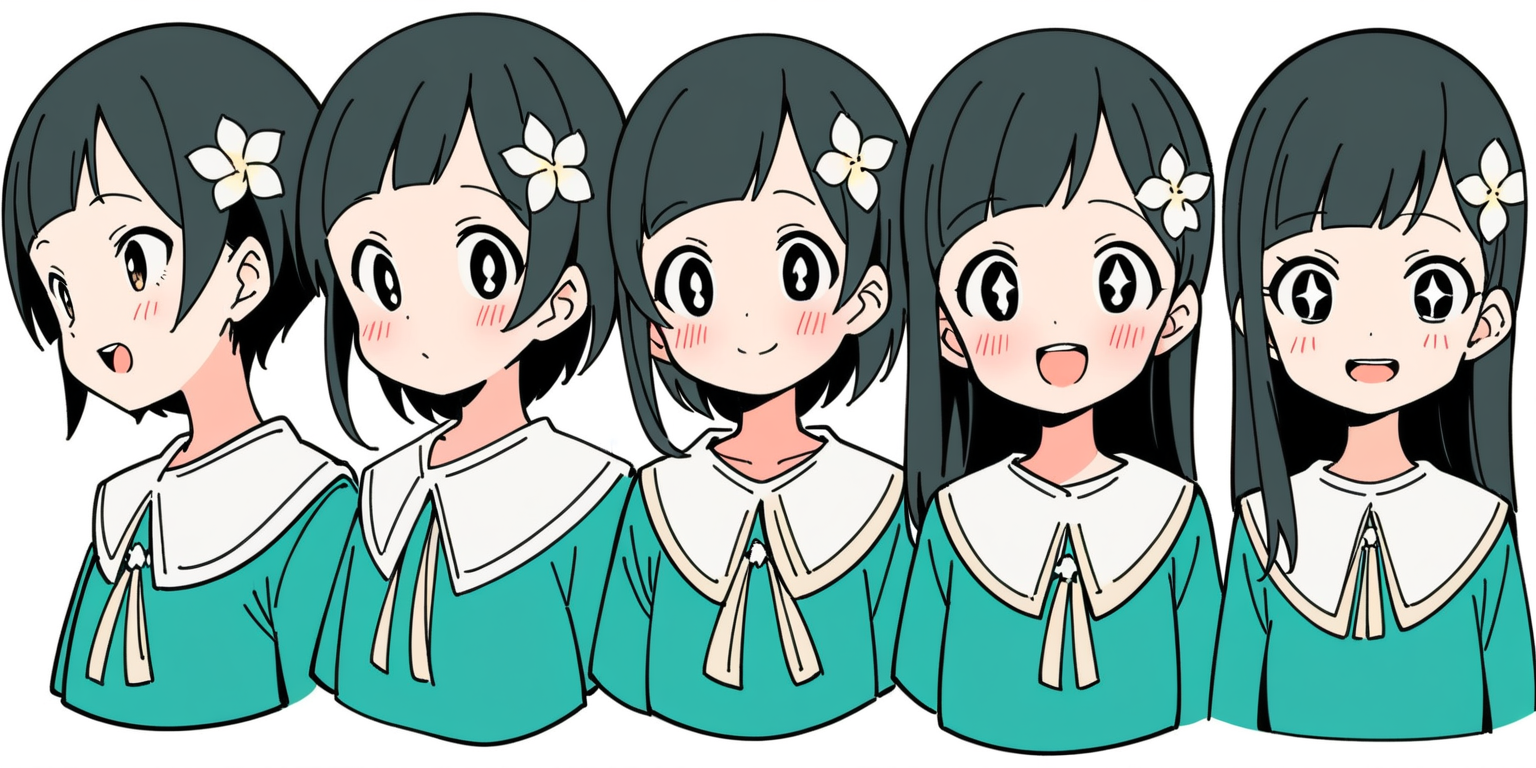
Expression sheet — the emotional rangeใบสีหน้า — ช่วงอารมณ์表情表 — 情绪幅度
Same face, different feelings. A scene file can then just say expression: surprised and the look is already defined.
ใบหน้าเดียวกัน อารมณ์ต่างกัน ไฟล์ฉากก็แค่เขียนว่า expression: surprised แล้วหน้าตาก็ถูกกำหนดไว้แล้ว
同一张脸,不同情绪。场景文件只要写 expression: surprised,外观就已经定义好了。
Locations — capture multiple anglesสถานที่ — เก็บหลายมุม场景地点 — 拍下多个角度
A place isn't one picture. Capture the establishing wide, an interior, maybe a dusk variant — so any scene set here already has a matching backdrop instead of a fresh, inconsistent guess.
สถานที่หนึ่งไม่ใช่ภาพเดียว เก็บภาพมุมกว้างเปิดฉาก ภาพภายใน และอาจมีเวอร์ชันยามพลบค่ำ — เพื่อให้ทุกฉากที่เกิดที่นี่มีฉากหลังที่เข้ากันอยู่แล้ว แทนที่จะเดาใหม่ให้ไม่สม่ำเสมอ
一个地点不是一张图。拍下交代环境的大远景、一张室内,也许再来一张黄昏版本——这样任何设定在此的场景都已有匹配的背景,而不是重新瞎猜、前后不一。
establishingเปิดฉาก交代环境
inside the houseในบ้าน屋内
relit variantเปลี่ยนแสง重新打光
a prop close-upโคลสอัปพร็อพ道具特写

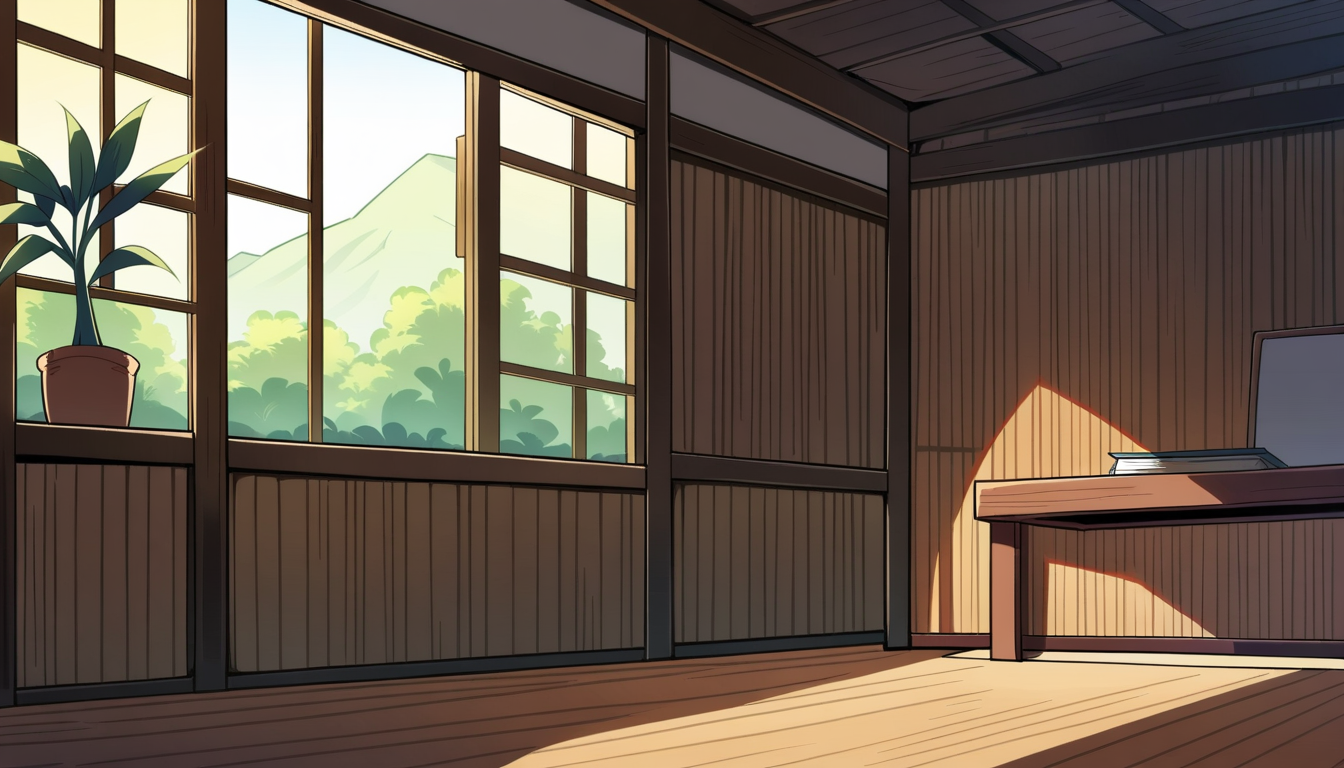
These backgrounds are deliberately Chiang Mai / Lanna — teak houses, carved gables, Doi Suthep on the horizon. Baking the setting into world.md and the location refs means every episode looks like your place, not generic anime.
ฉากหลังเหล่านี้ตั้งใจให้เป็นเชียงใหม่ / ล้านนา — เรือนไม้สัก หน้าจั่วแกะสลัก ดอยสุเทพอยู่ขอบฟ้า การฝังบริบทนี้ไว้ใน world.md และภาพอ้างอิงสถานที่ ทำให้ทุกตอนดูเป็น "ที่ของคุณ" ไม่ใช่อนิเมะทั่วไป
这些背景刻意设为清迈/兰纳风——柚木屋、雕花山墙、地平线上的素贴山。把设定烙进 world.md 和场景参考图,意味着每一集看起来都是「你的地方」,而不是千篇一律的动漫。
How text + images become videoข้อความ + ภาพ กลายเป็นวิดีโอได้อย่างไร文字+图像如何变成视频
Here's the move that ties it all together. A scene file plus the bible's references get assembled into one still prompt → that still is rendered → the still becomes the first frame a video model animates. The reference layer feeds both halves.
นี่คือจังหวะที่ร้อยทุกอย่างเข้าด้วยกัน ไฟล์ฉากบวกกับภาพอ้างอิงจากคัมภีร์เรื่องถูกประกอบเป็นพรอมป์ภาพนิ่งหนึ่งอัน → เรนเดอร์ภาพนิ่งนั้น → ภาพนิ่งกลายเป็นเฟรมแรกที่โมเดลวิดีโอนำไปทำให้เคลื่อนไหว ชั้นข้อมูลอ้างอิงป้อนทั้งสองฝั่ง
这一步把一切串了起来。一个场景文件加上设定集里的参考,被组装成一条静帧提示词 → 渲染出该静帧 → 这张静帧成为视频模型动起来的第一帧。参考层同时供给前后两半。
Referencesไฟล์อ้างอิง参考
Assemble promptประกอบพรอมป์组装提示词
Render stillเรนเดอร์ภาพนิ่ง渲染静帧
Seed stillภาพนิ่งตั้งต้น种子静帧
motion: line+ บรรทัด motion: ของฉาก+ 场景的 motion: 行Animateทำให้เคลื่อนไหว动起来
The composed still below is scene 01's seed frame — Ploy, on-model, standing in the location ref, ready to be animated into her wave:
ภาพนิ่งที่ประกอบไว้ด้านล่างคือเฟรมตั้งต้นของฉาก 01 — พลอย ตรงแบบ ยืนอยู่ในภาพสถานที่อ้างอิง พร้อมถูกทำให้เคลื่อนไหวเป็นท่าโบกมือ:
下面这张组装好的静帧就是场景 01 的种子帧——Ploy,不走形,站在场景参考里,随时可以动起来挥手:

As text: the locked look_tokens go straight into the prompt. As pixels: the turnaround / location PNG is fed image-to-image or as the i2v first frame, so the model copies the actual drawing, not your description of it. Most pipelines use both.
แบบข้อความ: look_tokens ที่ล็อกไว้เข้าสู่พรอมป์โดยตรง แบบพิกเซล: ภาพ PNG หมุนตัว/สถานที่ ถูกป้อนแบบ image-to-image หรือเป็นเฟรมแรกของ i2v โมเดลจึงลอกภาพวาดจริง ไม่ใช่คำบรรยายของคุณ ไปป์ไลน์ส่วนใหญ่ใช้ทั้งสองอย่าง
作为文字:锁定的 look_tokens 直接进入提示词。作为像素:转面图/场景 PNG 以 image-to-image 或作为 i2v 的第一帧喂入,于是模型复制的是真正的画作,而不是你对它的描述。大多数流程两者并用。
Metadata first → production is automaticข้อมูลมาก่อน → การผลิตเดินเอง元数据先行 → 生产自动化
Once the bible exists, look at what's left. Every step is a function of files — no new creative decisions, just lookups and renders. That's a loop.
เมื่อคัมภีร์เรื่องมีแล้ว ลองดูว่าเหลืออะไร ทุกขั้นตอนเป็นฟังก์ชันของไฟล์ — ไม่มีการตัดสินใจสร้างสรรค์ใหม่ มีแค่การเปิดดูและเรนเดอร์ นั่นแหละคือลูป
一旦设定集就位,看看还剩什么。每一步都是文件的函数——没有新的创意决策,只有查阅和渲染。这就是一个循环。
Author the bibleเขียนคัมภีร์เรื่อง撰写设定集
Split story into scene_NN.mdแบ่งเรื่องเป็น scene_NN.md把故事拆成 scene_NN.md
Assemble each promptประกอบแต่ละพรอมป์组装每条提示词
Render still → animate clipเรนเดอร์ภาพนิ่ง → ทำคลิปเคลื่อนไหว渲染静帧 → 生成动态片段
Voice + supersเสียงพากย์ + ซับ配音 + 字幕
dialogue:, bilingual subtitles via ffmpegTTS จาก dialogue:, ซับสองภาษาผ่าน ffmpeg由 dialogue: 生成 TTS,用 ffmpeg 烧录双语字幕Stitch the episodeต่อเป็นตอน拼接成一集
The four script stages don't need you. In pseudocode the whole back half is a for loop over the scene files:
สี่ขั้นตอน สคริปต์ ไม่ต้องใช้คุณเลย ในรูปซูโดโค้ด ครึ่งหลังทั้งหมดคือลูป for วนไฟล์ฉาก:
那四个 脚本 阶段不需要你。用伪代码看,后半段整个就是对场景文件的一个 for 循环:
Adding episode 7 isn't "make a cartoon from scratch." It's: write a few scene_NN.md files and run the loop. The expensive, judgment-heavy work — the look, the cast, the world — was paid for once, at the start. Everything after compounds on it.
การเพิ่มตอนที่ 7 ไม่ใช่ "สร้างการ์ตูนใหม่ทั้งหมด" แต่คือ: เขียนไฟล์ scene_NN.md ไม่กี่ไฟล์ แล้วสั่งรันลูป งานที่แพงและใช้วิจารณญาณสูง — หน้าตา ตัวละคร โลกของเรื่อง — จ่ายไปแล้วครั้งเดียวตั้งแต่ต้น ทุกอย่างหลังจากนั้นทบต้นจากมัน
加第 7 集不是「从零做一部卡通」。而是:写几个 scene_NN.md 文件,跑一遍循环。那些昂贵、需要判断力的工作——外观、角色、世界——在一开始就一次性付清了。之后的一切都在它之上复利累积。
"Almost automatic" is the right phrase, not "automatic." Models still miss — a bad hand, a drifted face, a clip that ignores the motion prompt. The loop gets you a full draft cheaply; you still spot-fix shots by re-rolling a seed or nudging a scene file. Front-loading the bible is what makes those fixes local instead of cascading.
"เกือบอัตโนมัติ" คือคำที่ถูก ไม่ใช่ "อัตโนมัติ" โมเดลยังพลาด — มือเพี้ยน หน้าหลุด คลิปที่ไม่สนพรอมป์การเคลื่อนไหว ลูปให้ดราฟต์เต็มได้ในราคาถูก คุณยังต้องแก้เฉพาะจุดด้วยการสุ่มซีดใหม่หรือปรับไฟล์ฉาก การเตรียมคัมภีร์ไว้ก่อนคือสิ่งที่ทำให้การแก้เหล่านั้นเฉพาะจุด ไม่ลามเป็นลูกโซ่
「几乎自动」才是准确的说法,而不是「自动」。模型仍会失手——画坏的手、走样的脸、无视运动提示的片段。循环能廉价地给你一份完整草稿;你仍要靠重掷种子或微调场景文件来逐镜修补。提前准备好设定集,正是让这些修补局部化、而不连锁扩散的原因。
Copy-paste templates — a blank form + a filled example for every fileเทมเพลตคัดลอกวาง — ฟอร์มเปล่า + ตัวอย่างที่กรอกแล้ว สำหรับทุกไฟล์复制粘贴模板 — 每个文件都有一份空白表单+一个填好的示例
Here is the whole bible as fill-in-the-blank forms. For each file: copy the blank on the left into your project, then use the filled example on the right as the answer key. Replace every <…> placeholder and delete the angle brackets.
นี่คือคัมภีร์เรื่องทั้งหมดในรูปฟอร์มเติมคำในช่องว่าง สำหรับแต่ละไฟล์: คัดลอกฟอร์มเปล่าทางซ้ายไปไว้ในโปรเจกต์ แล้วใช้ตัวอย่างที่กรอกแล้วทางขวาเป็นเฉลย แทนที่ทุกตัวยึด <…> แล้วลบวงเล็บมุมออก
这是整本设定集的填空表单。每个文件:把左边的空白复制进你的项目,再用右边填好的示例当答案。替换每个 <…> 占位符并删掉尖括号。
style.md — the lookstyle.md — หน้าตาstyle.md — 外观
world.md — the settingworld.md — ฉากของเรื่องworld.md — 设定世界
story.md — the arc + episode liststory.md — เส้นเรื่อง + รายการตอนstory.md — 故事弧线+剧集清单
locations.md — the place indexlocations.md — ดัชนีสถานที่locations.md — 地点索引
characters/<name>.md — a character sheetcharacters/<name>.md — ใบประวัติตัวละครcharacters/<name>.md — 角色设定表
scenes/scene_NN.md — one shotscenes/scene_NN.md — หนึ่งช็อตscenes/scene_NN.md — 一个镜头
Top to bottom is also chronological: style → world → story → one characters/*.md per cast member → locations → then a scenes/scene_NN.md per shot. The first five are the write-once bible; only the scene form repeats per shot.
จากบนลงล่างคือลำดับเวลาด้วย: style → world → story → characters/*.md หนึ่งไฟล์ต่อตัวละคร → locations → แล้วจึง scenes/scene_NN.md ต่อช็อต ห้าอย่างแรกคือคัมภีร์เขียนครั้งเดียว มีแค่ฟอร์มฉากที่ทำซ้ำต่อช็อต
从上到下也是时间顺序:style → world → story → 每个角色一份 characters/*.md → locations → 然后每个镜头一份 scenes/scene_NN.md。前五个是写一次的设定集;只有场景表单每镜头重复。
Start hereเริ่มต้นตรงนี้从这里开始
- Create the folder tree above — empty files are fine to start.
- สร้างโครงสร้างโฟลเดอร์ด้านบน — เริ่มด้วยไฟล์เปล่าก็ได้
- 建好上面的目录树——一开始用空文件也没关系。
- Write
style.mdfirst. Nail therender_tokensline; everything inherits it. - เขียน
style.mdก่อน จัดบรรทัดrender_tokensให้ลงตัว ทุกอย่างสืบทอดจากมัน - 先写
style.md。把render_tokens那行打磨到位,一切都继承它。 - For each character: write the sheet, generate a turnaround + expression sheet, pick the best, lock it.
- สำหรับแต่ละตัวละคร: เขียนใบประวัติ สร้างภาพหมุนตัว + ใบสีหน้า เลือกที่ดีที่สุด แล้วล็อก
- 对每个角色:写设定表,生成转面图+表情表,选出最好的,锁定它。
- For each location: generate a wide + one or two other angles.
- สำหรับแต่ละสถานที่: สร้างภาพมุมกว้าง + อีกหนึ่งหรือสองมุม
- 对每个地点:生成一张大远景+一两个其他角度。
- Only now write
scene_01.md— and notice how little it has to say, because the bible already said it. - ค่อยเขียน
scene_01.mdตอนนี้ — แล้วสังเกตว่ามันแทบไม่ต้องพูดอะไร เพราะคัมภีร์เรื่องพูดไปหมดแล้ว - 现在才写
scene_01.md——你会发现它没什么好说的,因为设定集已经说完了。 - Render one scene by hand end-to-end. When it works, wrap those steps in the loop.
- เรนเดอร์ฉากหนึ่งด้วยมือตั้งแต่ต้นจนจบ พอใช้ได้แล้วค่อยห่อขั้นตอนเหล่านั้นเป็นลูป
- 先手动把一个场景从头到尾渲染一遍。跑通后,再把这些步骤包进循环。
The example stills here were generated locally on the DGX Spark with animagine-xl-3.1 — no paid API. The same Spark runs the Wan 2.2 image-to-video step. See How We Made the Hero Video for a real end-to-end build.
ภาพนิ่งตัวอย่างในหน้านี้สร้างบนเครื่อง DGX Spark ด้วย animagine-xl-3.1 — ไม่มี API เสียเงิน เครื่อง Spark เดียวกันรันขั้นตอน Wan 2.2 image-to-video ดู How We Made the Hero Video สำหรับการสร้างจริงตั้งแต่ต้นจนจบ
本页的示例静帧是在 DGX Spark 本地用 animagine-xl-3.1 生成的——没有付费 API。同一台 Spark 跑 Wan 2.2 图生视频这一步。完整的端到端实例见 How We Made the Hero Video。