1 🧑🤝🧑 Two different jobs · สองงานที่ต่างกัน · 两件不同的事
🇬🇧 English
People say “face recognition” for two jobs that are not the same, and the second is much harder than the first.
- Finding a face. Is there a face in this picture, and where? Old, fast, and it works.
- Naming a face. Is this Jay Chou, or Michelle Yeoh, or somebody we have never seen? This is the hard one, and most of this lesson is about how it fails.
You will build both, plus a version that finds faces in your laptop camera, in well under two hundred lines of Python. No model download, nothing sent to the internet.
🇹🇭 ไทย
คนเรียก “การรู้จำใบหน้า” รวมกันสองงานที่ไม่เหมือนกัน และงานที่สองยากกว่างานแรกมาก
- หาใบหน้า ในรูปนี้มีหน้าคนไหม อยู่ตรงไหน เป็นเทคนิคเก่า เร็ว และใช้ได้จริง
- บอกว่าเป็นใคร นี่คือเจย โจว หรือมิชเสล เยอห์ หรือคนที่เราไม่เคยเห็น นี่คืองานที่ยาก และบทเรียนนี้ส่วนใหญ่พูดถึงว่ามันพังอย่างไร
คุณจะสร้างทั้งสองอย่าง บวกรุ่นที่ดูกล้องโน้ตบุกสด ด้วย Python ไม่ถึงสองร้อยบรรทัด ไม่ต้องดาวน์โหลดโมเดล และไม่มีอะไรถูกส่งขึ้นอินเทอร์เน็ต
🇨🇳 中文
大家把两件不一样的事都叫“人脸识别”,而第二件比第一件难得多。
- 找到一张脸。这张图里有没有人脸?在哪里?技术很老、很快,而且真的好用。
- 说出这是谁。这是周杰伦、是杨紫琼、还是一个我们没见过的人?这一件很难,本课大部分内容讲的是它怎么出错。
你会把两件都做出来,再加上一个看笔记本摄像头的版本,总共不到两百行 Python。不下载模型,也没有任何东西被送上网。
2 📦 One install line · ติดตั้งบรรทัดเดียว · 一行安装命令
🇬🇧 English
OpenCV is the library. The contrib build is the one you want: it carries both the face finder and the face namer.
Pin the version. We tested on 4.12.
🇹🇭 ไทย
ไลบรารีคือ OpenCV ให้ใช้รุ่น contrib เพราะมีทั้งตัวหาใบหน้าและตัวบอกชื่อใบหน้ามาให้ครบ
ระบุเวอร์ชันให้ชัด เราทดสอบบน 4.12
🇨🇳 中文
库就是 OpenCV。要装 contrib 版:找脸和认脸的功能都在里面。
把版本钉死。我们测的是 4.12。
terminal
pip install "opencv-contrib-python==4.12.0.88"cv2/data/ empty, so cv2.data.haarcascades + "haarcascade_frontalface_default.xml" — the line in nearly every face-detection tutorial online — points at a file that is not there. Version 4.12 ships 17 cascade files and cv2.face for the naming half.
อย่าติดตั้ง OpenCV 5 สำหรับบทเรียนนี้ เราตรวจแล้ว รุ่น 5.0.0 ส่ง cv2/data/ มาแบบว่างเปล่า บรรทัด cv2.data.haarcascades + "haarcascade_frontalface_default.xml" ซึ่งมีอยู่ในบทเรียนการหาใบหน้าแทบทุกที่บนอินเทอร์เน็ต จะชี้ไปยังไฟล์ที่ไม่มีอยู่ ส่วนรุ่น 4.12 มีไฟล์ cascade 17 ไฟล์ และมี cv2.face สำหรับงานบอกชื่อ
这一课不要装 OpenCV 5。我们验证过:5.0.0 发出来的 cv2/data/ 是空的,所以网上几乎每篇人脸检测教程里的那行 cv2.data.haarcascades + "haarcascade_frontalface_default.xml" 指向的文件根本不存在。4.12 带了 17 个 cascade 文件,也带了负责认脸的 cv2.face。
3 🔍 Find a face · หาใบหน้า · 找到一张脸
🇬🇧 English
The finder is not AI in the modern sense. It slides a set of simple light-and-dark patterns over the picture, at many sizes, and reports the places that look face-shaped. The rules ship inside OpenCV as an XML file.
minNeighbors is the fussiness dial: raise it for fewer false alarms, lower it to catch more faces.
🇹🇭 ไทย
ตัวหาใบหน้าไม่ใช่ AI แบบสมัยใหม่ มันเลื่อนชุดลวดลายสว่าง-มืดง่าย ๆ ไปทั่วรูปในหลายขนาด แล้วรายงานจุดที่รูปทรงเหมือนใบหน้า กฏพวกนี้มากับ OpenCV เป็นไฟล์ XML
minNeighbors คือปุ่มความเข้มงวด เพิ่มค่าเพื่อลดการแจ้งผิด ลดค่าเพื่อจับใบหน้าให้ได้มากขึ้น
🇨🇳 中文
这个找脸器不是现代意义上的 AI。它把一组简单的明暗图案在图片上按多种尺寸滑动,报告哪些位置长得像脸。这些规则作为一个 XML 文件随 OpenCV 一起发布。
minNeighbors 是挑剔程度的旋钮:调高,误报更少;调低,能抓到更多脸。
find_faces.py
"""find_faces.py — is there a face in this picture, and where?

    python find_faces.py photo.jpg

It draws a box around every face it finds and saves the picture as found_photo.jpg.
No AI model is downloaded: the rules for what a face looks like ship with OpenCV.
"""
import sys
from pathlib import Path

import cv2

CASCADE = cv2.data.haarcascades + "haarcascade_frontalface_default.xml"


def find_faces(path):
    """Returns the picture, and a box (x, y, width, height) for every face."""
    picture = cv2.imread(str(path))
    if picture is None:
        raise SystemExit(f"cannot open {path}")
    grey = cv2.cvtColor(picture, cv2.COLOR_BGR2GRAY)      # the detector ignores colour
    detector = cv2.CascadeClassifier(CASCADE)
    faces = detector.detectMultiScale(grey,
                                      scaleFactor=1.1,    # look for faces 10% bigger each pass
                                      minNeighbors=5,     # higher = fewer false alarms
                                      minSize=(30, 30))   # ignore anything tiny
    return picture, faces


if __name__ == "__main__":
    path = Path(sys.argv[1])
    picture, faces = find_faces(path)
    print(f"{path.name}: {len(faces)} face(s)")
    for (x, y, w, h) in faces:
        print(f"   a face at x={x} y={y}, {w} by {h} pixels")
        cv2.rectangle(picture, (x, y), (x + w, y + h), (0, 255, 0), 2)
    out = path.with_name("found_" + path.name)
    cv2.imwrite(str(out), picture)
    print("saved", out.name)
four real photos, one run each
jay_chou_headshot.jpg: 1 face(s)
   a face at x=5 y=89, 167 by 167 pixels

michelle_yeoh_2015.jpg: 1 face(s)
   a face at x=138 y=273, 537 by 537 pixels

jay_chou_the_era_singapore_2010_concert.jpg: 0 face(s)

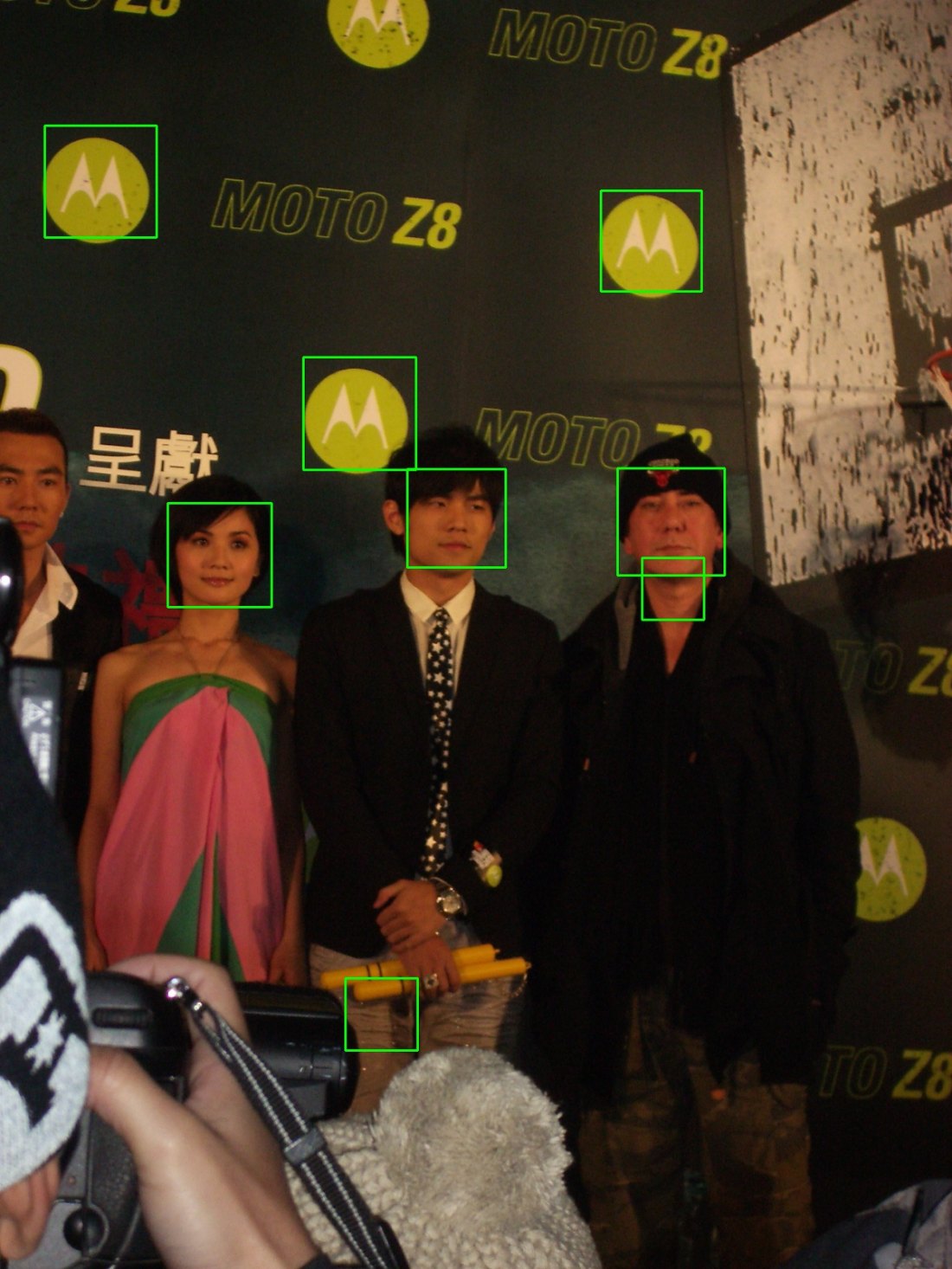
kungfudunkmoviepromo1.jpg: 8 face(s)
   a face at x=56 y=158, 141 by 141 pixels
   a face at x=757 y=240, 127 by 127 pixels
   a face at x=382 y=450, 142 by 142 pixels
   ... and five more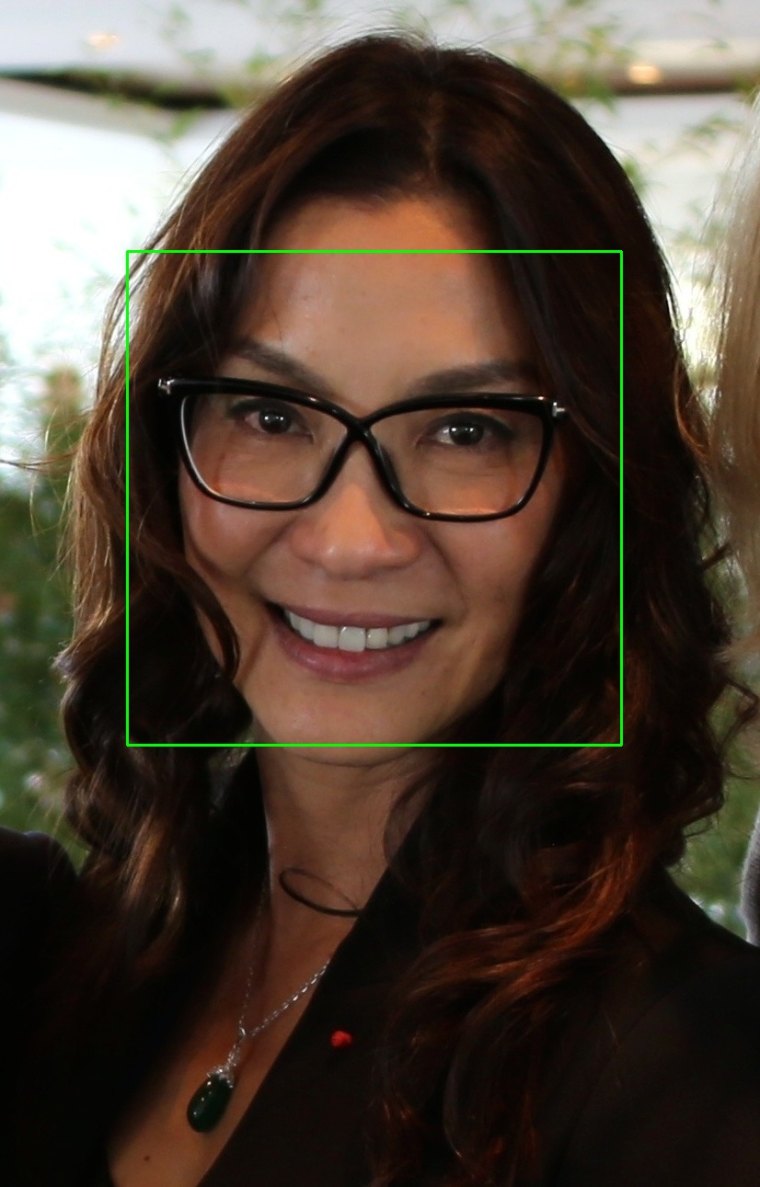
4 🙋 Give it photos, then a new photo · ให้รูป แล้วให้รูปใหม่ · 先给照片,再给一张新的
🇬🇧 English
Now the second job. Put a few photos of each person in a folder named after them, and the program learns the pattern of light and dark across each face (LBPH). Then hand it a new photo and it answers with a name and a distance.
Low distance means a close match. Above the threshold it must say I do not know — that answer is the whole point.
🇹🇭 ไทย
ทีนี้มาถึงงานที่สอง วางรูปของแต่ละคนไว้ในโฟลเดอร์ที่ตั้งชื่อตามคนนั้น โปรแกรมจะเรียนรูปแบบความสว่าง-มืดบนใบหน้าแต่ละหน้า (LBPH) จากนั้นยื่นรูปใหม่ให้ มันจะตอบเป็นชื่อพร้อมระยะห่าง
ระยะห่างน้อยแปลว่าใกล้เคียงมาก ถ้าเกินเกณฑ์ มันต้องตอบว่า ไม่รู้จัก คำตอบนี้แหละคือหัวใจ
🇨🇳 中文
现在是第二件事。把每个人的几张照片放进以他名字命名的文件夹,程序就会学习每张脸上明暗的分布(LBPH)。然后给它一张新照片,它会回答一个名字和一个距离。
距离小表示很接近。超过阈值时它必须说我不知道 —— 这个答案才是重点。
the folders
faces/
  jay_chou/       00.jpg 01.jpg ... 07.jpg
  michelle_yeoh/  00.jpg 01.jpg ... 07.jpg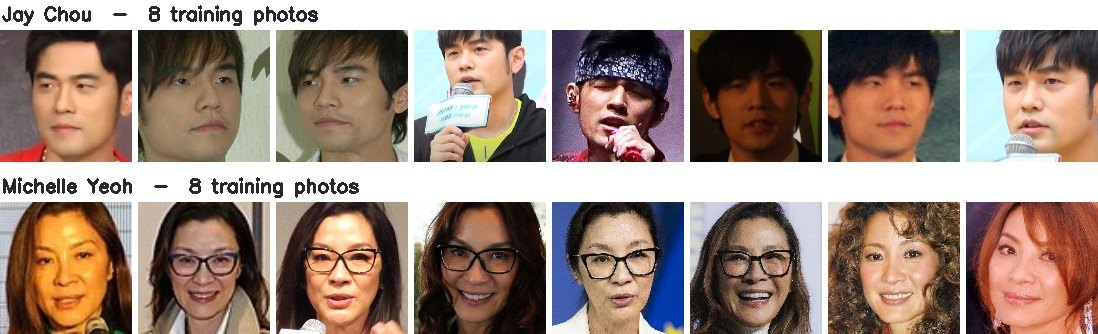
who_is_this.py
"""who_is_this.py — learn a few faces, then name the person in a new photo.

    faces/
      ploy/    1.jpg 2.jpg 3.jpg ...     a few photos of each person
      nok/     1.jpg 2.jpg 3.jpg ...

    python who_is_this.py faces test.jpg

It prints a name and a distance. A LOW distance means a good match. Above the
threshold it says "I do not know", which is the answer you want for a stranger.
"""
import sys
from pathlib import Path

import cv2
import numpy as np

CASCADE = cv2.data.haarcascades + "haarcascade_frontalface_default.xml"
SIZE = (200, 200)          # every face is cut out and resized to this before learning
THRESHOLD = 56             # distance above this = not sure enough to give a name.
                           # Measured on 101 photos, not guessed. Read the page:
                           # this number is a compromise, not a solution.


def face_from(path):
    """The largest face in a photo, in grey, cut out and resized. None if there is none."""
    picture = cv2.imread(str(path), cv2.IMREAD_GRAYSCALE)
    if picture is None:
        return None
    faces = cv2.CascadeClassifier(CASCADE).detectMultiScale(picture, 1.1, 5, minSize=(30, 30))
    if len(faces) == 0:
        return None
    x, y, w, h = max(faces, key=lambda box: box[2] * box[3])
    return cv2.resize(picture[y:y + h, x:x + w], SIZE)


def learn(folder):
    """Train on faces/<name>/*.jpg. Returns the model and the list of names."""
    faces, labels, names = [], [], []
    for person in sorted(p for p in Path(folder).iterdir() if p.is_dir()):
        photos = sorted(list(person.glob("*.jpg")) + list(person.glob("*.png")))
        found = [face_from(photo) for photo in photos]
        found = [f for f in found if f is not None]
        if not found:
            print(f"  {person.name}: no face found in any photo, skipping")
            continue
        names.append(person.name)
        faces += found
        labels += [len(names) - 1] * len(found)
        print(f"  {person.name}: learned {len(found)} of {len(photos)} photos")
    model = cv2.face.LBPHFaceRecognizer_create()
    model.train(faces, np.array(labels))
    return model, names


def who(model, names, path):
    """Name the face in one photo, or say it does not know."""
    face = face_from(path)
    if face is None:
        return "no face found", None
    label, distance = model.predict(face)
    if distance > THRESHOLD:
        return "I do not know", distance
    return names[label], distance


if __name__ == "__main__":
    folder, test = sys.argv[1], sys.argv[2]
    print("learning:")
    model, names = learn(folder)
    print("knows:", ", ".join(names))
    name, distance = who(model, names, test)
    if distance is None:
        print(f"{Path(test).name}: {name}")
    else:
        print(f"{Path(test).name}: {name}  (distance {distance:.1f}, threshold {THRESHOLD})")
terminal
python who_is_this.py faces test_jay_chou.jpgfive photos it had never been trained on
test_jay_chou.jpg:        jay_chou       (distance 54.6, threshold 56)
test_michelle_yeoh.jpg:   michelle_yeoh  (distance 34.6, threshold 56)
hard_jay_chou.jpg:        I do not know  (distance 64.3, threshold 56)
stranger_zhang_ziyi.jpg:  I do not know  (distance 59.2, threshold 56)
stranger_jackie_chan.jpg: michelle_yeoh  (distance 54.0, threshold 56)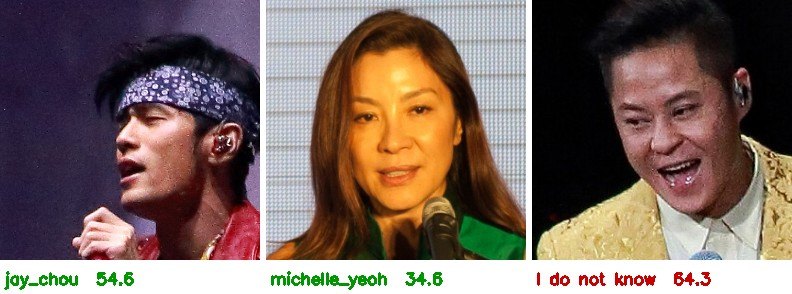
5 📏 How do you know it works? · จะรู้ได้อย่างไรว่ามันใช้ได้ · 你怎么知道它好用?
🇬🇧 English
One demo photo proves nothing: pick a lucky photo and it looks brilliant, pick an awkward one and it looks broken. So we measured. Eight training photos each, then 25 new photos of the same two people and 76 photos of people it had never seen — including Jackie Chan, Zhang Ziyi, Gong Li and Michael Chang, so that “stranger” was not made easy by every stranger looking nothing like them.
Read the first row, then the two rows under it.
🇹🇭 ไทย
รูปเดโมรูปเดียวพิสูจน์อะไรไม่ได้ เลือกรูปที่เข้าทางมันก็ดูเก่ง เลือกรูปที่ยากก็ดูพัง เราจึงวัดจริง ใช้รูปฝึกคนละแปดรูป แล้วทดสอบด้วยรูปใหม่ของสองคนนั้น 25 รูป และรูปของคนที่ไม่เคยเห็น 76 รูป รวมถึงเชื่อวง จางอี้โจว กงลี่ และไมเคิล จาง เพื่อไม่ให้งานแยกคนแปลกหน้าง่ายเกินไป
อ่านแถวแรก แล้วจึงอ่านสองแถวถัดมา
🇨🇳 中文
一张演示照片证明不了什么:挑一张顺的它就像天才,挑一张别扭的它就像坏了。所以我们做了测量。每人八张训练照,然后用这两人的 25 张新照片和它没见过的 76 张照片来测 —— 里面包括成龙、章子怡、巩俐和张德培,这样“陈生人”这一关就不会因为每个陈生人都长得不像他们而变简单。
先读第一行,再读它下面那两行。
| resultผล结果 | |
|---|---|
| Which of the two is it? (no threshold)เป็นคนไหนในสองคน (ไม่ใช้เกณฑ์)是两人中的哪一个?(不用阀值) | 23 / 25 |
| Same person, distance rangeคนเดียวกัน ช่วงระยะห่าง同一个人,距离范围 | 34.6 – 77.8 |
| Stranger, distance rangeคนแปลกหน้า ช่วงระยะห่าง陈生人,距离范围 | 52.1 – 88.7 |
| Best threshold, and how often it is rightเกณฑ์ที่ดีที่สุด และความถูกต้อง最佳阀值,以及正确率 | 56 → 85.1% |
| At that threshold: known people recognisedที่เกณฑ์นั้น คนที่รู้จักที่ถูกจำได้在该阀值下:认识的人被认出 | 13 / 25 |
| At that threshold: strangers refusedที่เกณฑ์นั้น คนแปลกหน้าที่ถูกปฏิเสธ在该阀值下:陈生人被拒绝 | 73 / 76 |
6 📷 The camera: find faces, name nobody · กล้อง: หาใบหน้า ไม่บอกชื่อ · 摄像头:只找脸,不认人
🇬🇧 English
Back to the first job, on a live picture. Read a frame, find every face in it, draw a box, repeat. A camera is just a lot of photos, quickly.
Every face it finds gets a green box labelled with its size in pixels, and a running count sits in the corner. Point it at an empty room and the count stays at nought.
This one deliberately stops there. It does not try to say who anyone is — after section 5 you know that naming is the half that gets it wrong, and a program that quietly puts a name on a stranger is worse than one that says nothing at all.
MIN_FACE is the dial worth playing with: raise it and distant faces are ignored, lower it and the detector starts finding faces in the furniture.
🇹🇭 ไทย
กลับมาที่งานแรก แต่ทำกับภาพสด อ่านหนึ่งเฟรม หาทุกใบหน้าในนั้น วาดกล่อง แล้ววนซ้ำ กล้องก็คือภาพจำนวนมากที่มาเร็ว ๆ เท่านั้น
ทุกใบหน้าที่เจอจะได้กล่องสีเขียวพร้อมป้ายบอกขนาดเป็นพิกเซล และมีตัวนับอยู่ที่มุมภาพ ถ้าหันไปที่ห้องว่าง ตัวนับก็จะอยู่ที่ศูนย์
โปรแกรมนี้ตั้งใจหยุดแค่นั้น มันไม่พยายามบอกว่าใครเป็นใคร หลังอ่านหัวข้อ 5 แล้วคุณรู้ว่าการบอกชื่อคือส่วนที่ผิดพลาด และโปรแกรมที่เงียบ ๆ เอาชื่อไปแปะให้คนแปลกหน้านั้นแย่กว่าโปรแกรมที่ไม่พูดอะไรเลย
MIN_FACE คือปุ่มที่ควรลองปรับ เพิ่มค่าแล้วใบหน้าที่อยู่ไกลจะถูกมองข้าม ลดค่าแล้วตัวตรวจจับจะเริ่มเจอใบหน้าในเฟอร์นิเจอร์
🇨🇳 中文
回到第一件事,只不过对象是实时画面。读一帧,找出里面每一张脸,画个框,重复。摄像头不过是很多张快速到来的照片。
它找到的每一张脸都会得到一个绿框,框上标着以像素为单位的尺寸,画面角落还有一个计数。对着空房间,计数就一直是零。
这个程序特意就停在这里。它不试图说出谁是谁 —— 读过第五节你就知道,认名字才是会出错的那一半,而一个悄悄把名字安在陌生人头上的程序,比什么都不说的程序更糟。
MIN_FACE 是值得调着玩的旋钮:调高,远处的脸会被忽略;调低,检测器就会开始在家具上找到人脸。
watch_camera.py
"""watch_camera.py - find faces in the laptop camera picture.

    python watch_camera.py

It draws a box around every face it can see, and counts them. It does not try to
say who anyone is. That is the other half of the job, and section 5 shows how
often it gets that wrong.

Press q to stop. Nothing is recorded: each frame is looked at and thrown away.
"""
import cv2

CAMERA = 0             # 0 is the built-in laptop camera. Try 1 for a plugged-in one.
MIN_FACE = 80          # ignore anything smaller than this, in pixels
CASCADE = cv2.data.haarcascades + "haarcascade_frontalface_default.xml"
detector = cv2.CascadeClassifier(CASCADE)


def find_faces(frame):
    """Every face in one camera frame, as a box (x, y, width, height)."""
    grey = cv2.cvtColor(frame, cv2.COLOR_BGR2GRAY)      # the detector ignores colour
    return detector.detectMultiScale(grey,
                                     scaleFactor=1.1,
                                     minNeighbors=5,
                                     minSize=(MIN_FACE, MIN_FACE))


if __name__ == "__main__":
    camera = cv2.VideoCapture(CAMERA)
    if not camera.isOpened():
        raise SystemExit("cannot open the camera - is another program using it?")
    print("camera on. Press q to stop.")
    while True:
        ok, frame = camera.read()
        if not ok:
            break
        faces = find_faces(frame)
        for (x, y, w, h) in faces:
            cv2.rectangle(frame, (x, y), (x + w, y + h), (0, 200, 0), 2)
            cv2.putText(frame, f"{w} by {h}", (x, y - 8),
                        cv2.FONT_HERSHEY_SIMPLEX, 0.6, (0, 200, 0), 2)
        cv2.putText(frame, f"faces: {len(faces)}", (10, 30),
                    cv2.FONT_HERSHEY_SIMPLEX, 0.8, (0, 200, 0), 2)
        cv2.imshow("find a face - press q to quit", frame)
        if cv2.waitKey(1) & 0xFF == ord("q"):
            break
    camera.release()
    cv2.destroyAllWindows()
terminal
python watch_camera.pya real run on this laptop, with nobody in front of the camera
camera on. Press q to stop.
   faces: 0
(camera 640x480, 320 frames read, nothing recorded)7 👉 Where it breaks, and what to try · มันพังตรงไหน และลองอะไรต่อ · 它在哪里出错,接下来试什么
🇬🇧 English
- Light, angle, glasses, a smile. LBPH compares light and dark patches, so a stage light behind the person can matter more than the face. Our worst miss was a side-lit concert photo of a man the model knew well.
- Who it was trained on. Methods like this have been measured as less accurate for darker skin, for women, and for children — because the photos they were tuned on were mostly not them. A number that is 85% on average is not 85% for everybody.
- Try it yourself: change
THRESHOLDand watch the two kinds of mistake trade places. Add a third person. Take ten photos of yourself in different rooms and see the distance move. Put a Motorola logo in front of the camera. - Then ask the harder question: if it mistook Jackie Chan for Michelle Yeoh, what is it allowed to decide? Not who enters a building, and not who is marked absent.
Next: Build an AI Agent if you want a program that decides what to do, or Six More Things Python Can Ask For for more real data to play with.
🇹🇭 ไทย
- แสง มุมกล้อง แว่นตา รอยยิ้ม LBPH เทียบหย่อมสว่าง-มืด แสงไฟบนเวทีที่อยู่ด้านหลังคนจึงอาจมีผลมากกว่าตัวใบหน้า การพลาดที่หนักที่สุดของเราคือรูปคอนเสิร์ตแสงข้างของคนที่โมเดลรู้จักดี
- ถูกฝึกมาจากใคร วิธีแบบนี้ถูกวัดแล้วว่าแม่นน้อยกว่ากับผิวสีเข้ม กับผู้หญิง และกับเด็ก เพราะรูปที่ใช้ปรับแต่งส่วนใหญ่ไม่ใช่คนกลุ่มนั้น ตัวเลข 85% โดยเฉลี่ยไม่ได้แปลว่า 85% สำหรับทุกคน
- ลองเอง เปลี่ยนค่า
THRESHOLDแล้วดูความผิดพลาดสองแบบสลับที่กัน เพิ่มคนที่สาม ถ่ายรูปตัวเองสิบรูปในห้องต่างกันแล้วดูระยะห่างขยับ ลองเอาโลโก้ Motorola ไปวางหน้ากล้องดู - แล้วถามคำถามที่ยากกว่า ถ้ามันมองเชื่อวงเป็นมิชเสล เยอห์ มันควรได้ตัดสินเรื่องอะไร ไม่ใช่ว่าใครเข้าอาคารได้ และไม่ใช่ว่าใครถูกบันทึกว่าขาดเรียน
ต่อไป: สร้าง AI Agent ถ้าอยากได้โปรแกรมที่ตัดสินใจเองว่าจะทำอะไร หรือ อีกหกอย่างที่ Python ขอได้ ถ้าอยากได้ข้อมูลจริงมาเล่นเพิ่ม
🇨🇳 中文
- 光线、角度、眼镜、笑容。LBPH 比较的是明暗块,所以人背后的舞台灯,影响可能比脸本身还大。我们最严重的一次漏认,就是一张侧光的演唱会照片,而那个人模型很熟。
- 它是拿谁的照片调出来的。这类方法被测出对深肤色、对女性、对儿童的准确率更低 —— 因为当初用来调参的照片大多不是他们。平均 85% 不等于对每个人都是 85%。
- 自己试:改
THRESHOLD,看两种错误此消彼长。加第三个人。在不同房间给自己拍十张照片,看距离怎么变。把一个摩托罗拉标志撥在摄像头前。 - 然后问更难的问题:既然它把成龙认成了杨紫琼,它有资格决定什么?不该是谁能进栋,也不该是谁被记为缺席。
接下来:想要一个自己决定做什么的程序,看做一个 AI 智能体;想要更多真实数据来玩,看Python 还能要来的六样东西。