Pan's toolsetเครื่องมือของ Pan
Log inเข้าสู่ระบบ
This toolset holds Pan's recordings, so it is locked. Type the password you were given. Capital and small letters count.
เครื่องมือนี้เก็บเสียงที่ Pan อัดไว้ จึงล็อกไว้ พิมพ์รหัสผ่านที่ได้รับมา ตัวพิมพ์ใหญ่และตัวพิมพ์เล็กมีผล
Your guide: from recording to a new voiceคู่มือ: จากการอัดเสียงสู่เสียงใหม่
After you finish recording, you can teach the computer voice again from all your recordings. This guide shows what to press, when you can press it, and what happens next.
เมื่ออัดเสียงเสร็จ คุณสอนเสียงคอมพิวเตอร์ใหม่จากเสียงที่อัดทั้งหมดได้ คู่มือนี้บอกว่าต้องกดอะไร กดได้เมื่อไหร่ และจะเกิดอะไรขึ้นต่อไป
After a sitting, in four stepsหลังอัดเสียงเสร็จ ทำสี่ขั้นนี้
- Finish recording on the recorder page. Each sentence is saved the moment you save it.
- Here, open Training and press “Train a new voice from all my recordings”.
- Close the page if you like: the run goes on without it. It takes about 20 minutes (18.5 on 17 October 2026, with 53 clean recordings), longer when the computer is busy or you have recorded more.
- Open Results, choose the newest run and listen: your reading beside the new voice.
- อัดเสียงในหน้าอัดเสียงให้เสร็จ ทุกประโยคถูกบันทึกทันทีที่คุณกดบันทึก
- ในหน้านี้ เปิดแท็บ ฝึกเสียง แล้วกด “ฝึกเสียงใหม่จากเสียงที่อัดทั้งหมด”
- จะปิดหน้านี้ก็ได้ การฝึกยังทำต่อไปเอง ใช้เวลาประมาณ 20 นาที (18.5 นาที เมื่อวันที่ 17 ตุลาคม 2569 กับเสียงที่สะอาด 53 เสียง) จะนานขึ้นถ้าคอมพิวเตอร์ไม่ว่าง หรือคุณอัดเพิ่ม
- เปิดแท็บ ผลลัพธ์ เลือกการฝึกครั้งล่าสุด แล้วฟัง: เสียงที่คุณอ่าน เทียบกับเสียงใหม่
When you can start a runเริ่มฝึกได้เมื่อไหร่
- Any time you are not in the middle of recording. A run takes the recordings you have at the moment you press; what you record after that goes into the next run.
- One run at a time. The button is grey while a run is copying, waiting or training.
- If the project's computer is busy (another training, or not enough free memory), your run waits in line and starts by itself.
- After a sitting, not after every sentence: the voice changes most when there are many new recordings.
- เริ่มได้ทุกเมื่อที่คุณไม่ได้กำลังอัดอยู่ การฝึกใช้เสียงที่มีอยู่ ณ ตอนที่กดปุ่ม เสียงที่อัดหลังจากนั้นจะเข้าการฝึกครั้งถัดไป
- ฝึกได้ครั้งละหนึ่งรอบ ปุ่มจะเป็นสีเทาระหว่างที่กำลังคัดลอก รอคิว หรือกำลังฝึก
- ถ้าคอมพิวเตอร์ของโครงการไม่ว่าง (มีการฝึกอื่นอยู่ หรือหน่วยความจำว่างไม่พอ) การฝึกของคุณจะรอคิว แล้วเริ่มเอง
- ฝึกหลังอัดเสร็จแต่ละครั้ง ไม่ต้องฝึกทุกประโยค เสียงจะเปลี่ยนมากที่สุดเมื่อมีเสียงใหม่หลาย ๆ เสียง
What goes into a runเสียงไหนเข้าไปในการฝึก
Inside one runภายในการฝึกหนึ่งครั้ง
What you can do, and whenทำอะไรได้บ้าง และเมื่อไหร่
Your writing rules and word list do not change a voice training: they go to the project and teach the computer's writing (The process, step 7).
กฎการเขียนและรายการคำของคุณไม่ได้เปลี่ยนการฝึกเสียง แต่จะเข้าโครงการเพื่อสอนการเขียนของคอมพิวเตอร์ (แท็บ ขั้นตอน ขั้นที่ 7)
What happens after you recordหลังจากคุณอัดเสียง เกิดอะไรขึ้นบ้าง
After every sitting, your recordings go through these steps, in this order. Each step says who does it. The project's full instructions are its file AFTER_A_SITTING.md; this list follows it.
หลังการอัดเสียงแต่ละครั้ง เสียงของคุณจะผ่านขั้นตอนเหล่านี้ตามลำดับ แต่ละขั้นบอกว่าใครเป็นคนทำ คำแนะนำทั้งหมดของโครงการอยู่ในไฟล์ AFTER_A_SITTING.md และรายการนี้ทำตามไฟล์นั้น
- 1You recordคุณอัดเสียงYouคุณ
Read the sentences on the recorder page. If people do not say a sentence that way, correct it there; skip one you cannot read. You can also check the translations (ตรวจคำแปลคำเมือง on the recorder page), answer on the first-voice listening page, and use this toolset.
อ่านประโยคในหน้าอัดเสียง ถ้าคนไม่พูดประโยคนั้นแบบนี้ ให้แก้ได้ที่นั่นเลย ประโยคที่อ่านไม่ได้ ข้ามไปก่อนได้ นอกจากนี้ คุณยังตรวจคำแปลคำเมือง (ในหน้าอัดเสียง) ตอบในหน้าฟังเสียงแรก และใช้เครื่องมือในหน้านี้ได้
- 2Your recordings are copiedคัดลอกเสียงที่อัดThe projectโครงการ
Your new recordings and your corrections are copied from the online storage to the project's computer, and the recorder is asked which sentences are still missing: the ones you skipped.
เสียงใหม่และประโยคที่คุณแก้ ถูกคัดลอกจากที่เก็บออนไลน์มาไว้ที่คอมพิวเตอร์ของโครงการ แล้วถามหน้าอัดเสียงว่ายังขาดประโยคไหนบ้าง คือประโยคที่คุณข้ามไป
👀 A sentence you skipped may come back to you as a question: why was it skipped?
👀 ประโยคที่ข้ามไป อาจมีคนถามคุณว่าข้ามเพราะอะไร
- 3Every recording is checkedตรวจเสียงทุกเสียงThe projectโครงการ
For each new recording: how far your voice is above the room's noise, whether it was so loud that it broke up, whether the end was cut off, whether there is a reading in it at all, and what a speech recogniser hears. The numbers are compared with your earlier sittings.
เสียงใหม่ทุกเสียงถูกตรวจว่า เสียงพูดดังกว่าเสียงรบกวนในห้องแค่ไหน ดังจนเสียงแตกหรือไม่ ท้ายเสียงถูกตัดหรือไม่ มีเสียงอ่านอยู่จริงหรือไม่ และโปรแกรมฟังเสียงได้ยินว่าอะไร แล้วเทียบตัวเลขกับการอัดครั้งก่อน ๆ
- 4Recordings with a problem are sent backส่งเสียงที่มีปัญหากลับไปอัดใหม่The owner decidesเจ้าของโครงการตัดสินใจ
Only recordings with a real problem (the end cut off, too loud, no reading in it), and only on the owner's word. Nothing is deleted: the recording stays as an earlier version, and if an earlier one was better, it can be put back.
เฉพาะเสียงที่มีปัญหาจริง (ท้ายเสียงถูกตัด ดังเกินไป หรือไม่มีเสียงอ่าน) และต้องให้เจ้าของโครงการตกลงก่อน ไม่มีอะไรถูกลบทิ้ง เสียงเดิมยังเก็บเป็นฉบับก่อนหน้า และถ้าฉบับก่อนดีกว่า ก็เอากลับมาใช้ได้
👀 The sentence comes back on the recorder page, and here under Recordings → “To record again”.
👀 ประโยคนั้นจะกลับมาในหน้าอัดเสียง และในหน้านี้ที่ เสียงที่อัด → “ต้องอัดใหม่”
- 5Your corrections are studiedศึกษาประโยคที่คุณแก้The projectโครงการThe owner decidesเจ้าของโครงการตัดสินใจ
Which changes you make again and again (a new spelling rule?), which sounds you change (ร→ฮ, ช→จ), which mistakes in the script you fixed, and how you write the syllables with ◌๋. A new spelling rule is added only on the owner's word.
ดูว่าคุณเปลี่ยนอะไรซ้ำ ๆ (อาจเป็นกฎการสะกดใหม่) เปลี่ยนเสียงไหน (ร→ฮ, ช→จ) แก้คำผิดอะไรในบทอ่าน และเขียนพยางค์ที่มี ◌๋ อย่างไร กฎการสะกดใหม่จะเพิ่มก็ต่อเมื่อเจ้าของโครงการตกลง
👀 New rules appear under Writing rules.
👀 กฎใหม่จะขึ้นในแท็บ กฎการเขียน
- 6Your answers are countedนับคำตอบของคุณThe projectโครงการ
Your translation checks: how often you marked each computer translator right, close or wrong; the translations you wrote yourself become material to teach and test it. Your answers on the listening page: which computer voice sounded closest to you, and which words came out wrong.
การตรวจคำแปลของคุณ: นับว่าคุณให้คำแปลของคอมพิวเตอร์แต่ละตัวว่า ถูก ใกล้เคียง หรือผิด กี่ครั้ง คำแปลที่คุณเขียนเองจะใช้สอนและทดสอบคอมพิวเตอร์ต่อไป คำตอบในหน้าฟังเสียงแรก: เสียงคอมพิวเตอร์เสียงไหนใกล้เสียงคุณที่สุด และคำไหนออกเสียงผิด
👀 The listening page's answers are under Results.
👀 คำตอบในหน้าฟังเสียงแรกอยู่ในแท็บ ผลลัพธ์
- 7Your changes here go into the projectนำสิ่งที่คุณแก้ในหน้านี้เข้าโครงการThe owner decidesเจ้าของโครงการตัดสินใจ
Your copies of the writing rules, the ก จ ต ป syllables and the word list are compared with the project's, and your changes go into the project on the owner's word. Your training runs are looked at too; if one failed, its log says why.
ฉบับของคุณ (กฎการเขียน พยางค์ ก จ ต ป และรายการคำ) ถูกเทียบกับฉบับของโครงการ แล้วสิ่งที่คุณแก้จะเข้าโครงการเมื่อเจ้าของโครงการตกลง การฝึกเสียงที่คุณเริ่มก็ถูกตรวจด้วย ถ้าครั้งไหนไม่สำเร็จ บันทึกของครั้งนั้นจะบอกสาเหตุ
- 8The ก จ ต ป list is updatedปรับรายการพยางค์ ก จ ต ปThe projectโครงการ
Every syllable you write with ◌๋ is a vote on how the computer should read ก จ ต ป. When the votes change the list, it changes in both readers: the computer voice's and the alphabet page's.
ทุกพยางค์ที่คุณเขียนด้วย ◌๋ เหมือนเป็นคะแนนโหวตว่าคอมพิวเตอร์ควรอ่าน ก จ ต ป อย่างไร ถ้าคะแนนทำให้รายการเปลี่ยน รายการจะเปลี่ยนทั้งในเสียงคอมพิวเตอร์และในหน้าตัวอักษร
👀 The list is under Writing rules.
👀 รายการนี้อยู่ในแท็บ กฎการเขียน
- 9The listeners are tested on your new recordingsทดสอบโปรแกรมฟังเสียงกับเสียงใหม่ของคุณThe projectโครงการ
Two speech recognisers, the plain one and the one trained on your voice, write down what they hear in your new recordings. That shows whether the trained one hears Kam Mueang better.
โปรแกรมฟังเสียงสองตัว คือตัวปกติ และตัวที่ฝึกด้วยเสียงของคุณ เขียนสิ่งที่ได้ยินจากเสียงใหม่ของคุณ ทำให้รู้ว่าตัวที่ฝึกแล้วฟังคำเมืองได้ดีขึ้นหรือไม่
- 10Training again, when there is enoughฝึกใหม่ เมื่อมีพอThe owner decidesเจ้าของโครงการตัดสินใจYouคุณ
A new listener once there are recordings from three or more sittings. The writer (the computer that writes Kam Mueang) after about every hundred sentences you correct. The voice whenever you start a run under Training.
โปรแกรมฟังเสียงตัวใหม่ เมื่อมีเสียงจากการอัดสามครั้งขึ้นไป โปรแกรมเขียนคำเมือง ทุก ๆ ประมาณร้อยประโยคที่คุณแก้ และเสียงคอมพิวเตอร์ ทุกครั้งที่คุณเริ่มในแท็บ ฝึกเสียง
- 11A summary for youสรุปให้คุณThe projectโครงการ
What the sitting added, and what all your work has built so far, written for you in Thai and English. Each summary is kept in the project's records.
สรุปสิ่งที่การอัดครั้งนี้เพิ่มเข้ามา และสิ่งที่งานทั้งหมดของคุณสร้างขึ้นแล้ว เขียนให้คุณเป็นภาษาไทยและภาษาอังกฤษ สรุปทุกครั้งเก็บไว้ในบันทึกของโครงการ
👀 The summary is the first thing you see on the recorder page ↗.
👀 สรุปอยู่ในหน้าอัดเสียง ↗ เป็นสิ่งแรกที่เห็นเมื่อเปิดหน้านั้น
- 12Written down and savedจดบันทึกและเก็บงานThe projectโครงการ
The sitting's numbers, the recordings sent back and what your corrections showed go into the project's notes, which are saved; then every computer is tidied up.
ตัวเลขของการอัดครั้งนี้ เสียงที่ส่งกลับไป และสิ่งที่ประโยคที่คุณแก้บอก ถูกจดลงในบันทึกของโครงการและบันทึกเก็บไว้ จากนั้นปิดงานที่ค้างบนคอมพิวเตอร์ทุกเครื่อง
Your recordingsเสียงที่คุณอัด
"Record again" sends a recording back: the recorder page will ask you to read that sentence again. "Versions" lists every recording of a sentence; "Put this one back" makes an earlier one the one used again.
"อัดใหม่" ส่งเสียงนั้นกลับไป หน้าอัดเสียงจะขอให้อ่านประโยคนั้นอีกครั้ง "ฉบับต่าง ๆ" แสดงทุกครั้งที่อัดประโยคนั้น "ใช้ฉบับนี้" จะเอาฉบับก่อนหน้ากลับมาใช้
The sentences you readประโยคที่คุณอ่าน
Change the words to what people really say, in ordinary Thai letters. If you change the words of a sentence you already recorded, the recorder will ask you to record it again (a new note alone does not). "Leave this sentence out" if nobody says it.
แก้คำให้เป็นแบบที่คนพูดกันจริง ด้วยตัวอักษรไทยธรรมดา ถ้าแก้คำของประโยคที่อัดไปแล้ว หน้าอัดเสียงจะขอให้อัดใหม่ (แก้แค่หมายเหตุไม่ต้องอัดใหม่) ถ้าไม่มีใครพูดแบบนี้ ให้ติ๊ก "ไม่ใช้ประโยคนี้"
Spelling rulesกฎการสะกด
Each rule changes a Central Thai spelling into the Kam Mueang one you use. "Look for" is the exact letters; signs like (?<!เ) mean "not after เ" and (?!ย) "not before ย": leave them as they are unless you are sure. Your changes are saved as your own copy; the project folds them into the code and the voice.
กฎแต่ละข้อเปลี่ยนการสะกดแบบไทยกลาง เป็นแบบคำเมืองที่คุณใช้ "หาคำ" คือตัวอักษรที่ต้องหา เครื่องหมายอย่าง (?<!เ) แปลว่า "ไม่อยู่หลัง เ" และ (?!ย) แปลว่า "ไม่อยู่หน้า ย" ถ้าไม่แน่ใจ ให้ปล่อยไว้อย่างนั้น สิ่งที่แก้จะบันทึกเป็นฉบับของคุณเอง แล้วโครงการจะนำไปใส่ในโปรแกรมและเสียง
| Look forหาคำ | Write insteadเขียนแทน | Where it came fromมาจากไหน |
|---|
ก จ ต ป said like ค ช ท พก จ ต ป ที่ออกเสียงแบบ ค ช ท พ
Kam Mueang writes some ค ช ท พ words with ก จ ต ป (ตาง for ทาง, จาย for ชาย). These syllables, written with no tone mark, are read that way; any other bare ก จ ต ป is read as its own letter, rising. Add a syllable, or remove one with ×.
คำเมืองเขียนคำที่มี ค ช ท พ บางคำด้วย ก จ ต ป (ตาง แทน ทาง, จาย แทน ชาย) พยางค์ในรายการนี้ ที่ไม่มีรูปวรรณยุกต์ จะอ่านแบบนั้น ส่วน ก จ ต ป อื่นที่ไม่มีรูปวรรณยุกต์ จะอ่านเป็นเสียงของตัวเอง (เสียงจัตวา) เพิ่มพยางค์ หรือกด × เพื่อลบ
Central Thai and Kam Mueang wordsคำไทยกลางกับคำเมือง
Search for a word in either language. Remove a wrong Kam Mueang word with ×, add a right one, or add a new Central Thai word. Then press Save the word list. The small letters after a word say where it came from: "yours", a dictionary or a collection of sentences (mcq, slscu, wikt), "YouTube" (a lesson video) or "web" (a word list on the web); ⚠ marks a rude word.
ค้นหาคำได้ทั้งสองภาษา กด × เพื่อลบคำเมืองที่ผิด เพิ่มคำที่ถูก หรือเพิ่มคำไทยกลางคำใหม่ แล้วกด บันทึกรายการคำ ตัวอักษรเล็ก ๆ หลังคำบอกว่าคำนั้นมาจากไหน: "ของคุณ" พจนานุกรมหรือชุดประโยค (mcq, slscu, wikt) "YouTube" (คลิปสอนภาษา) หรือ "เว็บ" (รายการคำบนเว็บ) ส่วน ⚠ คือคำหยาบ
The words from YouTube and the web are new (17 October 2026) and may have mistakes: choose them under Show to check them.
คำจาก YouTube และเว็บเป็นคำใหม่ (17 ตุลาคม 2569) อาจมีคำที่ผิด เลือกดูได้ที่ แสดง เพื่อตรวจ
The words of the cartoonคำพูดในการ์ตูน
Chang Ngu is waiting for your words and your voice. Every line you correct, and read in your own voice, makes the tale sound the way the north really speaks.
ตำนานช้างงูรอคำและเสียงของคุณอยู่ ทุกประโยคที่คุณแก้คำ และอ่านด้วยเสียงของคุณเอง จะทำให้นิทานเรื่องนี้พูดเหมือนที่คนเหนือพูดกันจริง ๆ
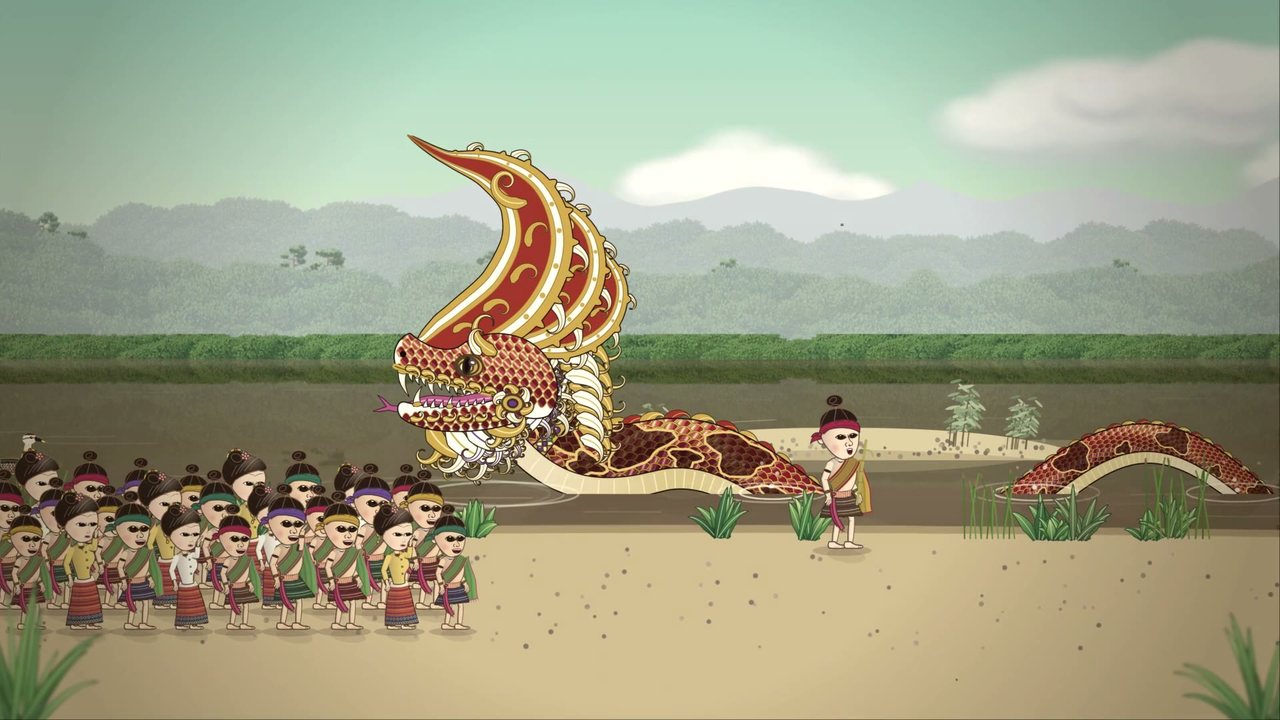
The cartoon on krueng.ai's Lanna cartoon page tells its stories in Kam Mueang: an AI voice made from your own recordings reads these lines, and they show under the picture. These are the lines of the second tale, Chang Ngu: Prince Phrom and the snake-elephant of Chiang Saen. No one who speaks Kam Mueang has checked them yet. For each line, press ▶ Watch to see and hear it in the cartoon, read what it should mean, then change the words to what people really say. If a line is right, press Save without changing it, so we know you checked it. If the voice says a word wrong, write that in the note.
การ์ตูนในหน้าการ์ตูนล้านนาของ krueng.ai เล่าเรื่องเป็นคำเมือง เสียง AI ที่สร้างจากเสียงที่คุณบันทึกไว้เองอ่านประโยคเหล่านี้ และขึ้นเป็นตัวหนังสือใต้ภาพ ตรงนี้คือประโยคของนิทานเรื่องที่สอง ตำนานช้างงู: เจ้าพรหมกับช้างงูแห่งเชียงแสน ยังไม่มีคนที่พูดคำเมืองได้ตรวจเลย ในแต่ละประโยค กด ▶ ดู เพื่อดูและฟังช่วงนั้นในการ์ตูน อ่านความหมายที่ควรจะเป็น แล้วแก้คำให้เป็นแบบที่คนพูดกันจริง ถ้าประโยคไหนถูกแล้ว กด บันทึก โดยไม่ต้องแก้ เพื่อให้รู้ว่าคุณตรวจแล้ว ถ้าเสียงอ่านคำไหนผิด เขียนไว้ในหมายเหตุ
The project's owner decides when the cartoon is made again with your words; only the lines you changed are spoken again. Every save is kept.
เจ้าของโครงการจะตัดสินใจว่าจะทำการ์ตูนใหม่ด้วยคำของคุณเมื่อไร โดยจะอ่านใหม่เฉพาะประโยคที่คุณแก้ ทุกครั้งที่บันทึกจะเก็บไว้หมด
Questions for youคำถามถึงคุณ
Some of your corrections point two ways, and the project needs your word to know which way to go. Each question shows your own sentences. Pick the answer that fits, or write how it really is, then press Save. You can change an answer whenever you like.
คำที่คุณแก้บางคำไปได้สองทาง โครงการจึงต้องถามคุณว่าแบบไหนถูก แต่ละคำถามแสดงประโยคของคุณเอง เลือกคำตอบที่ตรง หรือเขียนอธิบายว่าจริง ๆ เป็นอย่างไร แล้วกด บันทึก จะเปลี่ยนคำตอบเมื่อไรก็ได้
The Maeng film, in your voiceการ์ตูนแมงสี่หูห้าตา ด้วยเสียงของคุณ
The first cartoon tale, Maeng Si Hu Ha Ta, now speaks every line in your own voice: your readings of its lines, fitted to the pictures. Nobody who knows your voice has heard the whole of it yet. Please watch it to the end, then tell us how your voice sounds in it: what sounds like you, what does not, any line that sounds wrong.
การ์ตูนนิทานเรื่องแรก แมงสี่หูห้าตา ตอนนี้พูดทุกประโยคด้วยเสียงของคุณเอง คือเสียงที่คุณอ่านแต่ละประโยค ปรับให้เข้ากับภาพ ยังไม่มีคนที่รู้จักเสียงของคุณได้ฟังทั้งเรื่องเลย รบกวนดูให้จบ แล้วบอกเราว่าเสียงของคุณในเรื่องเป็นอย่างไร ตรงไหนเหมือนคุณ ตรงไหนไม่เหมือน มีประโยคไหนที่ฟังผิดบ้าง
About 18 minutes. If it is slow to play here, the same film is on YouTube:ยาวประมาณ 18 นาที ถ้าเล่นในหน้านี้ช้า มีเรื่องเดียวกันบน YouTube: youtu.be/ekaWGclRYCE
Our play: Xiang Miang and the Kingละครของเรา: เซียงเมี่ยงกับพญา
An idea: a short comedy of about 15 minutes from the Lanna tales of Xiang Miang the trickster, for you, your daughter, your friends and family to act together and record. Only your voices are recorded: no faces, no pictures, no video of anyone; the cartoon draws the characters. Everyone has lines; it is not a narrator's story. The little girl, La, is a part for your daughter: short lines, and many of them the same ("That's one!", "That's two!"). No stage is needed: one long blue cloth is both the river and the lotus pond. The play will become a new Lanna Tales cartoon video, with your voices: each person records the lines of their own part, and the cartoon is made from those recordings. Everyone who records should know that their voice (only their voice) will be in a video that other people can watch, and for the children their parents should agree. The project's owner will tell you how to send the recordings. The script below is in Thai and every word of it can be changed, into Kam Mueang too.
ไอเดีย: ละครตลกสั้น ๆ ประมาณ 15 นาที จากนิทานเซียงเมี่ยงจอมเจ้าเล่ห์ของล้านนา ให้คุณ ลูกสาว เพื่อน ๆ และครอบครัว เล่นด้วยกันแล้วอัดไว้ อัดแค่เสียงเท่านั้น ไม่มีการถ่ายหน้า รูป หรือวิดีโอของใครเลย ตัวละครในการ์ตูนจะวาดขึ้นมา ทุกคนมีบทพูด ไม่ใช่มีแค่คนเล่าเรื่อง ตัวละครเด็กผู้หญิงตัวน้อยชื่อหล้า เป็นบทสำหรับลูกสาวของคุณ บทสั้น ๆ และหลายบทพูดซ้ำกัน (“หนึ่งแล้ว!” “สองแล้ว!”) ไม่ต้องมีเวที ผ้าสีฟ้ายาว ๆ ผืนเดียวเป็นทั้งแม่น้ำและสระบัว ละครเรื่องนี้จะกลายเป็นวิดีโอการ์ตูนนิทานล้านนาเรื่องใหม่ โดยใช้เสียงของพวกคุณ แต่ละคนอัดเสียงบทของตัวละครที่ตัวเองเล่น แล้วการ์ตูนจะทำจากเสียงที่อัดไว้ ทุกคนที่อัดเสียงควรรู้ว่าเสียงของตัวเอง (เฉพาะเสียง) จะอยู่ในวิดีโอที่คนอื่นดูได้ และเด็ก ๆ ควรได้รับความยินยอมจากพ่อแม่ เจ้าของโครงการจะบอกวิธีส่งเสียงที่อัดไว้ บทข้างล่างแก้ได้ทุกคำ จะเปลี่ยนเป็นคำเมืองก็ได้
เรื่องย่อ
แม่หม้ายยากจนขอติดเรือข้ามฟากไปกับพญา แต่พญาบอกว่าเรือมีไว้สำหรับคนสำคัญ แล้วยังสาดน้ำใส่แม่อีก แม่จึงขอให้ลูกชาย เซียงเมี่ยง มีปัญญาเอาชนะพญาได้สักวัน เซียงเมี่ยงได้เข้าไปอยู่ในวัง แล้วหลอกพญาได้สี่ครั้ง หล้า น้องสาวตัวน้อย คอยนับเสียงดังทุกครั้ง
- สระบัว พญาท้าให้หลอกให้ลงน้ำ เซียงเมี่ยงบอกว่า “หลอกให้ลงไม่ได้หรอก แต่ถ้าอยู่ในน้ำแล้ว หลอกให้ขึ้นได้” พญาเลยก้าวลงน้ำเพื่อพิสูจน์ว่าไม่มีใครหลอกได้
- ม้า “พญาอยู่สูงเกินไป กลของผมเอื้อมไม่ถึง ลงมาก่อนสิ” พญาก็ลงจากม้า
- ถุงหมาก พญาสั่งให้วิ่งตามม้า ช้าไปก็โดนว่า เร็วไปก็โดนว่า สุดท้ายสั่งว่า “เก็บทุกอย่างที่หล่นข้างหลังม้า” เซียงเมี่ยงก็เก็บทุกอย่างจริง ๆ
- คดีแมว พญาจะเอาแมวของหล้า เซียงเมี่ยงขอให้แมวเลือกเองระหว่างปลาในชามทองกับข้าวเหนียวเปล่า ๆ แล้วแอบโรยพริกบนปลาตอนกลางคืน
- เรือหลวง พญาสาบานว่าวันนี้ใครขออะไรจะไม่ทำให้ หล้าเลยขอว่า “อย่าให้พวกหนูขึ้นเรือหลวงนะเจ้า” พญาเลยสั่งให้ทุกคนขึ้นเรือ แม่ได้ข้ามฟากด้วยเรือของพญาเอง ครั้งที่ห้านี้หล้าทำเอง
อะไรมาจากนิทานเดิม อะไรเพิ่มเข้ามา
แม่หม้ายที่ไม่ได้ติดเรือ คำขอของแม่ ชาวบ้านส่งเซียงเมี่ยงไปอยู่กับพญา สระบัว ม้า ถุงหมาก และคดีแมว มาจากนิทานเซียงเมี่ยงค่ำพญา (เซียงเมี่ยงหลอกพญา) ส่วนที่เพิ่มเข้ามาในละครนี้: หล้า (ในนิทานเดิม แม่หม้ายมีลูกชายสามคน ไม่มีลูกสาว) ขุนวังกับคำว่า “ยอดเยี่ยมขอรับ!” การนับ พริก (ในนิทานเดิม เซียงเมี่ยงฝึกแมวให้กินแต่ข้าว) และกลเรือตอนจบ ส่วนที่ตัดออก: ตอนที่เกี่ยวกับมเหสี การตายของเซียงเมี่ยง และน้องชายสองคนของเขา
นักแสดงและของประกอบฉาก
มีแปดบท แต่หกคนก็เล่นได้: คนหนึ่งเล่นม้าแล้วเปลี่ยนไปเล่นเหมียว และคนที่เล่นแม่เล่นชาวบ้านด้วย
- ผ้าสีฟ้ายาว ๆ หนึ่งผืน: แม่น้ำตอนเปิดและตอนจบ และสระบัวในฉากที่ 2
- หมอนกับไม้พายสำหรับเรือหลวง และแก้วน้ำหนึ่งใบสำหรับสาดน้ำ
- ตะกร้าใส่ห่อเมี่ยง (ใบไม้พับ) ของหล้า
- ถุงผ้าไหมใส่หมากสองสามลูก และถุงเท้าสีน้ำตาลม้วนเป็นก้อนสามก้อน สำหรับของที่ม้าทำหล่น
- ชามทองใส่ปลากระดาษ ก่องข้าวใบเล็ก และขวดพริก
- ไฟฉายสำหรับฉากกลางคืน
แก้บท
กดในช่องไหนก็ได้แล้วพิมพ์แก้ เปลี่ยนชื่อตัวละครในช่องชื่อ แล้วชื่อหน้าบทพูดทุกบทจะเปลี่ยนตาม (ชื่อที่อยู่ในประโยคต้องแก้เอง) ปุ่ม + เพิ่มบรรทัดใหม่ใต้บรรทัดนั้น ปุ่ม ✕ ลบบรรทัด บทของหล้ามีพื้นสีเหลือง แก้เสร็จแล้วกด บันทึก ที่ด้านล่าง บทที่บันทึกไว้จะอยู่ทุกครั้งที่เปิดหน้านี้ ปุ่ม “กลับไปใช้บทเดิม” นำบทเดิมของโครงการกลับมา และต้องกด บันทึก อีกครั้งถึงจะเก็บไว้ ฉบับที่บันทึกก่อนหน้าทุกฉบับยังเก็บไว้ ไม่หายไปไหน
The plot, and how to change the script
A poor widow is splashed by the King's boat and wishes for a son clever enough to beat a king. Her son Xiang Miang tricks the King four times (the lotus pond, the horse, the betel bag, the cat trial) while his little sister La counts each one out loud; then La plays the fifth trick herself, and the widow crosses the river in the King's own boat. La is added for this play: in the old tale the widow has three sons. Switch to ไทย for the full overview, the cast and the props. Every box below can be changed: rename a part and every line's label follows; + adds a line, ✕ removes one; La's lines are yellow; Save keeps your copy, and every earlier save is kept too.
Teach the voice againสอนเสียงใหม่
A training run takes all your current recordings (not the ones sent back, not the sentences left out), keeps the clean ones, and teaches the computer voice from them. Then it speaks the test sentences (the ones it never learns from) and measures them. Only one run at a time; it waits if the project's computer is busy. On 17 October 2026 it took 18 minutes with 53 clean recordings, and it takes longer as you record more; you can close this page and come back.
การฝึกแต่ละครั้งใช้เสียงที่อัดไว้ทั้งหมดในตอนนี้ (ไม่รวมเสียงที่ส่งกลับไปอัดใหม่ และประโยคที่ตัดออก) เลือกเฉพาะเสียงที่สะอาด แล้วสอนเสียงคอมพิวเตอร์จากเสียงเหล่านั้น จากนั้นให้มันอ่านประโยคทดสอบ (ประโยคที่ไม่ได้ใช้สอน) แล้ววัดผล ฝึกได้ครั้งละหนึ่งรอบ ถ้าคอมพิวเตอร์ของโครงการไม่ว่างจะรอคิว เมื่อวันที่ 17 ตุลาคม 2569 ใช้เวลา 18 นาที กับเสียงที่สะอาด 53 เสียง และจะนานขึ้นเมื่ออัดเพิ่ม ปิดหน้านี้แล้วค่อยกลับมาดูได้
Earlier runsการฝึกครั้งก่อน ๆ
What each training madeผลของการฝึกแต่ละครั้ง
For every test sentence: your own reading, then the voice trained on your recordings, the plain computer voice copying one recording of yours, and the plain computer voice. "Wrong letters" is what a Central Thai computer listener got wrong (lower is clearer to a Central ear, not better Kam Mueang); "pitch" is how high the voice is. Your ears are the real judge.
ทุกประโยคทดสอบ: เสียงที่คุณอ่านเอง แล้วตามด้วยเสียงที่ฝึกจากเสียงของคุณ เสียงคอมพิวเตอร์ที่เลียนแบบจากเสียงเดียวของคุณ และเสียงเดิมของคอมพิวเตอร์ "อักษรผิด" คือสิ่งที่ตัวฟังของคอมพิวเตอร์ที่รู้ภาษาไทยกลางเขียนผิด (ต่ำแปลว่าหูภาษาไทยกลางเข้าใจง่าย ไม่ได้แปลว่าเป็นคำเมืองที่ดีกว่า) "ระดับเสียง" คือเสียงสูงแค่ไหน หูของคุณคือผู้ตัดสินตัวจริง
Answers on the listening pageคำตอบในหน้าฟังเสียง
Ask the assistantถามผู้ช่วย
The Kam Mueang assistant that your recordings and corrections are for. Ask it something in Kam Mueang: type it, or press 🎤, speak, and press 🎤 again. It shows what it heard, what it understood in Central Thai and its answer in Kam Mueang, then reads the answer aloud. There are two boxes: the same assistant answers in both, but the first reads its answer in the computer's voice and the second in your own voice, trained on your recordings (how the two differ is at the bottom). The first answer can take a minute while the project's computer gets ready; later ones take about 10 to 30 seconds.
ผู้ช่วยคำเมือง ที่เสียงอัดและการแก้ไขของคุณช่วยสร้าง ถามเป็นคำเมืองได้เลย พิมพ์ หรือกด 🎤 พูด แล้วกด 🎤 อีกครั้ง ผู้ช่วยจะแสดงสิ่งที่ได้ยิน สิ่งที่เข้าใจเป็นภาษาไทยกลาง และคำตอบเป็นคำเมือง แล้วอ่านคำตอบให้ฟัง มีสองช่อง ผู้ช่วยตัวเดียวกันตอบทั้งสองช่อง แต่ช่องแรกอ่านคำตอบด้วยเสียงคอมพิวเตอร์ ช่องที่สองอ่านด้วยเสียงของคุณเอง ที่ฝึกจากเสียงอัดของคุณ (สองเสียงนี้ต่างกันอย่างไร อยู่ด้านล่าง) คำตอบแรกอาจใช้เวลาราวหนึ่งนาที ระหว่างที่คอมพิวเตอร์ของโครงการเตรียมพร้อม ครั้งต่อไปประมาณ 10 ถึง 30 วินาที
It is a first try: it can mishear, misunderstand, write Kam Mueang wrongly or make things up. Your questions and its answers are kept on the project's computer, so we can see where it goes wrong.
นี่เป็นรุ่นแรก อาจได้ยินผิด เข้าใจผิด เขียนคำเมืองผิด หรือแต่งเรื่องขึ้นเอง คำถามของคุณและคำตอบจะเก็บไว้ในคอมพิวเตอร์ของโครงการ เพื่อดูว่าผู้ช่วยผิดตรงไหน
1 · Answered in the computer's voice1 · ตอบด้วยเสียงคอมพิวเตอร์
2 · Answered in your own voice2 · ตอบด้วยเสียงของคุณเอง
How the two voices differ, and how each was madeสองเสียงนี้ต่างกันอย่างไร และสร้างมาอย่างไร
Both boxes use the same assistant: the same listener hears you, the same steps understand and answer, and the same writer puts the answer into Kam Mueang. Only the voice that reads the answer aloud is different.
ทั้งสองช่องใช้ผู้ช่วยตัวเดียวกัน ตัวฟังเสียงตัวเดียวกันฟังคุณ ขั้นตอนเข้าใจและตอบเหมือนกัน และตัวเขียนตัวเดียวกันเปลี่ยนคำตอบเป็นคำเมือง ต่างกันแค่เสียงที่อ่านคำตอบออกมา
1 · The computer's voice is Meta's MMS Northern Thai voice (Meta is the company behind Facebook). In 2023 Meta made speech for more than a thousand languages, and for each language trained a separate small model on one recording: one person reading the New Testament of the Bible aloud in that language. For Northern Thai that is a reader nobody in this project knows. It was not trained here: the project uses it as it is, and only adds one thing, numbers said the Kam Mueang way (20 is ซาว). It is quick, a few seconds an answer. It is free to use, but not to make money with.
1 · เสียงคอมพิวเตอร์ คือเสียงภาษาไทยถิ่นเหนือ MMS ของ Meta (บริษัทเจ้าของ Facebook) ในปี 2566 Meta ทำเสียงพูดให้กว่าหนึ่งพันภาษา โดยฝึกโมเดลเล็ก ๆ แยกกันภาษาละหนึ่งตัว จากเสียงอัดชุดเดียว คือคนคนหนึ่งอ่านพระคัมภีร์ไบเบิลภาคพันธสัญญาใหม่ออกเสียงเป็นภาษานั้น สำหรับภาษาไทยถิ่นเหนือ ผู้อ่านเป็นคนที่ไม่มีใครในโครงการรู้จัก โครงการไม่ได้ฝึกเสียงนี้เอง ใช้ตามที่เป็นอยู่ แค่เพิ่มให้อ่านตัวเลขแบบคำเมือง (20 อ่านว่า ซาว) เสียงนี้เร็ว คำตอบหนึ่งใช้ไม่กี่วินาที ใช้ได้ฟรี แต่ห้ามใช้หาเงิน
2 · Your voice was made here, on the project's computer, from your recordings. It starts from VoxCPM2, a large speech model made by the VoxCPM team (OpenBMB) and free for anyone to use, which learned to speak from more than two million hours of speech in many languages, Thai among them. On top of it a small add-on (called a LoRA) is trained on your clean recordings, so that it speaks like you; the large model itself stays as it is. Recordings that are too loud (clipped) or cut off at the end are left out, and so are the test sentences, which are kept to check it. Each training under Training makes a new version from all your current recordings, and this box always uses the newest one that has finished. It is slower than the computer's voice, and it learned from only a few minutes of your speech, so it can still sound unlike you or say a word wrongly. The Results tab sets each training beside your own reading.
2 · เสียงของคุณ สร้างที่นี่ บนคอมพิวเตอร์ของโครงการ จากเสียงอัดของคุณ เริ่มจาก VoxCPM2 โมเดลเสียงพูดขนาดใหญ่ที่ทีม VoxCPM (OpenBMB) สร้างและให้ทุกคนใช้ได้ฟรี ซึ่งเรียนการพูดมาจากเสียงพูดกว่าสองล้านชั่วโมงในหลายภาษา รวมทั้งภาษาไทย จากนั้นฝึกส่วนเสริมเล็ก ๆ (เรียกว่า LoRA) ด้วยเสียงอัดที่สะอาดของคุณ เพื่อให้พูดเหมือนคุณ ส่วนโมเดลใหญ่ไม่เปลี่ยน เสียงที่ดังเกินไป (เสียงแตก) หรือถูกตัดตอนท้าย จะไม่ถูกใช้ และประโยคทดสอบก็ไม่ใช้ เพราะเก็บไว้ตรวจผล การฝึกแต่ละครั้งที่แท็บ ฝึกเสียง จะสร้างเสียงรุ่นใหม่จากเสียงอัดปัจจุบันทั้งหมดของคุณ และช่องนี้ใช้รุ่นล่าสุดที่ฝึกเสร็จแล้วเสมอ เสียงนี้ช้ากว่าเสียงคอมพิวเตอร์ และเรียนจากเสียงของคุณเพียงไม่กี่นาที จึงอาจยังไม่เหมือนคุณ หรืออ่านบางคำผิด แท็บ ผลลัพธ์ วางการฝึกแต่ละครั้งไว้ข้างเสียงที่คุณอ่านเอง