🇬🇧 English
You have written a Python program and you want to give it to someone. The trouble is that a .py file is not a program by itself. It only runs on a computer that has Python installed, in a suitable version, together with every library your file imports. Most of the people you would give it to have none of that.
The usual answer is a tool called PyInstaller. It reads your script, works out everything the script needs, and copies all of it, Python itself included, into one folder or one file. The person you give it to double-clicks it, and it runs. This page teaches that tool by using it three times, on three programs of very different sizes.
The third program is the interesting one. It is a small game in which you are a tiny fish that grows by eating, while bigger fish, a snake and a lizard hunt you. The animals move with the code from Animals that move by themselves, and an AI model called decider reads the hunters' rules, which are written in English, and chooses each move. Packing a few hundred lines of Python is easy. Packing an AI model along with them is where most people get stuck, so this page spends real time there.
Nothing here is copied from a manual in the hope that it works. Each app was built and started on a Windows 11 laptop, and the sizes, start times and memory figures come from scripts that you can run yourself. We do not own a Mac, so the Mac steps come from the documentation of PyInstaller and of Apple, and the page says so wherever it matters.
🇹🇭 ไทย
คุณเขียนโปรแกรม Python เสร็จแล้ว และอยากส่งให้คนอื่นใช้ ปัญหาคือไฟล์ .py ไม่ใช่โปรแกรมที่รันได้ด้วยตัวเอง มันรันได้เฉพาะบนคอมพิวเตอร์ที่ติดตั้ง Python ไว้แล้ว ต้องเป็นเวอร์ชันที่เหมาะสม และต้องมีไลบรารีทุกตัวที่ไฟล์ของคุณ import ครบ คนส่วนใหญ่ที่คุณอยากส่งให้ไม่มีสิ่งเหล่านี้เลยสักอย่าง
คำตอบที่ใช้กันทั่วไปคือเครื่องมือชื่อ PyInstaller มันอ่านสคริปต์ของคุณ หาว่าสคริปต์ต้องใช้อะไรบ้าง แล้วคัดลอกทั้งหมดนั้น รวมทั้งตัว Python เอง ลงในโฟลเดอร์เดียวหรือไฟล์เดียว คนที่ได้รับแค่ดับเบิลคลิก มันก็รัน หน้านี้สอนเครื่องมือนี้ด้วยการใช้มันสามครั้ง กับโปรแกรมสามตัวที่ขนาดต่างกันมาก
โปรแกรมตัวที่สามคือตัวที่น่าสนใจ มันเป็นเกมเล็ก ๆ ที่คุณเป็นปลาตัวจิ๋ว กินแล้วโตขึ้น ขณะที่ปลาตัวใหญ่กว่า งู และกิ้งก่าคอยไล่ล่าคุณ สัตว์ทุกตัวเคลื่อนไหวด้วยโค้ดจากหน้า สัตว์ที่ขยับเองได้ และโมเดล AI ชื่อ decider เป็นผู้อ่านกฎของนักล่า ซึ่งเขียนไว้เป็นภาษาอังกฤษ แล้วเลือกท่าแต่ละครั้ง การแพ็กโค้ด Python ไม่กี่ร้อยบรรทัดนั้นง่าย แต่การแพ็กโมเดล AI ไปด้วยคือจุดที่คนส่วนใหญ่ติด หน้านี้จึงใช้เวลากับตรงนั้นอย่างจริงจัง
ไม่มีอะไรในหน้านี้ที่ลอกมาจากคู่มือแล้วหวังว่าจะใช้ได้ แอปทุกตัวถูกบิลด์และเปิดจริงบนแล็ปท็อป Windows 11 ส่วนขนาด เวลาเปิด และหน่วยความจำที่ใช้ ล้วนมาจากสคริปต์ที่คุณรันเองได้ เราไม่มีเครื่องแมค ขั้นตอนของแมคจึงมาจากเอกสารของ PyInstaller และของ Apple และหน้านี้จะบอกไว้ทุกจุดที่เรื่องนี้สำคัญ
🇨🇳 中文
你写好了一个 Python 程序,想把它交给别人用。麻烦在于,.py 文件本身并不是一个能独立运行的程序。它只能在装了 Python 的电脑上运行,版本要合适,你的文件 import 的每一个库也都得装好。而你想给的那些人,大多数一样都没有。
常用的办法是一个叫 PyInstaller 的工具。它读你的脚本,弄清脚本需要的一切,然后把这些东西连同 Python 本身,一起复制到一个文件夹或一个文件里。拿到的人双击一下,它就运行了。这一页的教法是把这个工具用三次,对象是三个大小相差很远的程序。
第三个程序最有意思。它是一个小游戏:你是一条小鱼,靠吃东西长大,同时有更大的鱼、一条蛇和一只蜥蜴在追捕你。动物的动作用的是《自己会动的动物》里的代码;一个叫 decider 的 AI 模型负责读用英文写的猎手规则,并挑出每一步动作。打包几百行 Python 很容易;连 AI 模型一起打包,才是多数人卡住的地方,所以这一页在那里花了真功夫。
这里没有哪一步是从手册上抄来、指望它能用的。每个应用都在一台 Windows 11 笔记本上真正构建并启动过,大小、启动时间和内存占用都来自你自己也能运行的脚本。我们没有 Mac,所以 Mac 的步骤来自 PyInstaller 和 Apple 的文档,凡是要紧的地方,页面都会明说。
python -m, PyInstaller, and the options after it. Watch it first, so that the commands below are not a surprise. The voice is a computer's and the drawings are made by code: every command and every number in them is taken from this page or from its saved outputs. The subtitles follow the language you switch on above.วิธีอ่านคำสั่งที่หน้านี้ใช้ ในสามนาทีครึ่ง: python -m, PyInstaller และตัวเลือกที่ตามมา ดูก่อนเริ่ม คำสั่งข้างล่างจะได้ไม่แปลกตา เสียงเป็นเสียงคอมพิวเตอร์ และภาพวาดขึ้นด้วยโค้ด: คำสั่งทุกคำสั่งและตัวเลขทุกตัวในภาพมาจากหน้านี้หรือจากผลลัพธ์ที่บันทึกไว้ คำบรรยายจะเปลี่ยนตามภาษาที่คุณเปิดไว้ข้างบน用三分半钟讲清怎样读这一页用的那条命令:python -m、PyInstaller,以及后面的选项。先看一遍,下面的命令就不会显得陌生。声音是电脑合成的,图是代码画的:图里的每条命令、每个数字,都取自这一页或它保存的输出。字幕会跟着你在上面打开的语言走。If you need to distribute your application for more than one OS, for example both Windows and macOS, you must install PyInstaller on each platform and bundle your app separately on each.ไฟล์ .exe คือโปรแกรมของ Windows แมครันมันไม่ได้ และ Windows ก็รันแอปของแมคไม่ได้ PyInstaller ไม่ได้เปลี่ยนเรื่องนี้ มันบิลด์แอปสำหรับคอมพิวเตอร์ชนิดที่มันกำลังรันอยู่เท่านั้น ไม่ใช่ชนิดอื่น แผนจึงเป็นสคริปต์ Python หนึ่งไฟล์กับการบิลด์สองครั้ง คุณรันคำสั่งเดียวกันบนพีซี Windows เพื่อให้ได้แอปของ Windows และรันบนแมคเพื่อให้ได้แอปของแมค เอกสารของ PyInstaller เขียนไว้ตรง ๆ ว่า ถ้าต้องแจกแอปให้มากกว่าหนึ่งระบบปฏิบัติการ เช่นทั้ง Windows และ macOS คุณต้องติดตั้ง PyInstaller บนแต่ละระบบ แล้วแพ็กแอปแยกกันบนแต่ละระบบ .exe 是 Windows 的程序。Mac 运行不了它,Windows 也运行不了 Mac 的应用。PyInstaller 改变不了这一点:它只为自己正在运行的那种电脑构建应用,别的都不行。所以方案是一个 Python 脚本、两次构建。同一条命令,在 Windows 电脑上运行得到 Windows 应用,在 Mac 上运行得到 Mac 应用。PyInstaller 的文档说得很直接:如果要把应用发给不止一种操作系统,比如同时有 Windows 和 macOS,就必须在每个平台上都安装 PyInstaller,并在每个平台上分别打包。
| Fileไฟล์文件 | What it isคืออะไร它是什么 | Where you use itใช้ตรงไหน用在哪里 |
|---|---|---|
| hello.py | The smallest app worth packing: one window, one sentence, one button. Twenty lines.แอปที่เล็กที่สุดที่ยังคุ้มจะแพ็ก: หน้าต่างหนึ่งบาน ประโยคหนึ่งประโยค ปุ่มหนึ่งปุ่ม ยี่สิบบรรทัด值得打包的最小应用:一个窗口、一句话、一个按钮,共二十行。 | Steps 1 to 5ขั้นที่ 1 ถึง 5第 1 到 5 步 |
| pond.py | The game. About 550 lines, and to play it you need nothing but Python's own library.ตัวเกม ราว 550 บรรทัด และเล่นได้โดยใช้แค่ไลบรารีที่มากับ Python游戏本身。大约 550 行,只用 Python 自带的库就能玩。 | Steps 6, 7 and 9ขั้นที่ 6, 7 และ 9第 6、7、9 步 |
| get_model.py | Downloads the AI model, and carries on from where it stopped if the connection breaks.ดาวน์โหลดโมเดล AI และโหลดต่อจากจุดที่ค้างไว้ได้ถ้าการเชื่อมต่อหลุด下载 AI 模型;连接断了,可以从断的地方接着下。 | Step 8ขั้นที่ 8第 8 步 |
| Wordคำ词 | What it means on this pageความหมายในหน้านี้在这一页里的意思 |
|---|---|
| app | A program you start with a double-click.แอป: โปรแกรมที่เปิดด้วยการดับเบิลคลิก应用:双击就能启动的程序。 |
| .exe | A Windows program file. The letters are short for “executable”: something the computer can run directly.ไฟล์โปรแกรมของ Windows ย่อมาจาก “executable” คือสิ่งที่คอมพิวเตอร์รันได้โดยตรงWindows 的程序文件。这几个字母是 “executable”(可执行)的缩写,指电脑能直接运行的东西。 |
| .app | A Mac program. In Finder it looks like one file, but it is really a folder with the program and all its parts inside.โปรแกรมของแมค ใน Finder ดูเหมือนไฟล์เดียว แต่จริง ๆ เป็นโฟลเดอร์ที่มีตัวโปรแกรมและชิ้นส่วนทั้งหมดอยู่ข้างในMac 的程序。在“访达”里看起来是一个文件,其实是一个文件夹,程序和它的所有部件都在里面。 |
| script | A program kept as a text file, which needs another program, here Python, to run it.สคริปต์: โปรแกรมที่เก็บเป็นไฟล์ข้อความ และต้องมีโปรแกรมอื่น ในที่นี้คือ Python มารันให้脚本:以文本文件保存的程序,要靠另一个程序(这里是 Python)来运行。 |
| PyInstaller | The tool this page uses. It gathers a script and everything the script needs into an app.เครื่องมือที่หน้านี้ใช้ มันรวบรวมสคริปต์และทุกอย่างที่สคริปต์ต้องใช้ให้กลายเป็นแอป这一页用的工具。它把脚本和脚本需要的一切收集起来,做成一个应用。 |
| to build | To make the app from the script. Each time you change the script, you build again.บิลด์: สร้างแอปจากสคริปต์ ทุกครั้งที่แก้สคริปต์ ต้องบิลด์ใหม่构建:用脚本做出应用。每次改了脚本,都要重新构建。 |
| bundle | What PyInstaller produces: the folder, or the single file, with everything inside it.บันเดิล: สิ่งที่ PyInstaller สร้างออกมา คือโฟลเดอร์หรือไฟล์เดียวที่มีทุกอย่างอยู่ข้างใน打包结果:PyInstaller 做出来的东西,即装着一切的那个文件夹或那个文件。 |
| virtual environment | A separate copy of Python for one project, with its own set of libraries. Often shortened to “venv”.สภาพแวดล้อมเสมือน: Python อีกชุดที่แยกไว้สำหรับโปรเจกต์เดียว มีชุดไลบรารีเป็นของตัวเอง มักเรียกสั้น ๆ ว่า “venv”虚拟环境:为一个项目单独准备的一份 Python,有自己的一套库。常简称 “venv”。 |
| console | The plain text window in which a program prints its messages.คอนโซล: หน้าต่างข้อความล้วนที่โปรแกรมใช้พิมพ์ข้อความออกมา控制台:程序用来打印信息的纯文字窗口。 |
| library | Code written by other people that your program imports and uses.ไลบรารี: โค้ดที่คนอื่นเขียนไว้ ซึ่งโปรแกรมของคุณ import มาใช้库:别人写好的代码,你的程序 import 进来使用。 |
| to sign | To attach the maker's checked identity to an app, so that an operating system can tell who made it and that nobody has changed it since.เซ็นรับรอง: ติดตัวตนของผู้สร้างที่ผ่านการตรวจสอบแล้วไว้กับแอป เพื่อให้ระบบปฏิบัติการรู้ว่าใครสร้าง และรู้ว่าไม่มีใครแก้ไขมันหลังจากนั้น签名:把经过核实的制作者身份附在应用上,让操作系统能知道是谁做的,以及之后没有人改动过它。 |
| AI model | A large file of numbers that came out of training, together with the code that uses those numbers to give answers.โมเดล AI: ไฟล์ตัวเลขขนาดใหญ่ที่ได้จากการฝึก พร้อมกับโค้ดที่ใช้ตัวเลขเหล่านั้นให้คำตอบAI 模型:训练得到的一大堆数字,加上用这些数字给出回答的代码。 |
📦 Tutorial 1 — The smallest app · บทที่ 1 — แอปที่เล็กที่สุด · 教程 1 —— 最小的应用
🇬🇧 English
Start with something so small that nothing can go wrong in the program itself. Then every surprise you meet comes from the packaging, which is the thing you are here to learn. The game in Tutorial 2 is packed with exactly the same commands.
🇹🇭 ไทย
เริ่มจากสิ่งที่เล็กมากจนตัวโปรแกรมเองไม่มีอะไรจะพังได้ แล้วทุกเรื่องที่ทำให้คุณแปลกใจก็จะมาจากการแพ็ก ซึ่งเป็นสิ่งที่คุณมาเรียนในหน้านี้ เกมในบทที่ 2 ก็แพ็กด้วยคำสั่งชุดเดียวกันทุกประการ
🇨🇳 中文
先从一个小到程序本身不可能出错的东西开始。这样,你遇到的每一个意外都来自打包,而打包正是你来这里要学的。教程 2 里的游戏,用的是完全相同的命令。
1 A window, run the ordinary way · หน้าต่างหนึ่งบาน รันแบบปกติ · 一个窗口,照常运行
🇬🇧 English
This is the whole program: a window with one sentence and a Close button. It also prints one line to the terminal, and that line is there on purpose. In step 5 you will see what happens to printed text when a program has no terminal to print to.
Save the file and run it the way you always run Python. On a Mac the command is usually python3 where this page says python.
🇹🇭 ไทย
นี่คือโปรแกรมทั้งหมด หน้าต่างหนึ่งบานที่มีประโยคเดียวกับปุ่ม Close มันยังพิมพ์ข้อความหนึ่งบรรทัดออกทางเทอร์มินัลด้วย และบรรทัดนั้นใส่ไว้โดยตั้งใจ ในขั้นที่ 5 คุณจะได้เห็นว่าข้อความที่พิมพ์ออกมาจะเป็นอย่างไร เมื่อโปรแกรมไม่มีเทอร์มินัลให้พิมพ์ลงไป
บันทึกไฟล์ แล้วรันแบบที่คุณรัน Python ตามปกติ บนแมค คำสั่งมักเป็น python3 ในจุดที่หน้านี้เขียนว่า python
🇨🇳 中文
整个程序就是这些:一个窗口,里面有一句话和一个 Close 按钮。它还会往终端打印一行字,这一行是故意放的。到第 5 步你会看到,程序没有终端可以打印的时候,打印出来的文字会怎么样。
把文件存好,像平时运行 Python 那样运行它。在 Mac 上,这一页写 python 的地方通常要写成 python3。
💻 RUN IT
python hello.py📄 NEW FILE · hello.py
"""hello.py - the smallest app: one window, one sentence and one button.

    python hello.py
"""
import tkinter as tk


def main():
    print("hello.py is running.")       # this goes to the terminal, not to the window
    root = tk.Tk()
    root.title("hello")
    words = tk.Label(root, text="Hello from my own app.", font=("Arial", 20))
    words.pack(padx=40, pady=30)
    button = tk.Button(root, text="Close", command=root.destroy)
    button.pack(pady=20)
    root.mainloop()


if __name__ == "__main__":
main()hello.py is running. in the terminal. So far Python is doing all the work, and this only runs because Python is installed on your computer.
หน้าต่างเล็ก ๆ หนึ่งบาน และบรรทัด hello.py is running. ในเทอร์มินัล ถึงตรงนี้ Python ยังเป็นผู้ทำงานทั้งหมด และที่มันรันได้ก็เพราะเครื่องของคุณติดตั้ง Python ไว้
一个小窗口,以及终端里的一行 hello.py is running.。到这里为止,活儿全是 Python 在干;它能运行,只是因为你的电脑上装着 Python。
2 A separate Python for the build · Python อีกชุดสำหรับการบิลด์ · 专门用来构建的一份 Python
🇬🇧 English
PyInstaller is a library, so it has to be installed into some Python. Give it one of its own: a virtual environment, which is a separate copy of Python with its own libraries, kept in a folder. The first command below creates one in a folder named venv, and the second installs PyInstaller into it.
Look closely at the second command. It does not begin with plain python. It names the Python that sits inside the new folder, and that is how you choose which Python does the work. PyInstaller builds the app out of the Python that runs it, so this choice decides what can end up inside your app. Step 8 shows how much that can matter: one script, built from two different environments, comes out at 25 MB from one and 563 MB from the other.
🇹🇭 ไทย
PyInstaller เป็นไลบรารี จึงต้องติดตั้งลงใน Python ชุดใดชุดหนึ่ง ให้มันมีชุดของตัวเองเลย นั่นคือสภาพแวดล้อมเสมือน ซึ่งเป็น Python อีกชุดที่แยกออกมา มีไลบรารีของตัวเอง และเก็บอยู่ในโฟลเดอร์เดียว คำสั่งแรกข้างล่างสร้างสภาพแวดล้อมนี้ไว้ในโฟลเดอร์ชื่อ venv ส่วนคำสั่งที่สองติดตั้ง PyInstaller ลงไปในนั้น
ดูคำสั่งที่สองให้ดี มันไม่ได้ขึ้นต้นด้วย python เฉย ๆ แต่ระบุ Python ตัวที่อยู่ในโฟลเดอร์ใหม่ นี่คือวิธีเลือกว่า Python ชุดไหนจะเป็นผู้ทำงาน PyInstaller สร้างแอปจาก Python ชุดที่รันมัน การเลือกนี้จึงเป็นตัวกำหนดว่าอะไรจะเข้าไปอยู่ในแอปของคุณได้บ้าง ขั้นที่ 8 จะแสดงให้เห็นว่าเรื่องนี้สำคัญแค่ไหน สคริปต์เดียวกัน บิลด์จากสภาพแวดล้อมสองชุด ชุดหนึ่งได้ 25 MB อีกชุดได้ 563 MB
🇨🇳 中文
PyInstaller 是一个库,所以得装进某一份 Python 里。给它单独准备一份:一个虚拟环境,也就是一份独立的 Python,有自己的库,放在一个文件夹里。下面第一条命令在名叫 venv 的文件夹里创建这个环境,第二条命令把 PyInstaller 装进去。
仔细看第二条命令。它不是以单独一个 python 开头,而是指明了新文件夹里的那个 Python。你就是这样选择让哪一份 Python 来干活的。PyInstaller 用运行它的那份 Python 来构建应用,所以这个选择决定了什么东西可能进到你的应用里。第 8 步会让你看到这有多要紧:同一个脚本,从两个不同的环境构建,一个得到 25 MB,另一个得到 563 MB。
🪟 WINDOWS
python -m venv venv
venv\Scripts\python -m pip install pyinstaller
🍎 MAC · not run by us · เราไม่ได้รันเอง · 我们没有运行过
python3 -m venv venv
venv/bin/python -m pip install pyinstallerpyinstaller. This page does neither. Naming the environment's Python in each command means there is no hidden state to remember: you can always see which Python is doing the work. The short command has a problem of its own on Windows. It is a small .exe that pip creates on your computer, and Windows can refuse to run a brand-new .exe, as the next step shows. It refused this one in one of our two environments on the day we built. python -m PyInstaller starts nothing but Python, which Windows already trusts. Mind the capital P and I.
คู่มือส่วนใหญ่บอกให้ “activate” สภาพแวดล้อมก่อน แล้วพิมพ์คำสั่งสั้น pyinstaller หน้านี้ไม่ทำทั้งสองอย่าง การระบุ Python ของสภาพแวดล้อมไว้ในทุกคำสั่งทำให้ไม่มีสถานะแอบแฝงที่ต้องจำ คุณมองเห็นได้เสมอว่า Python ชุดไหนกำลังทำงาน ส่วนคำสั่งสั้นนั้นมีปัญหาของมันเองบน Windows มันคือไฟล์ .exe เล็ก ๆ ที่ pip สร้างขึ้นบนเครื่องของคุณ และ Windows อาจไม่ยอมรันไฟล์ .exe ที่เพิ่งเกิดใหม่ ดังที่ขั้นถัดไปจะให้เห็น ในวันที่เราบิลด์ Windows ไม่ยอมรันมันในสภาพแวดล้อมหนึ่งจากสองชุดของเรา python -m PyInstaller ไม่ได้เปิดโปรแกรมอื่นใดนอกจาก Python ซึ่ง Windows ไว้ใจอยู่แล้ว ระวังตัว P และ I ต้องเป็นตัวพิมพ์ใหญ่
多数教程让你先“激活”环境,再输入短命令 pyinstaller。这一页两样都不做。每条命令都写明用环境里的那个 Python,就没有需要记在心里的隐藏状态:你随时看得出是哪一份 Python 在干活。短命令在 Windows 上还有它自己的问题。它是 pip 在你电脑上生成的一个小 .exe,而 Windows 可能拒绝运行一个全新的 .exe,下一步就会看到。在我们构建的那天,两个环境里有一个,Windows 就拒绝了它。python -m PyInstaller 启动的只有 Python,而 Windows 本来就信任 Python。注意 P 和 I 要大写。
3 Build it, and meet Windows' guard · บิลด์ แล้วเจอยามของ Windows · 构建,然后遇到 Windows 的门卫
🇬🇧 English
One command does it. PyInstaller reads hello.py, follows its imports, and finds that the script needs Python itself and the tkinter library, which in turn needs the files of Tcl/Tk. It copies all of that into a new folder.
🇹🇭 ไทย
คำสั่งเดียวก็เสร็จ PyInstaller อ่าน hello.py ไล่ตามบรรทัด import แล้วพบว่าสคริปต์ต้องใช้ตัว Python เองกับไลบรารี tkinter ซึ่งต้องใช้ไฟล์ของ Tcl/Tk อีกต่อหนึ่ง มันคัดลอกทั้งหมดนั้นลงในโฟลเดอร์ใหม่
🇨🇳 中文
一条命令就够了。PyInstaller 读 hello.py,顺着它的 import 找下去,发现这个脚本需要 Python 本身和 tkinter 库,而 tkinter 又需要 Tcl/Tk 的文件。它把这些全部复制到一个新文件夹里。
🪟 WINDOWS
venv\Scripts\python -m PyInstaller hello.py🍎 MAC · not run by us · เราไม่ได้รันเอง · 我们没有运行过
venv/bin/python -m PyInstaller hello.py🇬🇧 English
A few dozen lines scroll past, and the last one says Build complete!. On our laptop that took about five seconds. Three new things now sit beside your script, and the table below says what each one is.
Open dist, then hello, and double-click hello.exe. Your window appears, and with it a second, black window that shows the printed line. That black window is the console, and step 5 removes it.
The folder named _internal beside the .exe holds everything the program needs. The .exe cannot run without it, so the two always travel together: you give someone the whole hello folder, never the .exe alone.
🇹🇭 ไทย
ข้อความหลายสิบบรรทัดเลื่อนผ่านไป และบรรทัดสุดท้ายเขียนว่า Build complete! บนแล็ปท็อปของเราใช้เวลาราวห้าวินาที ตอนนี้มีของใหม่สามอย่างอยู่ข้างสคริปต์ของคุณ ตารางข้างล่างบอกว่าแต่ละอย่างคืออะไร
เปิดโฟลเดอร์ dist แล้วเปิด hello จากนั้นดับเบิลคลิก hello.exe หน้าต่างของคุณจะปรากฏขึ้น พร้อมกับหน้าต่างสีดำอีกบานที่แสดงบรรทัดที่พิมพ์ออกมา หน้าต่างสีดำนั้นคือคอนโซล และขั้นที่ 5 จะเอามันออก
โฟลเดอร์ชื่อ _internal ที่อยู่ข้างไฟล์ .exe เก็บทุกอย่างที่โปรแกรมต้องใช้ ไฟล์ .exe รันไม่ได้ถ้าไม่มีมัน สองอย่างนี้จึงต้องไปด้วยกันเสมอ คุณต้องส่งโฟลเดอร์ hello ทั้งโฟลเดอร์ให้คนอื่น ไม่ใช่ไฟล์ .exe เดี่ยว ๆ
🇨🇳 中文
几十行信息滚过去,最后一行写着 Build complete!。在我们的笔记本上大约用了五秒。现在你的脚本旁边多了三样东西,下面的表说明它们各是什么。
打开 dist,再打开 hello,双击 hello.exe。你的窗口出现了,同时还多了一个黑色的窗口,里面显示着打印出来的那一行。那个黑窗口就是控制台,第 5 步会把它去掉。
.exe 旁边那个叫 _internal 的文件夹,装着程序需要的一切。没有它,.exe 运行不了,所以两样东西总是一起走:你要给别人的是整个 hello 文件夹,绝不是单独一个 .exe。
| New beside your scriptของใหม่ข้างสคริปต์脚本旁边新出现的 | What it isคืออะไร它是什么 |
|---|---|
| dist | The result. Inside is a folder named hello, and inside that is your app. This is the only one of the three that you give to anybody.ผลลัพธ์ ข้างในมีโฟลเดอร์ชื่อ hello และในนั้นคือแอปของคุณ ในสามอย่างนี้ มีอย่างนี้อย่างเดียวที่คุณส่งให้คนอื่น成果。里面有一个叫 hello 的文件夹,再里面就是你的应用。三样东西里,只有这一样是要交给别人的。 |
| build | PyInstaller's working files. You can delete this folder at any time.ไฟล์ที่ PyInstaller ใช้ระหว่างทำงาน ลบโฟลเดอร์นี้ทิ้งได้ทุกเมื่อPyInstaller 的工作文件。这个文件夹随时可以删掉。 |
| hello.spec | The recipe for this build, written out as a file. You can ignore it for everything on this page.สูตรของการบิลด์ครั้งนี้ที่เขียนออกมาเป็นไฟล์ สำหรับทุกอย่างในหน้านี้ ไม่ต้องสนใจมันก็ได้这次构建的“配方”,写成了一个文件。就这一页的内容来说,可以不管它。 |
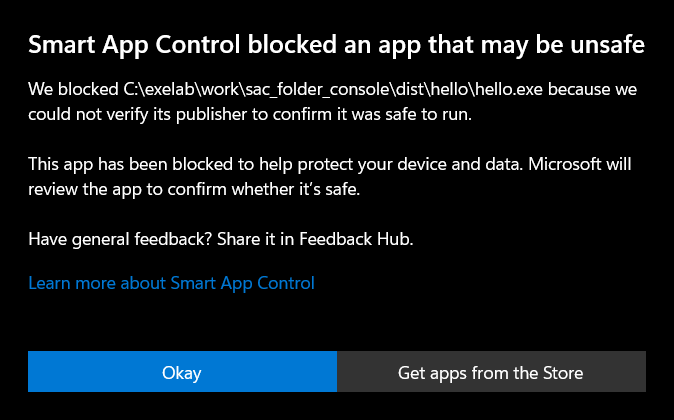
There is currently no way to bypass Smart App Control protection for individual apps.This does not mean you did something wrong. We built the hello app forty times in a row, and Windows blocked twelve of the forty the first time we started them. The forty programs were all the same; only the file was new each time. The next morning we started all forty again, and every one of them ran. The sentence in the box seems to mean what it says: Microsoft reviewed the apps, and by morning it allowed them.So you have two harmless ways forward. Build again: the new build is a new file and gets a fresh answer, and most of the time the answer is yes. Or wait, and try the same app later. You do not need to switch the protection off, and you should think twice before asking anyone else to switch theirs off. บางครั้งดับเบิลคลิกแล้วได้กล่องข้อความข้างล่างนี้แทนหน้าต่างของคุณ มันมาจาก Smart App Control ซึ่งเป็นระบบป้องกันที่เปิดอยู่ในคอมพิวเตอร์ Windows 11 เครื่องใหม่จำนวนมาก เมื่อคุณเปิดโปรแกรมที่ Windows ไม่เคยเห็นมาก่อน มันจะถามเซิร์ฟเวอร์ของ Microsoft ว่าโปรแกรมนี้เป็นที่รู้จักว่าปลอดภัยหรือไม่ โปรแกรมที่คุณเพิ่งบิลด์เมื่อสามสิบวินาทีก่อนย่อมไม่มีใครรู้จัก และไม่มีอะไรในตัวมันที่บอกว่าใครเป็นคนสร้าง คำตอบจึงเป็น “ไม่” ได้ กล่องนี้ไม่มีปุ่ม “Run anyway” และหน้าช่วยเหลือของ Microsoft เองก็เขียนว่า ขณะนี้ยังไม่มีวิธีข้าม Smart App Control ให้กับแอปเป็นรายตัวนี่ไม่ได้แปลว่าคุณทำอะไรผิด เราบิลด์แอป hello ติดต่อกันสี่สิบครั้ง และ Windows บล็อกสิบสองตัวจากสี่สิบตัวในครั้งแรกที่เราเปิด โปรแกรมทั้งสี่สิบตัวเหมือนกันทุกอย่าง มีแค่ตัวไฟล์ที่เป็นของใหม่ทุกครั้ง เช้าวันรุ่งขึ้นเราเปิดทั้งสี่สิบตัวอีกรอบ และรันได้ครบทุกตัว ประโยคในกล่องนั้นดูจะหมายความตามที่เขียนไว้จริง Microsoft ตรวจแอปเหล่านั้น และพอถึงเช้าก็อนุญาตคุณจึงมีทางไปต่อสองทางที่ไม่มีอันตราย ทางแรกคือบิลด์ใหม่ บิลด์ใหม่คือไฟล์ใหม่ จึงได้คำตอบใหม่ และส่วนใหญ่คำตอบคือ “ได้” อีกทางคือรอ แล้วลองเปิดแอปตัวเดิมทีหลัง คุณไม่จำเป็นต้องปิดระบบป้องกันนี้ และควรคิดให้ดีก่อนจะขอให้ใครปิดของเขา 有时候双击之后出现的不是你的窗口,而是下面这个提示框。它来自 Smart App Control(智能应用控制),很多新的 Windows 11 电脑都开着这项保护。当你启动一个 Windows 从没见过的程序时,它会去问 Microsoft 的服务器:这个程序是不是已知安全的。你三十秒前才构建出来的程序,谁也不认识,里面也没有任何东西说明是谁做的,所以答案可能是“不”。这个提示框没有“仍要运行”按钮,Microsoft 自己的帮助页也写着:目前没有办法让 Smart App Control 对某一个应用单独放行。这不代表你做错了什么。我们把 hello 应用连续构建了四十次,第一次启动时,Windows 拦下了四十个里的十二个。四十个程序完全一样,只是每次的文件都是新的。第二天早上我们把四十个又全部启动了一遍,每一个都能运行。提示框里那句话看来就是字面意思:Microsoft 审查了这些应用,到早上就放行了。所以你有两条没有风险的路。重新构建一次:新的构建是一个新文件,会得到一个新的答案,多数时候答案是“可以”。或者等一等,过后再试同一个应用。你不需要关掉这项保护,也要想清楚再去请别人关掉他们的。
Show the forty builds, and the next morning · แสดงการบิลด์สี่สิบครั้ง และเช้าวันถัดมา · 显示四十次构建,以及第二天早上的结果
2026-10-06 17:57  Windows 11 build 10.0.26200, PyInstaller 6.22.3. Smart App Control: on.
build  1  one folder  blocked   one second later: blocked
build  2  one file    ran
build  3  one folder  ran
build  4  one file    ran
build  5  one folder  ran
build  6  one file    ran
build  7  one folder  ran
build  8  one file    ran
build  9  one folder  ran
build 10  one file    ran
build 11  one folder  ran
build 12  one file    blocked   one second later: ran
build 13  one folder  blocked   one second later: blocked
build 14  one file    ran
build 15  one folder  blocked   one second later: blocked
build 16  one file    ran
build 17  one folder  blocked   one second later: blocked
build 18  one file    ran
build 19  one folder  ran
build 20  one file    ran
build 21  one folder  blocked   one second later: blocked
build 22  one file    ran
build 23  one folder  ran
build 24  one file    ran
build 25  one folder  blocked   one second later: blocked
build 26  one file    blocked   one second later: blocked
build 27  one folder  blocked   one second later: blocked
build 28  one file    blocked   one second later: blocked
build 29  one folder  ran
build 30  one file    ran
build 31  one folder  ran
build 32  one file    ran
build 33  one folder  ran
build 34  one file    blocked   one second later: blocked
build 35  one folder  ran
build 36  one file    ran
build 37  one folder  ran
build 38  one file    blocked   one second later: blocked
build 39  one folder  ran
build 40  one file    ran
one folder: Windows blocked 7 of 20 new apps at the first start.
one file: Windows blocked 5 of 20 new apps at the first start.
In all: 12 of 40 blocked. 1 of those ran one second later.
11 were blocked twice. At the end of the run, 10 of them were still blocked.
2026-10-07 07:44 Smart App Control: on. 40 apps, built from 2026-10-06 17:57 to 18:03.
Now Windows blocks 0 of the 40 apps.4 What is inside the folder · ข้างในโฟลเดอร์มีอะไร · 文件夹里有什么
🇬🇧 English
Your script is twenty lines long, and the folder holds 942 files and 25 MB. The list below shows where the size goes. The biggest single file is python312.dll, and that is Python itself. After it come the parts of Tcl/Tk, the library that actually draws tkinter's windows, and base_library.zip, which holds the parts of Python's standard library that every program needs.
That is the price of the convenience. The other person does not need Python because you are handing them a copy of it. It also means that the size hardly depends on your own code: a program ten times as long would add a few kilobytes. You will see that in Tutorial 2, where a game of about 550 lines produces a folder of exactly the same size as this one.
Two consequences are worth knowing. The app contains the Python you built with, so it is tied to that version of Python and to this kind of computer. And your script is inside, though not as readable text: PyInstaller stores it in Python's compiled form, which its documentation notes could in principle be turned back into something readable. Do not put a password into a program you hand out.
🇹🇭 ไทย
สคริปต์ของคุณยาวยี่สิบบรรทัด แต่โฟลเดอร์มีไฟล์ 942 ไฟล์ รวม 25 MB รายการข้างล่างแสดงว่าขนาดไปอยู่ที่ไหน ไฟล์เดี่ยวที่ใหญ่ที่สุดคือ python312.dll ซึ่งก็คือตัว Python เอง ถัดมาเป็นชิ้นส่วนของ Tcl/Tk ไลบรารีที่ทำหน้าที่วาดหน้าต่างของ tkinter จริง ๆ และ base_library.zip ที่เก็บส่วนของไลบรารีมาตรฐานของ Python ซึ่งทุกโปรแกรมต้องใช้
นี่คือราคาของความสะดวก อีกฝ่ายไม่ต้องมี Python เพราะคุณยื่นสำเนาของมันให้เขาไปด้วย และยังแปลว่าขนาดแทบไม่ขึ้นกับโค้ดของคุณเอง โปรแกรมที่ยาวกว่านี้สิบเท่าจะเพิ่มขึ้นแค่ไม่กี่กิโลไบต์ คุณจะเห็นเรื่องนี้ในบทที่ 2 ที่เกมราว 550 บรรทัดให้โฟลเดอร์ขนาดเท่ากับอันนี้พอดี
มีผลตามมาสองอย่างที่ควรรู้ แอปบรรจุ Python ชุดที่คุณใช้บิลด์ มันจึงผูกอยู่กับ Python เวอร์ชันนั้นและกับคอมพิวเตอร์ชนิดนี้ และสคริปต์ของคุณก็อยู่ข้างในด้วย เพียงแต่ไม่ใช่ข้อความที่อ่านได้ทันที PyInstaller เก็บมันในรูปที่ Python คอมไพล์แล้ว ซึ่งเอกสารของมันเองระบุว่าโดยหลักการแล้วสามารถแปลงกลับเป็นสิ่งที่อ่านออกได้ อย่าใส่รหัสผ่านไว้ในโปรแกรมที่คุณแจกให้คนอื่น
🇨🇳 中文
你的脚本只有二十行,文件夹里却有 942 个文件、25 MB。下面的清单告诉你体积花在了哪里。最大的单个文件是 python312.dll,它就是 Python 本身。接下来是 Tcl/Tk 的各个部分,真正把 tkinter 的窗口画出来的就是这个库;还有 base_library.zip,里面是每个程序都要用到的那部分 Python 标准库。
这就是方便的代价。对方不需要 Python,是因为你把一份 Python 一起交给了他。这也意味着体积几乎跟你自己的代码无关:程序再长十倍,也只多出几 KB。你会在教程 2 里看到这一点:一个约 550 行的游戏,生成的文件夹和这一个一样大。
有两个后果值得知道。应用里装的是你构建时用的那份 Python,所以它和那个 Python 版本、和这一类电脑绑在一起。你的脚本也在里面,只不过不是可以直接读的文本:PyInstaller 存的是 Python 编译后的形式,它的文档提到,这种形式原则上可以被还原成能读懂的东西。不要把密码写进你要发出去的程序里。
hello: 25.2 MB in 942 files
        6.9 MB   _internal/python312.dll
        5.2 MB   _internal/libcrypto-3.dll
        3.2 MB   _internal/_tcl_data/
        1.8 MB   _internal/tcl86t.dll
        1.8 MB   hello.exe
        1.6 MB   _internal/tk86t.dll
        1.3 MB   _internal/base_library.zip
        1.1 MB   _internal/unicodedata.pyd
        0.9 MB   _internal/_tk_data/
        0.3 MB   _internal/tcl8/
        1.0 MB   everything else (9 more things)
5 No console, and one file instead of a folder · ไม่มีคอนโซล และไฟล์เดียวแทนโฟลเดอร์ · 不要控制台,以及用单个文件代替文件夹
🇬🇧 English
Two options change the shape of what you get, and you can use them together.
--windowed leaves the console out. Use it for any program that has a window of its own. Now think of the line that hello.py prints. In a windowed app that text goes nowhere, because there is no console to show it. A program without a console has to put its messages in its own window, and that is why the game in Tutorial 2 writes its instructions on the screen and never uses print.
--onefile packs everything into a single .exe. There is no _internal folder to keep beside it, which makes it simple to hand over. The cost comes at the start. Each time it runs, the program first unpacks itself into a temporary folder, runs from there, and deletes the folder when you close it. We watched it happen: while the one-file hello app was open, a folder whose name begins with _MEI sat in the temporary folder with 941 files in it, and after the app closed it was gone.
🇹🇭 ไทย
มีตัวเลือกสองตัวที่เปลี่ยนรูปร่างของสิ่งที่คุณได้ และใช้ร่วมกันได้
--windowed ตัดคอนโซลออกไป ใช้มันกับโปรแกรมที่มีหน้าต่างของตัวเอง ทีนี้นึกถึงบรรทัดที่ hello.py พิมพ์ออกมา ในแอปแบบ windowed ข้อความนั้นไม่ไปโผล่ที่ไหนเลย เพราะไม่มีคอนโซลให้แสดง โปรแกรมที่ไม่มีคอนโซลจึงต้องแสดงข้อความในหน้าต่างของตัวเอง นี่คือเหตุผลที่เกมในบทที่ 2 เขียนคำแนะนำไว้บนจอ และไม่ใช้ print เลย
--onefile แพ็กทุกอย่างรวมเป็นไฟล์ .exe ไฟล์เดียว ไม่มีโฟลเดอร์ _internal ที่ต้องเก็บไว้ข้างกัน จึงส่งต่อได้ง่าย ราคาที่ต้องจ่ายอยู่ตอนเปิด ทุกครั้งที่รัน โปรแกรมต้องแตกตัวเองออกมาไว้ในโฟลเดอร์ชั่วคราวก่อน รันจากตรงนั้น แล้วลบโฟลเดอร์ทิ้งเมื่อคุณปิด เราเฝ้าดูมันเกิดขึ้นจริง ระหว่างที่แอป hello แบบไฟล์เดียวเปิดอยู่ มีโฟลเดอร์ที่ชื่อขึ้นต้นด้วย _MEI อยู่ในโฟลเดอร์ชั่วคราว พร้อมไฟล์ 941 ไฟล์ และพอปิดแอป มันก็หายไป
🇨🇳 中文
有两个选项会改变成品的样子,而且可以一起用。
--windowed 把控制台去掉。凡是自己有窗口的程序都该用它。现在想想 hello.py 打印的那一行。在不带控制台的应用里,这行字哪儿也去不了,因为没有控制台来显示它。没有控制台的程序,只能把信息显示在自己的窗口里;教程 2 的游戏把说明写在屏幕上、从不用 print,就是这个原因。
--onefile 把一切打包成一个 .exe。旁边不用再带着 _internal 文件夹,交给别人很省事。代价出在启动上。每次运行,程序都要先把自己解压到一个临时文件夹,从那里运行,等你关掉它再把文件夹删除。我们亲眼看着它发生:单文件的 hello 应用开着的时候,临时文件夹里有一个名字以 _MEI 开头的文件夹,里面有 941 个文件;应用一关,它就没了。
🪟 WINDOWS
venv\Scripts\python -m PyInstaller --windowed hello.py
venv\Scripts\python -m PyInstaller --onefile --windowed hello.py
🍎 MAC · not run by us · เราไม่ได้รันเอง · 我们没有运行过
venv/bin/python -m PyInstaller --windowed hello.py| Plain PythonPython ธรรมดา直接用 Python | One folderโฟลเดอร์เดียว一个文件夹 | One fileไฟล์เดียว单个文件 | |
|---|---|---|---|
| What you hand overสิ่งที่คุณส่งให้交给对方的东西 | hello.py, and the other person installs Pythonhello.py และอีกฝ่ายต้องติดตั้ง Python เองhello.py,对方得自己装 Python | the folder dist\helloโฟลเดอร์ dist\hello文件夹 dist\hello | the file dist\hello.exeไฟล์ dist\hello.exe文件 dist\hello.exe |
| Sizeขนาด大小 | 1 KB | 25 MB in 942 files25 MB ใน 942 ไฟล์25 MB,942 个文件 | 10 MB in 1 file10 MB ในไฟล์เดียว10 MB,1 个文件 |
| From the start to the windowจากเริ่มเปิดจนเห็นหน้าต่าง从启动到出现窗口 | 0.1 s0.1 วินาที0.1 秒 | 0.1 s0.1 วินาที0.1 秒 | 0.8 s0.8 วินาที0.8 秒 |
| The very first start of a new buildการเปิดครั้งแรกสุดของบิลด์ใหม่新构建的第一次启动 | — | about 1.3 sราว 1.3 วินาที约 1.3 秒 | about 2.2 sราว 2.2 วินาที约 2.2 秒 |
🇬🇧 English
The one-file app is smaller because the file is compressed, and slower because it has to undo that compression at every start. For a small program the difference is under a second, and one file is the friendlier choice. For a large program it is a different story, as Tutorial 3 shows. Notice also that the first start of every new build was slower than the later ones. That is most likely Windows examining a program it has not seen before.
On a Mac the advice is different. PyInstaller's documentation says that combining --onefile with --windowed there, while possible, is not recommended
, because the result has to unpack itself on every run. Build the folder kind on a Mac.
The complete list of what our measuring script printed is below. The same script is in the checks, so you can produce your own numbers.
🇹🇭 ไทย
แอปแบบไฟล์เดียวเล็กกว่าเพราะไฟล์ถูกบีบอัดไว้ และช้ากว่าเพราะต้องคลายการบีบอัดนั้นทุกครั้งที่เปิด สำหรับโปรแกรมเล็ก ๆ ความต่างนี้ไม่ถึงหนึ่งวินาที และไฟล์เดียวเป็นทางเลือกที่เป็นมิตรกว่า สำหรับโปรแกรมใหญ่เรื่องจะต่างออกไป ดังที่บทที่ 3 จะแสดงให้เห็น สังเกตด้วยว่าการเปิดครั้งแรกของทุกบิลด์ใหม่ช้ากว่าครั้งหลัง ๆ เป็นไปได้มากที่สุดว่า Windows กำลังตรวจโปรแกรมที่มันยังไม่เคยเห็น
บนแมคคำแนะนำไม่เหมือนกัน เอกสารของ PyInstaller ระบุว่าการใช้ --onefile คู่กับ --windowed บนแมคนั้นทำได้ แต่ไม่แนะนำ เพราะผลลัพธ์ต้องแตกตัวเองทุกครั้งที่รัน บนแมคให้บิลด์แบบโฟลเดอร์
รายการทั้งหมดที่สคริปต์วัดของเราพิมพ์ออกมาอยู่ข้างล่าง สคริปต์ตัวเดียวกันนี้อยู่ในชุดตรวจสอบ คุณจึงวัดตัวเลขของตัวเองได้
🇨🇳 中文
单文件的应用更小,是因为文件被压缩了;它更慢,是因为每次启动都得把压缩解开。对一个小程序来说,差别不到一秒,单文件是更省心的选择。对一个大程序就是另一回事了,教程 3 会让你看到。还要注意,每个新构建的第一次启动都比后来的慢。这最可能是 Windows 在检查一个它没见过的程序。
在 Mac 上,建议是不一样的。PyInstaller 的文档说,在 Mac 上把 --onefile 和 --windowed 一起用,虽然可行,但不推荐,因为成品每次运行都要先解压自己。在 Mac 上请构建文件夹的那一种。
下面是我们的测量脚本打印出来的完整清单。同一个脚本就在检查脚本里,你可以测出自己的数字。
Python 3.12.10, PyInstaller 6.22.3, Windows 11 build 10.0.26200, 22 logical cores
hello, one folder
    python -m PyInstaller hello.py
    build    4.9 s   size     25.2 MB in   942 files   first start  1.25 s   later starts  0.11 s
    open for 5 s: exit code 0, at most 32 MB of memory
    as a zip:     10.3 MB, made in 1 s
hello, one folder, no console
    python -m PyInstaller --windowed hello.py
    build    4.3 s   size     25.2 MB in   942 files   first start  1.37 s   later starts  0.11 s
    open for 5 s: exit code 0, at most 33 MB of memory
    as a zip:     10.3 MB, made in 1 s
hello, one file, no console
    python -m PyInstaller --onefile --windowed hello.py
    build    6.5 s   size     10.4 MB in     1 files   first start  2.17 s   later starts  0.77 s
    open for 5 s: exit code 0, at most 32 MB of memory
    as a zip:     10.1 MB, made in 0 s
pond, one folder, no console
    python -m PyInstaller --windowed pond.py
    build    4.5 s   size     25.2 MB in   942 files   first start  1.26 s   later starts  0.12 s
    open for 5 s: exit code 0, at most 33 MB of memory
    as a zip:     10.4 MB, made in 1 s
pond, one file, no console
    python -m PyInstaller --onefile --windowed pond.py
    build    6.5 s   size     10.4 MB in     1 files   first start  2.64 s   later starts  0.82 s
    open for 5 s: exit code 0, at most 33 MB of memory
    as a zip:     10.1 MB, made in 0 s
5 builds in all. Smart App Control blocked 0 of them at the first start.- Build
hello.pyall three ways, and start each result. Compare what you see with the table. - Start the one-file app. While it is open, type
%TEMP%into the address bar of File Explorer and look for a folder whose name begins with_MEI. Close the app and look again. - Change the sentence in
hello.py, then start the app without building again. Why has nothing changed?
- บิลด์
hello.pyให้ครบทั้งสามแบบ แล้วเปิดผลลัพธ์แต่ละอัน เทียบสิ่งที่คุณเห็นกับตาราง - เปิดแอปแบบไฟล์เดียว ระหว่างที่มันเปิดอยู่ พิมพ์
%TEMP%ลงในแถบที่อยู่ของ File Explorer แล้วมองหาโฟลเดอร์ที่ชื่อขึ้นต้นด้วย_MEIปิดแอปแล้วดูอีกครั้ง - แก้ประโยคใน
hello.pyแล้วเปิดแอปโดยไม่บิลด์ใหม่ ทำไมจึงไม่มีอะไรเปลี่ยน
- 把
hello.py用三种方式都构建一遍,再把每个成品启动一次。把你看到的和表格比一比。 - 启动单文件的应用。趁它开着,在文件资源管理器的地址栏里输入
%TEMP%,找一个名字以_MEI开头的文件夹。关掉应用,再看一次。 - 改掉
hello.py里的那句话,然后不重新构建,直接启动应用。为什么什么都没变?
🐟 Tutorial 2 — A game worth packing · บทที่ 2 — เกมที่คุ้มค่าแก่การแพ็ก · 教程 2 —— 一个值得打包的游戏
🇬🇧 English
A window with a Close button proves that the method works, but nobody wants to be sent one. Here is something people will actually open.
🇹🇭 ไทย
หน้าต่างที่มีปุ่ม Close พิสูจน์ได้ว่าวิธีนี้ใช้ได้ แต่ไม่มีใครอยากได้รับมัน นี่คือสิ่งที่คนจะเปิดเล่นจริง ๆ
🇨🇳 中文
一个带 Close 按钮的窗口能证明方法可行,但没有人想收到这么个东西。下面是别人真的会打开的东西。
6 pond.py: play it before you pack it · pond.py: เล่นก่อนแล้วค่อยแพ็ก · pond.py:先玩,再打包
🇬🇧 English
You are the small gold fish, and it swims toward your mouse. The white dots are food, and each one makes you a little bigger. The other animals are bigger than you at the start, which the game shows by drawing their edges in red: if the head of a red-edged animal touches you, the game is over. Under a leaf nothing can see you, so nothing can eat you. As you grow, the animals you have outgrown turn white-edged and begin to run from you, and now you can eat them. Eat all four and you have won.
Run it like any other script. There is nothing to install, because the game uses only Python's own library.
🇹🇭 ไทย
คุณคือปลาทองตัวเล็ก และมันว่ายตามเมาส์ของคุณ จุดสีขาวคืออาหาร แต่ละจุดทำให้คุณตัวโตขึ้นนิดหนึ่ง สัตว์ตัวอื่นตัวใหญ่กว่าคุณตั้งแต่ต้น เกมแสดงเรื่องนี้ด้วยการวาดขอบของพวกมันเป็นสีแดง ถ้าหัวของสัตว์ขอบแดงแตะตัวคุณ เกมก็จบ ใต้ใบบัวไม่มีอะไรมองเห็นคุณ จึงไม่มีอะไรกินคุณได้ เมื่อคุณโตขึ้น สัตว์ที่คุณตัวใหญ่กว่าแล้วจะเปลี่ยนเป็นขอบขาวและเริ่มหนีคุณ ตอนนี้คุณกินพวกมันได้ กินให้ครบทั้งสี่ตัวคือชนะ
รันมันเหมือนสคริปต์ทั่วไป ไม่ต้องติดตั้งอะไร เพราะเกมใช้แค่ไลบรารีที่มากับ Python
🇨🇳 中文
你是那条金色的小鱼,它会朝你的鼠标游过去。白点是食物,每吃一个你就长大一点。别的动物一开始都比你大,游戏用红色的轮廓来表示这一点:红边动物的头碰到你,游戏就结束。躲在荷叶下面,谁也看不见你,所以谁也吃不了你。等你长大了,被你超过的动物会变成白边并开始躲着你,这时你可以吃掉它们。四只全吃掉,你就赢了。
像运行别的脚本一样运行它。什么都不用装,因为这个游戏只用 Python 自带的库。
💻 RUN IT
python pond.py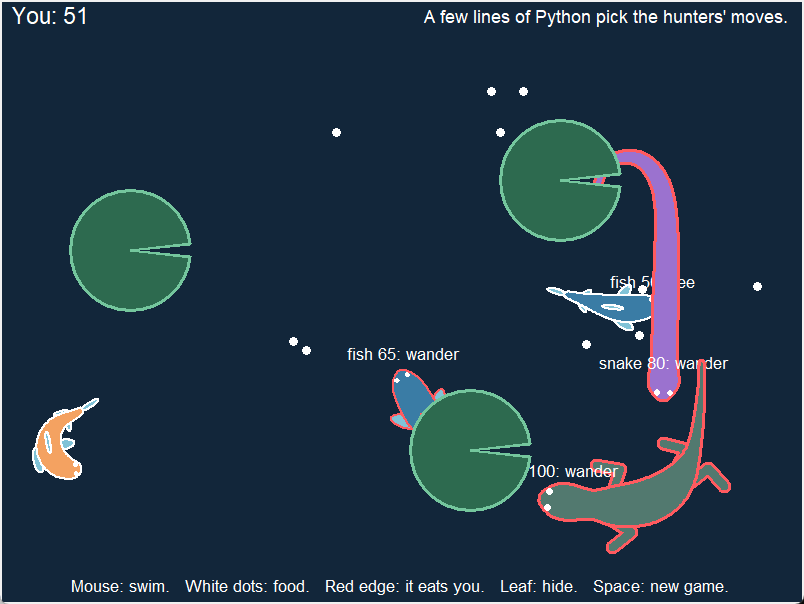
🇬🇧 English
The animals are not drawn as pictures. Each one is a chain of points that follow one another, with a width at every point, and the fish, the snake and the lizard differ only in a list of widths and a few fins or legs. That technique, and nearly all of the code for it, comes from Animals that move by themselves, where it is built up step by step. What this file adds is a second class, Game, which holds everything that is not an animal: the food, the leaves, who eats whom, and who decides what the hunters do.
That last part is the reason the game is on this page. Each hunter knows three things about your fish: whether it is hidden under a leaf, whether it is smaller than the hunter, and whether it is near. From those three facts something has to choose one of three moves: hunt, flee or wander. Game can be built in two ways. Built as Game("rules"), a function made of three if statements does the choosing, and that is the game you are playing now. Built as Game("model"), an AI model reads the same facts as an English sentence and chooses. Tutorial 3 turns that on.
🇹🇭 ไทย
สัตว์เหล่านี้ไม่ได้ถูกวาดเป็นรูปภาพ แต่ละตัวคือโซ่ของจุดที่เดินตามกันไป โดยทุกจุดมีความกว้างของตัวเอง ปลา งู และกิ้งก่าต่างกันแค่รายการความกว้างกับครีบหรือขาไม่กี่ชิ้น เทคนิคนี้ และโค้ดแทบทั้งหมดของมัน มาจากหน้า สัตว์ที่ขยับเองได้ ซึ่งสร้างมันขึ้นทีละขั้น สิ่งที่ไฟล์นี้เพิ่มเข้ามาคือคลาสตัวที่สองชื่อ Game ซึ่งดูแลทุกอย่างที่ไม่ใช่สัตว์ ได้แก่อาหาร ใบบัว ใครกินใคร และใครเป็นผู้ตัดสินว่านักล่าจะทำอะไร
ส่วนสุดท้ายนี้เองคือเหตุผลที่เกมมาอยู่ในหน้านี้ นักล่าแต่ละตัวรู้สามเรื่องเกี่ยวกับปลาของคุณ คือมันซ่อนอยู่ใต้ใบบัวหรือไม่ มันตัวเล็กกว่านักล่าหรือไม่ และมันอยู่ใกล้หรือไม่ จากข้อเท็จจริงสามข้อนี้ ต้องมีอะไรสักอย่างเลือกหนึ่งในสามท่า คือ hunt (ล่า) flee (หนี) หรือ wander (ว่ายเล่น) Game สร้างได้สองแบบ ถ้าสร้างเป็น Game("rules") ฟังก์ชันที่มี if สามบรรทัดจะเป็นผู้เลือก และนั่นคือเกมที่คุณกำลังเล่นอยู่ตอนนี้ ถ้าสร้างเป็น Game("model") โมเดล AI จะอ่านข้อเท็จจริงชุดเดียวกันในรูปประโยคภาษาอังกฤษ แล้วเป็นผู้เลือก บทที่ 3 จะเปิดใช้ส่วนนั้น
🇨🇳 中文
这些动物不是画出来的图片。每一只都是一串一个跟着一个的点,每个点有自己的宽度;鱼、蛇和蜥蜴的区别,只是一组宽度数字,再加上几片鳍或几条腿。这个技巧以及几乎全部的代码,都来自《自己会动的动物》,那一页是一步一步把它搭起来的。这个文件新加的是第二个类 Game,它管着动物以外的一切:食物、荷叶、谁吃谁,以及由谁来决定猎手做什么。
最后这一点,正是这个游戏出现在这一页的原因。每个猎手知道关于你这条鱼的三件事:它是不是藏在荷叶下面,它是不是比猎手小,它是不是在近处。根据这三个事实,总得有什么东西从三个动作里挑一个:hunt(追)、flee(逃)或 wander(闲游)。Game 有两种建法。建成 Game("rules"),由一个包含三个 if 的函数来挑,你现在玩的就是这一种。建成 Game("model"),由一个 AI 模型把同样的事实当作一句英文来读,再由它来挑。教程 3 会把这一种打开。
| Part of the fileส่วนของไฟล์文件里的部分 | What it doesทำอะไร做什么 |
|---|---|
Animal | One class for the fish, the snake and the lizard. The word you hand in picks the body.คลาสเดียวสำหรับปลา งู และกิ้งก่า คำที่ส่งเข้าไปเป็นตัวเลือกร่าง鱼、蛇、蜥蜴共用的一个类。传进去的那个词决定身体的样子。 |
Game | The window, the food, the leaves and the rules of eating. The word you hand in picks who chooses the hunters' moves.หน้าต่าง อาหาร ใบบัว และกติกาการกิน คำที่ส่งเข้าไปเป็นตัวเลือกว่าใครจะเลือกท่าของนักล่า窗口、食物、荷叶和吃与被吃的规则。传进去的那个词决定由谁来挑猎手的动作。 |
facts() | Works out the three things a hunter knows, each as True or False.หาคำตอบของสามเรื่องที่นักล่ารู้ แต่ละเรื่องเป็น True หรือ False算出猎手知道的三件事,每件是 True 或 False。 |
pick() | The rules written as Python: three facts in, one move out.กฎที่เขียนเป็น Python รับข้อเท็จจริงสามข้อ ส่งคืนท่าหนึ่งท่า用 Python 写的规则:进去三个事实,出来一个动作。 |
in_words(), ask() | The same three facts as a sentence, and the question that is put to the model. Only the model game uses them.ข้อเท็จจริงสามข้อเดิมในรูปประโยค และคำถามที่ส่งให้โมเดล มีแต่เกมแบบโมเดลที่ใช้สองตัวนี้把同样三个事实写成一句话,以及交给模型的问题。只有用模型的那种游戏才用到它们。 |
think() | Runs beside the game in a second thread. It loads the model and keeps every hunter's move up to date.ทำงานคู่ไปกับเกมในเธรดที่สอง มันโหลดโมเดล และคอยอัปเดตท่าของนักล่าทุกตัว在第二个线程里和游戏并行运行。它加载模型,并不断更新每个猎手的动作。 |
model_file() | Finds the model's file beside the program. Step 9 depends on these three lines.หาไฟล์ของโมเดลที่อยู่ข้างโปรแกรม ขั้นที่ 9 พึ่งสามบรรทัดนี้在程序旁边找到模型的文件。第 9 步全靠这三行。 |
📄 NEW FILE · pond.py
Show the whole file · แสดงทั้งไฟล์ · 显示整个文件
"""pond.py - you are a tiny fish in a pond. Eat, grow, and do not get eaten.

    python pond.py

Move the mouse. Your gold fish swims to it. Eat the white dots to grow.
An animal with a red edge is bigger than you, and it hunts you.
Hide under a leaf, and it cannot see you.
When you are bigger than an animal, its edge is white. Then you can eat it.

Who picks each hunter's move? Put the folder "model" beside this file, and
an AI model picks. With no such folder, a few lines of Python pick.
"""
import math
import os
import random
import threading
import time
import tkinter as tk

WIDE = 800                # the window, in pixels
HIGH = 600
SWIM = 4                  # pixels your fish moves in one frame
QUICK = 0.3               # the most your fish can turn in one frame
SLOW = 1.2                # pixels a hunter moves in one frame when it wanders
TURN = 0.15               # the most a hunter can turn in one frame
ARRIVED = 30              # a hunter has arrived at a place when it is this close
BEND = math.pi / 8        # the most one joint can bend: 22.5 degrees
QUARTER = math.pi / 2     # a quarter turn. Python measures angles in radians.
BONE = 24                 # how long each of the two bones in a leg is
REACH = 36                # how far from the hip a new step lands
STEP = 60                 # a foot takes a step when it is this far behind
NEAR = 150                # inside this many pixels, a hunter says your fish is "near"
FOOD = 12                 # how many white dots are in the pond
BITE = 3                  # how much one white dot makes your fish grow
LEAF = 60                 # how far a leaf's edge is from its centre
WATER = "#12263a"         # the colour behind everything
FIN = "#81c3d7"           # the colour of the fins
GOLD = "#f4a261"          # the colour of your fish
GREEN = "#2d6a4f"         # the colour of the leaves
RED = "#ff5a5f"           # the colour of the edge of an animal that can eat you

# How far the skin is from the spine at each point, from the head to the tail.
# These numbers are for an animal of size 100. A size of 50 uses half of each.
SNAKE = [18, 20, 17, 16, 16, 16, 16, 16, 16, 16, 16, 15, 15, 15,
         14, 14, 13, 13, 12, 12, 11, 10, 9, 8, 7, 6, 5, 4]
FISH = [20, 25, 27, 27, 25, 21, 17, 12, 9, 6]
LIZARD = [17, 19, 13, 20, 22, 23, 21, 16, 9, 6, 5, 4, 3, 3]

# The hunters at the start: the kind, the size, and the place of the head.
HUNTERS = [["fish", 50, [700, 90]], ["fish", 65, [120, 520]],
           ["snake", 80, [720, 520]], ["lizard", 100, [300, 70]]]

# The centre of each leaf.
LEAVES = [[130, 250], [560, 180], [470, 450]]

# The words at the bottom of the window. An app has no manual, so they are here.
HELP = ("Mouse: swim.   White dots: food.   Red edge: it eats you.   "
        "Leaf: hide.   Space: new game.")

# The file of the AI model. It sits in the folder "model", beside this file.
MODEL = "decider-2b-v11-Q4_K_M.gguf"

# The rules of a hunter. The model reads these with every question.
RULES = ("If you cannot see the gold fish, wander. "
         "If the gold fish is bigger than you, flee. "
         "If it is smaller than you and near, hunt it. "
         "If it is smaller than you and far away, wander.")

# The moves a hunter can choose from, and what each one is for.
MOVES = {
    "hunt": ("Swim to the gold fish and eat it. "
             "Do this when it is smaller than you and near."),
    "flee": ("Swim away from the gold fish. "
             "Do this when it is bigger than you."),
    "wander": ("Swim around slowly. Do this when it is smaller than you "
               "and far away, or when you cannot see it."),
}


def angle_to(start, end):
    """The direction you face when you stand at start and look at end."""
    return math.atan2(end[1] - start[1], end[0] - start[0])


def walk(start, angle, far):
    """Stand at start, face angle, walk far pixels. Give back where you are."""
    return [start[0] + math.cos(angle) * far, start[1] + math.sin(angle) * far]


def limit(angle, middle, most):
    """Give back angle, or the nearest angle that is within most of middle."""
    # How far angle is from middle, going the short way round the circle.
    # The answer is from -pi to pi: minus is one way round, plus is the other.
    away = (angle - middle + math.pi) % (2 * math.pi) - math.pi
    if away > most:
        return middle + most
    if away < -most:
        return middle - most
    return angle


def oval(centre, angle, long, wide):
    """Twelve points round the edge of an oval. Its long side points along angle."""
    edge = []
    for k in range(12):
        around = k * math.pi / 6        # twelve of these make one full turn
        # Go along the oval's long side, then out to the edge.
        along = walk(centre, angle, math.cos(around) * long)
        edge.append(walk(along, angle + QUARTER, math.sin(around) * wide))
    return edge


def pull(anchor, point, gap):
    """Give back the place that is gap pixels from anchor, on the way to point."""
    far = math.dist(anchor, point)      # how far apart the two are now
    if far == 0:
        # The same place: there is no direction, and gap / 0 would crash.
        return point
    scale = gap / far                   # 0.5 means "come half as far"
    x = anchor[0] + (point[0] - anchor[0]) * scale
    y = anchor[1] + (point[1] - anchor[1]) * scale
    return [x, y]


def reach(joints, start, end, bone):
    """Bend the chain of joints so it starts at start and reaches toward end."""
    last = len(joints) - 1
    # Forward: put the last joint on the target, then pull the others after it.
    joints[last] = end
    for i in reversed(range(last)):             # count down: last - 1, ..., 1, 0
        joints[i] = pull(joints[i + 1], joints[i], bone)
    # That dragged the first joint off its place. Put it back.
    # Backward: pull the others after it again, this time from the other end.
    joints[0] = start
    for i in range(1, last + 1):
        joints[i] = pull(joints[i - 1], joints[i], bone)


def model_file():
    """The full path of the model's file: in the folder "model", beside this file."""
    here = os.path.dirname(os.path.abspath(__file__))
    return os.path.join(here, "model", MODEL)


def pick(hidden, smaller, near):
    """The rules as Python. The "rules" game asks this, and asks no model."""
    if hidden:
        return "wander"
    if not smaller:
        return "flee"
    if near:
        return "hunt"
    return "wander"


def in_words(hidden, smaller, near):
    """What a hunter sees, in words. The model reads words, not True and False."""
    if hidden:
        return "You cannot see the gold fish."
    if not smaller:
        # No "near" or "far away" here. The rule for a bigger fish does not use
        # them. With them, the model followed those words and forgot "bigger".
        return "The gold fish is bigger than you."
    if near:
        return "The gold fish is smaller than you. It is near."
    return "The gold fish is smaller than you. It is far away."


def ask(model, kind, sees):
    """Give the model the rules, what a hunter sees, and the moves. Give back the move."""
    who = "You are a hungry " + kind + " in a pond. A gold fish swims in the pond too."
    question = {"type": "choice",
                "instructions": "What should you do right now?",
                "criteria": MOVES}
    state = who + " Rules: " + RULES + "\n\nSituation: " + sees
    answer = model.system_one(state, {"move": question})
    return answer["answers"]["move"]["choice"]


def touches(place, far, animal):
    """Is place within far pixels of the animal's skin, at any point of its spine?"""
    for i in range(len(animal.points)):
        if math.dist(place, animal.points[i]) < animal.widths[i] + far:
            return True
    return False


class Animal:
    def __init__(self, canvas, kind, size, place):
        self.canvas = canvas            # the picture this animal draws itself on
        self.kind = kind                # "fish", "snake" or "lizard"
        if kind == "snake":
            self.full_widths = SNAKE
            self.full_gap = 14  # pixels between two points of the spine, at size 100
            self.colour = "#9b72cf"
            self.speed = 3.0    # pixels in one frame when it hunts or flees
        if kind == "fish":
            self.full_widths = FISH
            self.full_gap = 20
            self.colour = "#3a7ca5"
            self.speed = 3.4
        if kind == "lizard":
            self.full_widths = LIZARD
            self.full_gap = 20
            self.colour = "#52796f"
            self.speed = 2.6
        self.rim = "white"              # the colour of its edge
        self.doing = "wander"           # its move now: hunt, flee or wander
        self.goal = place               # the place it swims to when it wanders
        self.resize(size)
        # Start as a straight line. Point 0 is the head.
        self.points = []
        self.angles = []      # which way the body faces at each point
        for i in range(len(self.widths)):
            self.points.append([place[0] - i * self.gap, place[1]])
            self.angles.append(0)       # 0 is "facing right"
        # Only the lizard has legs. Each leg is: which point of the spine it
        # joins, which side (-1 left, 1 right), and how far back its foot starts.
        self.legs = []
        if kind == "lizard":
            half = STEP * self.scale / 2
            self.add_leg(3, -1, 0)
            self.add_leg(3, 1, half)    # half a step behind, so the legs take turns
            self.add_leg(7, -1, half)
            self.add_leg(7, 1, 0)

    def resize(self, size):
        """Make the animal this big. 100 is the size the lists at the top are for."""
        self.size = size
        self.scale = size / 100         # size 50 gives 0.5: half of every number
        self.gap = self.full_gap * self.scale
        self.widths = []
        for wide in self.full_widths:
            self.widths.append(wide * self.scale)

    def add_leg(self, spot, side, behind):
        leg = {"spot": spot, "side": side}
        hip, ahead = self.leg_places(leg)
        # The place on the ground where the foot stands. It stays there until a step.
        leg["ground"] = walk(ahead, self.angles[spot], -behind)
        # Hip, knee, foot. The knee starts on the hip, and reach() moves it.
        leg["joints"] = [hip, hip, leg["ground"]]
        self.legs.append(leg)

    def leg_places(self, leg):
        """Where this leg's hip is now, and where its next step will land."""
        spot = leg["spot"]
        facing = self.angles[spot]
        sideways = facing + leg["side"] * QUARTER
        hip = walk(self.points[spot], sideways, self.widths[spot] - 6 * self.scale)
        # The next step lands out to the side and in front: half a quarter turn.
        ahead = walk(hip, facing + leg["side"] * QUARTER / 2, REACH * self.scale)
        return hip, ahead

    def go(self, place, speed, turn):
        """Move the head toward place. Then the body follows it."""
        head = self.points[0]
        wanted = angle_to(head, place)
        self.angles[0] = limit(wanted, self.angles[0], turn)
        self.points[0] = walk(head, self.angles[0], speed)
        for i in range(1, len(self.widths)):
            # Each point wants to face the point in front of it, within BEND.
            wanted = angle_to(self.points[i], self.points[i - 1])
            self.angles[i] = limit(wanted, self.angles[i - 1], BEND)
            # Then it stands one gap behind that point. Minus is a walk backwards.
            self.points[i] = walk(self.points[i - 1], self.angles[i], -self.gap)

    def move_legs(self):
        for leg in self.legs:
            hip, ahead = self.leg_places(leg)
            # The body walks on and the foot stays. When the foot is too far
            # behind, it gets a new place on the ground: that is one step.
            if math.dist(leg["ground"], ahead) > STEP * self.scale:
                leg["ground"] = ahead
            # The foot does not jump. Each frame it goes 4 tenths of the way there.
            ground = leg["ground"]
            foot = leg["joints"][2]
            x = foot[0] + (ground[0] - foot[0]) * 0.4
            y = foot[1] + (ground[1] - foot[1]) * 0.4
            reach(leg["joints"], hip, [x, y], BONE * self.scale)

    def outline(self):
        """The points of the skin, in order: down one side and back up the other."""
        left = []
        right = []
        for i in range(len(self.widths)):
            # A quarter turn from "forward" is "sideways". Walk out to the skin.
            wide = self.widths[i]
            left.append(walk(self.points[i], self.angles[i] - QUARTER, wide))
            right.append(walk(self.points[i], self.angles[i] + QUARTER, wide))
        right.reverse()       # the right side runs from the tail back to the head
        nose = walk(self.points[0], self.angles[0], self.widths[0])
        return [nose] + left + right

    def shape(self, edge, colour):
        # smooth=True rounds every corner, so the points become one curved shape.
        self.canvas.create_polygon(edge, fill=colour, outline=self.rim,
                                   width=1 + 2 * self.scale, smooth=True)

    def circle(self, centre, radius, fill):
        x, y = centre
        # An oval is given by the box around it: left, top, right, bottom.
        box = [x - radius, y - radius, x + radius, y + radius]
        self.canvas.create_oval(box, fill=fill, outline=fill)

    def fin(self, spot, side, long, wide):
        """One fin on the skin beside point spot. side is -1 for left, 1 for right."""
        sideways = self.angles[spot] + side * QUARTER
        centre = walk(self.points[spot], sideways, self.widths[spot])
        # The fin leans out and back. It copies the angle of the point in front
        # of it, so it starts to turn a moment before the body under it does.
        lean = self.angles[spot - 1] + side * math.pi / 4
        self.shape(oval(centre, lean, long * self.scale, wide * self.scale), FIN)

    def draw(self):
        scale = self.scale
        if self.kind == "fish":
            # The fins go on first, so the body covers the place where they join.
            self.fin(3, -1, 26, 10)
            self.fin(3, 1, 26, 10)
            self.fin(7, -1, 15, 5)
            self.fin(7, 1, 15, 5)
            # The tail is one more oval. It sits behind the last point of the spine.
            tail = len(self.widths) - 1
            centre = walk(self.points[tail], self.angles[tail], -16 * scale)
            self.shape(oval(centre, self.angles[tail], 20 * scale, 5 * scale), FIN)
        # The legs go on first too. Each is a thick line in the colour of the
        # edge, with a thinner line on top, so it looks like it has an edge.
        for leg in self.legs:
            self.canvas.create_line(leg["joints"], fill=self.rim, width=14 * scale,
                                    capstyle="round", joinstyle="round")
            self.canvas.create_line(leg["joints"], fill=self.colour, width=8 * scale,
                                    capstyle="round", joinstyle="round")
        self.shape(self.outline(), self.colour)
        if self.kind == "fish":
            # The fin on its back goes on after the body, so it sits on top.
            back = oval(self.points[4], self.angles[4], 22 * scale, 4 * scale)
            self.shape(back, FIN)
        # The eyes. 1.2 is most of a quarter turn (1.57), so one sits on each side.
        head = self.points[0]
        facing = self.angles[0]
        far = self.widths[0] / 2
        self.circle(walk(head, facing - 1.2, far), 1 + 2 * scale, "white")
        self.circle(walk(head, facing + 1.2, far), 1 + 2 * scale, "white")


class Game:
    def __init__(self, brain):
        self.brain = brain              # "model" or "rules": who picks the moves
        self.root = tk.Tk()
        self.root.title("pond")
        self.canvas = tk.Canvas(self.root, width=WIDE, height=HIGH, bg=WATER)
        self.canvas.pack()
        self.canvas.bind("<Motion>", self.mouse_moved)
        self.root.bind("<space>", self.start)
        self.note = "A few lines of Python pick the hunters' moves."
        self.loading = False            # True while the model loads. Nothing moves then.
        self.start()
        if brain == "model":
            # Only this brain needs a model, and a second thread to ask it in.
            self.note = "An AI model picks the hunters' moves."
            self.loading = True
            thread = threading.Thread(target=self.think, daemon=True)
            thread.start()

    def start(self, event=None):
        """Put everything back where a new game begins."""
        self.mouse = [WIDE / 2, HIGH / 2]
        self.player = Animal(self.canvas, "fish", 30, [WIDE / 2, HIGH / 2])
        self.player.colour = GOLD
        self.hunters = []
        for kind, size, place in HUNTERS:
            self.hunters.append(Animal(self.canvas, kind, size, place))
        self.food = []
        for i in range(FOOD):
            self.food.append(self.somewhere())
        self.over = ""                  # the words at the end. "" means: still playing.

    def somewhere(self):
        """A place in the pond, picked by chance. It is not too near the edge."""
        return [random.uniform(40, WIDE - 40), random.uniform(60, HIGH - 60)]

    def mouse_moved(self, event):
        self.mouse = [event.x, event.y]

    def under_leaf(self):
        """Is the head of your fish under a leaf?"""
        for leaf in LEAVES:
            if math.dist(self.player.points[0], leaf) < LEAF:
                return True
        return False

    def facts(self, hunter):
        """Three things a hunter knows about your fish. Each is True or False."""
        smaller = self.player.size < hunter.size
        near = math.dist(self.player.points[0], hunter.points[0]) < NEAR
        return self.under_leaf(), smaller, near

    def think(self):
        """Load the model. Then ask it for each hunter's move, again and again."""
        # This runs in a second thread, so the window can draw while it asks.
        try:
            # This import takes seconds, and only the model game needs it.
            # So it is here and not at the top.
            from decider.infer import Decider
            # n_ctx is how many tokens (pieces of words) the model has room for.
            # A question here has about 170, and a small room needs less memory.
            model = Decider(model_file(), gguf_options={"n_ctx": 2048})
        except Exception as problem:
            # The library or one of its files is not there. Say why in the
            # window, because an app has no terminal. Then play by the rules.
            # [-70:] keeps the last 70 letters: the end names what is missing.
            self.note = "No AI model: " + str(problem)[-70:]
            self.brain = "rules"
            self.loading = False
            return
        self.loading = False
        known = {}            # every answer so far. Each key is one question.
        while True:
            for hunter in list(self.hunters):
                hidden, smaller, near = self.facts(hunter)
                sees = in_words(hidden, smaller, near)
                key = hunter.kind + ": " + sees
                if key not in known:
                    # The model is slow, and the same question always gets the
                    # same answer. So ask each question once, and keep the answer.
                    known[key] = ask(model, hunter.kind, sees)
                    self.note = "Answers from the AI model: " + str(len(known))
                hunter.doing = known[key]
            # A short rest. A loop that never rests keeps the computer busy.
            time.sleep(0.05)

    def act(self, hunter):
        """Move one hunter for one frame. Its move says how."""
        head = hunter.points[0]
        fish = self.player.points[0]
        if hunter.doing == "hunt":
            hunter.go(fish, hunter.speed, TURN)
            return
        if hunter.doing == "flee":
            # Look from your fish to the hunter. It swims on along that line.
            ahead = walk(head, angle_to(fish, head), 200)
            # Keep that place inside the pond.
            x = min(max(ahead[0], 40), WIDE - 40)
            y = min(max(ahead[1], 40), HIGH - 40)
            hunter.goal = [x, y]
            if math.dist(head, hunter.goal) > ARRIVED:
                hunter.go(hunter.goal, hunter.speed, TURN)
            return
        # The move is "wander": swim slowly to a place, then pick a new place.
        if math.dist(head, hunter.goal) < ARRIVED:
            hunter.goal = self.somewhere()
        hunter.go(hunter.goal, SLOW, TURN)

    def eat_food(self):
        player = self.player
        for dot in list(self.food):
            if math.dist(player.points[0], dot) < player.widths[0] + 6:
                self.food.remove(dot)
                self.food.append(self.somewhere())      # a new dot for the old one
                player.resize(player.size + BITE)

    def meet(self, hunter):
        """Your fish and one hunter. Does one of them eat the other?"""
        player = self.player
        if hunter.size > player.size:
            # It can eat you when its head touches you. Under a leaf you are safe.
            bites = touches(hunter.points[0], hunter.widths[0], player)
            if bites and not self.under_leaf():
                self.over = "A " + hunter.kind + " ate you. Press Space to try again."
            return
        if touches(player.points[0], player.widths[0], hunter):
            self.hunters.remove(hunter)
            player.resize(player.size + hunter.size // 5)
        if not self.hunters:
            self.over = "You are the biggest animal in the pond. You win!"

    def play(self):
        """One frame of the game: everything moves, and some things get eaten."""
        player = self.player
        # Your fish stops when the mouse is on its head. A small fish has a small head.
        if math.dist(player.points[0], self.mouse) > player.widths[0]:
            player.go(self.mouse, SWIM, QUICK)
        self.eat_food()
        for hunter in list(self.hunters):
            if self.brain == "rules":
                hidden, smaller, near = self.facts(hunter)
                hunter.doing = pick(hidden, smaller, near)
            self.act(hunter)
            hunter.move_legs()
            self.meet(hunter)

    def write(self, x, y, text, size, anchor):
        self.canvas.create_text(x, y, text=text, fill="white", anchor=anchor,
                                font=("Arial", size))

    def draw(self):
        self.canvas.delete("all")                         # wipe the last picture
        for dot in self.food:
            self.canvas.create_oval(dot[0] - 4, dot[1] - 4, dot[0] + 4, dot[1] + 4,
                                    fill="white", outline="white")
        for hunter in self.hunters:
            hunter.rim = "white"
            if hunter.size > self.player.size:
                hunter.rim = RED        # it is bigger than you, so it can eat you
            hunter.draw()
            # Above its head: the kind, the size, and the move it does now.
            label = hunter.kind + " " + str(hunter.size) + ": " + hunter.doing
            head = hunter.points[0]
            self.write(head[0], head[1] - hunter.widths[0] - 12, label, 10, "center")
        self.player.draw()
        for x, y in LEAVES:
            # A leaf is a circle with one small piece cut out of it.
            self.canvas.create_arc(x - LEAF, y - LEAF, x + LEAF, y + LEAF,
                                   start=6, extent=348, fill=GREEN, outline="#74c69d",
                                   width=3)
        self.write(12, 16, "You: " + str(self.player.size), 14, "w")
        self.write(WIDE - 12, 16, self.note, 11, "e")
        self.write(WIDE / 2, HIGH - 14, HELP, 10, "center")
        # Big words go a third of the way down, so they do not cover your fish.
        if self.loading:
            self.write(WIDE / 2, HIGH / 3, "The AI model is loading. Wait a little.",
                       20, "center")
        if self.over:
            self.write(WIDE / 2, HIGH / 3, self.over, 20, "center")

    def frame(self):
        if not self.over and not self.loading:
            self.play()
        self.draw()
        # Ask tkinter to call frame again in 16 ms, so the picture keeps changing.
        self.root.after(16, self.frame)

    def run(self):
        self.frame()
        self.root.mainloop()


def main():
    brain = "rules"                     # a few lines of Python pick each move
    if os.path.exists(model_file()):
        brain = "model"                 # the AI model picks each move
    game = Game(brain)
    game.run()


if __name__ == "__main__":
main()- Play until you win. A careful player can: in our test, a simple program that plays carefully won 86 games out of 100.
- In
start(), change the fish's size from 30 to 90 and run it again. Which animals run from you now, and which one still hunts you? NEARis how close you can come before a hunter notices you. Make it 300, then 60.- Add a fifth hunter to the list
HUNTERS.
- เล่นจนชนะ ผู้เล่นที่ระวังตัวทำได้ ในการทดสอบของเรา โปรแกรมง่าย ๆ ที่เล่นอย่างระวังชนะ 86 เกมจาก 100 เกม
- ใน
start()เปลี่ยนขนาดของปลาจาก 30 เป็น 90 แล้วรันใหม่ ตอนนี้สัตว์ตัวไหนหนีคุณ และตัวไหนยังล่าคุณอยู่ NEARคือระยะที่คุณเข้าใกล้ได้ก่อนนักล่าจะสังเกตเห็น ลองเปลี่ยนเป็น 300 แล้วลอง 60- เพิ่มนักล่าตัวที่ห้าลงในรายการ
HUNTERS
- 一直玩到赢。小心一点的玩家是可以赢的:在我们的测试里,一个小心谨慎的简单程序 100 局赢了 86 局。
- 在
start()里,把鱼的大小从 30 改成 90,再运行。现在哪些动物躲着你,哪一只还在追你? NEAR是你能靠多近而不被猎手注意到。把它改成 300,再改成 60。- 在
HUNTERS这个列表里加上第五个猎手。
7 Turn the game into an app · เปลี่ยนเกมให้เป็นแอป · 把游戏变成应用
🇬🇧 English
Nothing new is needed. The two commands that packed the hello window pack the game. Build the folder kind first: PyInstaller's documentation advises you to make sure your app works correctly when bundled to one folder
before trying one file, because in a folder you can see exactly what was collected.
🇹🇭 ไทย
ไม่ต้องมีอะไรใหม่ คำสั่งสองคำสั่งที่ใช้แพ็กหน้าต่าง hello ก็แพ็กเกมได้ ให้บิลด์แบบโฟลเดอร์ก่อน เอกสารของ PyInstaller แนะนำให้ตรวจให้แน่ใจว่าแอปทำงานถูกต้องเมื่อแพ็กเป็นโฟลเดอร์ ก่อนจะลองแบบไฟล์เดียว เพราะในโฟลเดอร์คุณมองเห็นได้ชัดว่ามีอะไรถูกเก็บรวมเข้ามาบ้าง
🇨🇳 中文
不需要任何新东西。打包 hello 窗口的那两条命令,同样能打包这个游戏。先构建文件夹的那一种:PyInstaller 的文档建议,在尝试单文件之前,先确认应用打包成文件夹时工作正常,因为在文件夹里你能清楚地看到到底收集了些什么。
🪟 WINDOWS
venv\Scripts\python -m PyInstaller --windowed pond.py
venv\Scripts\python -m PyInstaller --onefile --windowed pond.py
🍎 MAC · not run by us · เราไม่ได้รันเอง · 我们没有运行过
venv/bin/python -m PyInstaller --windowed pond.py🇬🇧 English
Look again at the list in step 5. The game is about 550 lines against hello's twenty, and the two apps are the same size to the megabyte: 25 MB as a folder, 10 MB as one file. Almost everything in the bundle is Python and Tcl/Tk. Your own code is a rounding error.
Play the packed game and you will notice something that the script never needed. An app has no terminal and no file of instructions beside it, so everything the player has to know must be inside the window. That is what the line of help along the bottom of the pond is for.
The app says in its top corner that a few lines of Python are choosing the hunters' moves. It looked for a folder named model beside itself, found none, and chose the rules. The next tutorial gives it one.
🇹🇭 ไทย
กลับไปดูรายการในขั้นที่ 5 อีกครั้ง เกมยาวราว 550 บรรทัด เทียบกับ hello ที่มียี่สิบบรรทัด แต่แอปทั้งสองมีขนาดเท่ากันถึงระดับเมกะไบต์ คือ 25 MB เมื่อเป็นโฟลเดอร์ และ 10 MB เมื่อเป็นไฟล์เดียว เกือบทั้งหมดในบันเดิลคือ Python กับ Tcl/Tk โค้ดของคุณเองเป็นเพียงเศษเสี้ยวเล็กน้อยเท่านั้น
ลองเล่นเกมที่แพ็กแล้ว คุณจะสังเกตเห็นสิ่งหนึ่งที่ตอนเป็นสคริปต์ไม่เคยจำเป็น แอปไม่มีเทอร์มินัล และไม่มีไฟล์คำแนะนำวางอยู่ข้าง ๆ ทุกอย่างที่ผู้เล่นต้องรู้จึงต้องอยู่ในหน้าต่าง บรรทัดช่วยเหลือที่ขอบล่างของบ่อมีไว้เพื่อการนี้
ที่มุมบน แอปบอกว่าโค้ด Python ไม่กี่บรรทัดเป็นผู้เลือกท่าของนักล่า มันมองหาโฟลเดอร์ชื่อ model ข้างตัวเอง ไม่พบ จึงเลือกใช้กฎ บทถัดไปจะหาโฟลเดอร์นั้นมาให้มัน
🇨🇳 中文
再看一眼第 5 步的清单。游戏大约 550 行,hello 只有二十行,可两个应用的大小精确到 MB 都一样:文件夹是 25 MB,单文件是 10 MB。打包结果里几乎全是 Python 和 Tcl/Tk,你自己的代码只是个零头。
玩一玩打包好的游戏,你会注意到一件脚本从来不需要的事。应用没有终端,旁边也没有说明文件,所以玩家需要知道的一切都得在窗口里。池塘底边那一行帮助文字,就是为此而设的。
应用在右上角写着:是几行 Python 在挑猎手的动作。它在自己旁边找过一个叫 model 的文件夹,没找到,于是选了规则。下一个教程会给它一个。
think() catches any error there and writes the end of it in the corner of the pond.
ขึ้นอยู่กับว่ามันพังตรงไหน และเราทดสอบทั้งสองกรณี ถ้าข้อผิดพลาดหยุดส่วนหลักของแอปแบบ windowed PyInstaller จะแสดงกล่องที่มีหัวเรื่องว่า “Unhandled exception in script” พร้อมข้อผิดพลาดและเลขบรรทัด คุณจึงไม่ต้องเดา แต่ถ้าข้อผิดพลาดเกิดในเธรดที่สอง คุณจะไม่เห็นอะไรเลย หน้าต่างยังเปิดอยู่และดูปกติดี เกมนี้โหลดโมเดลในเธรดที่สอง และนั่นคือเหตุผลที่ think() ดักทุกข้อผิดพลาดตรงนั้น แล้วเขียนท่อนท้ายของมันไว้ที่มุมบ่อ
要看它在哪里出错,两种情况我们都测过。如果错误让一个不带控制台的应用的主体停了下来,PyInstaller 会弹出一个标题为 “Unhandled exception in script” 的提示框,里面有错误信息和行号,你不用去猜。如果错误发生在第二个线程里,你什么都看不到:窗口还开着,看起来一切正常。这个游戏正是在第二个线程里加载模型的,所以 think() 才要在那里接住所有错误,并把错误信息的结尾写在池塘的角上。
main_fails: a window named 'Unhandled exception in script' appeared. It says: ["Failed to execute script 'main_fails' due to unhandled exception: division by zero"]
thread_fails: a window named 'thread_fails' appeared
thread_fails: no error box appeared in 8 seconds.
🧠 Tutorial 3 — An AI model inside the app · บทที่ 3 — โมเดล AI ในแอป · 教程 3 —— 应用里装一个 AI 模型
🇬🇧 English
Now the hunters get a brain that reads. The model is called decider-2b, and it does not chat. You give it a situation in words and a list of choices, each with a short description, and it tells you how strongly it favours each choice. How decider works explains it in detail. In the game it reads the hunters' rules, which are four English sentences, together with one sentence that says what a hunter sees, and it picks hunt, flee or wander.
The model runs on your own computer, and once it has been downloaded it does not use the internet. That makes it a good test of packaging. An app that carries its own AI model is exactly the kind of program you cannot send to somebody as a script.
🇹🇭 ไทย
ตอนนี้นักล่าจะได้สมองที่อ่านหนังสือออก โมเดลนี้ชื่อ decider-2b และมันไม่ได้คุยโต้ตอบ คุณให้สถานการณ์เป็นคำพูด พร้อมรายการตัวเลือกที่แต่ละข้อมีคำอธิบายสั้น ๆ แล้วมันจะบอกว่าเอนเอียงไปทางตัวเลือกไหนมากน้อยเพียงใด หน้า decider ทำงานอย่างไร อธิบายเรื่องนี้โดยละเอียด ในเกม มันอ่านกฎของนักล่า ซึ่งเป็นประโยคภาษาอังกฤษสี่ประโยค พร้อมกับอีกหนึ่งประโยคที่บอกว่านักล่าเห็นอะไร แล้วเลือก hunt, flee หรือ wander
โมเดลรันบนคอมพิวเตอร์ของคุณเอง และเมื่อดาวน์โหลดเสร็จแล้วก็ไม่ใช้อินเทอร์เน็ตอีก จึงเป็นบททดสอบการแพ็กที่ดี แอปที่พกโมเดล AI ของตัวเองไปด้วย คือโปรแกรมชนิดที่คุณส่งให้ใครเป็นสคริปต์ไม่ได้เลย
🇨🇳 中文
现在猎手们要有一个会读字的脑子了。这个模型叫 decider-2b,它不聊天。你给它一段用文字描述的情况,再给一组选项,每个选项带一句简短的说明,它就告诉你它对每个选项有多倾向。《decider 是怎么工作的》里讲得很细。在游戏里,它读猎手的规则(四句英文),再读一句说明猎手看到了什么的话,然后挑出 hunt、flee 或 wander。
模型在你自己的电脑上运行,下载完以后就不再用网络。这正好拿来考验打包:一个自带 AI 模型的应用,恰恰是那种没法当成脚本发给别人的程序。
8 Give the hunters a model · ให้นักล่ามีโมเดล · 给猎手一个模型
🇬🇧 English
Three things have to be in place: a second environment, the library that runs the model, and the model's own files.
A second environment. Why not install the library into the venv you already have? Because of one line in pond.py. Inside think() there is an import of the model's library, and PyInstaller packs every import that its Python can satisfy, whether or not that line ever runs. We tried it. From the plain environment the game came out at 25 MB. From the environment that has the model's library, with no other change, it came out at 563 MB, and it still played by the Python rules, because there was no model for it to load. The hello app, which imports nothing of the kind, was 25 MB from both. So keep two environments, and one script gives you two apps: a small one and a large one.
🇹🇭 ไทย
ต้องมีสามอย่างให้พร้อม คือสภาพแวดล้อมชุดที่สอง ไลบรารีที่รันโมเดล และไฟล์ของตัวโมเดลเอง
สภาพแวดล้อมชุดที่สอง ทำไมไม่ติดตั้งไลบรารีลงใน venv ที่มีอยู่แล้ว เหตุผลอยู่ที่บรรทัดเดียวใน pond.py ข้างใน think() มีบรรทัด import ไลบรารีของโมเดล และ PyInstaller จะแพ็กทุก import ที่ Python ของมันหาเจอ ไม่ว่าบรรทัดนั้นจะได้รันจริงหรือไม่ เราลองแล้ว จากสภาพแวดล้อมธรรมดา เกมออกมาขนาด 25 MB จากสภาพแวดล้อมที่มีไลบรารีของโมเดล โดยไม่ได้เปลี่ยนอะไรอื่นเลย มันออกมา 563 MB และยังเล่นด้วยกฎ Python เหมือนเดิม เพราะไม่มีโมเดลให้โหลด ส่วนแอป hello ซึ่งไม่ได้ import อะไรทำนองนั้น ได้ 25 MB จากทั้งสองชุด ดังนั้นให้เก็บสภาพแวดล้อมไว้สองชุด แล้วสคริปต์เดียวจะให้แอปสองตัว ตัวเล็กหนึ่งและตัวใหญ่หนึ่ง
🇨🇳 中文
有三样东西要准备好:第二个环境、运行模型的库,以及模型自己的文件。
第二个环境。为什么不把库直接装进已有的 venv?原因在 pond.py 里的一行。think() 里面有一句 import 模型库的代码,而只要它所在的 Python 找得到,PyInstaller 就会把每一个 import 都打包进去,不管那一行实际会不会运行。我们试过了。从普通环境构建,游戏是 25 MB。从装了模型库的环境构建,别的什么都没改,它变成了 563 MB,而且仍然按 Python 的规则在玩,因为根本没有模型可加载。而 hello 应用不 import 这类东西,从两个环境构建出来都是 25 MB。所以请保留两个环境,这样一个脚本就能做出两个应用:一个小的,一个大的。
🪟 WINDOWS
python -m venv venv_model
venv_model\Scripts\python -m pip install pyinstaller "decider-ai[gguf]" --only-binary llama-cpp-python --extra-index-url https://abetlen.github.io/llama-cpp-python/whl/cpu
🍎 MAC · not run by us · เราไม่ได้รันเอง · 我们没有运行过
python3 -m venv venv_model
venv_model/bin/python -m pip install pyinstaller "decider-ai[gguf]"
🇬🇧 English
The Windows command is long for a reason. One of the libraries, llama-cpp-python, is written in C++. What pip normally downloads for it is source code that has to be compiled on your computer, and a Windows PC without a compiler cannot do that. The two extra options tell pip to fetch a ready-made copy from the project's own collection instead. On a Mac pip compiles it, which needs Apple's command line tools.
The model's files. get_model.py downloads five files, 1.3 GB in all, into a folder named model beside the game. It is written for bad connections. If the download breaks, run it again and it continues from where it stopped, because each time it asks the site only for the bytes it does not have yet. We wrote it after a download died six megabytes in on hotel wifi, and it finished that same file from there.
🇹🇭 ไทย
คำสั่งของ Windows ยาวอย่างมีเหตุผล ไลบรารีตัวหนึ่งคือ llama-cpp-python เขียนด้วย C++ สิ่งที่ pip ดาวน์โหลดมาตามปกติคือซอร์สโค้ดที่ต้องคอมไพล์บนเครื่องของคุณ และพีซี Windows ที่ไม่มีคอมไพเลอร์ทำแบบนั้นไม่ได้ ตัวเลือกเพิ่มสองตัวบอกให้ pip ไปเอาสำเนาที่ทำสำเร็จแล้วจากคลังของโปรเจกต์นั้นเองแทน บนแมค pip จะคอมไพล์ให้ ซึ่งต้องมีเครื่องมือบรรทัดคำสั่งของ Apple
ไฟล์ของโมเดล get_model.py ดาวน์โหลดไฟล์ห้าไฟล์ รวม 1.3 GB ลงในโฟลเดอร์ชื่อ model ข้างตัวเกม มันเขียนมาเพื่อการเชื่อมต่อที่ไม่ดี ถ้าดาวน์โหลดหลุด ให้รันอีกครั้ง มันจะทำต่อจากจุดที่ค้างไว้ เพราะแต่ละครั้งมันขอจากเว็บไซต์เฉพาะไบต์ที่ยังไม่มี เราเขียนมันขึ้นหลังจากการดาวน์โหลดครั้งหนึ่งล่มไปตอนได้แค่หกเมกะไบต์บน wifi ของโรงแรม และมันโหลดไฟล์เดียวกันนั้นต่อจากตรงนั้นจนเสร็จ
🇨🇳 中文
Windows 的命令这么长是有原因的。其中一个库 llama-cpp-python 是用 C++ 写的。pip 通常下载到的是它的源代码,得在你的电脑上编译,而没有编译器的 Windows 电脑做不到。多出来的两个选项让 pip 改从这个项目自己的仓库里取一份现成的。在 Mac 上 pip 会自己编译,这需要 Apple 的命令行工具。
模型的文件。get_model.py 会下载五个文件,一共 1.3 GB,放进游戏旁边一个叫 model 的文件夹。它是为糟糕的网络写的。下载断了,就再运行一次,它会从断的地方接着下,因为它每次只向网站要自己还没有的那些字节。我们是在酒店 wifi 上一次下载刚到六兆就断掉之后写的它,它就从那里把同一个文件下完了。
💻 RUN IT
python get_model.py📄 NEW FILE · get_model.py
Show the whole file · แสดงทั้งไฟล์ · 显示整个文件
"""get_model.py - download the AI model for pond.py into the folder "model".

    python get_model.py

It downloads five files: 1.3 GB in all. On slow wifi that takes a long time.
If it stops, run it again. It goes on from where it stopped.
"""
import os
import time
import urllib.error
import urllib.request

SITE = "https://huggingface.co/Mapika/decider-2b-GGUF/resolve/main/"
FILES = ["decider_config.json", "tokenizer_config.json", "chat_template.jinja",
         "tokenizer.json", "decider-2b-v11-Q4_K_M.gguf"]
PIECE = 1024 * 1024       # read one megabyte at a time


def size_of(path):
    """How many bytes of the file are here now. 0 when there is no file yet."""
    if os.path.exists(path):
        return os.path.getsize(path)
    return 0


def add_rest(name, path):
    """Ask the site for the bytes that are not here yet. Add them to the file."""
    have = size_of(path)
    request = urllib.request.Request(SITE + name)
    # Range says: start at byte number `have`, and not at the first byte.
    request.add_header("Range", "bytes=" + str(have) + "-")
    with urllib.request.urlopen(request, timeout=60) as reply:
        mode = "ab"           # "ab": add the new bytes at the end of the file
        if reply.status == 200:
            # 200 means the site did not start at `have`: it sends the whole file.
            mode = "wb"       # "wb": throw the old bytes away and start again
            have = 0
        with open(path, mode) as file:
            piece = reply.read(PIECE)
            while piece:
                file.write(piece)
                have = have + len(piece)
                # end="\r" goes back to the start of the line, so the number counts up.
                print("  ", name, have // PIECE, "MB", end="\r")
                piece = reply.read(PIECE)


def fetch(name, path):
    """Download one file. Ask again and again, until the site has no more of it."""
    while True:
        try:
            add_rest(name, path)
        except urllib.error.HTTPError as problem:
            if problem.code == 416:
                return        # 416 means: no bytes come after ours. The file is whole.
            raise
        except OSError as problem:
            print("\n   The connection stopped:", problem)
            print("   Trying again in 5 seconds.")
            time.sleep(5)


def main():
    here = os.path.dirname(os.path.abspath(__file__))
    folder = os.path.join(here, "model")
    os.makedirs(folder, exist_ok=True)
    for name in FILES:
        path = os.path.join(folder, name)
        fetch(name, path)
        print(name, size_of(path), "bytes      ")
    print("Done. The model is in:", folder)


if __name__ == "__main__":
    main()
🇬🇧 English
Play. Start the game with the Python that has the library. This time main() finds the model folder and builds Game("model").
🇹🇭 ไทย
เล่น เปิดเกมด้วย Python ชุดที่มีไลบรารี คราวนี้ main() จะพบโฟลเดอร์ model และสร้าง Game("model")
🇨🇳 中文
开玩。用装了库的那份 Python 启动游戏。这一次 main() 找到了 model 文件夹,于是建的是 Game("model")。
🪟 WINDOWS
venv_model\Scripts\python pond.py🍎 MAC · not run by us · เราไม่ได้รันเอง · 我们没有运行过
venv_model/bin/python pond.py🇬🇧 English
The pond stands still for a few seconds while the model loads, and then the top corner starts to count: Answers from the AI model: 1, 2, 3. Each time a hunter meets a situation that the model has not been asked about, the game asks, and on our laptop one answer takes about two seconds. The model gives the same answer to the same question every time, so the game keeps each answer in a dictionary and never asks twice. There are only twelve different questions in this game: three kinds of hunter, times four things a hunter can be told. After the twelfth, the hunters react at once.
How do we know the model follows the rules? We asked it. The list below comes from a check that puts all twelve questions to the model with the three moves in every possible order, 72 questions in all, and compares each answer with what the Python rules say. All 72 agree. The two numbers on each line are the smallest and the largest share that the model gave to the right move.
🇹🇭 ไทย
บ่อจะนิ่งอยู่ไม่กี่วินาทีระหว่างที่โมเดลโหลด จากนั้นมุมบนจะเริ่มนับ: Answers from the AI model: 1, 2, 3 ทุกครั้งที่นักล่าเจอสถานการณ์ที่ยังไม่เคยถามโมเดล เกมจะถาม และบนแล็ปท็อปของเรา คำตอบหนึ่งคำตอบใช้เวลาราวสองวินาที โมเดลให้คำตอบเดิมกับคำถามเดิมทุกครั้ง เกมจึงเก็บคำตอบแต่ละข้อไว้ในดิกชันนารี และไม่ถามซ้ำ ในเกมนี้มีคำถามที่ต่างกันเพียงสิบสองข้อ คือนักล่าสามชนิด คูณกับสี่อย่างที่นักล่าอาจถูกบอก หลังจากข้อที่สิบสอง นักล่าจะตอบสนองทันที
เรารู้ได้อย่างไรว่าโมเดลทำตามกฎ เราถามมันดู รายการข้างล่างมาจากการตรวจที่ส่งคำถามทั้งสิบสองข้อให้โมเดล โดยเรียงท่าทั้งสามในทุกลำดับที่เป็นไปได้ รวม 72 คำถาม แล้วเทียบแต่ละคำตอบกับสิ่งที่กฎ Python บอก ทั้ง 72 ข้อตรงกัน ตัวเลขสองตัวในแต่ละบรรทัดคือสัดส่วนน้อยที่สุดและมากที่สุดที่โมเดลให้กับท่าที่ถูกต้อง
🇨🇳 中文
模型加载的那几秒钟,池塘是静止的,然后右上角开始计数:Answers from the AI model: 1, 2, 3。每当一个猎手遇到一种还没问过模型的情况,游戏就去问;在我们的笔记本上,一个回答大约要两秒。同样的问题,模型每次给的答案都一样,所以游戏把每个答案存进一个字典,绝不问第二遍。这个游戏里一共只有十二个不同的问题:三种猎手,乘以猎手可能被告知的四种情况。第十二个之后,猎手就立刻有反应了。
我们怎么知道模型照着规则做?我们问了它。下面的清单来自一项检查:把十二个问题全部交给模型,三个动作按所有可能的顺序排列,一共 72 个问题,再把每个回答和 Python 规则的结论比较。72 个全部一致。每行的两个数字,是模型给正确动作的最小份额和最大份额。
The library took 3.9 s to import, and the model 2.0 s to load.
fish   wander 0.986 to 0.994   You cannot see the gold fish.
fish   hunt   0.997 to 1.000   The gold fish is smaller than you. It is near.
fish   wander 0.998 to 0.999   The gold fish is smaller than you. It is far away.
fish   flee   0.984 to 0.992   The gold fish is bigger than you.
snake  wander 0.990 to 0.995   You cannot see the gold fish.
snake  hunt   0.996 to 0.999   The gold fish is smaller than you. It is near.
snake  wander 0.998 to 0.999   The gold fish is smaller than you. It is far away.
snake  flee   0.980 to 0.991   The gold fish is bigger than you.
lizard wander 0.987 to 0.995   You cannot see the gold fish.
lizard hunt   0.996 to 1.000   The gold fish is smaller than you. It is near.
lizard wander 0.998 to 0.999   The gold fish is smaller than you. It is far away.
lizard flee   0.981 to 0.991   The gold fish is bigger than you.
72 questions, 0 wrong. The lowest share of a right move: 0.980.
A question is 170 to 176 tokens long.
About 1.8 s for one question on this computer.Show the first wording fail · แสดงผลของถ้อยคำชุดแรกที่ล้มเหลว · 显示第一版措辞是怎么失败的
The library took 4.1 s to import, and the model 2.0 s to load.
fish   wander 0.976 to 0.995   You cannot see the gold fish.
fish   hunt   0.997 to 1.000   The gold fish is smaller than you. It is near.
fish   wander 0.998 to 0.999   The gold fish is smaller than you. It is far away.
   WRONG  fish   moves in the order hunt, flee, wander: the model said hunt {'hunt': 0.9492, 'flee': 0.0464, 'wander': 0.0044}
   WRONG  fish   moves in the order hunt, wander, flee: the model said hunt {'hunt': 0.9393, 'wander': 0.0033, 'flee': 0.0574}
   WRONG  fish   moves in the order flee, hunt, wander: the model said hunt {'flee': 0.0385, 'hunt': 0.9578, 'wander': 0.0036}
   WRONG  fish   moves in the order flee, wander, hunt: the model said hunt {'flee': 0.0476, 'wander': 0.0021, 'hunt': 0.9503}
   WRONG  fish   moves in the order wander, hunt, flee: the model said hunt {'wander': 0.0011, 'hunt': 0.9763, 'flee': 0.0225}
   WRONG  fish   moves in the order wander, flee, hunt: the model said hunt {'wander': 0.0018, 'flee': 0.0368, 'hunt': 0.9614}
fish   flee   0.022 to 0.057   The gold fish is bigger than you. It is near.
   WRONG  fish   moves in the order hunt, flee, wander: the model said wander {'hunt': 0.0006, 'flee': 0.1507, 'wander': 0.8487}
   WRONG  fish   moves in the order hunt, wander, flee: the model said wander {'hunt': 0.0008, 'wander': 0.9244, 'flee': 0.0748}
   WRONG  fish   moves in the order flee, hunt, wander: the model said wander {'flee': 0.3162, 'hunt': 0.0011, 'wander': 0.6827}
   WRONG  fish   moves in the order flee, wander, hunt: the model said wander {'flee': 0.1171, 'wander': 0.882, 'hunt': 0.0008}
   WRONG  fish   moves in the order wander, hunt, flee: the model said wander {'wander': 0.9381, 'hunt': 0.001, 'flee': 0.0609}
   WRONG  fish   moves in the order wander, flee, hunt: the model said wander {'wander': 0.9496, 'flee': 0.0496, 'hunt': 0.0008}
fish   flee   0.050 to 0.316   The gold fish is bigger than you. It is far away.
snake  wander 0.981 to 0.995   You cannot see the gold fish.
snake  hunt   0.996 to 0.999   The gold fish is smaller than you. It is near.
snake  wander 0.998 to 0.999   The gold fish is smaller than you. It is far away.
   WRONG  snake  moves in the order hunt, flee, wander: the model said hunt {'hunt': 0.8412, 'flee': 0.1498, 'wander': 0.0089}
   WRONG  snake  moves in the order hunt, wander, flee: the model said hunt {'hunt': 0.8526, 'wander': 0.0071, 'flee': 0.1403}
   WRONG  snake  moves in the order flee, hunt, wander: the model said hunt {'flee': 0.1496, 'hunt': 0.842, 'wander': 0.0084}
   WRONG  snake  moves in the order flee, wander, hunt: the model said hunt {'flee': 0.1737, 'wander': 0.0057, 'hunt': 0.8206}
   WRONG  snake  moves in the order wander, hunt, flee: the model said hunt {'wander': 0.0024, 'hunt': 0.942, 'flee': 0.0556}
   WRONG  snake  moves in the order wander, flee, hunt: the model said hunt {'wander': 0.0053, 'flee': 0.1589, 'hunt': 0.8358}
snake  flee   0.056 to 0.174   The gold fish is bigger than you. It is near.
   WRONG  snake  moves in the order hunt, flee, wander: the model said wander {'hunt': 0.0009, 'flee': 0.1449, 'wander': 0.8542}
   WRONG  snake  moves in the order hunt, wander, flee: the model said wander {'hunt': 0.0013, 'wander': 0.9244, 'flee': 0.0744}
   WRONG  snake  moves in the order flee, hunt, wander: the model said wander {'flee': 0.2314, 'hunt': 0.0012, 'wander': 0.7674}
   WRONG  snake  moves in the order flee, wander, hunt: the model said wander {'flee': 0.1013, 'wander': 0.8977, 'hunt': 0.0011}
   WRONG  snake  moves in the order wander, hunt, flee: the model said wander {'wander': 0.9311, 'hunt': 0.0014, 'flee': 0.0676}
   WRONG  snake  moves in the order wander, flee, hunt: the model said wander {'wander': 0.9463, 'flee': 0.0527, 'hunt': 0.001}
snake  flee   0.053 to 0.231   The gold fish is bigger than you. It is far away.
lizard wander 0.978 to 0.995   You cannot see the gold fish.
lizard hunt   0.996 to 0.999   The gold fish is smaller than you. It is near.
lizard wander 0.998 to 0.999   The gold fish is smaller than you. It is far away.
   WRONG  lizard moves in the order hunt, flee, wander: the model said hunt {'hunt': 0.9007, 'flee': 0.0933, 'wander': 0.006}
   WRONG  lizard moves in the order hunt, wander, flee: the model said hunt {'hunt': 0.9008, 'wander': 0.0048, 'flee': 0.0944}
   WRONG  lizard moves in the order flee, hunt, wander: the model said hunt {'flee': 0.1055, 'hunt': 0.8888, 'wander': 0.0057}
   WRONG  lizard moves in the order flee, wander, hunt: the model said hunt {'flee': 0.1369, 'wander': 0.0039, 'hunt': 0.8592}
   WRONG  lizard moves in the order wander, hunt, flee: the model said hunt {'wander': 0.0017, 'hunt': 0.9535, 'flee': 0.0448}
   WRONG  lizard moves in the order wander, flee, hunt: the model said hunt {'wander': 0.0034, 'flee': 0.1065, 'hunt': 0.8901}
lizard flee   0.045 to 0.137   The gold fish is bigger than you. It is near.
   WRONG  lizard moves in the order hunt, flee, wander: the model said wander {'hunt': 0.0009, 'flee': 0.2434, 'wander': 0.7557}
   WRONG  lizard moves in the order hunt, wander, flee: the model said wander {'hunt': 0.0012, 'wander': 0.8801, 'flee': 0.1188}
   WRONG  lizard moves in the order flee, hunt, wander: the model said wander {'flee': 0.2761, 'hunt': 0.0012, 'wander': 0.7226}
   WRONG  lizard moves in the order flee, wander, hunt: the model said wander {'flee': 0.1275, 'wander': 0.8714, 'hunt': 0.0011}
   WRONG  lizard moves in the order wander, hunt, flee: the model said wander {'wander': 0.9098, 'hunt': 0.0015, 'flee': 0.0887}
   WRONG  lizard moves in the order wander, flee, hunt: the model said wander {'wander': 0.9236, 'flee': 0.0753, 'hunt': 0.0011}
lizard flee   0.075 to 0.276   The gold fish is bigger than you. It is far away.
90 questions, 36 wrong. The lowest share of a right move: 0.022.
A question is 163 to 169 tokens long.
About 1.7 s for one question on this computer.- Watch the corner while you play. At what number does the count stop, and why can it never pass twelve?
- Hide under a leaf when a hunter is chasing you. How long does it keep coming the first time, and how long the second time?
- Change one sentence of
RULES. Then runchecks/wording.py: it tells you every question on which the model no longer agrees withpick().
- คอยดูที่มุมจอระหว่างเล่น ตัวนับหยุดที่เลขอะไร และทำไมมันจึงเกินสิบสองไม่ได้
- ซ่อนใต้ใบบัวตอนที่นักล่ากำลังไล่คุณ ครั้งแรกมันยังตามมาอีกนานแค่ไหน และครั้งที่สองนานแค่ไหน
- แก้ประโยคหนึ่งใน
RULESแล้วรันchecks/wording.pyมันจะบอกทุกคำถามที่โมเดลตอบไม่ตรงกับpick()อีกต่อไป
- 玩的时候盯着角上。计数停在几?为什么它永远不会超过十二?
- 有猎手追你的时候,躲到荷叶下面。第一次它还会追多久?第二次呢?
- 改掉
RULES里的一句话,然后运行checks/wording.py:它会告诉你,在哪些问题上模型和pick()不再一致。
9 Pack the model into the app · แพ็กโมเดลเข้าไปในแอป · 把模型打包进应用
🇬🇧 English
Two things about this build are new. The model's files are data, not code, so PyInstaller has to be told to take them. And one of the libraries keeps files in a place where PyInstaller does not look.
🇹🇭 ไทย
การบิลด์ครั้งนี้มีของใหม่สองอย่าง ไฟล์ของโมเดลเป็นข้อมูล ไม่ใช่โค้ด จึงต้องบอก PyInstaller ให้เก็บมันไปด้วย และไลบรารีตัวหนึ่งเก็บไฟล์ไว้ในที่ที่ PyInstaller ไม่ได้มองหา
🇨🇳 中文
这次构建有两点是新的。模型的文件是数据,不是代码,所以得告诉 PyInstaller 把它们带上。另外,有一个库把文件放在了 PyInstaller 不会去找的地方。
🪟 WINDOWS
venv_model\Scripts\python -m PyInstaller --windowed --add-data "model:model" --collect-binaries llama_cpp pond.py🍎 MAC · not run by us · เราไม่ได้รันเอง · 我们没有运行过
venv_model/bin/python -m PyInstaller --windowed --add-data "model:model" --collect-binaries llama_cpp pond.py🇬🇧 English
--add-data "model:model" means: copy the folder named model, and put it inside the app under the name model. Before the colon is where the folder is now, and after it is where it goes.
--collect-binaries llama_cpp is the one you would not guess. PyInstaller finds libraries by reading import lines. The llama_cpp library also needs five .dll files, which it loads by name while it is running, and no import line mentions them. This option tells PyInstaller to take every file of that kind that belongs to the library.
We learned that the honest way. Our first build left the option out. The app started, the pond appeared, and the corner read No AI model: followed by the end of an error that named a missing folder, llama_cpp\lib. The game had caught the error, shown the useful end of it, and carried on with the Python rules. Without that message the app would simply have played without its model, and nothing would have told us.
How the app finds its model. The script and the packed app have to answer the same question: where am I? model_file() answers it with __file__, which holds the location of the running file, and looks for the model folder beside it. Inside a packed app, PyInstaller sets __file__ to a place inside the bundle, the same place where --add-data put the folder. Its documentation calls __file__ the preferred way of locating such resources
. So the same three lines work in both worlds, and the game never needs to know whether it has been packed.
🇹🇭 ไทย
--add-data "model:model" แปลว่า ให้คัดลอกโฟลเดอร์ชื่อ model ไปไว้ในแอปด้วยชื่อ model ส่วนที่อยู่หน้าเครื่องหมายโคลอนคือที่ที่โฟลเดอร์อยู่ตอนนี้ และส่วนที่อยู่หลังคือที่ที่มันจะไปอยู่
--collect-binaries llama_cpp คือตัวที่คุณเดาไม่ออก PyInstaller หาไลบรารีด้วยการอ่านบรรทัด import แต่ไลบรารี llama_cpp ยังต้องใช้ไฟล์ .dll อีกห้าไฟล์ ซึ่งมันโหลดตามชื่อขณะกำลังรัน และไม่มีบรรทัด import ไหนเอ่ยถึงไฟล์เหล่านั้น ตัวเลือกนี้บอกให้ PyInstaller เก็บไฟล์ชนิดนั้นทุกไฟล์ที่เป็นของไลบรารีตัวนี้
เราเรียนรู้เรื่องนี้ด้วยวิธีที่ตรงไปตรงมา การบิลด์ครั้งแรกของเราไม่ได้ใส่ตัวเลือกนี้ แอปเปิดขึ้น บ่อปรากฏ และที่มุมจอเขียนว่า No AI model: ตามด้วยท่อนท้ายของข้อผิดพลาดที่ระบุโฟลเดอร์ที่หายไป คือ llama_cpp\lib เกมดักข้อผิดพลาดไว้ แสดงท่อนท้ายที่มีประโยชน์ แล้วเล่นต่อด้วยกฎ Python ถ้าไม่มีข้อความนั้น แอปก็คงเล่นไปเฉย ๆ โดยไม่มีโมเดล และไม่มีอะไรบอกเราเลย
แอปหาโมเดลของตัวเองได้อย่างไร ทั้งสคริปต์และแอปที่แพ็กแล้วต้องตอบคำถามเดียวกัน คือฉันอยู่ที่ไหน model_file() ตอบด้วย __file__ ซึ่งเก็บตำแหน่งของไฟล์ที่กำลังรัน แล้วมองหาโฟลเดอร์ model ที่อยู่ข้างกัน ในแอปที่แพ็กแล้ว PyInstaller ตั้งค่า __file__ ให้ชี้ไปยังที่แห่งหนึ่งภายในบันเดิล ซึ่งเป็นที่เดียวกับที่ --add-data วางโฟลเดอร์ไว้ เอกสารของมันเรียก __file__ ว่าเป็นวิธีที่แนะนำสำหรับการหาไฟล์ประเภทนี้ สามบรรทัดเดิมจึงใช้ได้ในทั้งสองโลก และเกมไม่จำเป็นต้องรู้เลยว่าตัวเองถูกแพ็กแล้วหรือยัง
🇨🇳 中文
--add-data "model:model" 的意思是:把名叫 model 的文件夹复制一份,放进应用里,名字也叫 model。冒号前面是文件夹现在在哪里,冒号后面是它要放到哪里。
--collect-binaries llama_cpp 是你猜不到的那一个。PyInstaller 靠读 import 语句来找库。llama_cpp 这个库还需要五个 .dll 文件,它是在运行时按文件名去加载的,没有哪一句 import 提到它们。这个选项告诉 PyInstaller:属于这个库的这一类文件,统统带上。
这是我们老老实实试出来的。第一次构建时没加这个选项。应用启动了,池塘出现了,角上写着 No AI model:,后面是一条错误信息的结尾,指明缺了一个文件夹:llama_cpp\lib。游戏接住了这个错误,把有用的那段结尾显示出来,然后改用 Python 规则继续玩。要是没有这条信息,应用只会不带模型地玩下去,而没有任何东西会告诉我们。
应用是怎么找到自己的模型的。脚本和打包后的应用要回答同一个问题:我在哪里?model_file() 用 __file__ 来回答,它记录着正在运行的文件的位置;然后到它旁边去找 model 文件夹。在打包后的应用里,PyInstaller 把 __file__ 设成打包结果内部的一个位置,也正是 --add-data 放文件夹的地方。它的文档把 __file__ 称为定位这类资源的首选方式。所以同样的三行代码在两种情况下都管用,游戏根本不需要知道自己有没有被打包。
Python 3.12.10, PyInstaller 6.22.3, Windows 11 build 10.0.26200, 22 logical cores
hello, from the model's environment
    python -m PyInstaller hello.py
    build    4.6 s   size     25.2 MB in   942 files   first start  1.63 s   later starts  0.13 s
    open for 5 s: exit code 0, at most 32 MB of memory
    as a zip:     10.3 MB, made in 1 s
pond, from the model's environment, no console
    python -m PyInstaller --windowed pond.py
    build  108.5 s   size    562.8 MB in  5948 files   first start  5.98 s   later starts  0.29 s
    open for 5 s: exit code 0, at most 51 MB of memory
    as a zip:    203.9 MB, made in 20 s
pond with the model, one folder
    python -m PyInstaller --windowed --add-data model:model --collect-binaries llama_cpp pond.py
    build  110.3 s   size   1864.0 MB in  5959 files   first start  6.11 s   later starts  0.29 s
    open for 40 s: exit code 0, at most 2,620 MB of memory
    as a zip:   1460.6 MB, made in 63 s
3 builds in all. Smart App Control blocked 0 of them at the first start.
pond: 1,864.0 MB in 5,959 files
1294.4 MB _internal/model/
383.0 MB _internal/torch/
61.3 MB pond.exe
41.5 MB _internal/transformers/
21.2 MB _internal/numpy.libs/
9.5 MB _internal/hf_xet/
7.8 MB _internal/tokenizers/
6.9 MB _internal/python312.dll
6.7 MB _internal/llama_cpp/
6.4 MB _internal/numpy/
25.4 MB everything else (57 more things)🇬🇧 English
The result is a folder of 1.9 GB. Two thirds of it is the model, and most of the rest is the libraries that run it. It is built as a folder and not as one file, and now you can see why that choice matters: a one-file version would have to unpack 1.9 GB into a temporary folder at every start. As a folder, the pond is on the screen in about a quarter of a second, the model is ready a few seconds later, and the whole game holds about 2.6 GB of memory. The same model run through its usual library holds about 10 GB, as the decider page measured, which is why this page uses the smaller form of the model.
While it plays, the app talks to nobody. We started it and asked Windows, several times a second for 40 seconds, which network connections belonged to it. There were none.
🇹🇭 ไทย
ผลลัพธ์คือโฟลเดอร์ขนาด 1.9 GB สองในสามเป็นตัวโมเดล และส่วนที่เหลือเกือบทั้งหมดคือไลบรารีที่รันมัน มันถูกบิลด์เป็นโฟลเดอร์ ไม่ใช่ไฟล์เดียว และตอนนี้คุณเห็นแล้วว่าทำไมการเลือกนี้จึงสำคัญ เวอร์ชันไฟล์เดียวจะต้องแตก 1.9 GB ออกไปไว้ในโฟลเดอร์ชั่วคราวทุกครั้งที่เปิด เมื่อเป็นโฟลเดอร์ บ่อขึ้นมาบนจอในราวหนึ่งในสี่วินาที โมเดลพร้อมในอีกไม่กี่วินาทีต่อมา และทั้งเกมใช้หน่วยความจำราว 2.6 GB โมเดลตัวเดียวกันเมื่อรันผ่านไลบรารีตามปกติของมันจะใช้ราว 10 GB ตามที่หน้า decider วัดไว้ นั่นคือเหตุผลที่หน้านี้ใช้โมเดลในรูปแบบที่เล็กกว่า
ระหว่างเล่น แอปไม่ได้ติดต่อกับใครเลย เราเปิดมัน แล้วถาม Windows วินาทีละหลายครั้ง เป็นเวลา 40 วินาที ว่ามีการเชื่อมต่อเครือข่ายใดเป็นของมันบ้าง ไม่มีเลย
🇨🇳 中文
成品是一个 1.9 GB 的文件夹。三分之二是模型,剩下的大部分是运行它的库。它被构建成文件夹而不是单文件,现在你明白这个选择为什么要紧了:单文件版本每次启动都得把 1.9 GB 解压到临时文件夹里。做成文件夹,池塘大约四分之一秒就出现在屏幕上,几秒之后模型就绪,整个游戏占用约 2.6 GB 内存。同一个模型如果用它平常的库来运行,要占约 10 GB,这是 decider 那一页测出来的;这一页之所以用模型的较小形式,原因就在这里。
玩的时候,应用不跟任何人通信。我们启动它,然后在 40 秒里每秒好几次地问 Windows:哪些网络连接是属于它的?一个都没有。
The game with the model ran for 40 seconds. We looked 147 times.
Network connections that belonged to the game: 0.🍎 Tutorial 4 — A Mac · บทที่ 4 — เครื่องแมค · 教程 4 —— Mac
10 The same build on a Mac · บิลด์แบบเดียวกันบนแมค · 在 Mac 上做同样的构建
🇬🇧 English
The commands are the ones you have already used, written the Mac's way.
🇹🇭 ไทย
คำสั่งเป็นชุดเดียวกับที่คุณใช้มาแล้ว เพียงเขียนตามแบบของแมค
🇨🇳 中文
命令还是你已经用过的那些,只是换成 Mac 的写法。
🍎 MAC · not run by us · เราไม่ได้รันเอง · 我们没有运行过
python3 -m venv venv
venv/bin/python -m pip install pyinstaller
venv/bin/python -m PyInstaller --windowed pond.py
🇬🇧 English
The result is dist/pond.app. On a Mac, --windowed does more than leave the console out: it is the option that makes PyInstaller produce an .app at all. Without it you get a plain program that is meant to be started from a Terminal window.
Two things are particular to Macs. The first is the processor. PyInstaller builds for the kind of processor in the Mac it runs on, unless you ask for something else with --target-arch, so an app built on a Mac with an Apple chip is an app for Apple chips. The second is the version of macOS. PyInstaller's documentation warns that an app built on one version may not run on an older one, and advises building on the oldest version you want to support.
The game with the model should build in the same way, with the commands of steps 8 and 9 in their Mac form. The one difference we know of is the install: on a Mac, pip compiles llama-cpp-python, and that needs Apple's command line tools, which xcode-select --install installs.
🇹🇭 ไทย
ผลลัพธ์คือ dist/pond.app บนแมค --windowed ทำมากกว่าการตัดคอนโซลออก มันคือตัวเลือกที่ทำให้ PyInstaller สร้างไฟล์ .app ขึ้นมา ถ้าไม่ใส่ คุณจะได้โปรแกรมธรรมดาที่ต้องเปิดจากหน้าต่าง Terminal
มีสองเรื่องที่เป็นเรื่องเฉพาะของแมค เรื่องแรกคือหน่วยประมวลผล PyInstaller บิลด์สำหรับหน่วยประมวลผลชนิดเดียวกับแมคเครื่องที่มันรันอยู่ เว้นแต่คุณจะขอเป็นอย่างอื่นด้วย --target-arch แอปที่บิลด์บนแมคที่ใช้ชิปของ Apple จึงเป็นแอปสำหรับชิปของ Apple เรื่องที่สองคือเวอร์ชันของ macOS เอกสารของ PyInstaller เตือนว่าแอปที่บิลด์บนเวอร์ชันหนึ่งอาจรันบนเวอร์ชันที่เก่ากว่าไม่ได้ และแนะนำให้บิลด์บนเวอร์ชันที่เก่าที่สุดที่คุณต้องการรองรับ
เกมที่มีโมเดลน่าจะบิลด์ได้ด้วยวิธีเดียวกัน โดยใช้คำสั่งของขั้นที่ 8 และ 9 ในแบบของแมค ความต่างเดียวที่เรารู้คือขั้นตอนติดตั้ง บนแมค pip จะคอมไพล์ llama-cpp-python เอง ซึ่งต้องมีเครื่องมือบรรทัดคำสั่งของ Apple ที่ติดตั้งได้ด้วย xcode-select --install
🇨🇳 中文
成品是 dist/pond.app。在 Mac 上,--windowed 不只是去掉控制台:正是这个选项才让 PyInstaller 生成 .app。不加它,你得到的是一个要从“终端”窗口里启动的普通程序。
有两件事是 Mac 特有的。第一是处理器。PyInstaller 为它所在那台 Mac 的处理器类型构建,除非你用 --target-arch 另作要求;所以在 Apple 芯片的 Mac 上构建出来的,就是给 Apple 芯片用的应用。第二是 macOS 的版本。PyInstaller 的文档提醒说,在某个版本上构建的应用,未必能在更旧的版本上运行,并建议在你想支持的最旧版本上构建。
带模型的游戏应该可以用同样的方式构建,用第 8、9 步的命令,换成 Mac 的写法即可。我们知道的唯一差别在安装:在 Mac 上,pip 会自己编译 llama-cpp-python,这需要 Apple 的命令行工具,用 xcode-select --install 安装。
| Windows | Mac | |
|---|---|---|
| Starting Pythonการเรียก Python启动 Python | python | python3 |
| The environment's PythonPython ของสภาพแวดล้อม环境里的 Python | venv\Scripts\python | venv/bin/python |
What --windowed gives youสิ่งที่ --windowed ให้--windowed 带来什么 | no console windowไม่มีหน้าต่างคอนโซล没有控制台窗口 | no console, and an .appไม่มีคอนโซล และได้ไฟล์ .app没有控制台,并且得到一个 .app |
| The appตัวแอป应用本身 | dist\pond\pond.exe, with _internal beside itdist\pond\pond.exe โดยมี _internal อยู่ข้างกันdist\pond\pond.exe,旁边是 _internal | dist/pond.app, one icon in Finderdist/pond.app เป็นไอคอนเดียวใน Finderdist/pond.app,在“访达”里是一个图标 |
| One fileไฟล์เดียว单文件 | fine for a small appใช้ได้ดีกับแอปเล็ก小应用用它没问题 | not recommended for an .appไม่แนะนำสำหรับ .app不推荐用于 .app |
--add-data "model:model" | as writtenตามที่เขียน照写 | the sameเหมือนกัน一样 |
| tkinter | comes with Python from python.orgมากับ Python จาก python.orgpython.org 的 Python 自带 | comes with Python from python.org. With Homebrew: brew install python-tkมากับ Python จาก python.org ถ้าใช้ Homebrew: brew install python-tkpython.org 的 Python 自带。用 Homebrew 的话:brew install python-tk |
📮 Tutorial 5 — Give it to someone · บทที่ 5 — ส่งให้คนอื่น · 教程 5 —— 交给别人
🇬🇧 English
A program that arrives over the internet is treated with more suspicion than one you built yourself, and rightly so: this is exactly how harmful software travels. Your app is not signed, which means that nothing in it proves who made it. Windows and macOS both react to that, and the person you send it to should hear from you, in advance, what they are going to see.
🇹🇭 ไทย
โปรแกรมที่มาทางอินเทอร์เน็ตถูกมองด้วยความระแวงมากกว่าโปรแกรมที่คุณบิลด์เอง และก็สมควรแล้ว เพราะซอฟต์แวร์อันตรายเดินทางมาด้วยวิธีนี้เอง แอปของคุณไม่ได้เซ็นรับรอง แปลว่าไม่มีอะไรในตัวมันพิสูจน์ได้ว่าใครเป็นผู้สร้าง ทั้ง Windows และ macOS ต่างมีปฏิกิริยากับเรื่องนี้ และคนที่คุณส่งให้ควรได้ยินจากคุณล่วงหน้าว่าเขาจะเจออะไร
🇨🇳 中文
从网上来的程序,会比你自己构建的程序受到更多的怀疑,这是应该的:有害软件正是这样传播的。你的应用没有签名,也就是说里面没有任何东西能证明是谁做的。Windows 和 macOS 都会对此作出反应,所以收到它的人应该事先从你这里知道,自己将会看到什么。
11 What their computer will say · คอมพิวเตอร์ของเขาจะว่าอย่างไร · 对方的电脑会说什么
🇬🇧 English
Send it as a zip. A folder cannot be attached to anything, and a zip keeps it in one piece. On Windows, right-click the folder and choose “Compress to”, then “ZIP File”; on some versions the entry reads “Compress to ZIP file”. On a Mac, right-click it and choose Compress. The small game is about 10 MB as a zip. The game with the model is about 1.5 GB, which rules out mail.
On Windows one of two things happens, depending on whether Smart App Control is on in their computer. If it is on, your app either runs or is blocked with the box from step 3, and there is nothing for them to click. In our test every blocked app was allowed by the next morning. If it is off, they are more likely to meet a different protection, called SmartScreen, which shows a box headed “Windows protected your PC”. That one does have a way through: More info, and then Run anyway. We could not look at that box ourselves, because Smart App Control is on in our laptop.
On a Mac the first double-click is refused. Apple's help page says: If you try to open an app that isn't registered with Apple by a known developer, you get a warning dialog.
Its instructions for opening the app anyway are these: open System Settings, click Privacy & Security, go to Security, click Open, and then click Open Anyway. Apple adds that the button is available for about an hour after you try to open the app
, and that it asks for the Mac's password. After that the app opens with a double-click like any other.
Why not sign it? Signing is the real cure: a signed app carries proof of who made it, and both systems treat it far more gently. But a signature has to come from a certificate issued to a person or a company whose identity has been checked. On a Mac that means joining Apple's developer programme, which costs US$99 a year. On Windows it means a certificate from one of the certificate authorities that Microsoft trusts. For a game you made for a friend or for a class, that is a great deal.
So be plain about it. Tell them the app is not signed, tell them what the warning will say, and send the Python file along with it, so that anyone who wants to can read exactly what the program does. Apple's own page is blunt about why the warnings exist: Overriding security settings to open an app is the most common way that a Mac gets infected with malware.
Somebody who clicks through a warning for you is trusting you, and should know what they are trusting.
🇹🇭 ไทย
ส่งเป็นไฟล์ zip โฟลเดอร์แนบไปกับอะไรไม่ได้ และ zip ทำให้มันอยู่รวมเป็นชิ้นเดียว บน Windows ให้คลิกขวาที่โฟลเดอร์ แล้วเลือก “Compress to” ตามด้วย “ZIP File” ในบางเวอร์ชันรายการนี้เขียนว่า “Compress to ZIP file” บนแมค ให้คลิกขวาแล้วเลือก Compress เกมตัวเล็กเมื่อเป็น zip มีขนาดราว 10 MB ส่วนเกมที่มีโมเดลมีขนาดราว 1.5 GB ซึ่งส่งทางอีเมลไม่ได้แน่
บน Windows จะเกิดอย่างใดอย่างหนึ่งในสองอย่าง ขึ้นอยู่กับว่าเครื่องของเขาเปิด Smart App Control อยู่หรือไม่ ถ้าเปิด แอปของคุณจะรันได้ หรือไม่ก็ถูกบล็อกด้วยกล่องข้อความแบบในขั้นที่ 3 และไม่มีอะไรให้เขาคลิกเลย ในการทดสอบของเรา แอปทุกตัวที่ถูกบล็อกได้รับอนุญาตภายในเช้าวันถัดมา ถ้าปิดอยู่ เขามีแนวโน้มจะเจอระบบป้องกันอีกตัวหนึ่งชื่อ SmartScreen ซึ่งแสดงกล่องที่มีหัวเรื่องว่า “Windows protected your PC” กล่องนี้มีทางผ่าน คือกด More info แล้วกด Run anyway เราเองดูกล่องนี้ด้วยตาไม่ได้ เพราะแล็ปท็อปของเราเปิด Smart App Control อยู่
บนแมค การดับเบิลคลิกครั้งแรกจะถูกปฏิเสธ หน้าช่วยเหลือของ Apple บอกว่า ถ้าคุณพยายามเปิดแอปที่ไม่ได้ลงทะเบียนกับ Apple โดยนักพัฒนาที่เป็นที่รู้จัก คุณจะได้กล่องคำเตือน คำแนะนำของ Apple สำหรับการเปิดแอปต่อไปมีดังนี้ เปิด System Settings คลิก Privacy & Security ไปที่หัวข้อ Security คลิก Open แล้วคลิก Open Anyway Apple บอกเพิ่มว่าปุ่มนี้จะอยู่ให้กดราวหนึ่งชั่วโมงหลังจากที่คุณพยายามเปิดแอป และจะถามรหัสผ่านของเครื่องแมค หลังจากนั้นแอปจะเปิดด้วยการดับเบิลคลิกได้เหมือนแอปอื่น
ทำไมไม่เซ็นรับรองเสียเลย การเซ็นรับรองคือทางแก้ที่แท้จริง แอปที่เซ็นแล้วมีหลักฐานว่าใครสร้าง และทั้งสองระบบก็ปฏิบัติกับมันอย่างนุ่มนวลกว่ามาก แต่ลายเซ็นต้องมาจากใบรับรองที่ออกให้กับบุคคลหรือบริษัทที่ผ่านการตรวจสอบตัวตนแล้ว บนแมคหมายถึงการเข้าร่วมโปรแกรมนักพัฒนาของ Apple ซึ่งมีค่าใช้จ่าย 99 ดอลลาร์สหรัฐต่อปี บน Windows หมายถึงใบรับรองจากผู้ออกใบรับรองรายหนึ่งที่ Microsoft ไว้ใจ สำหรับเกมที่คุณทำให้เพื่อนหรือให้ห้องเรียน นั่นเป็นเรื่องใหญ่เกินไปมาก
ดังนั้นจงพูดกันตรง ๆ บอกเขาว่าแอปไม่ได้เซ็นรับรอง บอกเขาว่าคำเตือนจะเขียนว่าอะไร และส่งไฟล์ Python ไปด้วย ใครอยากอ่านจะได้เห็นชัดว่าโปรแกรมทำอะไรบ้าง หน้าของ Apple เองพูดไว้ตรงมากถึงเหตุผลที่มีคำเตือนพวกนี้ ว่าการข้ามการตั้งค่าความปลอดภัยเพื่อเปิดแอปคือวิธีที่พบบ่อยที่สุดที่ทำให้แมคติดมัลแวร์ คนที่ยอมกดผ่านคำเตือนให้คุณกำลังไว้ใจคุณ และเขาควรรู้ว่าตัวเองกำลังไว้ใจอะไร
🇨🇳 中文
压成 zip 再发。文件夹没法当附件,zip 能让它保持成一整块。在 Windows 上,右键点文件夹,选 “Compress to”,再选 “ZIP File”;有些版本里这一项写的是 “Compress to ZIP file”。在 Mac 上,右键点它,选“压缩”。小游戏压成 zip 大约 10 MB。带模型的游戏大约 1.5 GB,发邮件是不可能了。
在 Windows 上会出现两种情况之一,取决于对方的电脑有没有开 Smart App Control。开着的话,你的应用要么能运行,要么被第 3 步里的那个提示框拦下,而对方没有任何可以点的东西。在我们的测试里,每一个被拦下的应用到第二天早上都被放行了。没开的话,对方更可能遇到另一项保护,叫 SmartScreen,它会弹出一个标题为 “Windows protected your PC” 的框。这一个是有路可走的:先点 More info,再点 Run anyway。这个框我们自己没法亲眼看到,因为我们的笔记本开着 Smart App Control。
在 Mac 上,第一次双击会被拒绝。Apple 的帮助页说:如果你想打开一个不是由已知开发者向 Apple 注册的应用,就会出现一个警告对话框。Apple 给出的“仍然打开”的步骤是:打开“系统设置”,点“隐私与安全性”,找到“安全性”,点“打开”,再点“仍要打开”。Apple 还说明,这个按钮在你尝试打开应用之后大约一小时内可用,并且会要求输入 Mac 的密码。之后这个应用就可以像别的应用一样双击打开了。
为什么不给它签名?签名才是真正的解药:签过名的应用带着“是谁做的”的证明,两个系统对它都客气得多。但签名必须来自一张证书,而证书是发给身份经过核实的个人或公司的。在 Mac 上,这意味着加入 Apple 的开发者计划,每年 99 美元。在 Windows 上,这意味着从 Microsoft 信任的证书颁发机构那里取得证书。对一个做给朋友或做给班级的游戏来说,这实在太重了。
所以就直说吧。告诉对方这个应用没有签名,告诉对方警告会写些什么,并且把 Python 文件一起发过去,谁想看都能看清这个程序到底做了什么。Apple 自己的页面对这些警告为什么存在说得很直白:为了打开一个应用而绕过安全设置,是 Mac 感染恶意软件最常见的途径。愿意为你点过警告的人是在信任你,他应该知道自己信任的是什么。
🧰 Build your own command · ประกอบคำสั่งของคุณเอง · 拼出你自己的命令
🇬🇧 English
You started with a script that only you could run. You finished with three programs that need no Python at all, the last of them with an AI model inside. The command hardly changed along the way, because each added option answers one plain question. Should a console open? One folder, or one file? Is there anything the program needs that no import line mentions? Choose your answers below and the page writes the command.
🇹🇭 ไทย
คุณเริ่มจากสคริปต์ที่มีแต่คุณรันได้ และจบด้วยโปรแกรมสามตัวที่ไม่ต้องใช้ Python เลย โดยตัวสุดท้ายมีโมเดล AI อยู่ข้างใน ตลอดทางคำสั่งแทบไม่เปลี่ยน เพราะตัวเลือกแต่ละตัวที่เพิ่มเข้ามาคือคำตอบของคำถามธรรมดาหนึ่งข้อ จะให้คอนโซลเปิดขึ้นมาไหม จะเอาโฟลเดอร์เดียวหรือไฟล์เดียว มีอะไรที่โปรแกรมต้องใช้แต่ไม่มีบรรทัด import ไหนเอ่ยถึงหรือไม่ เลือกคำตอบของคุณข้างล่าง แล้วหน้านี้จะเขียนคำสั่งให้
🇨🇳 中文
你从一个只有你自己能运行的脚本出发,最后做出了三个完全不需要 Python 的程序,最后一个里面还装着 AI 模型。一路上命令几乎没怎么变,因为每多加一个选项,都是在回答一个简单的问题:要不要弹出控制台?一个文件夹,还是一个文件?有没有程序需要、却没有哪一句 import 提到的东西?在下面选好你的答案,页面会把命令写出来。
_internal folder beside it.
ส่งให้คนอื่นทั้งโฟลเดอร์ ไฟล์ .exe รันไม่ได้ถ้าไม่มีโฟลเดอร์ _internal อยู่ข้างกัน
要把整个文件夹交给别人。旁边没有 _internal 文件夹,.exe 运行不了。
--windowed a console window opens beside your program. That is useful while you are looking for an error.
ถ้าไม่ใส่ --windowed จะมีหน้าต่างคอนโซลเปิดขึ้นข้างโปรแกรมของคุณ ซึ่งมีประโยชน์ตอนที่คุณกำลังหาข้อผิดพลาด
不加 --windowed,程序旁边会多开一个控制台窗口。找错误的时候,这很有用。
--windowed on a Mac, while possible, is not recommended.
เอกสารของ PyInstaller บอกว่าการใช้ไฟล์เดียวคู่กับ --windowed บนแมคนั้นทำได้ แต่ไม่แนะนำ
PyInstaller 的文档说,在 Mac 上把单文件和 --windowed 一起用,虽然可行,但不推荐。
| What we builtสิ่งที่เราบิลด์我们构建了什么 | hello.py | pond.py | pond.py with the modelpond.py พร้อมโมเดล带模型的 pond.py |
|---|---|---|---|
| Your own codeโค้ดของคุณเอง你自己的代码 | 20 lines20 บรรทัด20 行 | about 550 linesราว 550 บรรทัด约 550 行 | the same 550 lines550 บรรทัดเดิม同样的 550 行 |
| Time to buildเวลาที่ใช้บิลด์构建用时 | about 5 sราว 5 วินาที约 5 秒 | about 5 sราว 5 วินาที约 5 秒 | under 2 minutesไม่ถึง 2 นาที不到 2 分钟 |
| Sizeขนาด大小 | 25 MB as a folder, 10 MB as one file25 MB เมื่อเป็นโฟลเดอร์, 10 MB เมื่อเป็นไฟล์เดียว文件夹 25 MB,单文件 10 MB | the sameเท่ากัน一样 | 1.9 GB as a folder1.9 GB เมื่อเป็นโฟลเดอร์文件夹 1.9 GB |
| As a zipเมื่อเป็น zip压成 zip | 10 MB | 10 MB | 1.5 GB |
| From the start to the windowจากเริ่มเปิดจนเห็นหน้าต่าง从启动到出现窗口 | 0.1 s as a folder, 0.8 s as one file0.1 วินาทีเมื่อเป็นโฟลเดอร์, 0.8 วินาทีเมื่อเป็นไฟล์เดียว文件夹 0.1 秒,单文件 0.8 秒 | the sameเท่ากัน一样 | 0.3 s, and the model is ready a few seconds later0.3 วินาที และโมเดลพร้อมในอีกไม่กี่วินาที0.3 秒,几秒后模型就绪 |
| Memory while it runsหน่วยความจำขณะรัน运行时的内存 | 33 MB | 33 MB | 2.6 GB |
🇬🇧 English
Next: the animals in the game are built from nothing in Animals that move by themselves, and the model that moves them is taken apart in How decider works. For more windows in tkinter, see a chat window in tkinter and classes, taught with a window.
PyInstaller's own documentation is at pyinstaller.org, and it is worth reading: most of what this page says about it is there in more detail. The model's files are at huggingface.co/Mapika/decider-2b-GGUF.
🇹🇭 ไทย
ต่อไป: สัตว์ในเกมนี้สร้างขึ้นจากศูนย์ในหน้า สัตว์ที่ขยับเองได้ และโมเดลที่ขยับพวกมันถูกแกะให้ดูในหน้า decider ทำงานอย่างไร ถ้าอยากทำหน้าต่างด้วย tkinter เพิ่ม ดูที่ หน้าต่างแชตด้วย tkinter และ คลาส สอนด้วยหน้าต่าง
เอกสารของ PyInstaller เองอยู่ที่ pyinstaller.org และควรค่าแก่การอ่าน สิ่งที่หน้านี้พูดถึงมันส่วนใหญ่มีอยู่ที่นั่นอย่างละเอียดกว่า ส่วนไฟล์ของโมเดลอยู่ที่ huggingface.co/Mapika/decider-2b-GGUF
🇨🇳 中文
接下来:游戏里的动物,在《自己会动的动物》里是从零做出来的;驱动它们的模型,在《decider 是怎么工作的》里被拆开来讲。想用 tkinter 做更多窗口,可以看用 tkinter 做聊天窗口和用一个窗口来讲类。
PyInstaller 自己的文档在 pyinstaller.org,很值得读:这一页关于它说的大部分内容,那里都讲得更细。模型的文件在 huggingface.co/Mapika/decider-2b-GGUF。
📋 PyInstaller cheat sheet: every option · สรุปย่อ PyInstaller: ตัวเลือกทุกตัว · PyInstaller 速查表:全部选项
🇬🇧 English
Everything you type after the name of a program is a command-line argument. A program reads its arguments and decides what to do. The command this page uses most has four parts, and it helps to know which program reads each one.
🇹🇭 ไทย
ทุกอย่างที่คุณพิมพ์ต่อจากชื่อโปรแกรมคืออาร์กิวเมนต์ของบรรทัดคำสั่ง โปรแกรมอ่านอาร์กิวเมนต์ของมันแล้วตัดสินใจว่าจะทำอะไร คำสั่งที่หน้านี้ใช้บ่อยที่สุดมีสี่ส่วน และควรรู้ว่าโปรแกรมไหนเป็นผู้อ่านแต่ละส่วน
🇨🇳 中文
你在程序名后面输入的一切,都是命令行参数。程序读取自己的参数,再决定做什么。这一页最常用的那条命令有四个部分,弄清每个部分由哪个程序来读,会很有帮助。
venv\Scripts\python -m PyInstaller --onefile --windowed hello.py| Partส่วน部分 | What it isคืออะไร它是什么 |
|---|---|
venv\Scripts\python | The program to start: the Python inside the folder venv. On a Mac it is venv/bin/python.โปรแกรมที่จะเริ่ม: Python ที่อยู่ในโฟลเดอร์ venv บนแมคคือ venv/bin/python要启动的程序:venv 文件夹里的那份 Python。在 Mac 上是 venv/bin/python。 |
-m PyInstaller | An option for Python, not for PyInstaller. It tells Python to find the installed module of this name and run it as a program. python -m pip and python -m venv in step 2 are the same idea.ตัวเลือกของ Python ไม่ใช่ของ PyInstaller มันบอกให้ Python หาโมดูลชื่อนี้ที่ติดตั้งไว้ แล้วรันเป็นโปรแกรม python -m pip และ python -m venv ในขั้นที่ 2 ก็เป็นแนวคิดเดียวกัน这是 Python 的选项,不是 PyInstaller 的。它让 Python 找到已安装的这个名字的模块,并把它当作程序来运行。第 2 步里的 python -m pip 和 python -m venv 是同一个道理。 |
--onefile --windowed | Options for PyInstaller. Python stops reading options at the module's name, and hands everything after it to the module.ตัวเลือกของ PyInstaller เมื่อถึงชื่อโมดูล Python จะหยุดอ่านตัวเลือก และส่งทุกอย่างที่ตามมาให้โมดูล这些是 PyInstaller 的选项。Python 读到模块名就不再读选项,后面的一切都交给这个模块。 |
hello.py | The script to pack. It has no dashes in front, so PyInstaller takes it as the thing to work on.สคริปต์ที่จะแพ็ก ไม่มีขีดนำหน้า PyInstaller จึงรู้ว่านี่คือสิ่งที่ต้องทำงานด้วย要打包的脚本。它前面没有短横线,所以 PyInstaller 把它当作要处理的对象。 |
🇬🇧 English
PyInstaller 6.22.3 takes 52 options, and all of them are in the tables below. Some stand alone, like --onefile. Some need a value after them, like --name pond, and a value with a space in it goes inside quotes. Some have a short name with one dash: -F means the same as --onefile.
This page ran four of them: --onefile, --windowed, --add-data and --collect-binaries. The others we did not run. What the tables say about them comes from PyInstaller's own help text, which the check flags.py prints and which is saved as flags_output.txt. We ran that check on 10 October 2026. Your version may have more options than ours: run the check and compare.
🇹🇭 ไทย
PyInstaller 6.22.3 มีตัวเลือก 52 ตัว และทั้งหมดอยู่ในตารางข้างล่าง บางตัวใช้เดี่ยว ๆ ได้ เช่น --onefile บางตัวต้องมีค่าตามหลัง เช่น --name pond และค่าที่มีช่องว่างต้องอยู่ในเครื่องหมายคำพูด บางตัวมีชื่อย่อที่ใช้ขีดเดียว: -F มีความหมายเหมือน --onefile
หน้านี้รันไปสี่ตัว: --onefile, --windowed, --add-data และ --collect-binaries ตัวอื่นเราไม่ได้รัน สิ่งที่ตารางบอกเกี่ยวกับตัวเหล่านั้นมาจากข้อความช่วยเหลือของ PyInstaller เอง ซึ่งสคริปต์ตรวจสอบ flags.py พิมพ์ออกมา และบันทึกไว้เป็น flags_output.txt เรารันสคริปต์ตรวจสอบนี้เมื่อวันที่ 10 ตุลาคม 2026 เวอร์ชันของคุณอาจมีตัวเลือกมากกว่าของเรา ลองรันสคริปต์ตรวจสอบแล้วเทียบดู
🇨🇳 中文
PyInstaller 6.22.3 一共有 52 个选项,全部列在下面的表里。有的可以单独用,比如 --onefile。有的后面要跟一个值,比如 --name pond;值里有空格时,要放在引号里。有的还有一个只带一条短横线的短名字:-F 和 --onefile 是一个意思。
这一页运行过其中四个:--onefile、--windowed、--add-data 和 --collect-binaries。其余的我们没有运行过。表里关于它们的说明,来自 PyInstaller 自己的帮助文本:检查脚本 flags.py 把它打印出来,并保存为 flags_output.txt。这个检查我们是在 2026 年 10 月 10 日运行的。你的版本可能比我们的多几个选项:运行这个检查,对比一下。
What to makeจะสร้างอะไร生成什么
| Optionตัวเลือก选项 | What it doesทำอะไร它做什么 |
|---|---|
--onedir -D | Make a folder that holds the program and everything it needs. You get this when you ask for nothing. Step 3 builds this kind.สร้างโฟลเดอร์ที่มีตัวโปรแกรมและทุกอย่างที่มันต้องใช้ ถ้าไม่ระบุอะไรเลยก็จะได้แบบนี้ ขั้นที่ 3 บิลด์แบบนี้生成一个文件夹,里面是程序和它需要的一切。什么都不指定,得到的就是这个。第 3 步构建的就是这种。 |
--onefile -F | Make one file that holds everything. Step 5 runs it.สร้างไฟล์เดียวที่รวมทุกอย่างไว้ ขั้นที่ 5 รันตัวนี้生成一个装着一切的单个文件。第 5 步运行了它。 |
--name NAME -n | The name of the app and of the .spec file. Without it, the name of your first script.ชื่อของแอปและของไฟล์ .spec ถ้าไม่ใส่ จะใช้ชื่อของสคริปต์ตัวแรก应用和 .spec 文件的名字。不写的话,用第一个脚本的名字。 |
--specpath DIR | The folder where the .spec file is written. Without it, the folder you are in.โฟลเดอร์ที่จะเขียนไฟล์ .spec ถ้าไม่ใส่ จะใช้โฟลเดอร์ที่คุณอยู่写 .spec 文件的文件夹。不写的话,就是你当前所在的文件夹。 |
--contents-directory NAME | For a folder build only: the name of the folder that holds everything except the program itself. A single dot puts those files beside the program, as older versions did.ใช้กับการบิลด์แบบโฟลเดอร์เท่านั้น: ชื่อของโฟลเดอร์ที่เก็บทุกอย่างยกเว้นตัวโปรแกรม ถ้าใส่จุดตัวเดียว ไฟล์เหล่านั้นจะวางอยู่ข้างตัวโปรแกรม แบบที่เวอร์ชันเก่าทำ只用于文件夹式的构建:存放除程序本身以外所有东西的那个文件夹的名字。写一个点,这些文件就放在程序旁边,和旧版本一样。 |
The window and the iconหน้าต่างและไอคอน窗口和图标
| Optionตัวเลือก选项 | What it doesทำอะไร它做什么 |
|---|---|
--windowed -w --noconsole | No console window. On a Mac this also makes the .app. Step 5 runs it.ไม่มีหน้าต่างคอนโซล บนแมค ตัวเลือกนี้ทำให้ได้ .app ด้วย ขั้นที่ 5 รันตัวนี้不要控制台窗口。在 Mac 上,它还会生成 .app。第 5 步运行了它。 |
--console -c --nowindowed | Open a console window for what the program prints and reads. You get this when you ask for nothing.เปิดหน้าต่างคอนโซลสำหรับสิ่งที่โปรแกรมพิมพ์และอ่าน ถ้าไม่ระบุอะไรเลยก็จะได้แบบนี้打开一个控制台窗口,用来显示程序打印的内容、接收它读取的内容。什么都不指定,得到的就是这个。 |
--hide-console CHOICE | Windows only. Keep the console, but hide or minimize it when the program opened it by itself. The choices are minimize-early, hide-early, minimize-late and hide-late.เฉพาะ Windows เก็บคอนโซลไว้ แต่ซ่อนหรือย่อมันเมื่อโปรแกรมเป็นผู้เปิดคอนโซลนั้นเอง ตัวเลือกคือ minimize-early, hide-early, minimize-late และ hide-late仅限 Windows。保留控制台,但如果控制台是程序自己打开的,就把它隐藏或最小化。可选 minimize-early、hide-early、minimize-late 和 hide-late。 |
--icon FILE -i | The app's icon: a .ico file on Windows, a .icns file on a Mac. The word NONE gives no icon. Without this option the app gets PyInstaller's own icon.ไอคอนของแอป: ไฟล์ .ico บน Windows และไฟล์ .icns บนแมค คำว่า NONE คือไม่ใส่ไอคอน ถ้าไม่ใช้ตัวเลือกนี้ แอปจะได้ไอคอนของ PyInstaller เอง应用的图标:Windows 上是 .ico 文件,Mac 上是 .icns 文件。写 NONE 就不加图标。不用这个选项,应用用的是 PyInstaller 自己的图标。 |
--disable-windowed-traceback | In an app with no console, do not show the details of an error that stopped the program. A message says that this is switched off.ในแอปที่ไม่มีคอนโซล ไม่ต้องแสดงรายละเอียดของข้อผิดพลาดที่ทำให้โปรแกรมหยุด จะมีข้อความบอกว่าปิดการแสดงนี้ไว้在没有控制台的应用里,不显示让程序停下的那个错误的详情,而是显示一条消息,说这项功能已关闭。 |
--splash IMAGE_FILE | Experimental. Show a picture while the app unpacks and starts.ยังอยู่ในขั้นทดลอง แสดงรูปภาพระหว่างที่แอปแตกไฟล์และเริ่มทำงาน实验性功能。在应用解压和启动的时候显示一张图片。 |
--splash-center CHOICE | How that picture is centred on the screen: default, virtual, primary or active.วิธีจัดรูปภาพนั้นให้อยู่กลางจอ: default, virtual, primary หรือ active那张图片在屏幕上怎样居中:default、virtual、primary 或 active。 |
What goes insideใส่อะไรเข้าไปบ้าง把什么装进去
| Optionตัวเลือก选项 | What it doesทำอะไร它做什么 |
|---|---|
--add-data SOURCE:DEST | Add a file or a folder that is not Python code. SOURCE is where it is now. DEST is the folder inside the app, and a single dot means the top one. You can use it more than once. Step 9 runs it.เพิ่มไฟล์หรือโฟลเดอร์ที่ไม่ใช่โค้ด Python โดย SOURCE คือที่อยู่ตอนนี้ และ DEST คือโฟลเดอร์ข้างในแอป จุดตัวเดียวหมายถึงโฟลเดอร์บนสุด ใช้ได้มากกว่าหนึ่งครั้ง ขั้นที่ 9 รันตัวนี้加入不是 Python 代码的文件或文件夹。SOURCE 是它现在的位置,DEST 是应用里面的文件夹,一个点表示最上层。可以用不止一次。第 9 步运行了它。 |
--add-binary SOURCE:DEST | The same, for a binary file such as a library.แบบเดียวกัน แต่ใช้กับไฟล์ไบนารี เช่นไลบรารี同上,用于二进制文件,比如库文件。 |
--paths DIR -p | One more folder to search for the modules your script imports.โฟลเดอร์อีกหนึ่งแห่งสำหรับค้นหาโมดูลที่สคริปต์ของคุณ import再加一个文件夹,用来查找脚本 import 的模块。 |
--hidden-import MODULENAME --hiddenimport | Pack a module that no import line in your code shows.แพ็กโมดูลที่ไม่มีบรรทัด import ใดในโค้ดของคุณบอกไว้把代码里没有哪一句 import 提到的模块也打包进去。 |
--collect-submodules MODULENAME | Pack every submodule of this package.แพ็กโมดูลย่อยทุกตัวของแพ็กเกจนี้把这个包的所有子模块都打包进去。 |
--collect-data MODULENAME --collect-datas | Pack every data file of this package.แพ็กไฟล์ข้อมูลทุกไฟล์ของแพ็กเกจนี้把这个包的所有数据文件都打包进去。 |
--collect-binaries MODULENAME | Pack every binary file of this package. Step 9 runs it.แพ็กไฟล์ไบนารีทุกไฟล์ของแพ็กเกจนี้ ขั้นที่ 9 รันตัวนี้把这个包的所有二进制文件都打包进去。第 9 步运行了它。 |
--collect-all MODULENAME | All three at once: the submodules, the data files and the binary files of this package.ทั้งสามอย่างพร้อมกัน: โมดูลย่อย ไฟล์ข้อมูล และไฟล์ไบนารีของแพ็กเกจนี้三样一起:这个包的子模块、数据文件和二进制文件。 |
--copy-metadata PACKAGENAME | Copy the metadata of this package into the app.คัดลอกเมทาดาทาของแพ็กเกจนี้เข้าไปในแอป把这个包的元数据复制进应用。 |
--recursive-copy-metadata PACKAGENAME | The same, for this package and for every package it depends on.แบบเดียวกัน สำหรับแพ็กเกจนี้และทุกแพ็กเกจที่มันต้องพึ่งพา同上,针对这个包和它依赖的每一个包。 |
--exclude-module EXCLUDES | Leave a module or a package out, as though it had not been found.ไม่เอาโมดูลหรือแพ็กเกจนี้ เหมือนกับว่าหามันไม่พบ不要某个模块或包,就当没有找到它。 |
--additional-hooks-dir HOOKSPATH | One more folder to search for hooks.โฟลเดอร์อีกหนึ่งแห่งสำหรับค้นหา hook再加一个文件夹,用来查找 hook。 |
--runtime-hook RUNTIME_HOOKS | A Python file that is packed into the app and runs before any other code, to prepare things for your program.ไฟล์ Python ที่ถูกแพ็กเข้าไปในแอป และรันก่อนโค้ดอื่นทั้งหมด เพื่อเตรียมสิ่งต่าง ๆ ให้โปรแกรมของคุณ一个打包进应用的 Python 文件,它在其他任何代码之前运行,替你的程序做好准备。 |
How the app is builtวิธีบิลด์แอป怎样构建
| Optionตัวเลือก选项 | What it doesทำอะไร它做什么 |
|---|---|
--debug CHOICE -d | Help in finding out why a packed app does not work. The choices are all, imports, bootloader and noarchive.ช่วยหาสาเหตุที่แอปซึ่งแพ็กแล้วไม่ทำงาน ตัวเลือกคือ all, imports, bootloader และ noarchive帮你查出打包后的应用为什么不能用。可选 all、imports、bootloader 和 noarchive。 |
--optimize LEVEL | The bytecode optimization level for the Python code that is packed.ระดับการปรับแต่ง bytecode ของโค้ด Python ที่ถูกแพ็ก被打包的 Python 代码所用的字节码优化级别。 |
--python-option PYTHON_OPTION | An option to give to the Python inside the app every time it starts. It accepts v, u, W, X and hash_seed.ตัวเลือกที่จะส่งให้ Python ข้างในแอปทุกครั้งที่แอปเริ่มทำงาน รับได้ v, u, W, X และ hash_seed应用每次启动时交给里面那份 Python 的一个选项。可用 v、u、W、X 和 hash_seed。 |
--strip -s | Strip the symbol tables from the program and its libraries. Not recommended on Windows.ตัดตารางสัญลักษณ์ออกจากตัวโปรแกรมและไลบรารีของมัน ไม่แนะนำบน Windows去掉程序和它的库里的符号表。在 Windows 上不建议用。 |
--noupx | Do not use UPX, even if it is on the computer.ไม่ใช้ UPX แม้ว่าเครื่องจะมีอยู่即使电脑上有 UPX,也不用它。 |
--upx-exclude FILE | Do not let UPX compress this one file. For a file that UPX damages.ไม่ให้ UPX บีบอัดไฟล์นี้ ใช้กับไฟล์ที่ UPX ทำให้เสียหาย不让 UPX 压缩这一个文件。用于会被 UPX 压坏的文件。 |
--upx-dir UPX_DIR | The folder where UPX is. Without it, PyInstaller looks where the computer looks for programs.โฟลเดอร์ที่มี UPX ถ้าไม่ใส่ PyInstaller จะหาในที่เดียวกับที่เครื่องใช้หาโปรแกรมUPX 所在的文件夹。不写的话,PyInstaller 会到电脑查找程序的那些地方去找。 |
Folders and messagesโฟลเดอร์และข้อความ文件夹和消息
| Optionตัวเลือก选项 | What it doesทำอะไร它做什么 |
|---|---|
--distpath DIR | Where the finished app is put. Without it, a folder named dist.ที่วางแอปที่บิลด์เสร็จแล้ว ถ้าไม่ใส่ จะเป็นโฟลเดอร์ชื่อ dist做好的应用放在哪里。不写的话,是名叫 dist 的文件夹。 |
--workpath WORKPATH | Where the working files are put. Without it, a folder named build.ที่วางไฟล์ระหว่างทำงาน ถ้าไม่ใส่ จะเป็นโฟลเดอร์ชื่อ build工作文件放在哪里。不写的话,是名叫 build 的文件夹。 |
--noconfirm -y | Replace the folder of the last build without asking.เขียนทับโฟลเดอร์ของการบิลด์ครั้งก่อนโดยไม่ถาม不询问,直接替换上一次构建的文件夹。 |
--clean | Empty PyInstaller's cache and remove its temporary files before the build.ล้างแคชของ PyInstaller และลบไฟล์ชั่วคราวของมันก่อนบิลด์构建之前,清空 PyInstaller 的缓存并删除它的临时文件。 |
--log-level LEVEL | How much the build prints: TRACE, DEBUG, INFO, WARN, DEPRECATION, ERROR or FATAL. Without it, INFO.การบิลด์จะพิมพ์ข้อความมากแค่ไหน: TRACE, DEBUG, INFO, WARN, DEPRECATION, ERROR หรือ FATAL ถ้าไม่ใส่ จะเป็น INFO构建时打印多少内容:TRACE、DEBUG、INFO、WARN、DEPRECATION、ERROR 或 FATAL。不写的话,是 INFO。 |
--help -h | Print the list of options and stop.พิมพ์รายการตัวเลือกแล้วหยุด打印选项列表,然后停止。 |
--version -v | Print PyInstaller's version and stop.พิมพ์เวอร์ชันของ PyInstaller แล้วหยุด打印 PyInstaller 的版本,然后停止。 |
Windows onlyเฉพาะ Windows仅限 Windows
| Optionตัวเลือก选项 | What it doesทำอะไร它做什么 |
|---|---|
--version-file FILE | Add version details from a file to the .exe.เพิ่มข้อมูลเวอร์ชันจากไฟล์ลงใน .exe把一个文件里的版本信息加进 .exe。 |
--manifest FILE | Add a manifest to the .exe, from a file or written as XML.เพิ่ม manifest ลงใน .exe จากไฟล์ หรือเขียนเป็น XML给 .exe 加上 manifest,可以来自文件,也可以直接写成 XML。 |
-m FILE | An old short name for the manifest option, and no longer to be used. It is PyInstaller's own, and has nothing to do with the option of the same name that Python takes.ชื่อย่อแบบเก่าของตัวเลือก manifest และไม่ควรใช้แล้ว เป็นของ PyInstaller เอง และไม่เกี่ยวกับตัวเลือกชื่อเดียวกันของ Pythonmanifest 选项以前的短名字,已经不该再用。它是 PyInstaller 自己的,和 Python 那个同名的选项没有关系。 |
--resource RESOURCE -r | Add a resource to the .exe, or update one.เพิ่ม resource ลงใน .exe หรืออัปเดตที่มีอยู่给 .exe 加入一个资源,或更新已有的资源。 |
--uac-admin | The app asks for administrator rights when it starts.แอปจะขอสิทธิ์ผู้ดูแลระบบเมื่อเริ่มทำงาน应用启动时会请求管理员权限。 |
--uac-uiaccess | Lets an app that has administrator rights work with Remote Desktop.ทำให้แอปที่มีสิทธิ์ผู้ดูแลระบบใช้งานกับ Remote Desktop ได้让拥有管理员权限的应用能配合 Remote Desktop 使用。 |
Mac onlyเฉพาะแมค仅限 Mac
| Optionตัวเลือก选项 | What it doesทำอะไร它做什么 |
|---|---|
--argv-emulation | When someone opens a file with the app, the path of that file is added to the app's arguments.เมื่อมีคนเปิดไฟล์ด้วยแอปนี้ พาธของไฟล์นั้นจะถูกเพิ่มเข้าไปในอาร์กิวเมนต์ของแอป有人用这个应用打开文件时,那个文件的路径会被加进应用的参数里。 |
--osx-bundle-identifier BUNDLE_IDENTIFIER | The identifier of the .app, a name such as com.mycompany.department.appname. Without it, the name of your first script.ตัวระบุของ .app เป็นชื่ออย่างเช่น com.mycompany.department.appname ถ้าไม่ใส่ จะใช้ชื่อของสคริปต์ตัวแรก.app 的标识符,是像 com.mycompany.department.appname 这样的名字。不写的话,用第一个脚本的名字。 |
--target-architecture ARCH --target-arch | The kind of processor to build for: x86_64, arm64 or universal2. Without it, the kind that the build runs on. Step 10 names it.ชนิดของหน่วยประมวลผลที่จะบิลด์ให้: x86_64, arm64 หรือ universal2 ถ้าไม่ใส่ จะเป็นชนิดเดียวกับเครื่องที่ใช้บิลด์ ขั้นที่ 10 พูดถึงตัวนี้为哪一种处理器构建:x86_64、arm64 或 universal2。不写的话,就是构建所在的那一种。第 10 步提到了它。 |
--codesign-identity IDENTITY | The identity to sign the app with. Without it, the app gets an ad-hoc signature.ตัวตนที่ใช้เซ็นแอป ถ้าไม่ใส่ แอปจะได้ลายเซ็นแบบ ad-hoc给应用签名用的身份。不写的话,应用得到的是 ad-hoc 签名。 |
--osx-entitlements-file FILENAME | The entitlements file to use when the app is signed.ไฟล์ entitlements ที่ใช้ตอนเซ็นแอป给应用签名时使用的 entitlements 文件。 |
Rarely neededไม่ค่อยได้ใช้很少用到
| Optionตัวเลือก选项 | What it doesทำอะไร它做什么 |
|---|---|
--runtime-tmpdir PATH | For a one-file app: the folder to unpack into, in place of the computer's temporary folder.สำหรับแอปแบบไฟล์เดียว: โฟลเดอร์ที่จะแตกไฟล์ลงไป แทนโฟลเดอร์ชั่วคราวของเครื่อง用于单文件应用:解压到哪个文件夹,用来代替电脑的临时文件夹。 |
--bootloader-ignore-signals | The small program that starts your app ignores signals, and does not pass them on to your program.โปรแกรมเล็ก ๆ ที่เริ่มแอปของคุณจะไม่สนใจ signal และไม่ส่งต่อให้โปรแกรมของคุณ启动你的应用的那个小程序会忽略信号,不再把它们转给你的程序。 |