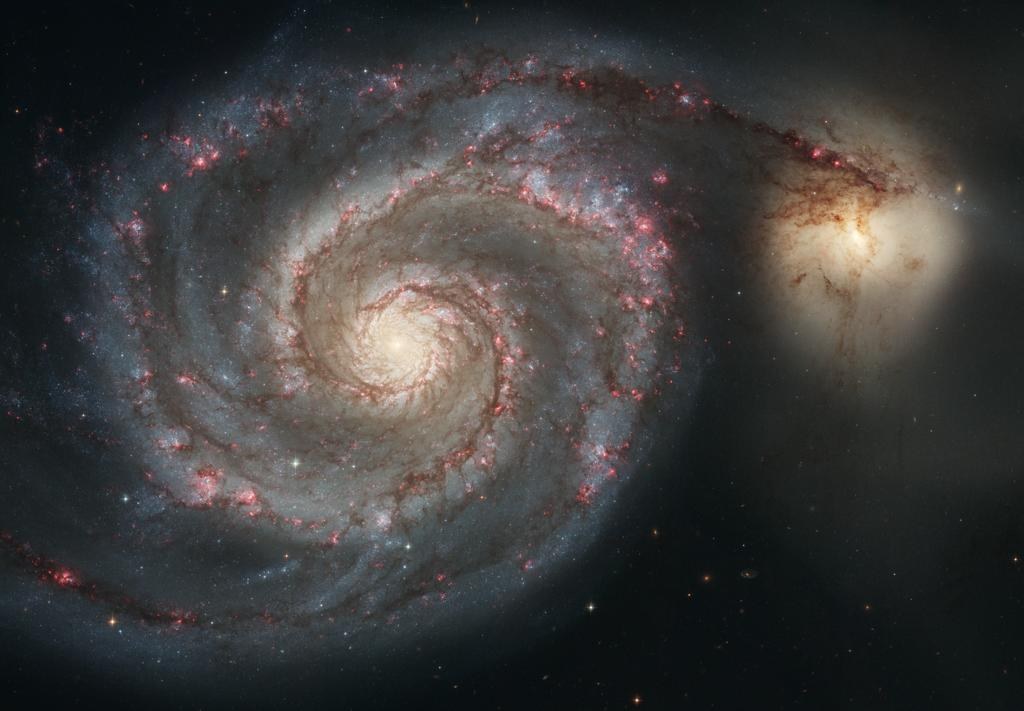
STSCI-H-p0512a.มาจากคลังข้อมูลโดยตรง ไฟล์ STSCI-H-p0512a直接来自档案库,文件 STSCI-H-p0512a。
python3
from astroquery.mast import Observations

# 1. find the finished pictures of M51
found = Observations.query_criteria(objectname="M51", obs_collection="OPO")

# 2. list every file inside them
files = Observations.get_product_list(found)

# 3. keep only the small ones
small = files[files["productType"] == "PREVIEW"]

# 4. download the first one
Observations.download_products(small[:1])| Lineบรรทัด行 | What it doesทำอะไร它做什么 |
|---|---|
import |
Borrow the tool that talks to NASA. You did not write it.ยืมเครื่องมือที่คุยกับ NASA มาใช้ คุณไม่ได้เขียนมันเอง借来那个跟 NASA 说话的工具。不是你写的。 |
query_criteria |
Ask a question. Two parts: which object, and which group of files.ถามคำถาม มีสองส่วน วัตถุไหน และไฟล์กลุ่มไหน问一个问题。两部分:哪个天体,哪一组文件。 |
get_product_list |
An answer is not a file yet. This asks what files are inside it.คำตอบยังไม่ใช่ไฟล์ บรรทัดนี้ถามว่าข้างในมีไฟล์อะไรบ้าง答案还不是文件。这行去问里面有哪些文件。 |
== "PREVIEW" |
Throw away the huge files. A preview is small, about 80 KB.ทิ้งไฟล์ใหญ่ ๆ ไป ไฟล์ตัวอย่างเล็กมาก ราว 80 KB把大文件扔掉。预览图很小,大约 80 KB。 |
download_products |
Copy it onto your computer. Now it is a real file you can open.คัดลอกลงเครื่องคุณ ตอนนี้เป็นไฟล์จริงที่เปิดดูได้แล้ว把它拷到你电脑上。现在它是一个能打开的真文件了。 |
What does OPO mean? · OPO แปลว่าอะไร · OPO 是什么意思
🇬🇧 English
It is short for Office of Public Outreach.
That is a real team of people. They work at the telescope institute.
Their job is to make the pictures you see in the news.
The archive keeps their pictures in a group. The group is named OPO.
You met that name already. It was in the list of 23 in step 2.
🇹🇭 ไทย
มันย่อมาจาก Office of Public Outreach
นั่นคือทีมงานจริง ๆ พวกเขาทำงานที่สถาบันกล้องโทรทรรศน์
หน้าที่ของพวกเขาคือทำภาพที่คุณเห็นในข่าว
คลังข้อมูลเก็บภาพของพวกเขาไว้เป็นกลุ่ม กลุ่มนั้นชื่อ OPO
คุณเจอชื่อนี้มาแล้ว มันอยู่ในรายการ 23 ชื่อในขั้นที่ 2
🇨🇳 中文
它是 Office of Public Outreach 的缩写。
那是一支真实的团队。他们在望远镜研究所工作。
他们的工作就是做出你在新闻里看到的那些图。
档案库把他们的图放在一组里。这一组就叫 OPO。
这个名字你见过了。它在第 2 步那 23 个名字里。
Raw file and finished file · ไฟล์ดิบกับไฟล์สำเร็จ · 生文件和成品文件
🇬🇧 English
Think of a photo on your phone. You take it. Then you crop it and fix the light.
The telescope works the same way, but much bigger.
A raw file is what the camera saved that night. Nobody has touched it.
A finished file is what a person made from many raw files.
Most of the archive is raw. That is what scientists need.
OPO holds finished files. That is what the rest of us want to look at.
🇹🇭 ไทย
นึกถึงรูปในมือถือคุณ คุณถ่ายมา แล้วครอปและแก้แสง
กล้องโทรทรรศน์ก็ทำงานแบบเดียวกัน แต่ใหญ่กว่ามาก
ไฟล์ดิบ คือสิ่งที่กล้องบันทึกไว้คืนนั้น ยังไม่มีใครแตะ
ไฟล์สำเร็จ คือสิ่งที่คนทำขึ้นจากไฟล์ดิบหลายไฟล์
คลังข้อมูลส่วนใหญ่เป็นของดิบ นั่นคือสิ่งที่นักวิทยาศาสตร์ต้องการ
OPO เก็บไฟล์สำเร็จ นั่นคือสิ่งที่พวกเราอยากดู
🇨🇳 中文
想想你手机里的照片。你先拍,然后裁一下、调一下亮度。
望远镜也是这样,只是大得多。
生文件是相机那天晚上存下来的东西。还没人动过。
成品文件是有人用很多生文件做出来的。
档案库大部分是生的。科学家要的就是那个。
OPO 装的是成品。那才是我们其他人想看的。
| Raw fileไฟล์ดิบ生文件 | Finished file (OPO)ไฟล์สำเร็จ (OPO)成品文件 (OPO) | |
|---|---|---|
| Made byใครทำ谁做的 | The camera, on its ownตัวกล้องเอง相机自己 | A person, over daysคน ใช้เวลาหลายวัน一个人,花了好几天 |
| Looks likeหน้าตา长什么样 | Dark. Grey. Gaps and specksมืด สีเทา มีช่องว่างและจุด很暗。灰色。有缝有斑点 | The picture at the top of this pageภาพบนสุดของหน้านี้这一页最上面那张图 |
| Made forทำเพื่อใคร给谁看 | Scientists measuring thingsนักวิทยาศาสตร์ที่ต้องวัดค่า要做测量的科学家 | Everybodyทุกคน所有人 |
| How manyมีเท่าไร有多少 | Almost all of the archiveเกือบทั้งคลังข้อมูล档案库里几乎全是 | A small part. M51 has 7ส่วนเล็ก ๆ M51 มี 7 ชุด很少一部分。M51 有 7 组 |
Now the whole program · ทีนี้มาดูโปรแกรมทั้งตัว · 现在看整个程序
🇬🇧 English
The four lines above got one picture. This program does more.
You give it the name of any object. Then it does four jobs.
1. It asks how many times telescopes looked there.
2. It counts which telescope looked how often.
3. It lists a few of the Hubble pictures.
4. It downloads one small file.
Below is what it printed. Read it with the table after it.
🇹🇭 ไทย
สี่บรรทัดข้างบนได้ภาพมาหนึ่งภาพ โปรแกรมนี้ทำมากกว่านั้น
คุณใส่ชื่อวัตถุอะไรก็ได้ แล้วมันจะทำงานสี่อย่าง
1. ถามว่ากล้องเคยมองตรงนั้นกี่ครั้ง
2. นับว่ากล้องตัวไหนมองบ่อยแค่ไหน
3. ไล่รายการภาพของฮับเบิลมาให้ดูบางส่วน
4. ดาวน์โหลดไฟล์เล็ก ๆ มาหนึ่งไฟล์
ข้างล่างคือสิ่งที่มันพิมพ์ออกมา อ่านคู่กับตารางที่ตามมา
🇨🇳 中文
上面那四行拿到了一张图。这个程序做得更多。
你给它任何一个天体的名字,它就做四件事。
1. 问望远镜在那里看过多少次。
2. 数一数哪台望远镜看了多少次。
3. 列出几张哈勃的照片。
4. 下载一个小文件。
下面是它打印出来的东西。配着后面那张表读。
the four jobs, in code · the whole file is in step 9
found = ask(TARGET)          # 1. ask
count_missions(found)        # 2. count
images = show_pictures(found)# 3. list
download_one(images) # 4. downloadThat is real output. Nothing here is made up. Now line by line. นั่นคือผลลัพธ์จริง ไม่มีอะไรแต่งขึ้น ทีนี้มาดูทีละบรรทัด 那是真实的输出。没有一句是编的。现在一行一行看。
| You seeคุณเห็น你看到 | It meansแปลว่า意思是 |
|---|---|
M16: 209 observations |
M16 is the Eagle Nebula. Telescopes looked at that spot 209 times.M16 คือเนบิวลาอินทรี กล้องเคยมองจุดนั้น 209 ครั้งM16 是鹰状星云。望远镜在那个位置看过 209 次。 |
who looked at it: |
The list under this is job 2. One line for each telescope.รายการข้างล่างนี้คืองานที่ 2 หนึ่งบรรทัดต่อกล้องหนึ่งตัว下面这个列表是第 2 件事。每台望远镜一行。 |
HST 112 |
HST is Hubble. It looked 112 times. That is the most.HST คือฮับเบิล มันมอง 112 ครั้ง มากที่สุดHST 是哈勃。它看了 112 次,最多。 |
HLA 50HLSP 21 |
Not telescopes. Finished work made from other telescopes' data. See step 2.ไม่ใช่กล้อง เป็นงานสำเร็จที่ทำจากข้อมูลของกล้องตัวอื่น ดูขั้นที่ 2不是望远镜。是用别的望远镜数据做出来的成品。见第 2 步。 |
OPO 1 |
One finished press picture of M16 exists. The famous one.มีภาพสำเร็จสำหรับสื่อของ M16 อยู่หนึ่งชุด ภาพที่โด่งดังนั่นแหละM16 有一组做好的新闻图。就是那张有名的。 |
Hubble images: 111 |
Job 3. Of Hubble's 112 looks, 111 are pictures. One is not.งานที่ 3 จาก 112 ครั้งของฮับเบิล มี 111 ครั้งที่เป็นภาพ อีกหนึ่งไม่ใช่第 3 件事。哈勃的 112 次里,111 次是图像。有一次不是。 |
instrument_nameACS/WFC |
Which camera took it. Hubble carries several.กล้องถ่ายภาพตัวไหนเป็นคนถ่าย ฮับเบิลมีหลายตัว是哪台相机拍的。哈勃上装了好几台。 |
filtersF775W |
Which colour of light. The number is the wavelength. 775 is deep red.แสงสีไหน ตัวเลขคือความยาวคลื่น 775 คือสีแดงเข้ม哪一种颜色的光。数字是波长。775 是深红色。 |
t_exptime2000.0 |
How long the shutter stayed open, in seconds. That is 33 minutes.เปิดหน้ากล้องนานแค่ไหน เป็นวินาที เท่ากับ 33 นาที快门开了多久,以秒计。那是 33 分钟。 |
obs_id |
The name of that one look. You can ask for it again by name.ชื่อของการมองครั้งนั้น คุณเรียกหามันซ้ำด้วยชื่อได้那一次观看的名字。你可以用名字再要一次。 |
files in one |
Job 4 starts. One look holds 83 files, not one.เริ่มงานที่ 4 การมองหนึ่งครั้งมี 83 ไฟล์ ไม่ใช่ไฟล์เดียว第 4 件事开始。一次观看里有 83 个文件,不是一个。 |
status: COMPLETE |
The download worked. If it failed this would say so.ดาวน์โหลดสำเร็จ ถ้าพลาดมันจะบอก下载成功了。要是失败它会说。 |
saved: sky/... |
Where the file is now, on your own computer. Go and open it.ตอนนี้ไฟล์อยู่ตรงไหนบนเครื่องคุณ ลองไปเปิดดู文件现在在你自己电脑上的哪里。去打开看看。 |
timeseries: brightness measured over time. It is a graph, not a photo.
ฮับเบิลมอง 112 ครั้ง เป็นภาพแค่ 111 ครั้ง อีกหนึ่งคือ timeseries คือค่าความสว่างที่วัดตามเวลา มันเป็นกราฟ ไม่ใช่ภาพถ่าย
哈勃看了 112 次。只有 111 次是图像。另外一次是 timeseries:随时间测量的亮度。那是一张图表,不是照片。
🇬🇧 English
Space telescopes are public. The pictures belong to everyone.
NASA keeps them in one big archive. It is called MAST.
You can ask MAST a question from Python. It answers in about two seconds.
This lesson asks four questions. Then it downloads one real file.
🇹🇭 ไทย
กล้องโทรทรรศน์อวกาศเป็นของสาธารณะ ภาพเป็นของทุกคน
NASA เก็บภาพไว้ในคลังใหญ่แห่งเดียว ชื่อว่า MAST
คุณถาม MAST จาก Python ได้ มันตอบในเวลาราวสองวินาที
บทเรียนนี้ถามสี่คำถาม แล้วดาวน์โหลดไฟล์จริงหนึ่งไฟล์
🇨🇳 中文
太空望远镜是公共的。照片属于所有人。
NASA 把它们放在一个大档案库里。它叫 MAST。
你可以用 Python 问 MAST。它大约两秒就回答。
这一课问四个问题,然后下载一个真实的文件。
0 What you need · ต้องมีอะไรบ้าง · 你需要什么
🇬🇧 English
Python 3. Any computer. The internet.
That is all. You do not need an account.
You do not need a password or a key. Nobody asks who you are.
🇹🇭 ไทย
Python 3 คอมพิวเตอร์เครื่องไหนก็ได้ และอินเทอร์เน็ต
แค่นั้น คุณไม่ต้องมีบัญชี
ไม่ต้องมีรหัสผ่าน ไม่ต้องมีคีย์ ไม่มีใครถามว่าคุณเป็นใคร
🇨🇳 中文
Python 3。任何一台电脑。还有网络。
就这些。你不需要账号。
不需要密码,也不需要密钥。没有人问你是谁。
1 Install two libraries · ติดตั้งไลบรารีสองตัว · 装两个库
🇬🇧 English
astropy knows about the sky. It handles positions and star names.
astroquery knows how to ask archives. MAST is one of them.
Both are free. Both are made by astronomers.
🇹🇭 ไทย
astropy รู้เรื่องท้องฟ้า มันจัดการพิกัดและชื่อดาว
astroquery รู้วิธีถามคลังข้อมูล MAST เป็นหนึ่งในนั้น
ทั้งคู่ฟรี และทั้งคู่สร้างโดยนักดาราศาสตร์
🇨🇳 中文
astropy 懂天空。它处理坐标和恒星的名字。
astroquery 懂怎么问档案库。MAST 就是其中一个。
两个都免费。两个都是天文学家做的。
pip3 install astropy astroquery

# check it worked
python3 -c "import astroquery; print('ok')"pip, or another package installer.
Installing puts it on your computer. It stays there.
Then import brings it into your file.
Python comes with many already. sys is one.
ไลบรารีคือโค้ดที่คนอื่นเขียนไว้
คุณติดตั้งมันด้วย pip หรือตัวติดตั้งแพ็กเกจตัวอื่น
การติดตั้งคือเอามันลงเครื่องคุณ แล้วมันอยู่ตรงนั้นเลย
จากนั้น import จะดึงมันเข้ามาในไฟล์ของคุณ
Python มีมาให้หลายตัวแล้ว sys เป็นหนึ่งในนั้น
库就是别人写好的代码。
你用 pip 或者别的包管理器把它装上。
装好就留在你电脑上了。
然后 import 把它请进你的文件里。
Python 自带很多。sys 就是一个。
import sys              # comes with Python
import astropy          # you installed this

# take one piece, not the whole box
from astroquery.mast import Observations
2 See which telescopes are in there · ดูว่ามีกล้องอะไรอยู่บ้าง · 看看里面有哪些望远镜
🇬🇧 English
You probably do not know a single one of these names. That is normal.
Most are machines that stopped working before you were born.
Each name is one telescope, or one project that made pictures.
Here is what all 23 of them are.
🇹🇭 ไทย
คุณอาจไม่รู้จักชื่อพวกนี้สักชื่อเดียว เป็นเรื่องปกติ
ส่วนใหญ่คือเครื่องที่หยุดทำงานไปก่อนคุณเกิดเสียอีก
แต่ละชื่อคือกล้องหนึ่งตัว หรือโครงการหนึ่งที่ผลิตภาพ
นี่คือคำอธิบายของทั้ง 23 ชื่อ
🇨🇳 中文
这些名字你大概一个都不认识。这很正常。
它们大多是在你出生以前就停止工作的机器。
每个名字是一台望远镜,或者一个做图的项目。
下面是这 23 个名字各自是什么。
| Nameชื่อ名字 | What it isมันคืออะไร它是什么 | Light it seesเห็นแสงแบบไหน看哪种光 |
|---|---|---|
| The two you will hear aboutสองตัวที่คุณจะได้ยินชื่อ你会听说的那两台 | ||
HST | Hubble Space Telescope. Flying since 1990. Still workingกล้องอวกาศฮับเบิล บินมาตั้งแต่ปี 1990 ยังทำงานอยู่哈勃太空望远镜。1990 年上天,现在还在用 | What we see, and a little moreแสงที่เรามองเห็น และมากกว่านั้นนิดหน่อย我们看得见的光,还多一点 |
JWST | James Webb Space Telescope. The newest. Started in 2022กล้องอวกาศเจมส์ เวบบ์ ใหม่ที่สุด เริ่มปี 2022詹姆斯·韦伯太空望远镜。最新的一台,2022 年开始 | Heat. It sees through dustความร้อน มันมองทะลุฝุ่นได้热。能看穿尘埃 |
| Planet huntersนักล่าดาวเคราะห์行星猎手 | ||
Kepler | Watched one patch of sky for years. Found thousands of planetsจ้องท้องฟ้าผืนเดียวอยู่หลายปี เจอดาวเคราะห์หลายพันดวง盯着同一片天空看了好几年。找到几千颗行星 | Visibleแสงที่มองเห็น可见光 |
K2 | Kepler again, after part of it broke. It kept goingKepler อีกครั้ง หลังชิ้นส่วนบางอย่างพัง มันยังทำงานต่อ还是 Kepler,坏了一部分之后接着干 | Visibleแสงที่มองเห็น可见光 |
KeplerFFIK2FFI | FFI means Full Frame Image. The whole camera view, not just the chosen starsFFI ย่อจาก Full Frame Image คือภาพเต็มหน้ากล้อง ไม่ใช่แค่ดาวที่เลือกไว้FFI 是「整幅图像」。整个相机画面,不只是选中的那些星 | Visibleแสงที่มองเห็น可见光 |
TESS | The one doing this job now. It looks at the whole sky, bit by bitตัวที่ทำงานนี้อยู่ตอนนี้ มันมองทั่วทั้งฟ้า ทีละส่วน现在干这活的就是它。它一块一块地看整片天 | Visibleแสงที่มองเห็น可见光 |
| Ultraviolet satellitesดาวเทียมอัลตราไวโอเลต紫外线卫星 | ||
IUE | International Ultraviolet Explorer. Worked 18 years, from 1978International Ultraviolet Explorer ทำงาน 18 ปี เริ่มปี 1978国际紫外探测器。从 1978 年起工作了 18 年 | Ultravioletอัลตราไวโอเลต紫外线 |
EUVE | Extreme Ultraviolet Explorer. Looked at the most extreme end of itExtreme Ultraviolet Explorer มองที่ปลายสุดขั้วของช่วงแสงนั้น极紫外探测器。看的是最极端的那一头 | Ultravioletอัลตราไวโอเลต紫外线 |
FUSE | Far Ultraviolet Spectroscopic Explorer. Split the light into a rainbowFar Ultraviolet Spectroscopic Explorer แยกแสงออกเป็นสีรุ้ง远紫外光谱探测器。把光摊开成彩虹 | Ultravioletอัลตราไวโอเลต紫外线 |
GALEX | Galaxy Evolution Explorer. Mapped galaxies to find their young starsGalaxy Evolution Explorer ทำแผนที่กาแล็กซีเพื่อหาดาวอายุน้อย星系演化探测器。给星系画图,找里面年轻的恒星 | Ultravioletอัลตราไวโอเลต紫外线 |
FIMS-SPEAR | A Korean satellite. Other countries send their data here tooดาวเทียมของเกาหลี ประเทศอื่นก็ส่งข้อมูลมาเก็บที่นี่เหมือนกัน一颗韩国卫星。别的国家也把数据放到这里 | Ultravioletอัลตราไวโอเลต紫外线 |
| Carried up by astronauts, then brought homeนักบินอวกาศหิ้วขึ้นไป แล้วเอากลับลงมา宇航员带上去,再带回来 | ||
HUT | Hopkins Ultraviolet Telescope. Rode in the Space ShuttleHopkins Ultraviolet Telescope ขึ้นไปกับกระสวยอวกาศ霍普金斯紫外望远镜。搭航天飞机上去的 | Ultravioletอัลตราไวโอเลต紫外线 |
WUPPE | Flew beside HUT, in the same cargo bayบินไปพร้อม HUT ในห้องเก็บสัมภาระเดียวกัน跟 HUT 一起飞,装在同一个货舱里 | Ultravioletอัลตราไวโอเลต紫外线 |
BEFS | Berkeley Extreme and Far-UV Spectrometer. Also a Shuttle riderBerkeley Extreme and Far-UV Spectrometer ก็ขึ้นกระสวยเหมือนกัน伯克利远紫外光谱仪。也是搭航天飞机的 | Ultravioletอัลตราไวโอเลต紫外线 |
TUES | A German instrument. It flew next to BEFSอุปกรณ์ของเยอรมนี บินไปข้าง ๆ BEFS一台德国仪器。跟 BEFS 挨着飞 | Ultravioletอัลตราไวโอเลต紫外线 |
| Other space telescopesกล้องอวกาศตัวอื่น别的太空望远镜 | ||
SWIFT | It waits for a star to explode, then turns fast to catch itมันรอให้ดาวระเบิด แล้วหันไปจับภาพอย่างรวดเร็ว它等着某颗恒星爆炸,然后飞快转过去拍 | Very high energyพลังงานสูงมาก很高能量的光 |
SPITZER_SHA | Spitzer. It saw heat, like Webb, but it stopped in 2020Spitzer มันเห็นความร้อนแบบเวบบ์ แต่หยุดทำงานปี 2020斯皮策。它跟韦伯一样看热,但 2020 年停了 | Heatความร้อน热 |
| Not in space. On the groundไม่ได้อยู่ในอวกาศ อยู่บนพื้นโลก不在太空。在地面上 | ||
PS1 | A telescope on a mountain in Hawaii. It watches for things that moveกล้องบนภูเขาในฮาวาย คอยจับสิ่งที่เคลื่อนที่夏威夷山上的一台望远镜。它盯着会动的东西 | Visibleแสงที่มองเห็น可见光 |
SDSS | Sloan Digital Sky Survey. It made a huge map of the skySloan Digital Sky Survey ทำแผนที่ท้องฟ้าขนาดมหึมา斯隆数字巡天。它做了一张巨大的天空地图 | Visibleแสงที่มองเห็น可见光 |
| Not telescopes at allไม่ใช่กล้องเลย根本不是望远镜 | ||
HLA | Hubble Legacy Archive. Old Hubble files, cleaned up againHubble Legacy Archive ไฟล์เก่าของฮับเบิลที่เอามาล้างใหม่哈勃遗产档案。哈勃的旧文件,重新洗过一遍 | — |
HLSP | Work that scientists finished and gave back to everyoneงานที่นักวิทยาศาสตร์ทำเสร็จแล้วมอบคืนให้ทุกคน科学家做完之后交还给大家的成果 | — |
OPO | The team who make the news pictures. You met them at the topทีมที่ทำภาพสำหรับข่าว คุณเจอพวกเขามาแล้วตอนต้นหน้า做新闻图的那个团队。你在最上面已经见过了 | — |
for loop does one job to every item in a group.
You never say how many there are. Python counts for you.
The indented line is the job. Indenting is not decoration in Python. It is the grouping.
ลูป for ทำงานหนึ่งอย่างกับทุกชิ้นในกลุ่ม
คุณไม่ต้องบอกว่ามีกี่ชิ้น Python นับให้เอง
บรรทัดที่ย่อหน้าคือตัวงาน การย่อหน้าใน Python ไม่ใช่ของประดับ มันคือการจัดกลุ่ม
for 循环把一件事做给一组里的每一个。
你不用说有几个。Python 自己会数。
缩进的那行就是要做的事。在 Python 里缩进不是装饰,它就是分组。
fruit = ["mango", "papaya", "lychee"]

for name in fruit:
    print(name)         # runs 3 times

# same shape, 23 telescopes instead of 3 fruit3 Ask one question · ถามหนึ่งคำถาม · 问一个问题
🇬🇧 English
Three lines. That is a real question to a real archive.
You give it a name. It finds the place in the sky.
Then it lists every look any telescope took there.
🇹🇭 ไทย
สามบรรทัด นั่นคือคำถามจริงถึงคลังข้อมูลจริง
คุณให้ชื่อไป มันหาตำแหน่งบนท้องฟ้าให้
แล้วมันไล่รายการทุกครั้งที่กล้องเคยมองตรงนั้น
🇨🇳 中文
三行。这就是向真实档案库提的真实问题。
你给它一个名字,它找到天上的那个位置。
然后它列出所有望远镜在那里看过的每一次。
python3
from astroquery.mast import Observations

obs = Observations.query_object("M51", radius="0.01 deg")
print(len(obs)) # 1705| Pieceส่วน部分 | What it doesทำอะไร它做什么 |
|---|---|
from … import |
Take one tool out of the library. Its name is Observations.หยิบเครื่องมือหนึ่งชิ้นออกจากไลบรารี ชื่อของมันคือ Observations从库里取出一件工具。它的名字叫 Observations。 |
Observations. |
The dot means "belonging to". This is the query_object that belongs to Observations.จุดแปลว่า "ของ" นี่คือ query_object ที่เป็นของ Observations点的意思是「属于」。这是属于 Observations 的 query_object。 |
query_object(…) |
The brackets run it. This is the line that goes out to NASA.วงเล็บคือการสั่งให้มันทำงาน บรรทัดนี้แหละที่วิ่งออกไปหา NASA括号让它跑起来。就是这一行出去找 NASA。 |
"M51" |
Which object. Python does not know the sky. NASA looks the name up.วัตถุไหน Python ไม่รู้จักท้องฟ้า NASA เป็นคนค้นชื่อให้哪个天体。Python 不认识天空。是 NASA 去查这个名字。 |
radius="0.01 deg" |
How wide a circle to search. Bigger radius, more results.ค้นในวงกว้างแค่ไหน รัศมียิ่งใหญ่ ยิ่งได้ผลเยอะ搜多大一个圈。半径越大,结果越多。 |
obs = |
Store the answer under the name obs. Now it will still be there on the next line.เก็บคำตอบไว้ในชื่อ obs บรรทัดถัดไปมันก็ยังอยู่把答案存到 obs 这个名字下。下一行它还在。 |
len(obs) |
len counts things. Here it counts the rows.len ใช้นับของ ตรงนี้มันนับจำนวนแถวlen 用来数数。这里数的是行数。 |
print(…) |
Show it on screen. Without this, Python knows the answer and says nothing.แสดงบนหน้าจอ ถ้าไม่มีบรรทัดนี้ Python รู้คำตอบแต่ไม่บอกคุณ显示在屏幕上。没有它,Python 知道答案但什么也不说。 |
obs = ... stores the answer under the name obs.
The = is not "equals". It means "store this under that name".
Write the name again and you get the value back.
A variable works anywhere its value would work.
In the brackets, radius= names an argument. Those can come in any order.
ตัวแปร คือชื่อที่เก็บค่าเอาไว้
obs = ... เก็บคำตอบไว้ภายใต้ชื่อ obs
= ไม่ได้แปลว่า "เท่ากับ" มันแปลว่า "เก็บสิ่งนี้ไว้ในชื่อนั้น"
พิมพ์ชื่อนั้นอีกครั้ง คุณก็ได้ค่ากลับมา
ตัวแปรใช้ได้ทุกที่ที่ใช้ค่าของมันได้
ในวงเล็บ radius= คือการตั้งชื่ออาร์กิวเมนต์ สลับลำดับได้
变量是一个存着值的名字。
obs = ... 把答案存在 obs 这个名字下。
= 不是「等于」。它是「把这个存到那个名字下」。
再写一次那个名字,值就回来了。
值能用的地方,变量都能用。
括号里的 radius= 是给参数起名。顺序随便。
city = "Chiang Mai"   # a variable called city
count = 1705           # a variable called count

# now use them
print(city)            # Chiang Mai
print(count + 1)       # 1706
print(f"{city}: {count}")  # Chiang Mai: 1705

# a variable works where its value would
target = "M51"
obs = Observations.query_object(target, radius="0.01 deg")

# named arguments can swap places
query_object(objectname="M51", radius="0.01 deg")
query_object(radius="0.01 deg", objectname="M51")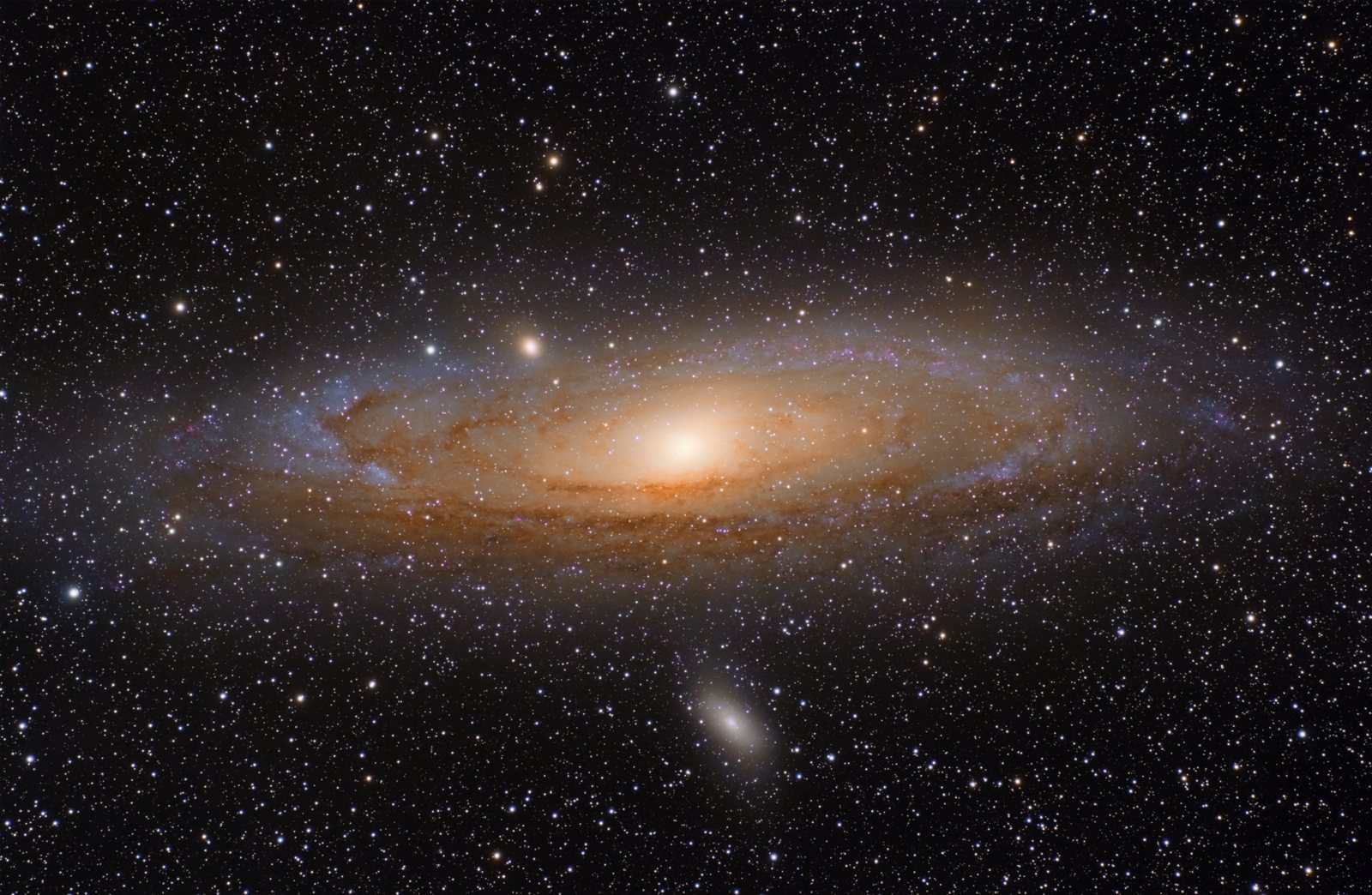

🇬🇧 English
So what is M51?
It is a galaxy. A galaxy is a huge group of stars.
M51 holds about 100 billion of them. Ours holds about the same.
It is very far away. Its light takes 31 million years to reach us.
So you are looking at old light. The galaxy has moved since.
People call it the Whirlpool. Look at the picture and you can see why.
The small golden galaxy beside it is pulling on one arm.
1705 observations came back. Try your own object next.
🇹🇭 ไทย
แล้ว M51 คืออะไร
มันคือกาแล็กซี กาแล็กซีคือกลุ่มดาวขนาดมหึมา
M51 มีดาวราวแสนล้านดวง ของเราก็ราว ๆ นั้น
มันอยู่ไกลมาก แสงของมันใช้เวลา 31 ล้านปีกว่าจะถึงเรา
คุณจึงกำลังมองแสงเก่า กาแล็กซีเคลื่อนไปแล้วตั้งแต่ตอนนั้น
คนเรียกมันว่ากังหันน้ำวน ดูภาพแล้วจะเข้าใจว่าทำไม
กาแล็กซีสีทองดวงเล็กข้าง ๆ กำลังดึงแขนของมันอยู่
ได้ผลกลับมา 1705 รายการ ลองใส่วัตถุของคุณเองดูบ้าง
🇨🇳 中文
那 M51 到底是什么?
它是一个星系。星系就是一大群恒星。
M51 里大约有一千亿颗。我们这个也差不多。
它非常远。它的光要走 3100 万年才到我们这里。
所以你看的是旧光。那个星系早就挪位置了。
人们叫它涡状星系。看看图就知道为什么。
旁边那个金色的小星系正在拉扯它的一条旋臂。
返回了 1705 条观测。下一个试试你自己的目标。
| Ask forถามหา要找的 | What it isมันคืออะไร它是什么 | You getได้เท่าไร你会得到 |
|---|---|---|
"M51" | A galaxyกาแล็กซี一个星系 | 1705 |
"M31" | Our big neighbourเพื่อนบ้านดวงใหญ่我们的大邻居 | 1856 |
"Orion Nebula" | Where stars are bornที่ที่ดาวเกิด恒星诞生的地方 | 2960 |
"M16" | The Eagle Nebulaเนบิวลาอินทรี鹰状星云 | 209 |
4 Read what came back · อ่านสิ่งที่ได้กลับมา · 读一读回来的东西
🇬🇧 English
The answer is a table. It looks like a spreadsheet.
Each row is one look at the sky. There are 1705 rows.
Each column holds one fact about that look. There are 36 columns.
One column is called obs_collection. It holds the telescope name.
So here is a real question. Which telescope looked at M51 the most?
To answer it, count how many rows each telescope has.
🇹🇭 ไทย
คำตอบคือตาราง หน้าตาเหมือนสเปรดชีต
แต่ละแถว คือการมองท้องฟ้าหนึ่งครั้ง มีทั้งหมด 1705 แถว
แต่ละคอลัมน์ เก็บข้อมูลหนึ่งอย่างของการมองครั้งนั้น มี 36 คอลัมน์
คอลัมน์หนึ่งชื่อ obs_collection มันเก็บชื่อกล้อง
นี่คือคำถามจริง กล้องตัวไหนมอง M51 มากที่สุด
จะตอบได้ ต้องนับว่ากล้องแต่ละตัวมีกี่แถว
🇨🇳 中文
答案是一张表。看起来像电子表格。
每一行是对天空的一次观看。一共 1705 行。
每一列装着这次观看的一个信息。一共 36 列。
有一列叫 obs_collection,它装的是望远镜的名字。
那就有个真问题了:哪台望远镜看 M51 看得最多?
要回答它,就数一数每台望远镜各有多少行。
python3
tally = {}
for row in obs:
    name = str(row["obs_collection"])
    tally[name] = tally.get(name, 0) + 1

for name, n in sorted(tally.items(), key=lambda p: -p[1]):
print(name, n)| Pieceส่วน部分 | What it doesทำอะไร它做什么 |
|---|---|
tally = {} |
Start an empty dictionary. Nothing is counted yet.เริ่มดิกชันนารีเปล่า ๆ ยังไม่ได้นับอะไรเลย建一个空字典。还什么都没数。 |
for row in obs: |
Go through the 1705 rows. One at a time.ไล่ไปทีละแถว จนครบ 1705 แถว把 1705 行走一遍,一次一行。 |
row["obs_collection"] |
From this row, take that one column. You get a telescope name.จากแถวนี้ หยิบคอลัมน์นั้นออกมา จะได้ชื่อกล้อง从这一行里取那一列。你会拿到一个望远镜的名字。 |
str(…) |
Make it plain text. The table stores it in its own special way.ทำให้เป็นข้อความธรรมดา ตารางเก็บมันไว้ในแบบเฉพาะของตัวเอง把它变成普通文字。表格是用自己的方式存的。 |
tally.get(name, 0) |
The count so far. If this telescope is new, use 0.จำนวนที่นับได้จนถึงตอนนี้ ถ้าเป็นกล้องตัวใหม่ ให้ใช้ 0到目前为止的数。要是这台望远镜是新的,就用 0。 |
… + 1 |
Add one, then store it back under the same name.บวกหนึ่ง แล้วเก็บกลับไว้ที่ชื่อเดิม加一,再存回同一个名字下。 |
tally.items() |
Turn the dictionary into pairs, so a loop can walk it.เปลี่ยนดิกชันนารีให้เป็นคู่ ๆ เพื่อให้ลูปเดินผ่านได้把字典变成一对一对的,好让循环走过去。 |
sorted(…) |
Put them in order. Without this they come out in any order.จัดเรียงให้เป็นลำดับ ถ้าไม่มีบรรทัดนี้ มันจะออกมามั่ว ๆ给它们排个序。不排的话顺序是乱的。 |
key=lambda p: -p[1] |
Sort by what? By the count. The minus flips it, so biggest comes first.เรียงตามอะไร ตามจำนวน เครื่องหมายลบกลับลำดับ ตัวมากจึงขึ้นก่อน按什么排?按数量。减号把顺序翻过来,最大的排前面。 |
for name, n in … |
Each pair splits into two names at once. name and n.แต่ละคู่ถูกแยกเป็นสองชื่อพร้อมกัน คือ name กับ n每一对同时拆成两个名字:name 和 n。 |
tally[name] on a missing key raises an error. tally.get(name, 0) hands back 0 instead.
That spare zero is the whole trick. The first row of every telescope needs it.
ลิสต์จำลำดับ ส่วนดิกชันนารีจำเป็นคู่
แต่ละคู่มีคีย์กับค่า ตรงนี้คีย์คือกล้อง ค่าคือจำนวน
tally[name] ถ้าไม่มีคีย์จะเกิดข้อผิดพลาด ส่วน tally.get(name, 0) จะคืน 0 ให้แทน
เลขศูนย์สำรองนั่นแหละคือเคล็ดลับ แถวแรกของกล้องทุกตัวต้องใช้มัน
列表记顺序,字典记成对的东西。
每一对有一个键和一个值。这里键是望远镜,值是次数。
tally[name] 碰到没有的键会报错。tally.get(name, 0) 会给你一个 0。
那个备用的零就是关键。每台望远镜的第一行都要靠它。
ages = {"Ploy": 14, "Nok": 15}

print(ages["Ploy"])          # 14
print(ages.get("Somchai", 0))  # 0, no error
print(ages["Somchai"])       # KeyError!

ages["Somchai"] = 13         # add a new pair
Those two lines, in detail · สองบรรทัดนั้น แบบละเอียด · 那两行,说细一点
🇬🇧 English
Both lines ask the same question. How old is Somchai?
Somchai is not in the dictionary. There is no answer.
The two lines handle that in very different ways.
ages["Somchai"] demands an answer. Python has none.
So Python gives up. It stops the whole program.
That stop is called a KeyError.
ages.get("Somchai", 0) asks the same thing politely.
You handed it a spare answer: the 0.
There is no real answer, so it gives you the spare.
The program does not stop. It keeps going.
🇹🇭 ไทย
สองบรรทัดถามคำถามเดียวกัน สมชายอายุเท่าไร
ไม่มีสมชายอยู่ในดิกชันนารี จึงไม่มีคำตอบ
สองบรรทัดนี้รับมือกับเรื่องนั้นต่างกันมาก
ages["Somchai"] เรียกร้องคำตอบ แต่ Python ไม่มีให้
Python จึงยอมแพ้ แล้วหยุดโปรแกรมทั้งตัว
การหยุดแบบนั้นเรียกว่า KeyError
ages.get("Somchai", 0) ถามเรื่องเดียวกันแบบสุภาพ
คุณยื่นคำตอบสำรองให้มันแล้ว คือเลข 0
เมื่อไม่มีคำตอบจริง มันก็ยื่นตัวสำรองกลับมา
โปรแกรมไม่หยุด มันทำงานต่อไป
🇨🇳 中文
两行问的是同一个问题。Somchai 多大了?
字典里没有 Somchai。所以没有答案。
这两行处理这件事的方式完全不同。
ages["Somchai"] 是要答案。Python 拿不出来。
于是 Python 放弃了。它把整个程序停掉。
这种停下来叫 KeyError。
ages.get("Somchai", 0) 是客气地问同一件事。
你已经给了它一个备用答案:那个 0。
既然没有真答案,它就把备用的给你。
程序不会停。它继续往下跑。
The 14 printed. The 0 printed. Then the program died. Any line after it never ran. เลข 14 พิมพ์ออกมาแล้ว เลข 0 ก็พิมพ์แล้ว จากนั้นโปรแกรมก็ตาย บรรทัดที่อยู่ถัดไปไม่ได้ทำงานเลย 14 打出来了。0 也打出来了。然后程序就死了。后面的行一行都没跑。
ages["Somchai"] |
ages.get("Somchai", 0) |
|
|---|---|---|
| Key is thereมีคีย์นั้น键存在 | Gives the valueคืนค่าให้给你那个值 | Gives the value. Sameคืนค่าให้ เหมือนกัน给你那个值。一样 |
| Key is missingไม่มีคีย์นั้น键不存在 | Stops the programหยุดโปรแกรม把程序停掉 | Gives your spare answerคืนคำตอบสำรองของคุณ给你那个备用答案 |
| Use it whenใช้ตอนไหน什么时候用 | The key must be thereคีย์นั้นต้องมีแน่ ๆ那个键一定得在 | The key might not beคีย์นั้นอาจจะไม่มี那个键可能不在 |
.get(name, 0) is what lets it run.
กล้องทุกตัวย่อมไม่มีอยู่ในตอนที่เจอครั้งแรก ถ้าใช้วงเล็บเหลี่ยม โค้ดนับจะหยุดตั้งแต่แถวแรกเลย .get(name, 0) คือสิ่งที่ทำให้มันไปต่อได้
每台望远镜第一次出现时都还不在字典里。用方括号的话,计数代码在第一行就停了。.get(name, 0) 才让它跑得下去。
sorted needs to know what to sort by. You tell it with a small function.
A lambda is a function written on one line, with no name.
You use it once and throw it away. That is the whole point.
The two lines on the right do exactly the same job.
sorted ต้องรู้ว่าจะเรียงตามอะไร คุณบอกมันด้วยฟังก์ชันเล็ก ๆ
lambda คือฟังก์ชันที่เขียนบรรทัดเดียว และไม่มีชื่อ
ใช้ครั้งเดียวแล้วทิ้ง นั่นคือจุดประสงค์ของมัน
สองแบบทางขวาทำงานเหมือนกันเป๊ะ
sorted 得知道按什么排。你用一个小函数告诉它。
lambda 就是写在一行里、没有名字的函数。
用一次就扔掉。这就是它存在的意义。
右边这两种写法做的是同一件事。
# the long way: a real function
def by_count(pair):
    return -pair[1]

sorted(tally.items(), key=by_count)

# the short way: same thing, no name
sorted(tally.items(), key=lambda pair: -pair[1])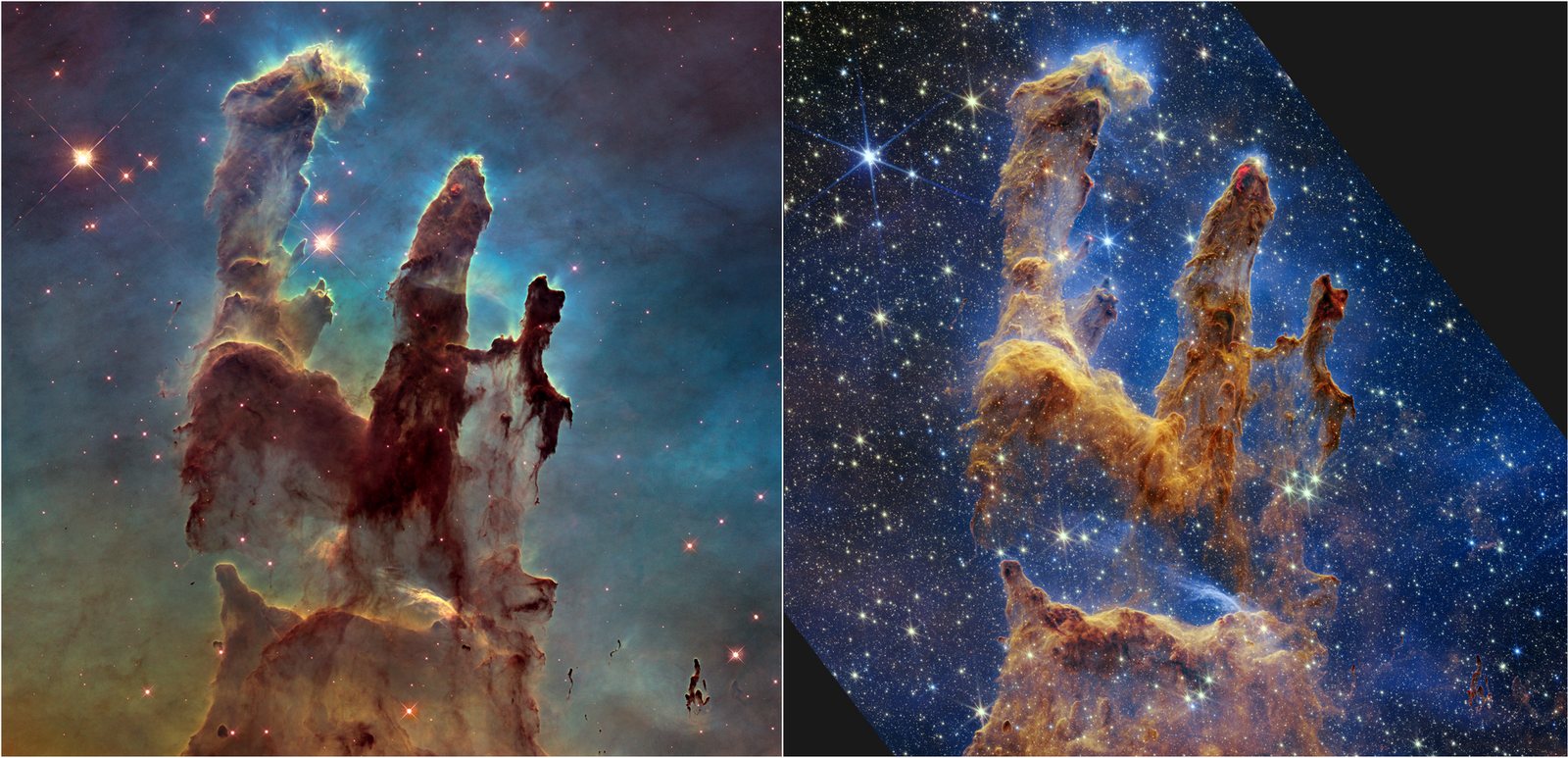
.png)
obs_collection matters. Ask for HST and you get the left one. Ask for JWST and you get the right one.
นี่คือเหตุผลที่ obs_collection สำคัญ ขอ HST จะได้ภาพซ้าย ขอ JWST จะได้ภาพขวา
这就是 obs_collection 重要的原因。要 HST 就拿到左边那张,要 JWST 就拿到右边那张。
| Columnคอลัมน์列 | What it holdsเก็บอะไร装什么 |
|---|---|
obs_collection | Which telescope. HST is Hubbleกล้องตัวไหน HST คือฮับเบิล哪台望远镜。HST 是哈勃 |
instrument_name | Which camera on itกล้องถ่ายภาพตัวไหนบนนั้น上面的哪台相机 |
filters | Which colour of lightแสงสีไหน哪一种颜色的光 |
t_exptime | How long the shutter stayed open, in secondsเปิดหน้ากล้องนานแค่ไหน เป็นวินาที快门开了多久,以秒计 |
dataproduct_type | What kind it is. image is a picture. timeseries is a graphเป็นชนิดไหน image คือภาพ timeseries คือกราฟ是哪一种。image 是图,timeseries 是图表 |
proposal_pi | The scientist who asked for itนักวิทยาศาสตร์ที่ขอถ่าย申请拍它的科学家 |
5 Keep only what you want · เก็บเฉพาะที่ต้องการ · 只留下你要的
🇬🇧 English
You have 1705 rows. That is too many to read.
You do not want all of them. You want Hubble pictures.
So cut the table down. That is called filtering.
It works like the filter in a spreadsheet.
Two rules here. It must be Hubble. It must be a picture.
🇹🇭 ไทย
คุณมี 1705 แถว มากเกินกว่าจะอ่านไหว
คุณไม่ได้อยากได้ทั้งหมด คุณอยากได้ภาพของฮับเบิล
ก็ตัดตารางให้เล็กลง เรียกว่าการ กรอง
มันทำงานเหมือนตัวกรองในสเปรดชีต
ตรงนี้มีสองกฎ ต้องเป็นฮับเบิล และต้องเป็นภาพ
🇨🇳 中文
你有 1705 行。多得读不完。
你不是全都要。你要的是哈勃的图片。
那就把表格减下来。这叫筛选。
它跟电子表格里的筛选一样。
这里有两条规则:得是哈勃,而且得是图片。
python3
pics = obs[(obs["obs_collection"] == "HST") &
           (obs["dataproduct_type"] == "image")]

print(len(pics))    # 602
pics["filters", "t_exptime", "obs_id"][:5].pprint()HST. That is Hubble Space Telescope.
กล้องโทรทรรศน์ที่ไม่ได้อยู่บนพื้นโลก มันโคจรรอบโลก อยู่เหนือชั้นอากาศ อากาศทำให้แสงดาวพร่า นั่นคือเหตุผลที่ดาวกะพริบ เหนือชั้นอากาศไม่มีอะไรทำให้พร่า ภาพจึงคมชัด มันขึ้นบินปี 1990 และยังทำงานอยู่ ในโค้ดใช้ชื่อย่อว่า HST ย่อจาก Hubble Space Telescope
一台不在地面上的望远镜。它绕着地球飞,在大气层之上。空气会让星光变模糊,星星一闪一闪就是这个原因。到了大气层之上就没有东西让它模糊了,所以拍出来很清楚。它 1990 年发射,现在还在用。代码里它的简称是 HST,就是哈勃太空望远镜。
| Pieceส่วน部分 | What it doesทำอะไร它做什么 |
|---|---|
obs["obs_collection"] |
Take one whole column. All 1705 telescope names at once.หยิบทั้งคอลัมน์ออกมา ชื่อกล้องทั้ง 1705 ชื่อพร้อมกัน整列取出来。1705 个望远镜名字一次拿齐。 |
== "HST" |
Ask every row at once: is this Hubble? You get 1705 answers, each True or False.ถามทุกแถวพร้อมกัน อันนี้ใช่ฮับเบิลไหม จะได้คำตอบ 1705 ข้อ แต่ละข้อเป็น True หรือ False同时问每一行:这是哈勃吗?你会得到 1705 个答案,每个不是 True 就是 False。 |
& |
Join the two answer lists. A row stays only if both are True.รวมคำตอบสองชุดเข้าด้วยกัน แถวจะอยู่รอดก็ต่อเมื่อเป็น True ทั้งคู่把两串答案合起来。两边都 True 这行才留下。 |
( ) |
Each test needs its own brackets. Leave them out and Python reads it wrong.แต่ละเงื่อนไขต้องมีวงเล็บของตัวเอง ถ้าไม่ใส่ Python จะอ่านผิด每个条件都要自己的括号。不加的话 Python 会读错。 |
obs[ … ] |
Hand the list of True and False back to the table. It keeps the True rows.ส่งชุด True กับ False กลับเข้าไปที่ตาราง มันจะเก็บแถวที่เป็น True ไว้把那串 True 和 False 交回给表格。它留下 True 的行。 |
pics = |
Store the smaller table. obs is untouched, still 1705 rows.เก็บตารางที่เล็กลงไว้ ส่วน obs ยังอยู่ครบ 1705 แถวเหมือนเดิม把小一点的表存起来。obs 没被动过,还是 1705 行。 |
len(pics) |
602 survived. M51 has 657 Hubble rows. 602 of them are pictures.เหลือรอด 602 แถว M51 มีแถวของฮับเบิล 657 แถว และ 602 แถวในนั้นเป็นภาพ活下来 602 行。M51 有 657 行是哈勃的,其中 602 行是图片。 |
pics["filters", …] |
Now pick columns, not rows. Show only these three.ทีนี้เลือกคอลัมน์ ไม่ใช่แถว แสดงแค่สามคอลัมน์นี้现在挑的是列,不是行。只显示这三列。 |
[:5].pprint() |
Take the first five rows. pprint prints them lined up neatly.เอาห้าแถวแรก pprint จะพิมพ์ให้เรียงสวยงาม取前五行。pprint 会印得整整齐齐。 |
== "HST" does not give one answer. It gives one answer per row.
That long list of True and False is the filter itself.
You hand it back to the table. The table keeps the true rows.
A plain list cannot do this. A table can.
ตรงนี้แหละที่คนมักตกใจ
== "HST" ไม่ได้ให้คำตอบเดียว มันให้คำตอบต่อหนึ่งแถว
ชุด True กับ False ยาว ๆ นั้นคือตัวกรอง
คุณส่งมันกลับเข้าตาราง ตารางจะเก็บแถวที่เป็นจริงไว้
ลิสต์ธรรมดาทำแบบนี้ไม่ได้ แต่ตารางทำได้
这一点最让人意外。
== "HST" 不是给你一个答案。它每一行给一个答案。
那一长串 True 和 False 就是筛子本身。
你把它交回表格。表格留下为真的那些行。
普通列表做不到。表格可以。
# pretend the column holds just 5 names
column = ["HST", "JWST", "HST", "TESS", "HST"]

# the question, asked of all 5 at once
column == "HST"
# [True, False, True, False, True]

# give that back to the table
# rows 0, 2 and 4 stay. the rest go= stores a value in a variable. == asks a question.
The answer is always True or False. Those are real Python values.
Mixing the two up is the most common beginner bug. Read them out loud and they differ.
Here one test runs on every row at once. That is why the table needs &, not and.
= คือเก็บค่าไว้ในตัวแปร ส่วน == คือถามคำถาม
คำตอบเป็น True หรือ False เสมอ สองคำนี้เป็นค่าจริงใน Python
การสับสนสองตัวนี้คือบั๊กของมือใหม่ที่พบบ่อยที่สุด ลองอ่านออกเสียงดู จะเห็นว่าต่างกัน
ตรงนี้เงื่อนไขหนึ่งทำงานกับทุกแถวพร้อมกัน ตารางจึงต้องใช้ & ไม่ใช่ and
= 是把值存进变量。== 是问一个问题。
答案永远是 True 或 False。它们是真正的 Python 值。
把这两个搞混是新手最常犯的错。念出声就听得出区别。
这里一个条件同时作用在每一行上。所以表格要用 &,不是 and。
age = 14           # put 14 in the box
age == 14          # True  — a question
age == 15          # False
age > 10           # True

# one value:  and   |  whole table:  &
age > 10 and age < 18& here, not and. And keep every test inside its own brackets. This is the same rule as in a spreadsheet filter.
ตรงนี้ใช้ & ไม่ใช่ and และใส่วงเล็บครอบทุกเงื่อนไข กฎเดียวกับตัวกรองในสเปรดชีต
这里用 &,不是 and。每个条件都要自己的括号。跟表格里的筛选规则一样。
6 One look is many files · หนึ่งการมอง คือหลายไฟล์ · 一次观看,是很多文件
🇬🇧 English
Now ask for the files behind one row.
One Hubble look at M16 holds 83 files.
One JWST look at M51 holds 286. This surprises people.
Raw frames. Cleaned frames. Notes. Small preview pictures.
🇹🇭 ไทย
ทีนี้ขอไฟล์ที่อยู่เบื้องหลังหนึ่งแถว
ฮับเบิลมอง M16 หนึ่งครั้ง มี 83 ไฟล์
JWST มอง M51 หนึ่งครั้ง มี 286 ไฟล์ คนมักตกใจ
ภาพดิบ ภาพที่ล้างแล้ว บันทึก และภาพตัวอย่างเล็ก ๆ
🇨🇳 中文
现在去要一行背后的文件。
哈勃看 M16 一次,有 83 个文件。
JWST 看 M51 一次,有 286 个。这让人吃惊。
原始画面、洗过的画面、记录,还有小小的预览图。
python3
products = Observations.get_product_list(pics[:1])
print(len(products))                # 83

small = products[products["productType"] == "PREVIEW"]
small.sort("size")
small["productFilename", "size"][:3].pprint()[:1], [:3] and [:5] on this page already.
That is a slice. It takes part of a group and leaves the rest.
Counting starts at 0, not 1. The first item is item 0.
The end number is not included. [:3] gives you 0, 1 and 2. Three items.
A slice never changes the original. It hands you a new piece.
ในหน้านี้คุณเห็น [:1], [:3] และ [:5] มาแล้ว
นั่นคือการหั่น มันหยิบบางส่วนของกลุ่มมา แล้วทิ้งที่เหลือไว้
การนับเริ่มที่ 0 ไม่ใช่ 1 ชิ้นแรกคือชิ้นที่ 0
เลขท้ายไม่ถูกนับรวม [:3] ให้ 0, 1 และ 2 รวมสามชิ้น
การหั่นไม่เปลี่ยนของเดิม มันส่งชิ้นใหม่มาให้
这一页上你已经见过 [:1]、[:3] 和 [:5] 了。
那叫切片。它取走一组里的一部分,剩下的留着。
数数从 0 开始,不是 1。第一个是第 0 个。
结尾那个数不算在内。[:3] 给你 0、1、2,一共三个。
切片从不改动原来的东西。它递给你一块新的。
days = ["Mon", "Tue", "Wed", "Thu", "Fri"]

days[0]      # "Mon"   — one item
days[:1]     # ["Mon"] — a list of one
days[:3]     # Mon Tue Wed
days[-1]     # "Fri"   — count from the end
7 Download one · ดาวน์โหลดมาหนึ่งไฟล์ · 下载一个
🇬🇧 English
Start with a preview file. They are about 10 KB.
Raw science files can be 100 MB. Do not grab those first.
🇹🇭 ไทย
เริ่มจากไฟล์ตัวอย่างก่อน ขนาดราว 10 KB
ไฟล์วิทยาศาสตร์ดิบอาจใหญ่ 100 MB อย่าเพิ่งไปคว้าอันนั้น
🇨🇳 中文
先从预览文件开始。大约 10 KB。
原始科学文件可能有 100 MB。别一上来就抓那个。
python3
result = Observations.download_products(small[:1], download_dir="sky")

print(result["Status"][0])       # COMPLETE
print(result["Local Path"][0]) # sky/mastDownload/HST/...print() is one. It shows text and hands back nothing.
Others hand something back. Catch it with =, or it is gone.
download_products hands back a small table. That is how you learn the file name.
Put f before a string. Then values drop into { }. That is an f-string.
บางฟังก์ชันแค่ทำงาน เช่น print() มันแสดงข้อความ แล้วไม่ส่งอะไรกลับ
บางตัวส่งของกลับมา ต้องรับด้วย = ไม่งั้นมันหายไปเลย
download_products ส่งตารางเล็ก ๆ กลับมา นั่นคือวิธีที่คุณรู้ชื่อไฟล์
ตัว f หน้าสตริง ทำให้ใส่ค่าลงใน { } ได้ เรียกว่า f-string
有的函数只干活。print() 就是。它显示文字,什么也不交回来。
有的会交东西回来。用 = 接住,不然它就没了。
download_products 交回一张小表。你就是这样知道文件名的。
字符串前面的 f 让你把值塞进 { } 里。那叫 f-string。
name = "Ploy"
n = 1705

# f-string: the values drop into the gaps
print(f"{name} found {n} pictures")

# catch what comes back, or lose it
result = download_products(small[:1])
saved = result["Local Path"][0]8 What you actually got · สิ่งที่คุณได้มาจริง ๆ · 你其实拿到了什么
🇬🇧 English
This surprises everyone the first time. The famous picture is not one photo.
A raw frame is dark. It has gaps. It has specks from space rays.
Astronomers stack hundreds of them. They clean them. Then they add colour.
This is a raw file. You met that word at the top.
Almost all of the archive is raw like this.
The finished files are the small group called OPO.
The picture at the top of this page came from there.
Now you know both. Take the meal, or cook it your own way.
🇹🇭 ไทย
ครั้งแรกทุกคนตกใจ ภาพดังนั้นไม่ใช่ภาพเดียว
ภาพดิบมันมืด มีช่องว่าง มีจุดจากรังสีอวกาศ
นักดาราศาสตร์ซ้อนมันหลายร้อยภาพ ล้างให้สะอาด แล้วใส่สี
นี่คือไฟล์ดิบ คุณเจอคำนี้มาแล้วตอนต้นหน้า
เกือบทั้งคลังข้อมูลเป็นของดิบแบบนี้
ไฟล์สำเร็จอยู่ในกลุ่มเล็ก ๆ ที่ชื่อ OPO
ภาพบนสุดของหน้านี้มาจากตรงนั้น
ตอนนี้คุณรู้ทั้งสองอย่าง จะเอาจานเสร็จ หรือจะปรุงเองก็ได้
🇨🇳 中文
第一次看到的人都会吃惊。那张名照片不是一张照片。
原始画面很暗。有缝隙。还有宇宙射线打出的斑点。
天文学家把几百张叠起来,洗干净,再上色。
这是一个生文件。这个词你在最上面见过了。
档案库里几乎全是这样的生文件。
成品文件在那个叫 OPO 的小组里。
这一页最上面那张图就来自那里。
现在两样你都知道了。端走成品,或者自己下厨。
9 The whole script · สคริปต์ทั้งตัว · 完整的脚本
🇬🇧 English
One file. It asks, it counts, it filters, it downloads.
Give it any object name on the command line.
🇹🇭 ไทย
ไฟล์เดียว มันถาม มันนับ มันกรอง มันดาวน์โหลด
ใส่ชื่อวัตถุอะไรก็ได้ตอนสั่งรัน
🇨🇳 中文
一个文件。它问、它数、它筛、它下载。
在命令行里给它任何一个天体的名字。
ask_a_telescope.py
"""ask_a_telescope.py — ask a real archive for real data."""

import sys

from astroquery.mast import Observations

TARGET = sys.argv[1] if len(sys.argv) > 1 else "M51"


def ask(target):
    """Ask the archive what it has near one object."""
    obs = Observations.query_object(target, radius="0.01 deg")
    print(f"{target}: {len(obs)} observations")
    return obs


def count_missions(obs):
    """Which telescope took how many?"""
    tally = {}
    for row in obs:
        name = str(row["obs_collection"])
        tally[name] = tally.get(name, 0) + 1

    print("\nwho looked at it:")
    for name, n in sorted(tally.items(), key=lambda pair: -pair[1]):
        print(f"  {name:<12} {n:>5}")


def show_pictures(obs):
    """Keep only the Hubble pictures. Show a few."""
    pics = obs[(obs["obs_collection"] == "HST") &
               (obs["dataproduct_type"] == "image")]
    print(f"\nHubble images: {len(pics)}")

    columns = ["instrument_name", "filters", "t_exptime", "obs_id"]
    pics[columns][:5].pprint(max_width=140)
    return pics


def download_one(pics):
    """Get one small file. Preview files are small."""
    products = Observations.get_product_list(pics[:1])
    print(f"\nfiles in one observation: {len(products)}")

    small = products[products["productType"] == "PREVIEW"]
    if len(small) == 0:
        print("no preview in this one — try another observation")
        return

    small.sort("size")
    result = Observations.download_products(small[:1], download_dir="sky")
    print("status:", str(result["Status"][0]))
    print("saved: ", str(result["Local Path"][0]))


if __name__ == "__main__":
    found = ask(TARGET)
    count_missions(found)
    images = show_pictures(found)
    if len(images):
        download_one(images)
    print("\nAll of that was free. Nobody asked who you are.")
python3 ask_a_telescope.py
python3 ask_a_telescope.py "Orion Nebula"
python3 ask_a_telescope.py "M16"10 Walk through the code · เดินดูโค้ดทีละส่วน · 一段一段读代码
🇬🇧 English
The file has five parts. We look at each one.
Each part does one job. That is why they are small.
🇹🇭 ไทย
ไฟล์นี้มีห้าส่วน เราจะดูทีละส่วน
แต่ละส่วนทำงานอย่างเดียว มันจึงสั้น
🇨🇳 中文
这个文件有五个部分。我们一个一个看。
每个部分只做一件事。所以它们都很短。
1 — the top
import sys

from astroquery.mast import Observations

TARGET = sys.argv[1] if len(sys.argv) > 1 else "M51"
🇬🇧 English
sys.argv is what you typed after the file name.
sys.argv[1] is the first word. It is your object.
If you typed nothing, the script uses M51. That is the else.
So the script always has a target. It never starts with nothing.
🇹🇭 ไทย
sys.argv คือสิ่งที่คุณพิมพ์ต่อท้ายชื่อไฟล์
sys.argv[1] คือคำแรก นั่นคือวัตถุของคุณ
ถ้าไม่พิมพ์อะไรเลย สคริปต์จะใช้ M51 นั่นคือส่วน else
สคริปต์จึงมีเป้าหมายเสมอ ไม่เคยเริ่มด้วยความว่างเปล่า
🇨🇳 中文
sys.argv 是你在文件名后面打的东西。
sys.argv[1] 是第一个词。那就是你的目标。
如果你什么都没打,脚本就用 M51。那就是 else。
所以脚本总有一个目标。它从不空着开始。
2 — ask()
def ask(target):
    obs = Observations.query_object(target, radius="0.01 deg")
    print(f"{target}: {len(obs)} observations")
    return obs
🇬🇧 English
This is the only part that touches the internet.
query_object turns a name into a place. Then it searches there.
radius is how wide to look. 0.01 deg is a small circle.
It returns the table. The other parts only read it.
🇹🇭 ไทย
ส่วนนี้เป็นส่วนเดียวที่แตะอินเทอร์เน็ต
query_object เปลี่ยนชื่อให้เป็นตำแหน่ง แล้วค้นหาตรงนั้น
radius คือขอบเขตที่จะมอง 0.01 deg คือวงเล็ก ๆ
มัน return ตารางออกมา ส่วนที่เหลือแค่อ่านมัน
🇨🇳 中文
这是唯一碰网络的部分。
query_object 把名字变成位置,然后在那里搜索。
radius 是看多宽。0.01 deg 是一个小圈。
它 return 那张表。别的部分只是读它。
3 — count_missions()
    tally = {}
    for row in obs:
        name = str(row["obs_collection"])
        tally[name] = tally.get(name, 0) + 1
🇬🇧 English
This counts. It is the same trick you use to count words.
tally.get(name, 0) means "the count so far, or zero".
Without the zero, the first row would crash. The key is not there yet.
Then sorted with -pair[1] puts the biggest first. The minus flips it.
🇹🇭 ไทย
ส่วนนี้ใช้นับ เป็นวิธีเดียวกับที่ใช้นับคำ
tally.get(name, 0) แปลว่า "จำนวนที่นับได้ หรือศูนย์"
ถ้าไม่มีศูนย์ แถวแรกจะพัง เพราะยังไม่มีคีย์นั้น
แล้ว sorted กับ -pair[1] เอาตัวมากขึ้นก่อน เครื่องหมายลบกลับลำดับ
🇨🇳 中文
这一段在数数。跟你数单词用的招式一样。
tally.get(name, 0) 的意思是「目前的数,或者零」。
没有那个零,第一行就会崩。因为键还不存在。
然后 sorted 加 -pair[1] 把最大的放前面。减号把顺序翻过来。
4 — show_pictures()
    pics = obs[(obs["obs_collection"] == "HST") &
               (obs["dataproduct_type"] == "image")]

    columns = ["instrument_name", "filters", "t_exptime", "obs_id"]
    pics[columns][:5].pprint(max_width=140)
🇬🇧 English
Two tests, joined by &. Both must be true.
Each test needs its own brackets. Python is strict here.
pics[columns] picks columns. [:5] picks the first five rows.
pprint prints it as a neat table, not as one long line.
🇹🇭 ไทย
สองเงื่อนไข เชื่อมด้วย & ต้องจริงทั้งคู่
แต่ละเงื่อนไขต้องมีวงเล็บของตัวเอง Python เข้มงวดตรงนี้
pics[columns] เลือกคอลัมน์ [:5] เลือกห้าแถวแรก
pprint พิมพ์ออกมาเป็นตารางสวย ไม่ใช่บรรทัดยาวเหยียด
🇨🇳 中文
两个条件,用 & 连起来。两个都要成立。
每个条件都要自己的括号。Python 在这里很严格。
pics[columns] 挑列。[:5] 挑前五行。
pprint 把它印成整齐的表格,不是一长条。
5 — download_one()
    small = products[products["productType"] == "PREVIEW"]
    if len(small) == 0:
        print("no preview in this one — try another observation")
        return

    small.sort("size")
    result = Observations.download_products(small[:1], download_dir="sky")
🇬🇧 English
First it keeps only preview files. Those are small.
Then it checks for zero. Some observations have no preview.
return leaves early. It does not crash, and it says why.
sort("size") puts the smallest first. [:1] takes one.
That is the safety belt. You never grab a 100 MB file by mistake.
🇹🇭 ไทย
อย่างแรกมันเก็บเฉพาะไฟล์ตัวอย่าง พวกนั้นเล็ก
แล้วมันเช็กว่าเป็นศูนย์ไหม บางการมองไม่มีไฟล์ตัวอย่าง
return คือออกก่อน มันไม่พัง และบอกเหตุผลด้วย
sort("size") เอาตัวเล็กสุดขึ้นก่อน [:1] หยิบมาหนึ่ง
นั่นคือเข็มขัดนิรภัย คุณจะไม่เผลอคว้าไฟล์ 100 MB
🇨🇳 中文
它先只留下预览文件。那些很小。
然后它检查是不是零。有些观测没有预览图。
return 是提前退出。它不崩溃,还告诉你为什么。
sort("size") 把最小的排前面。[:1] 取一个。
那就是安全带。你不会不小心抓到一个 100 MB 的文件。
6 — the bottom
if __name__ == "__main__":
    found = ask(TARGET)
    count_missions(found)
    images = show_pictures(found)
    if len(images):
        download_one(images)
🇬🇧 English
This runs the five parts in order. Read it like a list of jobs.
Ask. Count. Show. Then download, but only if there are pictures.
if __name__ == "__main__" means "only when I am run directly".
So another file can import this one. Nothing will happen by surprise.
🇹🇭 ไทย
ส่วนนี้สั่งให้ห้าส่วนทำงานตามลำดับ อ่านเหมือนรายการงาน
ถาม นับ แสดง แล้วค่อยดาวน์โหลด แต่ต่อเมื่อมีภาพเท่านั้น
if __name__ == "__main__" แปลว่า "ทำเมื่อถูกสั่งรันตรง ๆ เท่านั้น"
ไฟล์อื่นจึง import ไฟล์นี้ได้ โดยไม่มีอะไรทำงานขึ้นมาเอง
🇨🇳 中文
这一段让五个部分按顺序跑。像读一张任务清单。
问、数、显示,然后下载 —— 但只在有图片的时候。
if __name__ == "__main__" 的意思是「只有我被直接运行时」。
所以别的文件可以 import 这一个。不会有东西突然自己跑起来。
11 When it goes wrong · เมื่อมันไม่ได้ดั่งใจ · 出问题的时候
KeyError means a missing key. NameError means a word Python does not know.
ข้อความสีแดงยาว ๆ ดูน่ากลัว แต่มันพยายามช่วยคุณ
อ่านจากข้างล่างขึ้นมา บรรทัดสุดท้ายบอกว่าปัญหาคืออะไร
บรรทัดเหนือมันบอกว่าอยู่ตรงไหน ปกติแค่นั้นก็พอแล้ว
ชื่อสำคัญ KeyError คือไม่มีคีย์นั้น NameError คือ Python ไม่รู้จักคำนั้น
一大片红字看着吓人。其实它在帮你。
从下往上读。最后一行说问题是什么。
上面那行说在哪里。通常这就够了。
名字很重要。KeyError 是键不存在,NameError 是 Python 不认识那个词。
Traceback (most recent call last):
  File "sky.py", line 7, in <module>    # where
    print(ages["Somchai"])
KeyError: 'Somchai'                     # what

# read the last line first, then the line above| What you seeสิ่งที่เห็น你看到的 | Whyเพราะอะไร为什么 | Do thisทำอย่างนี้这样做 |
|---|---|---|
ResolverErroron "Saturn"เมื่อใส่ "Saturn"输入 "Saturn" 时 |
Planets move. The name finder only knows fixed thingsดาวเคราะห์เคลื่อนที่ ตัวหาชื่อรู้จักแต่ของที่อยู่นิ่ง行星会动。名字解析器只认不动的东西 | Use stars, galaxies or nebulas. Or give numbers for the positionใช้ดาว กาแล็กซี หรือเนบิวลา หรือใส่ตัวเลขพิกัดแทน用恒星、星系或星云。或者直接给坐标数字 |
| 0 observationsได้ 0 รายการ0 条观测 | Your circle is too small, or nobody looked thereวงที่ขอเล็กเกินไป หรือไม่มีใครเคยมองตรงนั้น你的圈太小,或者根本没人看过那里 | Make the radius bigger. Try "0.1 deg"ขยายรัศมี ลอง "0.1 deg"把半径放大。试 "0.1 deg" |
| The download is hugeดาวน์โหลดใหญ่มาก下载特别大 | You asked for raw science filesคุณขอไฟล์วิทยาศาสตร์ดิบ你要的是原始科学文件 | Filter first: productType == "PREVIEW", or check sizeกรองก่อน productType == "PREVIEW" หรือดู size先筛:productType == "PREVIEW",或看 size |
and gives an errorทำให้เกิดข้อผิดพลาด报错 |
Tables need &, not andตารางต้องใช้ & ไม่ใช่ and表格要用 &,不是 and |
Change it, and put brackets round each testเปลี่ยนเป็น & และใส่วงเล็บครอบทุกเงื่อนไข改掉它,每个条件都加括号 |
| Emoji or Thai text crashesอีโมจิหรือข้อความไทยทำให้พัง表情或中文让它崩溃 | Windows writes cp1252 by defaultWindows เขียนด้วย cp1252 เป็นค่าเริ่มต้นWindows 默认用 cp1252 写 | Always open(path, encoding="utf-8")ใช้ open(path, encoding="utf-8") เสมอ永远写 open(path, encoding="utf-8") |
12 A telescope that has not flown yet · กล้องที่ยังไม่ได้ขึ้นบิน · 一台还没上天的望远镜
🇬🇧 English
Run this now and you will see 23 telescopes. Roman is not one of them.
The Nancy Grace Roman Space Telescope is new. It has not launched yet.
Its data will arrive in 2027. It will land in the same archive.
One rule is new, and it matters. Roman data is public at once.
Hubble gives the team one year alone with it first. Roman gives nobody a head start.
🇹🇭 ไทย
รันตอนนี้จะเห็นกล้อง 23 ตัว ไม่มี Roman อยู่ในนั้น
กล้องอวกาศแนนซี เกรซ โรมัน เป็นของใหม่ ยังไม่ได้ขึ้นบิน
ข้อมูลจะมาถึงปี 2027 และจะลงในคลังเดียวกันนี้
มีกฎใหม่ข้อหนึ่งที่สำคัญ ข้อมูลของ Roman เป็นสาธารณะทันที
ฮับเบิลให้ทีมเจ้าของดูคนเดียวก่อนหนึ่งปี ส่วน Roman ไม่ให้ใครได้เปรียบ
🇨🇳 中文
现在跑一下,你会看到 23 台望远镜。Roman 不在里面。
南希·格雷斯·罗曼太空望远镜是新的。它还没发射。
它的数据 2027 年才到,会落进同一个档案库。
有一条新规矩很重要:Roman 的数据立刻公开。
哈勃先让申请的团队独享一年。Roman 不给任何人抢跑的机会。
python3
print(sorted(Observations.list_missions()))
# BEFS EUVE FUSE GALEX HLA HLSP HST HUT IUE K2 Kepler
# OPO PS1 SDSS SPITZER_SHA SWIFT TESS TUES WUPPE ...
# no ROMAN — not yet13 The Python you just used · Python ที่คุณเพิ่งใช้ไป · 你刚刚用过的 Python
🇬🇧 English
You did not sit down to learn Python. You sat down to get a picture.
But you used eleven ideas on the way. Here they are.
This is how a language sticks. You meet an idea when you need it.
🇹🇭 ไทย
คุณไม่ได้นั่งลงเพื่อเรียน Python คุณนั่งลงเพื่อเอาภาพ
แต่ระหว่างทางคุณใช้ไปสิบเอ็ดแนวคิด นี่คือทั้งหมด
ภาษาจะติดตัวแบบนี้แหละ คุณเจอแนวคิดตอนที่ต้องใช้มันจริง ๆ
🇨🇳 中文
你坐下来不是为了学 Python。你是为了拿一张图。
但一路上你用了十一个概念。都在这里。
语言就是这样记住的。你在需要它的时候遇见它。
| Ideaแนวคิด概念 | In one lineสรุปบรรทัดเดียว一句话 | Stepขั้น步骤 |
|---|---|---|
import | Borrow code other people wroteยืมโค้ดที่คนอื่นเขียนไว้借别人写好的代码 | 1 |
for | Do one job to every itemทำงานหนึ่งอย่างกับทุกชิ้น对每一个都做同一件事 | 2 |
| Variablesตัวแปร变量 | A name that holds a valueชื่อที่เก็บค่าเอาไว้一个存着值的名字 | 3 |
name= | Named arguments explain themselvesอาร์กิวเมนต์แบบมีชื่ออธิบายตัวเอง带名字的参数自己解释自己 | 3 |
| Dictionariesดิกชันนารี字典 | Remember pairs, not orderจำเป็นคู่ ไม่ใช่จำลำดับ记成对的东西,不记顺序 | 4 |
.get(k, 0) | Ask, with a spare answer readyถาม พร้อมเตรียมคำตอบสำรองไว้问一句,顺手备一个答案 | 4 |
== & | Ask a question, get True or Falseถามคำถาม ได้ True หรือ False问个问题,得到 True 或 False | 5 |
[:5] | Take a piece. Counting starts at 0หยิบมาบางส่วน การนับเริ่มที่ 0取一块。数数从 0 开始 | 6 |
f"{x}" | Drop values inside a stringใส่ค่าลงไปในสตริง把值塞进字符串里 | 7 |
def return | Name a job, hand back an answerตั้งชื่อให้งาน แล้วส่งคำตอบกลับ给一件事起名,再交回答案 | 10 |
| Tracebacksข้อความแจ้งข้อผิดพลาด报错信息 | Read the last line firstอ่านบรรทัดสุดท้ายก่อน先读最后一行 | 11 |
14 Now change it · ลองแก้ดู · 现在动手改它
| Try thisลองทำ试试这个 | Howทำยังไง怎么做 | Levelระดับ难度 |
|---|---|---|
| Ask about your own starถามหาดาวของคุณเอง问你自己的星星 | Change the name in query_objectเปลี่ยนชื่อใน query_object改 query_object 里的名字 | easy |
| Find the longest exposureหาภาพที่เปิดหน้ากล้องนานสุด找曝光最久的那张 | obs.sort("t_exptime") | easy |
| Save the table as a fileบันทึกตารางเป็นไฟล์把表存成文件 | obs.write("sky.csv") — then open it in a spreadsheetobs.write("sky.csv") แล้วเปิดในสเปรดชีตobs.write("sky.csv"),再用表格软件打开 | easy |
| Make a class page of itทำเป็นหน้าเว็บให้ทั้งห้อง做成一个全班能看的网页 | Write the rows into HTML, like Put It on the School Wifiเขียนแถวออกมาเป็น HTML แบบ เอาขึ้นไวไฟโรงเรียน把每一行写成 HTML,像放到学校 wifi 上那样 | harder |
| Ask the AI teacher about itถามครู AI เรื่องนี้问问 AI 老师 | Send obs_title to the model in Make Your Own AI Teacherส่ง obs_title ให้โมเดลใน สร้างครู AI ของคุณเอง把 obs_title 发给做一个你自己的 AI 老师里的模型 | harder |