🎞️ The films · ตัวหนัง · 影片
🇬🇧 English
The film at the top of this page is Lanna life woven on a cloth: it opens on one row of a woman's shoulder cloth, where the people and animals of Thai life walk as woven figures; the camera pulls back and she stands in her village; then the lane, the lotus pond, the rice fields in a rain that clears, and a night of dancing. A computer voice tells little children the story of Lanna in Kam Mueang, the northern Thai language: what is on the screen, and the things that are Lanna's own. Its words are under the picture in Kam Mueang, written in Thai letters, and in English.
What the film shows was looked up first. The research is in eleven NotebookLM notebooks, 285 sources in all, among them Thai journals, universities and museums. Each notebook is open to read: you can ask it questions, and see its sources and notes. Google asks you to sign in first.
🇹🇭 ไทย
หนังที่ด้านบนของหน้านี้เป็นวิถีล้านนาที่ทอบนผืนผ้า: เปิดเรื่องที่ผ้าสไบของหญิงสาวแถวหนึ่ง ซึ่งผู้คนและสัตว์ในวิถีไทยเดินกันอยู่เป็นลายทอ กล้องถอยออกมา แล้วเธอยืนอยู่ในหมู่บ้านของเธอ จากนั้นคือซอย สระบัว ทุ่งนาในสายฝนที่ซาลง และค่ำคืนแห่งการฟ้อนรำ เสียงคอมพิวเตอร์เล่าเรื่องล้านนาให้เด็กเล็กฟังเป็นคำเมือง ทั้งสิ่งที่อยู่บนจอ และของที่เป็นของล้านนาเอง คำของหนังอยู่ใต้ภาพเป็นคำเมืองที่เขียนด้วยอักษรไทย และภาษาอังกฤษ
สิ่งที่อยู่ในหนังถูกค้นคว้ามาก่อน งานค้นคว้าอยู่ในสมุดบันทึก NotebookLM สิบเอ็ดเล่ม รวม 285 แหล่ง ในนั้นมีวารสาร มหาวิทยาลัย และพิพิธภัณฑ์ของไทย ทุกเล่มเปิดให้อ่านได้ คุณถามคำถามกับมันได้ และดูแหล่งข้อมูลกับบันทึกของมันได้ Google จะขอให้ลงชื่อเข้าใช้ก่อน
🇨🇳 中文
这一页顶上的影片是织在一块布上的兰纳生活:从一位女子肩巾上的一行开始,泰式生活里的人和动物在那里以织出来的小人走着;镜头拉开,她站在自己的村子里;然后是小巷、莲花池、雨过天晴的稻田和一夜的舞蹈。一个电脑语音用北泰语给小朋友讲兰纳的故事:讲画面上的东西,也讲兰纳独有的东西。字幕在画面下方,是用泰文字母写的北泰语和英文。
影片里画的东西都先查过资料。研究放在十一本 NotebookLM 笔记本里,一共 285 个来源,其中有泰国的期刊、大学和博物馆。每一本都可以打开阅读:你可以向它提问,也可以看它的来源和笔记。Google 会先请你登录。
🧭 Before you start · ก่อนเริ่ม · 开始之前
🇬🇧 English
A cartoon is many pictures shown quickly, one after another. Here a program draws each one: a web page with a function, draw(t), that draws the picture for second t, and a Python program that asks Chrome for 30 pictures a second and joins them into a video. The drawing functions a film calls are its framework. The Lanna kit is one: its main file is oldcartoon.js, open source under the MIT licence, at github.com/ddtraveller/lannamation.
Nobody planned the kit. It grew from one habit, used again and again: look closely at one small thing in a picture, write what you see as a rule with a number, change one function to follow it, then draw a picture and compare. The pictures came first: a cartoon of the 1930s, then Thai paintings and temple murals. Nothing of them was copied, only rules. This page teaches you that habit, with Codex writing the code.
What you need:
- a Mac with Codex installed and signed in: steps 1 and 2 of the Codex on a Mac page;
- REA wired to Codex: step 4 of that page. REA needs Node.js;
- a GitHub account, and GitHub's command
ghsigned in: step 5 of that page; - Google Chrome, Python 3, and two Python libraries:
python3 -m pip install playwright pillow; - ffmpeg, to cut stills and make videos:
brew install ffmpeg, with Homebrew from brew.sh.
On this page you will:
- make a repository for your world on GitHub;
- choose a sample video and take still pictures from it;
- write its style down as rules with numbers, in
STYLE.md; - give Codex three open-source repositories to learn method from;
- use REA to find out how a page of moving creatures works;
- ask Codex for a first figure, and say what is wrong with it;
- work out the numbers of a walk, and ask Codex to make the walk follow them;
- ask Codex to refactor, and prove that no picture changed;
- turn your framework into a Codex skill;
- make a film from one sentence.
🇹🇭 ไทย
การ์ตูนคือภาพจำนวนมากที่ฉายต่อกันอย่างรวดเร็ว ในที่นี้โปรแกรมเป็นผู้วาดแต่ละภาพ คือหน้าเว็บที่มีฟังก์ชันหนึ่งตัวชื่อ draw(t) ซึ่งวาดภาพของวินาทีที่ t กับโปรแกรม Python ที่ขอภาพจาก Chrome วินาทีละ 30 ภาพแล้วนำมาต่อเป็นวิดีโอ ฟังก์ชันวาดภาพที่หนังเรียกใช้เรียกว่าเฟรมเวิร์ก ชุดเครื่องมือล้านนาก็เป็นเฟรมเวิร์กหนึ่ง ไฟล์หลักของมันคือ oldcartoon.js เป็นโอเพนซอร์ส ใช้สัญญาอนุญาต MIT อยู่ที่ github.com/ddtraveller/lannamation
ไม่มีใครวางแผนชุดเครื่องมือนี้ไว้ก่อน มันเติบโตจากนิสัยเดียวที่ทำซ้ำแล้วซ้ำอีก คือดูสิ่งเล็ก ๆ อย่างหนึ่งในภาพให้ละเอียด เขียนสิ่งที่เห็นเป็นกฎที่มีตัวเลข แก้ฟังก์ชันหนึ่งตัวให้ทำตามกฎนั้น แล้ววาดภาพออกมาเทียบกัน ภาพมาก่อนเสมอ คือการ์ตูนยุค 1930 แล้วจึงเป็นจิตรกรรมไทยและภาพจิตรกรรมฝาผนังวัด ไม่มีส่วนใดถูกลอกมา มีแต่กฎเท่านั้น หน้านี้สอนนิสัยนั้นให้คุณ โดยมี Codex เป็นผู้เขียนโค้ด
สิ่งที่คุณต้องมี:
- แมคหนึ่งเครื่องที่ติดตั้ง Codex และลงชื่อเข้าใช้แล้ว: ขั้นตอนที่ 1 และ 2 ของหน้า Codex บนแมค
- REA ที่ต่อเข้ากับ Codex แล้ว: ขั้นตอนที่ 4 ของหน้านั้น REA ต้องใช้ Node.js
- บัญชี GitHub และคำสั่ง
ghของ GitHub ที่ลงชื่อเข้าใช้แล้ว: ขั้นตอนที่ 5 ของหน้านั้น - Google Chrome, Python 3 และไลบรารี Python สองตัว:
python3 -m pip install playwright pillow - ffmpeg สำหรับตัดภาพนิ่งและทำวิดีโอ:
brew install ffmpegโดยใช้ Homebrew จาก brew.sh
ในหน้านี้คุณจะ:
- สร้างรีโพซิทอรีสำหรับโลกของคุณบน GitHub
- เลือกวิดีโอตัวอย่างหนึ่งเรื่องแล้วตัดภาพนิ่งออกมา
- เขียนสไตล์ของมันลงเป็นกฎที่มีตัวเลข ใน
STYLE.md - ให้ Codex อ่านรีโพซิทอรีโอเพนซอร์สสามแห่งเพื่อเรียนวิธีทำงาน
- ใช้ REA หาว่าหน้าเว็บที่มีสัตว์เคลื่อนไหวหน้าหนึ่งทำงานอย่างไร
- ขอให้ Codex วาดตัวละครตัวแรก แล้วบอกว่ามันผิดตรงไหน
- คำนวณตัวเลขของการเดิน แล้วขอให้ Codex ทำให้การเดินเป็นไปตามตัวเลขนั้น
- ขอให้ Codex รีแฟกเตอร์ แล้วพิสูจน์ว่าไม่มีภาพใดเปลี่ยน
- เปลี่ยนเฟรมเวิร์กของคุณให้เป็นสกิลของ Codex
- สร้างหนังจากประโยคเดียว
🇨🇳 中文
卡通就是很多张画面一张接一张快速放出来。这里每一张都是程序画的:一个网页里有一个函数 draw(t),画出第 t 秒的画面;一个 Python 程序每秒向 Chrome 要 30 张画面,再把它们接成视频。一部影片调用的那些画图函数,就是它的框架。兰纳工具包就是一个框架:它的主文件是 oldcartoon.js,采用 MIT 许可证开源,放在 github.com/ddtraveller/lannamation。
没有人事先规划过这个工具包。它是靠一个习惯一遍又一遍做出来的:仔细看画面里的一个小东西,把看到的写成一条带数字的规则,改一个函数让它照着规则画,然后画一张出来比较。图片总是先来:先是一部 1930 年代的卡通,然后是泰国绘画和寺庙壁画。它们的任何部分都没有被照抄,留下的只有规则。这一页把这个习惯教给你,由 Codex 来写代码。
你需要:
- 一台装好并登录了 Codex 的 Mac:在 Mac 上用 Codex 那一页的第 1 和第 2 步;
- 接到 Codex 上的 REA:那一页的第 4 步。REA 需要 Node.js;
- 一个 GitHub 账号,以及登录好的 GitHub 命令
gh:那一页的第 5 步; - Google Chrome、Python 3,以及两个 Python 库:
python3 -m pip install playwright pillow; - ffmpeg,用来截静帧和做视频:
brew install ffmpeg,Homebrew 在 brew.sh。
在这一页,你将:
- 在 GitHub 上为你的世界建一个仓库;
- 挑一段样片,从中截出静帧;
- 把它的风格写成带数字的规则,放进
STYLE.md; - 把三个开源仓库交给 Codex 去学方法;
- 用 REA 弄清一个满是会动的生物的网页是怎样运作的;
- 请 Codex 画出第一个角色,再说出它哪里不对;
- 算出走路的数字,请 Codex 让走路照着这些数字来;
- 请 Codex 重构,并证明没有一张画面变了;
- 把你的框架变成一个 Codex 技能;
- 用一句话做出一部影片。
0 Why code draws shapes, not oil paint · ทำไมโค้ดวาดรูปทรงได้ แต่วาดภาพสีน้ำมันไม่ได้ · 为什么代码会画形状,却画不了油画
🇬🇧 English
JavaScript draws with shapes. A circle needs three numbers: where its middle is, and how big it is. A line needs four, a curve six. The browser's canvas, and SVG, which is the same idea written as text, fill those shapes with flat colour very fast, 30 times a second and more. So code is good at pictures made of shapes: old cartoons, paper cuts, woven patterns, shadow puppets, maps.
It is bad at pictures that are not made of shapes. An oil painting is thousands of brush marks, each a little different in colour and edge. A photo is light, with no outline anywhere. No short list of shapes describes them, so nobody can write them as code. Pictures like those come from image and video models, which learn from millions of pictures and need a strong graphics card, and with them you cannot change one rule and draw again. Pick a style made of shapes, and code will draw it as often as you like, for nothing. shapes.py shows the difference in numbers.
🇹🇭 ไทย
JavaScript วาดด้วยรูปทรง วงกลมหนึ่งวงต้องใช้ตัวเลขสามตัว คือจุดกึ่งกลางอยู่ตรงไหน และใหญ่เท่าไร เส้นตรงต้องใช้สี่ตัว เส้นโค้งหกตัว แคนวาสของเบราว์เซอร์และ SVG ซึ่งเป็นความคิดเดียวกันแต่เขียนเป็นข้อความ ระบายสีเรียบลงในรูปทรงเหล่านั้นได้เร็วมาก วินาทีละ 30 ครั้งหรือมากกว่า โค้ดจึงเก่งกับภาพที่ทำจากรูปทรง เช่น การ์ตูนเก่า งานตัดกระดาษ ลายผ้าทอ หนังตะลุง และแผนที่
แต่โค้ดไม่เก่งกับภาพที่ไม่ได้ทำจากรูปทรง ภาพสีน้ำมันคือรอยพู่กันนับพันรอย แต่ละรอยต่างกันเล็กน้อยทั้งสีและขอบ ภาพถ่ายคือแสง ไม่มีเส้นขอบอยู่ที่ไหนเลย ไม่มีรายการรูปทรงสั้น ๆ ที่บรรยายภาพเหล่านี้ได้ จึงไม่มีใครเขียนมันเป็นโค้ดได้ ภาพแบบนั้นมาจากโมเดลสร้างภาพและวิดีโอ ซึ่งเรียนรู้จากภาพนับล้านและต้องใช้การ์ดจอแรง ๆ และกับโมเดลเหล่านั้น คุณเปลี่ยนกฎข้อเดียวแล้ววาดใหม่ไม่ได้ ถ้าเลือกสไตล์ที่ทำจากรูปทรง โค้ดจะวาดให้ได้บ่อยเท่าที่คุณต้องการ โดยไม่เสียเงิน shapes.py แสดงความต่างนี้เป็นตัวเลข
🇨🇳 中文
JavaScript 用形状来画。一个圆只要三个数字:圆心在哪里,有多大。一条直线要四个,一条曲线要六个。浏览器的 canvas,还有 SVG(同一个想法,只是写成文字),能非常快地用平涂的颜色填满这些形状,每秒 30 次甚至更多。所以代码擅长画由形状组成的画:老卡通、剪纸、织物花纹、皮影、地图。
不是由形状组成的画,它就画不好。一幅油画是成千上万的笔触,每一笔的颜色和边缘都略有不同;一张照片是光,哪里都没有轮廓线。没有哪一小串形状能描述它们,所以没人能把它们写成代码。那样的画来自图像和视频模型,它们从几百万张图片里学习,需要很强的显卡,而且用它们时,你没法改一条规则再画一遍。挑一种由形状组成的风格,代码就能想画多少次就画多少次,一分钱也不花。shapes.py 用数字把这个差别显示出来。
shapes.py
"""shapes.py - a picture made from a few numbers: a string of Lanna lanterns.

    python3 shapes.py

It writes lanterns.svg, which any web browser opens. Each lantern is a circle,
and a circle needs only three numbers: where its middle is (x and y) and how
big it is. That is why code draws shapes well. A photo of the same size needs
three numbers for every pixel, and no short list of shapes can make it.
"""
WIDE = 1040
TALL = 260


def lantern(x, y):
    # a string down from the rope, a red paper ball, a tassel under it
    return ('<line x1="' + str(x) + '" y1="40" x2="' + str(x) + '" y2="' + str(y) + '" '
            'stroke="#1b1b1b" stroke-width="4"/>'
            '<circle cx="' + str(x) + '" cy="' + str(y + 40) + '" r="40" '
            'fill="#c0392b" stroke="#1b1b1b" stroke-width="5"/>'
            '<line x1="' + str(x) + '" y1="' + str(y + 80) + '" x2="' + str(x) + '" '
            'y2="' + str(y + 120) + '" stroke="#d4a017" stroke-width="8"/>')


def main():
    xs = [100 + 140 * n for n in range(7)]       # seven lanterns along the rope
    ys = [60 + 30 * (n % 2) for n in range(7)]   # high, low, high, low ...
    shapes = [lantern(x, y) for x, y in zip(xs, ys)]
    rope = '<line x1="0" y1="40" x2="' + str(WIDE) + '" y2="40" stroke="#1b1b1b" stroke-width="6"/>'
    svg = ('<svg xmlns="http://www.w3.org/2000/svg" width="' + str(WIDE) + '" height="'
           + str(TALL) + '" style="background:#f4f1ea">' + rope + "".join(shapes) + "</svg>")
    with open("lanterns.svg", "w") as file:
        file.write(svg)

    print("lanterns.svg:", len(shapes), "lanterns, from", len(xs) + len(ys), "numbers we chose")
    print("A photo this size:", WIDE, "x", TALL, "pixels x 3 =", WIDE * TALL * 3, "numbers")


if __name__ == "__main__":
    main()
in the Terminal, in your repositoryใน Terminal ในรีโพซิทอรีของคุณ在终端里,在你的仓库中
python3 shapes.pywhat it printedสิ่งที่มันพิมพ์ออกมา它打印的内容
lanterns.svg: 7 lanterns, from 14 numbers we chose
A photo this size: 1040 x 260 pixels x 3 = 811200 numbers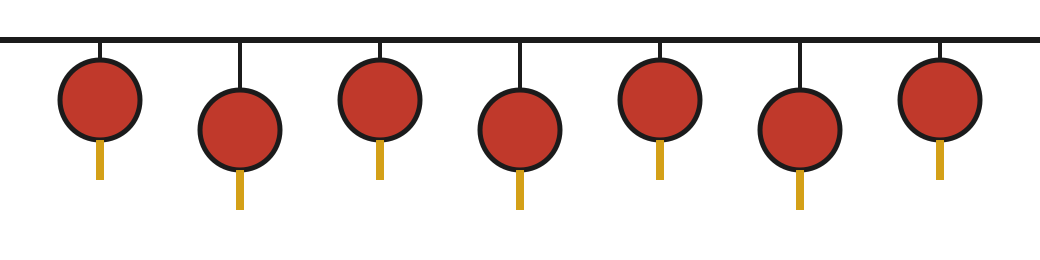
[100 + 140 * n for n in range(7)] is a list comprehension: it makes a whole list in one line. Read it as "100 + 140 × n, for each n from 0 to 6": 100, 240, 380 and so on to 940. zip(xs, ys) walks two lists side by side, one pair at a time. lantern(x, y) is a function: def gives it a name and the two numbers it needs, and return hands back the text of one lantern. "".join(shapes) glues a list of texts into one.
[100 + 140 * n for n in range(7)] คือลิสต์คอมพรีเฮนชัน มันสร้างลิสต์ทั้งลิสต์ในบรรทัดเดียว อ่านว่า "100 + 140 × n สำหรับ n แต่ละตัวตั้งแต่ 0 ถึง 6" ได้ 100, 240, 380 ไปจนถึง 940 zip(xs, ys) เดินไปตามลิสต์สองลิสต์พร้อมกัน ทีละคู่ lantern(x, y) คือฟังก์ชัน def ตั้งชื่อให้มันและบอกตัวเลขสองตัวที่มันต้องใช้ แล้ว return ส่งข้อความของโคมหนึ่งใบกลับมา "".join(shapes) ต่อข้อความในลิสต์ให้เป็นข้อความเดียว
[100 + 140 * n for n in range(7)] 是一个列表推导式:一行就做出整个列表。读作"对 0 到 6 的每个 n,算 100 + 140 × n":得到 100、240、380……一直到 940。zip(xs, ys) 并排走过两个列表,一次取一对。lantern(x, y) 是一个函数:def 给它起名字,并说明它需要的两个数字,return 交回一盏灯笼的文字。"".join(shapes) 把一个文字列表粘成一段。
🧠 Quiz 1: what will this print?🧠 แบบทดสอบ 1: มันจะพิมพ์อะไร🧠 小测验 1:它会打印什么?
Pick an answer. Then the page shows which one is right and why, and you can run the program yourself.เลือกคำตอบ แล้วหน้านี้จะบอกว่าข้อไหนถูกและเพราะอะไร และคุณรันโปรแกรมเองได้选一个答案。然后这一页会告诉你哪个是对的、为什么,你也可以自己运行这个程序。
# Quiz 1: what will this print?
xs = [10, 20, 30]
ys = [5, 6]
print([x + y for x, y in zip(xs, ys)])✅ Right!✅ ถูกต้อง!✅ 答对了!
Not this one. The marked answer is the right one.ยังไม่ใช่ คำตอบที่มีเครื่องหมายคือคำตอบที่ถูก不是这个。标出来的那个才是对的。
zip() stops at the end of the shorter list. ys has only two numbers, so there are only two pairs, 10 with 5 and 20 with 6, and 30 is never used.zip() หยุดเมื่อถึงท้ายลิสต์ที่สั้นกว่า ys มีตัวเลขแค่สองตัว จึงมีแค่สองคู่ คือ 10 กับ 5 และ 20 กับ 6 ส่วน 30 ไม่ได้ใช้เลยzip() 走到较短的那个列表的末尾就停。ys 只有两个数,所以只有两对:10 配 5,20 配 6,30 根本没用上。
what it printedสิ่งที่มันพิมพ์ออกมา它打印的内容
[15, 26]🔎 Part 1 — Research · ส่วนที่ 1 — ค้นคว้า · 第 1 部分 —— 研究
🇬🇧 English
A framework starts with looking, not with code. In this part you choose what to learn from, write down what you learned as rules, and find out how other people's code is built. Codex helps at each step, but you choose, and you check.
🇹🇭 ไทย
เฟรมเวิร์กเริ่มจากการดู ไม่ใช่จากโค้ด ในส่วนนี้คุณเลือกว่าจะเรียนจากอะไร เขียนสิ่งที่เรียนรู้ลงเป็นกฎ และหาว่าโค้ดของคนอื่นถูกสร้างขึ้นอย่างไร Codex ช่วยในทุกขั้น แต่คุณเป็นคนเลือก และคุณเป็นคนตรวจ
🇨🇳 中文
框架从看开始,不是从代码开始。在这一部分,你挑选要学习的对象,把学到的东西写成规则,并弄清别人的代码是怎样搭起来的。每一步 Codex 都会帮忙,但挑选的是你,检查的也是你。
1 A repository on GitHub · รีโพซิทอรีบน GitHub · GitHub 上的一个仓库
🇬🇧 English
Start on GitHub, so that your work has a home off your Mac. Sign in at github.com, press + and New repository, name it mycartoon, choose Private, turn on Add README and press Create repository. Then type these in the Terminal, with your own name in place of YOUR-NAME. A private repository can be copied only when git is signed in: gh auth login does that, as step 5 of the Codex on a Mac page shows.
🇹🇭 ไทย
เริ่มที่ GitHub เพื่อให้งานของคุณมีบ้านอยู่นอกแมค ลงชื่อเข้าใช้ที่ github.com กด + แล้วกด New repository ตั้งชื่อว่า mycartoon เลือก Private เปิด Add README แล้วกด Create repository จากนั้นพิมพ์คำสั่งเหล่านี้ใน Terminal โดยใส่ชื่อของคุณเองแทน YOUR-NAME รีโพซิทอรีส่วนตัวคัดลอกได้เมื่อ git ลงชื่อเข้าใช้แล้วเท่านั้น คำสั่ง gh auth login ทำสิ่งนั้น ตามที่ขั้นตอนที่ 5 ของหน้า Codex บนแมคแสดงไว้
🇨🇳 中文
从 GitHub 开始,这样你的作品在 Mac 之外也有个家。在 github.com 登录,按 + 和 New repository,命名为 mycartoon,选 Private,打开 Add README,再按 Create repository。然后在终端里输入下面几行,把 YOUR-NAME 换成你自己的名字。私有仓库只有在 git 登录之后才能复制:gh auth login 就是做这个的,在 Mac 上用 Codex 那一页的第 5 步讲过。
not run by us: in the Terminal, with your own GitHub nameเราไม่ได้รันเอง: ใน Terminal โดยใส่ชื่อ GitHub ของคุณเอง我们没有运行过:在终端里,换上你自己的 GitHub 名字
cd ~
git clone https://github.com/YOUR-NAME/mycartoon.git
cd mycartoon
mkdir research refs
🇬🇧 English
Then make two files with vim. .gitignore lists what git must never keep: the sample video, its stills and other people's repositories are big, and they are not yours to publish. AGENTS.md is what Codex reads first, each time it starts in this folder: what the repository is, and the rules it must keep. Write it now, and it guides every step after this one.
🇹🇭 ไทย
แล้วสร้างไฟล์สองไฟล์ด้วย vim ไฟล์ .gitignore บอกว่า git ห้ามเก็บอะไรบ้าง วิดีโอตัวอย่าง ภาพนิ่งของมัน และรีโพซิทอรีของคนอื่นมีขนาดใหญ่ และไม่ใช่ของคุณที่จะเผยแพร่ ส่วน AGENTS.md คือสิ่งที่ Codex อ่านเป็นอย่างแรกทุกครั้งที่เริ่มในโฟลเดอร์นี้ ว่ารีโพซิทอรีนี้คืออะไร และมีกฎอะไรที่ต้องรักษา เขียนมันตอนนี้ แล้วมันจะนำทางทุกขั้นหลังจากนี้
🇨🇳 中文
然后用 vim 建两个文件。.gitignore 列出 git 绝不能保存的东西:样片、它的静帧和别人的仓库都很大,而且不是你可以发布的。AGENTS.md 是 Codex 每次在这个文件夹里启动时最先读的:这个仓库是什么,以及必须遵守的规则。现在就写好它,之后的每一步它都会引路。
.gitignore
research/sample.webm
research/stills/
refs/
*.mp4
*.jpg
AGENTS.md
# mycartoon

A cartoon framework in JavaScript. Every picture is drawn by code, by the
rules in STYLE.md.

- Read STYLE.md before you draw anything. Each rule there has a number: keep it.
- world.js holds the drawing functions. Each film is one page beside it, like
  walk.html: it loads world.js and has LENGTH, draw(t) and the switch rendering.
  draw(t) draws second t from nothing, every time.
- refs/ holds other people's repositories, to learn their method from. Read
  them; never copy their drawings into world.js, and never change them.
- research/stills/ holds pictures of the sample video. They are for looking
  at only: never trace them, and never commit them.
- After every change, look at the pictures:
  python3 refs/lannamation/kit/stills.py walk.html look.jpg 0 0.25 0.5 0.75
- A refactor must leave every picture the same. Take stills before and after,
  then: python3 same.py before.jpg after.jpg
🧠 Quiz 2🧠 แบบทดสอบ 2🧠 小测验 2
Pick an answer. Then the page shows which one is right, and why.เลือกคำตอบ แล้วหน้านี้จะบอกว่าข้อไหนถูก และเพราะอะไร选一个答案。然后这一页会告诉你哪个是对的,以及为什么。
Why are research/stills/ and refs/ in .gitignore?ทำไม research/stills/ และ refs/ จึงอยู่ใน .gitignore为什么 research/stills/ 和 refs/ 写在 .gitignore 里?
✅ Right!✅ ถูกต้อง!✅ 答对了!
Not this one. The marked answer is the right one.ยังไม่ใช่ คำตอบที่มีเครื่องหมายคือคำตอบที่ถูก不是这个。标出来的那个才是对的。
Git can keep pictures, and Codex reads files whether git keeps them or not. The stills are pictures of someone else's film, and refs/ is someone else's code, which already has a home on GitHub. Your repository keeps what you made: the rules, the code, the skill.git เก็บรูปภาพได้ และ Codex อ่านไฟล์ได้ไม่ว่า git จะเก็บมันหรือไม่ ภาพนิ่งเป็นภาพจากหนังของคนอื่น และ refs/ เป็นโค้ดของคนอื่นซึ่งมีบ้านบน GitHub อยู่แล้ว รีโพซิทอรีของคุณเก็บสิ่งที่คุณสร้าง คือกฎ โค้ด และสกิลgit 能存图片,Codex 也能读文件,不管 git 存不存它。静帧是别人影片的画面,refs/ 是别人的代码,它在 GitHub 上已经有家了。你的仓库存的是你做的东西:规则、代码和技能。
2 A sample video, and stills from it · วิดีโอตัวอย่าง และภาพนิ่งจากมัน · 一段样片,和从中截出的静帧
🇬🇧 English
Choose one video to learn from, the way the kit began with one cartoon of the 1930s. Look for three things. It is made of shapes: flat colours and clear outlines, not a photo and not a painting. Something in it moves the way you want your characters to move: a walk, a jump, a dance. And you may use it. The safest videos are in the public domain or under a free licence, on Wikimedia Commons and the Internet Archive. Write down where yours came from and its licence. You may learn rules from any video you can watch, but its pictures stay on your computer and out of your repository.
Our example uses Steamboat Willie (1928), which is in the public domain. Commons keeps it at full size, 393 MB, and in smaller copies: we saved the 480p copy, 42 MB, as research/sample.webm. Mickey Mouse is still a trademark of Disney, so the example learns how the film draws and moves, and its characters are its own.
Codex cannot watch a video, but it can look at pictures. take_stills.py cuts one still every few seconds, with ffmpeg:
🇹🇭 ไทย
เลือกวิดีโอหนึ่งเรื่องไว้เรียน เหมือนที่ชุดเครื่องมือเริ่มจากการ์ตูนยุค 1930 เรื่องเดียว มองหาสามอย่าง หนึ่ง มันทำจากรูปทรง คือสีเรียบและเส้นขอบชัด ไม่ใช่ภาพถ่ายและไม่ใช่ภาพวาดสีน้ำมัน สอง มีบางอย่างในนั้นที่เคลื่อนไหวแบบที่คุณอยากให้ตัวละครของคุณเคลื่อนไหว เช่น การเดิน การกระโดด การเต้น สาม คุณใช้มันได้ วิดีโอที่ปลอดภัยที่สุดคือวิดีโอที่เป็นสาธารณสมบัติหรือใช้สัญญาอนุญาตเสรี บน Wikimedia Commons และ Internet Archive จดไว้ว่าวิดีโอของคุณมาจากไหนและใช้สัญญาอนุญาตอะไร คุณเรียนกฎจากวิดีโอใดก็ได้ที่คุณดูได้ แต่ภาพของมันต้องอยู่ในคอมพิวเตอร์ของคุณ และอยู่นอกรีโพซิทอรี
ตัวอย่างของเราใช้ Steamboat Willie (1928) ซึ่งเป็นสาธารณสมบัติแล้ว Commons เก็บไว้ทั้งขนาดเต็ม 393 MB และสำเนาที่เล็กกว่า เราบันทึกสำเนา 480p ขนาด 42 MB ไว้เป็น research/sample.webm มิกกี้เมาส์ยังเป็นเครื่องหมายการค้าของดิสนีย์อยู่ ตัวอย่างนี้จึงเรียนแค่วิธีที่หนังวาดและเคลื่อนไหว ส่วนตัวละครเป็นของมันเอง
Codex ดูวิดีโอไม่ได้ แต่ดูภาพได้ take_stills.py ตัดภาพนิ่งออกมาทุก ๆ ไม่กี่วินาทีด้วย ffmpeg:
🇨🇳 中文
挑一段视频来学,就像工具包当初从一部 1930 年代的卡通开始那样。找三样东西。它是由形状组成的:平涂的颜色和清楚的轮廓,不是照片,也不是油画。里面有东西的动法正是你想让你的角色那样动的:走路、跳、跳舞。而且你可以用它。最稳妥的是公有领域或自由许可的视频,在 Wikimedia Commons 和 Internet Archive 上。写下你的视频从哪里来、用什么许可。你可以从任何你能看的视频里学规则,但它的画面要留在你的电脑里,不能进你的仓库。
我们的例子用的是《汽船威利》(1928),它已经进入公有领域。Commons 保存着它的原尺寸版本(393 MB)和较小的版本:我们存了 480p 的那份(42 MB),命名为 research/sample.webm。米老鼠仍然是迪士尼的商标,所以这个例子只学这部片子怎样画、怎样动,角色是它自己的。
Codex 看不了视频,但能看图片。take_stills.py 用 ffmpeg 每隔几秒截一张静帧:
take_stills.py
"""take_stills.py - take still pictures out of a video, a few seconds apart.

    python3 take_stills.py research/sample.webm 460 30

The three words after the file name are the video, how many seconds long it
is, and how many seconds apart the pictures are. Codex cannot watch a video,
but it can look at pictures, so this file turns the video into pictures.
ffmpeg does the cutting (brew install ffmpeg). Without ffmpeg, this file only
prints the commands it would run.
"""
import pathlib
import shutil
import subprocess
import sys


def seconds_to_take(length, gap):
    # every gap-th second, from 0 to the end: 0, 30, 60, ...
    return [second for second in range(0, length, gap)]


def picture_name(second):
    # 7 becomes still_007.png, so the pictures sort in order
    return "still_" + str(second).zfill(3) + ".png"


def ffmpeg_command(video, second, picture):
    # -ss: go to this second; -frames:v 1: keep one picture
    return ["ffmpeg", "-loglevel", "error", "-y", "-ss", str(second),
            "-i", video, "-frames:v", "1", picture]


def main():
    video = sys.argv[1]
    length = int(sys.argv[2])
    gap = int(sys.argv[3])
    folder = pathlib.Path("research/stills")
    folder.mkdir(parents=True, exist_ok=True)

    seconds = seconds_to_take(length, gap)
    pictures = [str(folder / picture_name(second)) for second in seconds]
    print(len(pictures), "pictures, one every", gap, "seconds")

    have_ffmpeg = shutil.which("ffmpeg") is not None
    for second, picture in zip(seconds, pictures):
        command = ffmpeg_command(video, second, picture)
        if have_ffmpeg:
            subprocess.run(command, check=True)
            print("saved", picture)
        else:
            print(" ".join(command))
    if not have_ffmpeg:
        print("No ffmpeg here, so nothing was saved: these are the commands.")


if __name__ == "__main__":
    main()
in the Terminal, in your repositoryใน Terminal ในรีโพซิทอรีของคุณ在终端里,在你的仓库中
python3 take_stills.py research/sample.webm 460 30what it printedสิ่งที่มันพิมพ์ออกมา它打印的内容
16 pictures, one every 30 seconds
saved research/stills/still_000.png
saved research/stills/still_030.png
saved research/stills/still_060.png
saved research/stills/still_090.png
saved research/stills/still_120.png
saved research/stills/still_150.png
saved research/stills/still_180.png
saved research/stills/still_210.png
saved research/stills/still_240.png
saved research/stills/still_270.png
saved research/stills/still_300.png
saved research/stills/still_330.png
saved research/stills/still_360.png
saved research/stills/still_390.png
saved research/stills/still_420.png
saved research/stills/still_450.png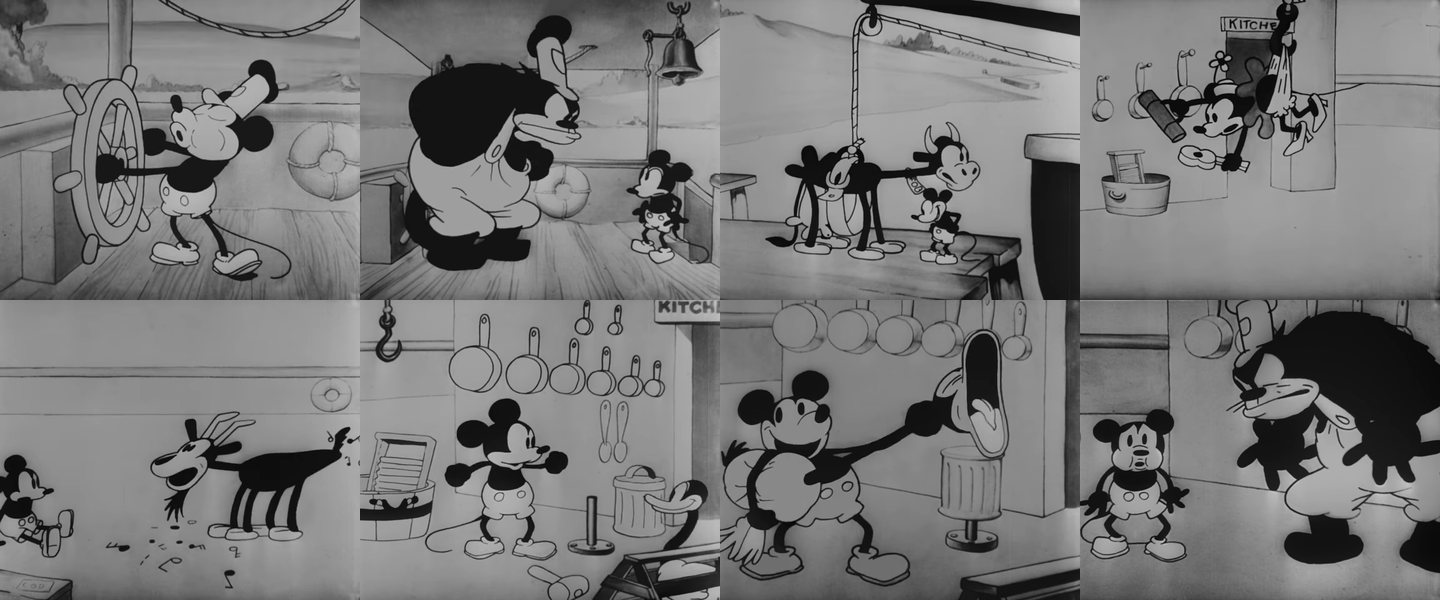
seconds_to_take(), picture_name() and ffmpeg_command() are functions: each does one small job and gives back its answer with return, so main() reads like a list of what happens. [second for second in range(0, length, gap)] is a list comprehension: range(0, 460, 30) counts 0, 30, 60 and on to 450. str(7).zfill(3) pads 7 to 007, so the pictures sort in order. shutil.which("ffmpeg") asks whether a program is installed. It gives None when it is not, and then the file only prints what it would run, which is what ▶ Run shows here.
seconds_to_take(), picture_name() และ ffmpeg_command() คือฟังก์ชัน แต่ละตัวทำงานเล็ก ๆ งานเดียว แล้วส่งคำตอบกลับด้วย return ทำให้ main() อ่านได้เหมือนรายการของสิ่งที่เกิดขึ้น [second for second in range(0, length, gap)] คือลิสต์คอมพรีเฮนชัน range(0, 460, 30) นับ 0, 30, 60 ไปจนถึง 450 str(7).zfill(3) เติม 7 ให้เป็น 007 ภาพจึงเรียงตามลำดับ shutil.which("ffmpeg") ถามว่าติดตั้งโปรแกรมนั้นไว้หรือไม่ ถ้าไม่ได้ติดตั้งมันจะให้ค่า None แล้วไฟล์นี้จะแค่พิมพ์สิ่งที่มันจะรัน ซึ่งก็คือสิ่งที่ ▶ Run แสดงตรงนี้
seconds_to_take()、picture_name() 和 ffmpeg_command() 都是函数:每个只做一件小事,用 return 交回答案,所以 main() 读起来就像一张"发生了什么"的清单。[second for second in range(0, length, gap)] 是列表推导式:range(0, 460, 30) 数 0、30、60,一直到 450。str(7).zfill(3) 把 7 补成 007,图片就能按顺序排好。shutil.which("ffmpeg") 问某个程序有没有装。没装时它给出 None,这个文件就只打印它本来要运行的命令,▶ Run 在这里显示的就是这些。
🇬🇧 English
Write down what you studied, and why, in research/notes.md. Codex reads it too, and in a month you will want to know where your rules came from.
🇹🇭 ไทย
จดสิ่งที่คุณศึกษาและเหตุผลไว้ใน research/notes.md Codex ก็อ่านมันด้วย และอีกเดือนหนึ่งคุณจะอยากรู้ว่ากฎของคุณมาจากไหน
🇨🇳 中文
把你研究了什么、为什么研究,写进 research/notes.md。Codex 也会读它;过一个月,你会想知道你的规则是从哪里来的。
research/notes.md
# Research notes

## The sample video

- Steamboat Willie (1928), by Walt Disney and Ub Iwerks. Public domain.
- From Wikimedia Commons:
  https://commons.wikimedia.org/wiki/File:Steamboat_Willie_(1928)_by_Walt_Disney.webm
- I saved the 480p copy (42 MB, 7 minutes 40 seconds) as research/sample.webm.
- 16 stills, one every 30 seconds: python3 take_stills.py research/sample.webm 460 30

## Why this one

- It is made of shapes: circles, ovals and thick lines, in black, white and
  grey. Code draws that kind of picture well.
- Its characters walk and bounce a lot, so there is a walk to learn from.

## What I looked at

- still_270 and still_330: how big the head is beside the body, how the arms
  bend, how big the shoes are.
- still_210: a character running, legs far apart and bent like hoses.

## What I will not do

- Copy a character. Mickey Mouse is still a trademark of Disney, and my world
  has characters of its own.
🧠 Quiz 3: what will this print?🧠 แบบทดสอบ 3: มันจะพิมพ์อะไร🧠 小测验 3:它会打印什么?
Pick an answer. Then the page shows which one is right and why, and you can run the program yourself.เลือกคำตอบ แล้วหน้านี้จะบอกว่าข้อไหนถูกและเพราะอะไร และคุณรันโปรแกรมเองได้选一个答案。然后这一页会告诉你哪个是对的、为什么,你也可以自己运行这个程序。
# Quiz 3: what will this print?
seconds = [second for second in range(0, 100, 30)]
print(seconds)✅ Right!✅ ถูกต้อง!✅ 答对了!
Not this one. The marked answer is the right one.ยังไม่ใช่ คำตอบที่มีเครื่องหมายคือคำตอบที่ถูก不是这个。标出来的那个才是对的。
range(0, 100, 30) starts at 0 and adds 30 each time, and it stops before 100: the end number is never in it. So it counts 0, 30, 60 and 90.range(0, 100, 30) เริ่มที่ 0 แล้วบวก 30 ทุกครั้ง และหยุดก่อนถึง 100 ตัวเลขสุดท้ายไม่เคยอยู่ในนั้น จึงนับ 0, 30, 60 และ 90range(0, 100, 30) 从 0 开始,每次加 30,并且在 100 之前停下:结束的那个数永远不在里面。所以它数 0、30、60 和 90。
what it printedสิ่งที่มันพิมพ์ออกมา它打印的内容
[0, 30, 60, 90]3 Rules, not copies: STYLE.md · กฎ ไม่ใช่การลอก: STYLE.md · 要规则,不要照抄:STYLE.md
🇬🇧 English
Now look closely, one small thing at a time, and write each thing you see as a rule with a number. The head is big
is not a rule yet. The head is a circle 0.38 as wide as the character is tall
is one: Codex can follow it, and you can check it. Rules are all you take from the video: never a traced line, never a copied character.
Give Codex the stills and ask it to help. -i attaches pictures to a prompt; for several, put commas between them:
🇹🇭 ไทย
ตอนนี้ให้ดูให้ละเอียดทีละอย่าง แล้วเขียนทุกอย่างที่เห็นเป็นกฎที่มีตัวเลข หัวใหญ่
ยังไม่ใช่กฎ หัวเป็นวงกลม กว้าง 0.38 เท่าของความสูงตัวละคร
คือกฎ Codex ทำตามได้ และคุณตรวจได้ สิ่งเดียวที่คุณเอามาจากวิดีโอคือกฎ ไม่เคยเอาเส้นที่ลอกลาย และไม่เคยลอกตัวละคร
ส่งภาพนิ่งให้ Codex แล้วขอให้มันช่วย -i แนบภาพไปกับพรอมต์ ถ้ามีหลายภาพให้คั่นด้วยจุลภาค:
🇨🇳 中文
现在仔细看,一次只看一个小东西,把看到的每样东西写成一条带数字的规则。头很大
还不算规则。头是一个圆,宽度是角色身高的 0.38
才算:Codex 能照着做,你也能检查。你从视频里拿走的只有规则:绝不描线,绝不照抄角色。
把静帧交给 Codex,请它帮忙。-i 把图片附到提示词上;有好几张时,用逗号隔开:
not run by us: in the Terminal, in your repositoryเราไม่ได้รันเอง: ใน Terminal ในรีโพซิทอรีของคุณ我们没有运行过:在终端里,在你的仓库中
codex -i research/stills/still_060.png,research/stills/still_270.png,research/stills/still_330.png "These are stills from my sample video, Steamboat Willie (1928), which is in the public domain. Do not describe or copy any character. Look only at HOW things are drawn, and write STYLE.md: a heading for each of colours, outline, head, body, arms, hands, legs and feet, and under each, two or three rules with numbers I can check in a picture, such as how wide the head is beside the height, or how thick a line is. My characters will be my own, so no rule may name a character from the film."🇬🇧 English
Read what it writes against the stills yourself, and change whatever is wrong: you decide the style, and Codex only writes it down. Our STYLE.md after the first look:
🇹🇭 ไทย
อ่านสิ่งที่มันเขียนเทียบกับภาพนิ่งด้วยตัวเอง และแก้ส่วนที่ผิด คุณเป็นคนตัดสินสไตล์ Codex แค่เขียนมันลงไป นี่คือ STYLE.md ของเราหลังการดูครั้งแรก:
🇨🇳 中文
自己对照静帧读一读它写的东西,哪里不对就改:风格由你决定,Codex 只负责写下来。这是我们第一次看完之后的 STYLE.md:
STYLE.md
# STYLE.md - the rules of my cartoon world

Learned from one sample video: Steamboat Willie (1928), in the public domain,
16 stills, one every 30 seconds. These are rules, not copies: no character,
drawing or line of the film is in this repository. The characters of my
world are my own.

## Colours

- Three flat colours and nothing in between: ink #1b1b1b, chalk #f4f1ea and
  stone #9a968c, on paper #d9d4c7.
- No gradients, and no shading inside a shape.

## Outline

- Every chalk shape has an ink outline 6 pixels thick. Ink shapes have none.

## Head

- A circle. Its width is 0.38 of the character's height.

## Body

- An ink oval, with chalk shorts at the bottom and two ink buttons on them.
  The head is nearly twice as wide as the body.

## Arms

- A rubber hose: one curved ink line 16 pixels thick, with no elbow. From the
  shoulder to the hand is 0.3 of the height.

## Hands

- A chalk glove: a circle 40 pixels across, with an outline.

## Legs

- A hose 22 pixels thick, with no knee. From the hip to the foot is 0.32 of
  the height.

## Feet

- Big ink shoes: ovals 68 pixels long, pointing the way the character faces.
🇬🇧 English
rules_left.py tells you which parts have no rule yet, so you know what to look at next:
🇹🇭 ไทย
rules_left.py บอกว่าส่วนไหนยังไม่มีกฎ คุณจะได้รู้ว่าต้องดูอะไรต่อ:
🇨🇳 中文
rules_left.py 告诉你哪些部分还没有规则,这样你就知道接下来该看什么:
rules_left.py
"""rules_left.py - which parts of a character have no rule in STYLE.md yet?

    python3 rules_left.py STYLE.md

A style is a list of rules, each about one part: the head, the arms, the walk.
This file reads your STYLE.md and tells you which parts it never names, so you
know what to look at next in your sample video.
"""
import sys

PARTS = {"head", "eyes", "mouth", "body", "arms", "hands",
         "legs", "feet", "walk", "colours", "outline"}


def words_in(path):
    text = open(path).read().lower()
    for mark in ".,:;()-*#`":
        text = text.replace(mark, " ")
    return set(text.split())


def main():
    words = words_in(sys.argv[1])
    named = PARTS & words      # in both sets: the parts that have a rule
    left = PARTS - words       # in PARTS but not in the file: no rule yet
    print("Rules for:", ", ".join(sorted(named)))
    print("No rule yet:", ", ".join(sorted(left)) or "none")


if __name__ == "__main__":
    main()
in the Terminal, in your repositoryใน Terminal ในรีโพซิทอรีของคุณ在终端里,在你的仓库中
python3 rules_left.py STYLE.mdwhat it printedสิ่งที่มันพิมพ์ออกมา它打印的内容
Rules for: arms, body, colours, feet, hands, head, legs, outline
No rule yet: eyes, mouth, walkPARTS is a set: a bag of names written in { }, with no order and no repeats. set(text.split()) makes a set of every word in the file, each word once. Two signs do the work. & keeps what is in both sets: the parts the file names. - keeps what is in the first set and not in the second: the parts it never names. A set has no order of its own, so sorted() puts the names in a–z order before they are printed.
PARTS คือเซต ถุงที่ใส่ชื่อไว้ เขียนใน { } ไม่มีลำดับและไม่มีตัวซ้ำ set(text.split()) สร้างเซตของทุกคำในไฟล์ คำละหนึ่งครั้ง เครื่องหมายสองตัวทำงานหลัก & เก็บสิ่งที่อยู่ในทั้งสองเซต คือส่วนที่ไฟล์เอ่ยถึง - เก็บสิ่งที่อยู่ในเซตแรกแต่ไม่อยู่ในเซตที่สอง คือส่วนที่ไฟล์ไม่เคยเอ่ยถึง เซตไม่มีลำดับของตัวเอง sorted() จึงเรียงชื่อตามตัวอักษรก่อนพิมพ์
PARTS 是一个集合:一袋名字,写在 { } 里,没有顺序,也没有重复。set(text.split()) 把文件里的每个词做成一个集合,每个词只出现一次。干活的是两个符号。& 留下两个集合里都有的:文件提到的部分。- 留下第一个集合里有、第二个里没有的:文件从没提到的部分。集合本身没有顺序,所以打印之前用 sorted() 把名字按字母顺序排好。
🧠 Quiz 4: what will this print?🧠 แบบทดสอบ 4: มันจะพิมพ์อะไร🧠 小测验 4:它会打印什么?
Pick an answer. Then the page shows which one is right and why, and you can run the program yourself.เลือกคำตอบ แล้วหน้านี้จะบอกว่าข้อไหนถูกและเพราะอะไร และคุณรันโปรแกรมเองได้选一个答案。然后这一页会告诉你哪个是对的、为什么,你也可以自己运行这个程序。
# Quiz 4: what will this print?
PARTS = {"head", "arms", "legs"}
words = {"the", "head", "is", "round", "and", "the", "legs", "bend"}
print(sorted(PARTS - words))✅ Right!✅ ถูกต้อง!✅ 答对了!
Not this one. The marked answer is the right one.ยังไม่ใช่ คำตอบที่มีเครื่องหมายคือคำตอบที่ถูก不是这个。标出来的那个才是对的。
PARTS - words keeps what is in PARTS and not in words. head and legs are in both, so they go; arms is not among the words, so it stays. The other words were never in PARTS. ['head', 'legs'] would be PARTS & words.PARTS - words เก็บสิ่งที่อยู่ใน PARTS แต่ไม่อยู่ใน words head และ legs อยู่ในทั้งสองเซต จึงถูกตัดออก arms ไม่อยู่ในคำเหล่านั้น จึงยังอยู่ คำอื่น ๆ ไม่เคยอยู่ใน PARTS ส่วน ['head', 'legs'] คือผลของ PARTS & wordsPARTS - words 留下在 PARTS 里、不在 words 里的。head 和 legs 两边都有,所以被去掉;arms 不在那些词里,所以留下。其他的词本来就不在 PARTS 里。['head', 'legs'] 是 PARTS & words 的结果。
what it printedสิ่งที่มันพิมพ์ออกมา它打印的内容
['arms']4 Repositories to learn method from · รีโพซิทอรีที่ใช้เรียนวิธีทำงาน · 用来学方法的仓库
🇬🇧 English
A sample video teaches a look. Other people's code teaches method: how they split the drawing into functions, how one frame is drawn, how they check their work. Clone three open-source repositories into refs/. Codex reads them there, on your Mac, and AGENTS.md tells it never to copy their drawings. --depth 1 fetches only the latest version, so a clone stays small: lannamation was 18 MB.
- lannamation (MIT), the Lanna kit: rules written as numbers in
docs/STYLE.md, onedraw(t)for each film page, a check after every change. Itsstills.pyandrender.pywork on any page that hasdraw(t),LENGTHandrendering, so your framework can use them as they are. - Rough.js (MIT): how a hand-drawn line is made from a straight one, with geometry and small random wobbles.
- Zdog (MIT): flat, round shapes that turn in 3D, one function for each kind of shape.
A licence says what you may do with code. All three are MIT: you may read, use and change them, as long as you keep their licence notice. Learning a method from them is always allowed; code copied from them takes its notice with it.
🇹🇭 ไทย
วิดีโอตัวอย่างสอนรูปลักษณ์ ส่วนโค้ดของคนอื่นสอนวิธีทำงาน ว่าเขาแบ่งการวาดเป็นฟังก์ชันอย่างไร วาดเฟรมหนึ่งอย่างไร และตรวจงานของตัวเองอย่างไร โคลนรีโพซิทอรีโอเพนซอร์สสามแห่งลงใน refs/ Codex อ่านมันที่นั่นบนแมคของคุณ และ AGENTS.md บอกมันว่าห้ามลอกภาพวาดของเขา --depth 1 ดึงมาแค่เวอร์ชันล่าสุด ไฟล์ที่โคลนจึงเล็ก lannamation มีขนาด 18 MB
- lannamation (MIT) ชุดเครื่องมือล้านนา: กฎที่เขียนเป็นตัวเลขใน
docs/STYLE.mdหน้าหนังแต่ละหน้ามีdraw(t)หนึ่งตัว และตรวจทุกครั้งหลังแก้stills.pyและrender.pyของมันใช้ได้กับทุกหน้าที่มีdraw(t),LENGTHและrenderingเฟรมเวิร์กของคุณจึงใช้มันได้เลย - Rough.js (MIT): เส้นที่ดูเหมือนวาดด้วยมือสร้างจากเส้นตรงได้อย่างไร ด้วยเรขาคณิตและการสั่นแบบสุ่มเล็กน้อย
- Zdog (MIT): รูปทรงแบน ๆ กลม ๆ ที่หมุนในสามมิติได้ รูปทรงแต่ละชนิดมีฟังก์ชันของตัวเอง
สัญญาอนุญาตบอกว่าคุณทำอะไรกับโค้ดได้บ้าง ทั้งสามแห่งใช้ MIT คุณอ่าน ใช้ และแก้ไขได้ ตราบใดที่คุณเก็บข้อความสัญญาอนุญาตของมันไว้ การเรียนวิธีทำงานจากมันทำได้เสมอ ส่วนโค้ดที่ลอกมาจากมันต้องพาข้อความสัญญาอนุญาตติดมาด้วย
🇨🇳 中文
样片教的是样子。别人的代码教的是方法:他们怎样把画图拆成函数,怎样画出一帧,怎样检查自己的作品。把三个开源仓库克隆到 refs/ 里。Codex 就在你的 Mac 上读它们,而 AGENTS.md 告诉它绝不能照抄它们的图。--depth 1 只取最新的版本,所以克隆下来的东西很小:lannamation 是 18 MB。
- lannamation(MIT),兰纳工具包:规则以数字写在
docs/STYLE.md里,每个影片网页一个draw(t),每次改动之后都检查。它的stills.py和render.py对任何有draw(t)、LENGTH和rendering的网页都能用,所以你的框架可以直接用它们。 - Rough.js(MIT):一条像手画的线是怎样从直线做出来的,靠几何和小小的随机抖动。
- Zdog(MIT):扁扁、圆圆、能在三维里转动的形状,每种形状一个函数。
许可证说明你可以拿代码做什么。这三个都是 MIT:你可以读、用、改,只要保留它们的许可声明。从它们那里学方法永远是允许的;从它们那里照抄来的代码,要连同它的声明一起带上。
in the Terminal, in your repository (we ran the first clone, on 25 October)ใน Terminal ในรีโพซิทอรีของคุณ (เรารันการโคลนแรกเมื่อ 25 ตุลาคม)在终端里,在你的仓库中(第一条克隆我们在 10 月 25 日运行过)
cd refs
git clone --depth 1 https://github.com/ddtraveller/lannamation
git clone --depth 1 https://github.com/rough-stuff/rough
git clone --depth 1 https://github.com/metafizzy/zdog
cd ..
🇬🇧 English
Then ask Codex to read them for method, and to write what it learned in a file you can read and correct:
🇹🇭 ไทย
จากนั้นขอให้ Codex อ่านมันเพื่อหาวิธีทำงาน แล้วเขียนสิ่งที่มันเรียนรู้ลงในไฟล์ที่คุณอ่านและแก้ได้:
🇨🇳 中文
然后请 Codex 读它们、学方法,再把学到的东西写进一个你能读、能改的文件:
not run by us: in the Terminal, in your repositoryเราไม่ได้รันเอง: ใน Terminal ในรีโพซิทอรีของคุณ我们没有运行过:在终端里,在你的仓库中
codex "Read refs/lannamation/README.md and refs/lannamation/docs/STYLE.md, then the README of refs/rough and of refs/zdog. Do not copy any code or drawing into my files. Write METHOD.md: for each of the three, in plain words, how the code is split into files and functions, how one picture is drawn, and how its author checks the result. End with the five habits my framework should take from them, each with the file you learned it from."🧠 Quiz 5🧠 แบบทดสอบ 5🧠 小测验 5
Pick an answer. Then the page shows which one is right, and why.เลือกคำตอบ แล้วหน้านี้จะบอกว่าข้อไหนถูก และเพราะอะไร选一个答案。然后这一页会告诉你哪个是对的,以及为什么。
What should Codex take from the repositories in refs/?Codex ควรเอาอะไรจากรีโพซิทอรีใน refs/Codex 应该从 refs/ 里的仓库拿走什么?
✅ Right!✅ ถูกต้อง!✅ 答对了!
Not this one. The marked answer is the right one.ยังไม่ใช่ คำตอบที่มีเครื่องหมายคือคำตอบที่ถูก不是这个。标出来的那个才是对的。
Open-source code is there to be read, and its method is the useful part: one function per thing, a draw for every frame, a check after every change. Its drawings are its author's, and they would not be in your style anyway.โค้ดโอเพนซอร์สมีไว้ให้อ่าน และวิธีทำงานของมันคือส่วนที่มีประโยชน์ ฟังก์ชันละหนึ่งอย่าง การวาดทุกเฟรม และการตรวจทุกครั้งหลังแก้ ภาพวาดเป็นของผู้เขียน และอย่างไรก็ไม่ได้อยู่ในสไตล์ของคุณ开源代码就是给人读的,有用的是它的方法:一样东西一个函数,每一帧画一次,每次改动后都检查。它的图属于它的作者,而且反正也不是你的风格。
5 REA: how a living scene works · REA: ฉากมีชีวิตทำงานอย่างไร · REA:活的场景是怎样运作的
🇬🇧 English
Reading code is not always the quickest way in. krueng.ai/living_scenes.html is a page of the Lanna kit where animals and people go about their day by themselves: they graze, sniff, peck, and fly off when something startles them. How does it decide what each one does? REA (Reverse Engineer Anything) can watch the page run and count how many times each of its functions is called. The names that run most are where the method is.
REA's web tools work through Chrome's debugging port, so start a Chrome of its own first, with no window. list-browser-targets prints the page's target_id; put it in place of TARGET-ID. When you are done, kill %1 stops that Chrome.
🇹🇭 ไทย
การอ่านโค้ดไม่ได้เป็นทางที่เร็วที่สุดเสมอไป krueng.ai/living_scenes.html เป็นหน้าหนึ่งของชุดเครื่องมือล้านนา ที่สัตว์และผู้คนใช้ชีวิตประจำวันไปเอง ทั้งกินหญ้า ดมกลิ่น จิกอาหาร และบินหนีเมื่อมีอะไรทำให้ตกใจ หน้านี้ตัดสินอย่างไรว่าแต่ละตัวจะทำอะไร REA (Reverse Engineer Anything) ดูหน้าเว็บทำงานแล้วนับได้ว่าแต่ละฟังก์ชันถูกเรียกกี่ครั้ง ชื่อที่ทำงานบ่อยที่สุดคือที่ที่วิธีทำงานซ่อนอยู่
เครื่องมือเว็บของ REA ทำงานผ่านพอร์ตดีบักของ Chrome จึงต้องเปิด Chrome ของมันเองขึ้นมาก่อน แบบไม่มีหน้าต่าง list-browser-targets พิมพ์ target_id ของหน้านั้นออกมา ให้ใส่มันแทน TARGET-ID เมื่อเสร็จแล้ว kill %1 จะปิด Chrome ตัวนั้น
🇨🇳 中文
读代码并不总是最快的入口。krueng.ai/living_scenes.html 是兰纳工具包的一个网页,动物和人自己过着日子:吃草、嗅闻、啄食,有东西吓到它们就飞走。它是怎样决定每一个做什么的?REA(Reverse Engineer Anything)能看着网页运行,数出它的每个函数被调用了多少次。运行得最多的那些名字,就是方法所在的地方。
REA 的网页工具通过 Chrome 的调试端口工作,所以先单独开一个没有窗口的 Chrome。list-browser-targets 会打印出这个网页的 target_id;把它填在 TARGET-ID 的位置。做完之后,kill %1 关掉那个 Chrome。
in the Terminal: we ran the two REA commands on Windows on 25 October, with Chrome 155; the first line is the Mac's way to start that Chromeใน Terminal: เรารันคำสั่ง REA สองคำสั่งบน Windows เมื่อ 25 ตุลาคม กับ Chrome 155 บรรทัดแรกคือวิธีเปิด Chrome ตัวนั้นบนแมค在终端里:两条 REA 命令我们 10 月 25 日在 Windows 上用 Chrome 155 运行过;第一行是在 Mac 上启动那个 Chrome 的写法
"/Applications/Google Chrome.app/Contents/MacOS/Google Chrome" --headless=new --remote-debugging-port=9222 --user-data-dir=/tmp/rea-chrome https://krueng.ai/living_scenes.html &
npx -y rea-agents@6.3.0 list-browser-targets http://127.0.0.1:9222
npx -y rea-agents@6.3.0 observe-web-execution http://127.0.0.1:9222 TARGET-ID --observation-ms 5000 --format json > living.json
🇬🇧 English
The report is long: ours was 1.8 MB. hot.py prints what matters. ▶ Run reads living.json, our report with the scripts' text taken out.
🇹🇭 ไทย
รายงานยาวมาก ของเรามีขนาด 1.8 MB hot.py พิมพ์เฉพาะสิ่งที่สำคัญ ▶ Run อ่าน living.json ซึ่งคือรายงานของเราที่ตัดข้อความของสคริปต์ออกแล้ว
🇨🇳 中文
报告很长:我们的有 1.8 MB。hot.py 只打印要紧的部分。▶ Run 读的是 living.json,也就是去掉了脚本文字的我们那份报告。
hot.py
"""hot.py - which functions did a page run most? It reads REA's report.

    python3 hot.py living.json

REA's observe-web-execution watches a page for a few seconds and counts how
many times each of its functions ran. The report is long: this file prints
the 12 functions that ran most, the file each one is in, and which of the
page's files REA has counts for. For the others REA does not say whether
they ran.
"""
import json
import sys


def main():
    report = json.load(open(sys.argv[1]))["normalized_result"]
    files = {}
    for source in report["sources"]:
        # REA names each script by a number; keep the end of its address
        files[source["script_id"]] = (source["url"] or "the page").split("/")[-1]

    counts = []
    for script in report["coverage"]["scripts"]:
        for function in script["functions"]:
            name = function["name"] or "(no name)"
            count = function["ranges"][0]["count"]
            counts.append((count, name, files[script["script_id"]]))
    counts.sort(reverse=True)            # the biggest count first

    seconds = report["window"]["requested_ms"] / 1000
    print("In", seconds, "seconds REA counted", len(counts), "functions. The busiest:")
    for count, name, file in counts[:12]:
        print(" ", count, "times", name, "in", file)
    counted = {file for count, name, file in counts if count > 0}
    print("REA has counts for", len(counted), "of the", len(set(files.values())),
          "files:", ", ".join(sorted(counted)))


if __name__ == "__main__":
    main()
in the Terminal, in your repositoryใน Terminal ในรีโพซิทอรีของคุณ在终端里,在你的仓库中
python3 hot.py living.jsonwhat it printedสิ่งที่มันพิมพ์ออกมา它打印的内容
In 5.0 seconds REA counted 85 functions. The busiest:
  1092 times checkName in oldcartoon.js
  572 times startled in living_scenes.html
  468 times (no name) in living_scenes.html
  422 times kindOf in living_scenes.html
  407 times (no name) in living_scenes.html
  407 times (no name) in living_scenes.html
  407 times (no name) in living_scenes.html
  390 times along in oldcartoon.js
  342 times where in motion.js
  162 times lengthsOf in motion.js
  104 times drawByZ in oldcartoon.js
  93 times (no name) in oldcartoon.js
REA has counts for 4 of the 19 files: backdrops.js, living_scenes.html, motion.js, oldcartoon.js
🇬🇧 English
Read the names. startled() ran 572 times in 5 seconds, because every creature asks it on every frame: did something scare me? kindOf() tells what each one is. along() and where(), in motion.js, move each one along its course. drawByZ() draws the far ones first and the near ones last. The busiest of all, checkName(), only checks that each name the page uses is a name the kit knows: a check that costs time on every frame. The counts depend on how fast the computer draws, so yours will differ. Then give the names to Codex, which can find those functions in refs/lannamation:
🇹🇭 ไทย
อ่านชื่อเหล่านั้น startled() ทำงาน 572 ครั้งใน 5 วินาที เพราะสัตว์ทุกตัวถามมันในทุกเฟรมว่า มีอะไรทำให้ฉันตกใจไหม kindOf() บอกว่าแต่ละตัวเป็นอะไร along() และ where() ใน motion.js พาแต่ละตัวไปตามเส้นทางของมัน drawByZ() วาดตัวที่อยู่ไกลก่อนและตัวที่อยู่ใกล้ทีหลัง ตัวที่ยุ่งที่สุด checkName() แค่ตรวจว่าทุกชื่อที่หน้านี้ใช้เป็นชื่อที่ชุดเครื่องมือรู้จัก เป็นการตรวจที่กินเวลาในทุกเฟรม ตัวเลขขึ้นกับว่าคอมพิวเตอร์วาดเร็วแค่ไหน ของคุณจึงจะต่างออกไป จากนั้นส่งชื่อเหล่านี้ให้ Codex ซึ่งหาฟังก์ชันเหล่านั้นใน refs/lannamation ได้:
🇨🇳 中文
读读这些名字。startled() 5 秒里运行了 572 次,因为每个生物每一帧都要问它:有东西吓到我了吗?kindOf() 说明每一个是什么。motion.js 里的 along() 和 where() 让每一个沿着自己的路线移动。drawByZ() 先画远的,最后画近的。最忙的 checkName() 只是检查网页用到的每个名字是不是工具包认识的名字:这个检查每一帧都要花时间。次数取决于电脑画得多快,所以你的会不一样。然后把这些名字交给 Codex,它能在 refs/lannamation 里找到这些函数:
not run by us: in the Terminal, in your repositoryเราไม่ได้รันเอง: ใน Terminal ในรีโพซิทอรีของคุณ我们没有运行过:在终端里,在你的仓库中
codex "REA watched https://krueng.ai/living_scenes.html for 5 seconds, and python3 hot.py living.json prints its busiest functions. Find startled, kindOf and frame in refs/lannamation/scenes/living_scenes.html, and along and where in refs/lannamation/kit/motion.js. Add to METHOD.md, in plain words: how the page decides what each creature does next, how it moves it, and how I could do the same for my characters. Change nothing in refs/."🇬🇧 English
With REA wired to Codex, as step 4 of the Codex on a Mac page does, you can also leave the REA commands to Codex: Use REA's observe-web-execution on the Chrome at http://127.0.0.1:9222 for 5 seconds, then tell me which functions ran most.
🇹🇭 ไทย
ถ้า REA ต่อเข้ากับ Codex แล้ว ตามที่ขั้นตอนที่ 4 ของหน้า Codex บนแมคทำ คุณก็ปล่อยให้ Codex รันคำสั่ง REA เองได้: Use REA's observe-web-execution on the Chrome at http://127.0.0.1:9222 for 5 seconds, then tell me which functions ran most.
🇨🇳 中文
如果 REA 已经接到 Codex 上(在 Mac 上用 Codex 那一页的第 4 步就是做这个的),REA 的命令也可以交给 Codex 去跑:Use REA's observe-web-execution on the Chrome at http://127.0.0.1:9222 for 5 seconds, then tell me which functions ran most.
json.load() turns REA's report into Python's own lists and dictionaries. Each count goes into a list as a group of three, (count, name, file); counts.sort(reverse=True) puts the biggest first, because Python compares such groups by their first item. counts[:12] is the first 12. {file for count, name, file in counts if count > 0} is a set comprehension: like a list comprehension, but in { }, so each file is kept once however many of its functions ran.
json.load() เปลี่ยนรายงานของ REA ให้เป็นลิสต์และดิกชันนารีของ Python เอง ตัวเลขแต่ละตัวถูกใส่ลงในลิสต์เป็นกลุ่มละสามค่า (count, name, file) counts.sort(reverse=True) เอาค่าที่มากที่สุดไว้ก่อน เพราะ Python เทียบกลุ่มแบบนี้ด้วยค่าแรก counts[:12] คือ 12 ตัวแรก {file for count, name, file in counts if count > 0} คือเซตคอมพรีเฮนชัน เหมือนลิสต์คอมพรีเฮนชันแต่อยู่ใน { } ไฟล์แต่ละไฟล์จึงถูกเก็บครั้งเดียว ไม่ว่าฟังก์ชันของมันจะทำงานกี่ตัว
json.load() 把 REA 的报告变成 Python 自己的列表和字典。每个次数以三个一组 (count, name, file) 放进一个列表;counts.sort(reverse=True) 把最大的排在最前,因为 Python 比较这种组时先比第一项。counts[:12] 是前 12 个。{file for count, name, file in counts if count > 0} 是一个集合推导式:和列表推导式一样,只是写在 { } 里,所以不管一个文件有多少函数运行过,它都只留一次。
🧠 Quiz 6: what will this print?🧠 แบบทดสอบ 6: มันจะพิมพ์อะไร🧠 小测验 6:它会打印什么?
Pick an answer. Then the page shows which one is right and why, and you can run the program yourself.เลือกคำตอบ แล้วหน้านี้จะบอกว่าข้อไหนถูกและเพราะอะไร และคุณรันโปรแกรมเองได้选一个答案。然后这一页会告诉你哪个是对的、为什么,你也可以自己运行这个程序。
# Quiz 6: what will this print?
ran = {"draw", "frame", "leg"}
mine = {"leg", "arm"}
print(ran & mine)✅ Right!✅ ถูกต้อง!✅ 答对了!
Not this one. The marked answer is the right one.ยังไม่ใช่ คำตอบที่มีเครื่องหมายคือคำตอบที่ถูก不是这个。标出来的那个才是对的。
& keeps only what is in both sets, and leg is the only name in both. All four names together would be ran | mine, and {'draw', 'frame'} would be ran - mine.& เก็บแค่สิ่งที่อยู่ในทั้งสองเซต และ leg เป็นชื่อเดียวที่อยู่ในทั้งสองเซต ชื่อทั้งสี่รวมกันคือผลของ ran | mine ส่วน {'draw', 'frame'} คือผลของ ran - mine& 只留下两个集合里都有的,而 leg 是两边都有的唯一名字。四个名字合在一起是 ran | mine,{'draw', 'frame'} 是 ran - mine。
what it printedสิ่งที่มันพิมพ์ออกมา它打印的内容
{'leg'}🛠️ Part 2 — Build it by asking · ส่วนที่ 2 — สร้างด้วยการขอ · 第 2 部分 —— 靠提要求来做
🇬🇧 English
Now Codex writes the JavaScript, and you are the one who watches. Every round is the same: ask for one thing, look at stills, say in plain words what looks wrong, turn that sentence into a rule in STYLE.md, and ask again. What Codex writes for you will differ from ours. Ours was written to show where each step leads, and you can download it to compare.
🇹🇭 ไทย
ตอนนี้ Codex เป็นคนเขียน JavaScript และคุณเป็นคนดู ทุกรอบเหมือนกัน ขออย่างหนึ่ง ดูภาพนิ่ง พูดด้วยคำธรรมดาว่าอะไรดูผิด เปลี่ยนประโยคนั้นเป็นกฎใน STYLE.md แล้วขออีกครั้ง สิ่งที่ Codex เขียนให้คุณจะต่างจากของเรา ของเราเขียนขึ้นเพื่อแสดงว่าแต่ละขั้นพาไปถึงไหน และคุณดาวน์โหลดไปเทียบได้
🇨🇳 中文
现在由 Codex 写 JavaScript,看的人是你。每一轮都一样:要一样东西,看静帧,用平常的话说出哪里看起来不对,把那句话变成 STYLE.md 里的一条规则,再要一次。Codex 给你写出来的会和我们的不一样。我们的是为了说明每一步会走到哪里而写的,你可以下载下来对照。
6 The first figure · ตัวละครตัวแรก · 第一个角色
🇬🇧 English
Ask for the smallest thing that is a cartoon: one character who walks across a stage. Say which rules it keeps, which files it goes in, and how it will be checked, and Codex has much less to guess:
🇹🇭 ไทย
ขอสิ่งที่เล็กที่สุดที่ยังเป็นการ์ตูน คือตัวละครหนึ่งตัวที่เดินข้ามเวที บอกว่ามันต้องทำตามกฎข้อไหน อยู่ในไฟล์ไหน และจะถูกตรวจอย่างไร แล้ว Codex จะต้องเดาน้อยลงมาก:
🇨🇳 中文
先要最小的、还算卡通的东西:一个走过舞台的角色。说清楚它要守哪些规则、放进哪些文件、怎样检查,Codex 要猜的就少得多:
not run by us: in the Terminal, in your repositoryเราไม่ได้รันเอง: ใน Terminal ในรีโพซิทอรีของคุณ我们没有运行过:在终端里,在你的仓库中
codex "Read AGENTS.md, STYLE.md and METHOD.md. Write world.js with two functions: paper(pen, t) draws the background, the ground at y 900 and a sun of circles and lines; kid(pen, x, y, t, look) draws one child of my world by every rule in STYLE.md, with the feet at x, y, and when look.walk is true the legs and arms swing. Then write walk.html: a 1920 by 1080 canvas that loads world.js and has var LENGTH = 6, var rendering = false and draw(t), as the pages in refs/lannamation/kit do, so that refs/lannamation/kit/stills.py and render.py work on it. In draw(t) the kid walks from x 300 to the right. Then run python3 refs/lannamation/kit/stills.py walk.html first.jpg 0 0.25 0.5 0.75 and look at first.jpg."the check Codex ran, and you can run againการตรวจที่ Codex รัน และคุณรันซ้ำได้Codex 运行的检查,你也可以再运行一次
python3 refs/lannamation/kit/stills.py walk.html first.jpg 0 0.25 0.5 0.75what it printedสิ่งที่มันพิมพ์ออกมา它打印的内容
first.jpg: 4 frames at seconds 0, 0.25, 0.5, 0.75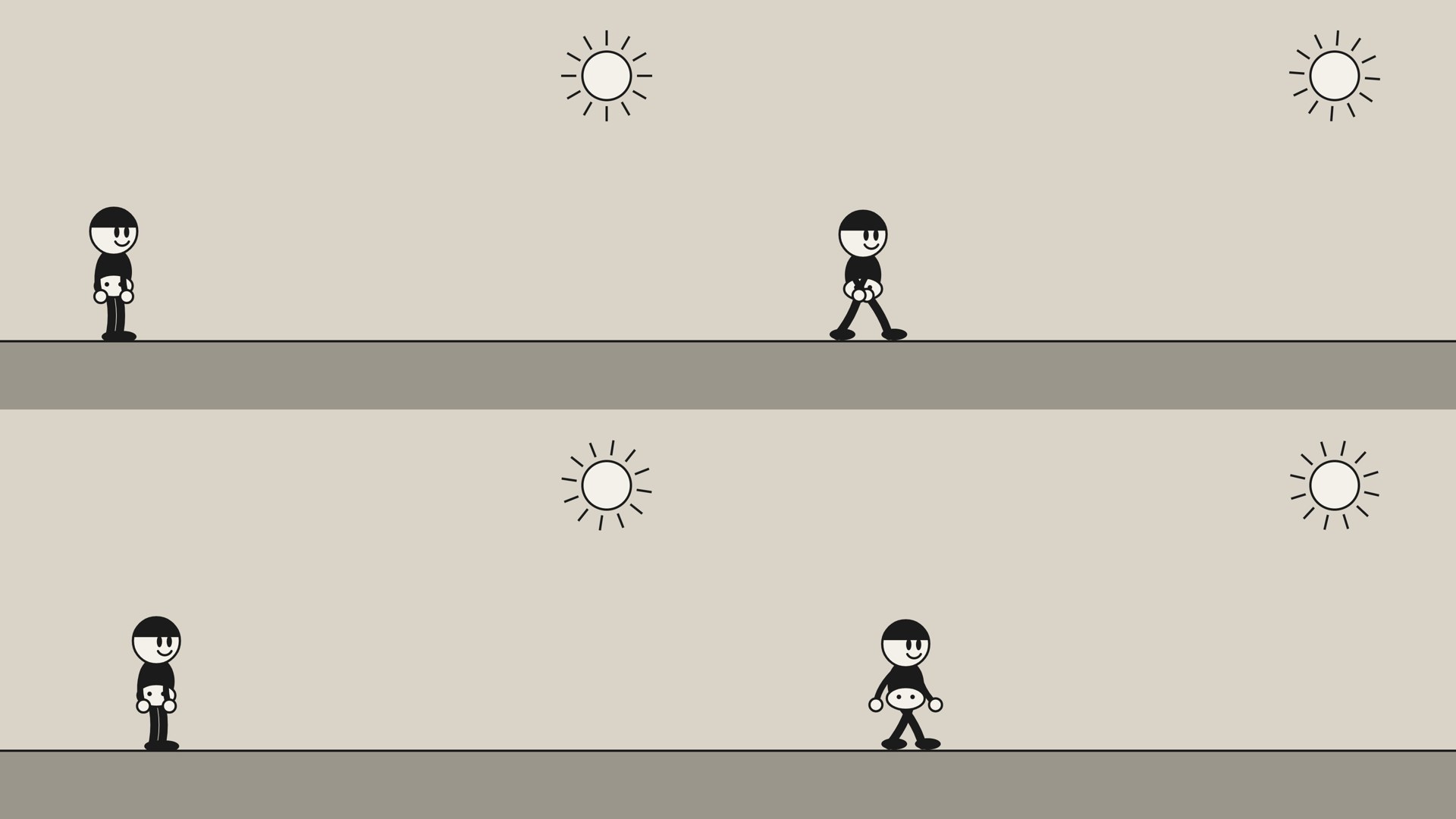
Show our first world.jsแสดง world.js ตัวแรกของเรา看我们的第一个 world.js
world.js
// world.js - the drawing functions of my cartoon world.
// The style is in STYLE.md: round heads, arms and legs like rubber hoses,
// big shoes, and only three colours. A page loads this file, then calls
// paper() and kid() inside its draw(t).

var INK = "#1b1b1b";      // outlines, shoes, hair
var CHALK = "#f4f1ea";    // faces, hands, shorts
var STONE = "#9a968c";    // the one grey: shadows and far things
var PAPER = "#d9d4c7";    // the background
var LINE = 6;             // every outline is this thick
var STEP = 0.5;           // seconds for one step

// The background: paper, the ground line, and a sun made of circles and lines.
function paper(pen, t) {
  pen.fillStyle = PAPER;
  pen.fillRect(0, 0, 1920, 1080);
  pen.fillStyle = STONE;
  pen.fillRect(0, 900, 1920, 180);
  pen.strokeStyle = INK;
  pen.lineWidth = LINE;
  pen.beginPath();
  pen.moveTo(0, 900);
  pen.lineTo(1920, 900);
  pen.stroke();
  // the sun turns slowly: 12 rays around one circle
  for (var i = 0; i < 12; i++) {
    var a = i * Math.PI / 6 + t * 0.3;
    pen.beginPath();
    pen.moveTo(1600 + 80 * Math.cos(a), 200 + 80 * Math.sin(a));
    pen.lineTo(1600 + 120 * Math.cos(a), 200 + 120 * Math.sin(a));
    pen.stroke();
  }
  pen.fillStyle = CHALK;
  pen.beginPath();
  pen.arc(1600, 200, 64, 0, 2 * Math.PI);
  pen.fill();
  pen.stroke();
}

// One kid. x, y is the point between the feet, on the ground. look.walk: true
// while walking. look.size: 1 is 360 pixels tall.
function kid(pen, x, y, t, look) {
  var s = look.size || 1;
  var swing = look.walk ? 28 * Math.sin(Math.PI * t / STEP) : 0;   // degrees
  var bob = look.walk ? 8 * Math.abs(Math.cos(Math.PI * t / STEP)) : 0;
  var a = swing * Math.PI / 180;
  pen.save();
  pen.translate(x, y);
  pen.scale(s, s);
  pen.lineCap = "round";
  pen.lineJoin = "round";

  // the far leg: a hose from the hip to the foot, bent a little
  var hipY = -120 - bob;
  var fx = 120 * Math.sin(-a), fy = hipY + 120 * Math.cos(-a);
  pen.strokeStyle = INK;
  pen.lineWidth = 22;
  pen.beginPath();
  pen.moveTo(-12, hipY);
  pen.quadraticCurveTo(-12 + fx / 2 + 14, hipY + (fy - hipY) / 2, -12 + fx, fy);
  pen.stroke();
  pen.fillStyle = INK;
  pen.beginPath();
  pen.ellipse(-12 + fx + 14, fy - 4, 34, 15, 0, 0, 2 * Math.PI);
  pen.fill();

  // the near leg: the same, swinging the other way
  fx = 120 * Math.sin(a);
  fy = hipY + 120 * Math.cos(a);
  pen.strokeStyle = INK;
  pen.lineWidth = 22;
  pen.beginPath();
  pen.moveTo(12, hipY);
  pen.quadraticCurveTo(12 + fx / 2 + 14, hipY + (fy - hipY) / 2, 12 + fx, fy);
  pen.stroke();
  pen.fillStyle = INK;
  pen.beginPath();
  pen.ellipse(12 + fx + 14, fy - 4, 34, 15, 0, 0, 2 * Math.PI);
  pen.fill();

  // the body: a black oval, white shorts with two buttons
  pen.fillStyle = INK;
  pen.beginPath();
  pen.ellipse(0, -175 - bob, 48, 64, 0, 0, 2 * Math.PI);
  pen.fill();
  pen.fillStyle = CHALK;
  pen.strokeStyle = INK;
  pen.lineWidth = LINE;
  pen.beginPath();
  pen.ellipse(0, -138 - bob, 50, 30, 0, 0, 2 * Math.PI);
  pen.fill();
  pen.stroke();
  pen.fillStyle = INK;
  pen.beginPath();
  pen.arc(-18, -142 - bob, 6, 0, 2 * Math.PI);
  pen.arc(18, -142 - bob, 6, 0, 2 * Math.PI);
  pen.fill();

  // the far arm swings against the near leg, the near arm against the far leg
  var shY = -205 - bob;
  var hx = 95 * Math.sin(a), hy = shY + 95 * Math.cos(a);
  pen.strokeStyle = INK;
  pen.lineWidth = 16;
  pen.beginPath();
  pen.moveTo(-34, shY);
  pen.quadraticCurveTo(-34 + hx / 2 - 18, shY + (hy - shY) / 2, -34 + hx, hy);
  pen.stroke();
  pen.fillStyle = CHALK;
  pen.lineWidth = LINE;
  pen.beginPath();
  pen.arc(-34 + hx, hy, 17, 0, 2 * Math.PI);
  pen.fill();
  pen.stroke();

  hx = 95 * Math.sin(-a);
  hy = shY + 95 * Math.cos(-a);
  pen.strokeStyle = INK;
  pen.lineWidth = 16;
  pen.beginPath();
  pen.moveTo(34, shY);
  pen.quadraticCurveTo(34 + hx / 2 - 18, shY + (hy - shY) / 2, 34 + hx, hy);
  pen.stroke();
  pen.fillStyle = CHALK;
  pen.lineWidth = LINE;
  pen.beginPath();
  pen.arc(34 + hx, hy, 17, 0, 2 * Math.PI);
  pen.fill();
  pen.stroke();

  // the head: a white circle, a black cap of hair, two tall eyes, a smile
  var headY = -282 - bob;
  pen.fillStyle = CHALK;
  pen.strokeStyle = INK;
  pen.lineWidth = LINE;
  pen.beginPath();
  pen.arc(0, headY, 62, 0, 2 * Math.PI);
  pen.fill();
  pen.stroke();
  pen.fillStyle = INK;
  pen.beginPath();
  pen.arc(0, headY, 62, Math.PI * 1.05, Math.PI * 1.95);
  pen.closePath();
  pen.fill();
  pen.beginPath();
  pen.ellipse(8, headY + 2, 7, 15, 0, 0, 2 * Math.PI);
  pen.ellipse(34, headY + 2, 7, 15, 0, 0, 2 * Math.PI);
  pen.fill();
  pen.beginPath();
  pen.arc(22, headY + 18, 20, 0.15 * Math.PI, 0.85 * Math.PI);
  pen.stroke();
  pen.restore();
}
walk.html
<!doctype html>
<html>
<head>
<meta charset="utf-8">
<title>walk - a kid walks across</title>
<style>
  html, body { margin: 0; background: #222; }
  canvas { display: block; width: 100vw; height: 100vh; object-fit: contain; }
</style>
</head>
<body>
<canvas id="stage" width="1920" height="1080"></canvas>
<script src="world.js"></script>
<script>
// draw(t) paints the picture for second t, from nothing, every time.
var LENGTH = 6;                          // seconds; render.py reads this
var stage = document.getElementById("stage");
var pen = stage.getContext("2d");

function draw(t) {
  paper(pen, t);
  var x = 300 + 225 * t;                 // 225 pixels a second: walk.py
  kid(pen, x, 900, t, {walk: true});
}

// In a browser the film plays by the clock. render.py sets "rendering"
// and then asks for each frame itself.
var rendering = false;
function play(now) {
  if (!rendering) { draw((now / 1000) % LENGTH); }
  requestAnimationFrame(play);
}
requestAnimationFrame(play);
</script>
</body>
</html>
🇬🇧 English
Now the habit that matters most. Look at the stills and say what is wrong, in plain words. Ours had three faults. The hands sit on the shorts, as if the arms grew out of the belly. The arms hardly swing. The head looks small beside the sample's. It looks weird
is not enough: find out what is weird, measure it, and write the rule that would have stopped it. Each sentence becomes a rule, and the rule goes into STYLE.md before it goes to Codex, so that it is never forgotten again.
🇹🇭 ไทย
ต่อไปคือนิสัยที่สำคัญที่สุด ดูภาพนิ่งแล้วพูดด้วยคำธรรมดาว่าอะไรผิด ของเรามีข้อผิดสามข้อ มือวางอยู่บนกางเกงขาสั้น เหมือนแขนงอกออกมาจากท้อง แขนแทบไม่แกว่ง และหัวดูเล็กเมื่อเทียบกับในตัวอย่าง มันดูแปลก ๆ
ยังไม่พอ ต้องหาให้ได้ว่าแปลกตรงไหน วัดมัน แล้วเขียนกฎที่จะกันไม่ให้มันเกิดขึ้น ทุกประโยคกลายเป็นกฎ และกฎนั้นต้องลงใน STYLE.md ก่อนจะส่งให้ Codex เพื่อไม่ให้ถูกลืมอีก
🇨🇳 中文
接下来是最要紧的习惯。看着静帧,用平常的话说出哪里不对。我们的有三个毛病:手放在短裤上,好像胳膊是从肚子里长出来的;胳膊几乎不摆;头和样片里的比起来显得小。看起来怪怪的
还不够:要找出怪在哪里,量一量,写出能防止它的规则。每一句话都变成一条规则,规则先写进 STYLE.md,再交给 Codex,这样它就不会再被忘掉。
🧠 Quiz 7🧠 แบบทดสอบ 7🧠 小测验 7
Pick an answer. Then the page shows which one is right, and why.เลือกคำตอบ แล้วหน้านี้จะบอกว่าข้อไหนถูก และเพราะอะไร选一个答案。然后这一页会告诉你哪个是对的,以及为什么。
Codex's first figure looks wrong. Which message helps it most?ตัวละครตัวแรกของ Codex ดูผิด ข้อความไหนช่วยมันได้มากที่สุดCodex 画的第一个角色看起来不对。哪条消息最能帮它?
✅ Right!✅ ถูกต้อง!✅ 答对了!
Not this one. The marked answer is the right one.ยังไม่ใช่ คำตอบที่มีเครื่องหมายคือคำตอบที่ถูก不是这个。标出来的那个才是对的。
A rule with a number says what to change and how far, and in STYLE.md it holds for every figure after this one. "Better" leaves Codex to guess. Tracing copies someone else's drawing, which is the one thing this method never does.กฎที่มีตัวเลขบอกว่าต้องเปลี่ยนอะไรและเปลี่ยนแค่ไหน และเมื่ออยู่ใน STYLE.md มันใช้กับทุกตัวละครหลังจากนี้ คำว่า "ดีขึ้น" ปล่อยให้ Codex เดาเอง ส่วนการลอกลายคือการลอกภาพวาดของคนอื่น ซึ่งเป็นสิ่งเดียวที่วิธีนี้ไม่ทำเลย带数字的规则说清了改什么、改多少,写进 STYLE.md 之后,它对之后的每个角色都有效。"好一点"让 Codex 去猜。描图是照抄别人的画,而这正是这个方法唯一绝不做的事。
7 A walk · การเดิน · 走路
🇬🇧 English
A walk is a few numbers too. Each leg swings like a playground swing, forward and back, and the sine function gives exactly that shape. The arms swing against the legs, and the body rises a little when the legs pass each other. walk.py prints the numbers of one stride, draws them, and works out the one number most walks get wrong: how fast the body must go, so that the feet do not slide on the ground.
🇹🇭 ไทย
การเดินก็เป็นตัวเลขไม่กี่ตัวเช่นกัน ขาแต่ละข้างแกว่งเหมือนชิงช้าในสนามเด็กเล่น ไปข้างหน้าแล้วกลับ และฟังก์ชันไซน์ (sine) ให้รูปแบบนั้นพอดี แขนแกว่งสวนกับขา และตัวยกขึ้นเล็กน้อยตอนขาสองข้างผ่านกัน walk.py พิมพ์ตัวเลขของการก้าวหนึ่งรอบ วาดมันออกมา และคำนวณตัวเลขหนึ่งตัวที่การเดินส่วนใหญ่ทำผิด คือตัวต้องเคลื่อนไปเร็วแค่ไหน เท้าจึงจะไม่ลื่นไถลบนพื้น
🇨🇳 中文
走路也只是几个数字。每条腿像操场上的秋千一样前后摆动,正弦函数(sine)给出的正是这种形状。胳膊和腿反着摆,两条腿交错经过时身体会稍微升高一点。walk.py 打印出一个跨步的数字,把它们画出来,再算出大多数走路都会算错的那个数:身体要走多快,脚才不会在地上打滑。
walk.py
"""walk.py - the numbers behind a walk.

    python3 walk.py

A leg swings like a swing in a playground: forward, back, forward. The sine
function, math.sin here and Math.sin in JavaScript, makes exactly that shape.
This file prints how far a leg swings at nine moments of one stride, works
out how fast the body must move so the feet do not slide, and draws the nine
moments side by side in walk.svg.
"""
import math

STEP = 0.5       # seconds for one step
SWING = 28       # the farthest a leg swings, in degrees
LEG = 120        # pixels from the hip to the foot


def leg_angle(t):
    # the swing at second t: 0, then up to 28, back to 0, down to -28 ...
    return SWING * math.sin(math.pi * t / STEP)


def foot_x(angle):
    # how far in front of the hip the foot is, in pixels
    return LEG * math.sin(math.radians(angle))


def leg_line(hip_x, angle, colour):
    x = hip_x + foot_x(angle)
    y = 30 + LEG * math.cos(math.radians(angle))
    return ('<line x1="' + str(hip_x) + '" y1="30" x2="' + str(round(x)) + '" y2="'
            + str(round(y)) + '" stroke="' + colour + '" stroke-width="12" stroke-linecap="round"/>')


def main():
    moments = [n * STEP / 4 for n in range(9)]    # 0, 0.125, ... 1.0 seconds
    angles = [leg_angle(t) for t in moments]
    for t, angle in zip(moments, angles):
        print(t, "s: near leg", round(angle), "degrees, far leg", round(-angle))

    # in one step a foot goes from behind the hip to in front of it
    stride = foot_x(SWING) - foot_x(-SWING)
    print("One step moves a foot", round(stride), "pixels, so walk at",
          round(stride / STEP), "pixels a second")

    hips = [70 + 120 * n for n in range(9)]
    near = [leg_line(x, angle, "#1b1b1b") for x, angle in zip(hips, angles)]
    far = [leg_line(x, -angle, "#9a968c") for x, angle in zip(hips, angles)]
    svg = ('<svg xmlns="http://www.w3.org/2000/svg" width="1100" height="180" '
           'style="background:#f4f1ea">' + "".join(far + near) + "</svg>")
    with open("walk.svg", "w") as file:
        file.write(svg)
    print("walk.svg:", len(near + far), "legs at", len(moments), "moments")


if __name__ == "__main__":
    main()
in the Terminal, in your repositoryใน Terminal ในรีโพซิทอรีของคุณ在终端里,在你的仓库中
python3 walk.pywhat it printedสิ่งที่มันพิมพ์ออกมา它打印的内容
0.0 s: near leg 0 degrees, far leg 0
0.125 s: near leg 20 degrees, far leg -20
0.25 s: near leg 28 degrees, far leg -28
0.375 s: near leg 20 degrees, far leg -20
0.5 s: near leg 0 degrees, far leg 0
0.625 s: near leg -20 degrees, far leg 20
0.75 s: near leg -28 degrees, far leg 28
0.875 s: near leg -20 degrees, far leg 20
1.0 s: near leg 0 degrees, far leg 0
One step moves a foot 113 pixels, so walk at 225 pixels a second
walk.svg: 18 legs at 9 moments
leg_angle(t) gives the swing at second t, foot_x(angle) how far in front of the hip the foot is, and leg_line() the SVG of one leg. A function's name says what it gives back, so main() reads almost like English. math.radians() turns degrees into the radians that sin and cos work in. moments, angles, hips, near and far are all list comprehensions.
ฟังก์ชันเล็ก ๆ สามตัว แต่ละตัวทำงานเดียว leg_angle(t) ให้มุมแกว่งที่วินาที t foot_x(angle) ให้ระยะที่เท้าอยู่ข้างหน้าสะโพก และ leg_line() ให้ SVG ของขาหนึ่งข้าง ชื่อของฟังก์ชันบอกว่ามันให้อะไรกลับมา main() จึงอ่านได้เกือบเหมือนภาษาอังกฤษ math.radians() แปลงองศาเป็นเรเดียน ซึ่งเป็นหน่วยที่ sin และ cos ใช้ moments, angles, hips, near และ far เป็นลิสต์คอมพรีเฮนชันทั้งหมด
三个小函数,各做一件事:leg_angle(t) 给出第 t 秒的摆角,foot_x(angle) 给出脚在髋部前面多远,leg_line() 给出一条腿的 SVG。函数的名字说明它交回什么,所以 main() 读起来几乎像英语。math.radians() 把角度换成 sin 和 cos 用的弧度。moments、angles、hips、near 和 far 都是列表推导式。
🇬🇧 English
Add the walk to STYLE.md (the lines below), check it with rules_left.py, and then ask Codex to make the walk follow the rules and to fix the three faults of step 6:
🇹🇭 ไทย
เพิ่มการเดินลงใน STYLE.md (บรรทัดข้างล่างนี้) ตรวจด้วย rules_left.py แล้วขอให้ Codex ทำให้การเดินเป็นไปตามกฎ และแก้ข้อผิดสามข้อของขั้นตอนที่ 6:
🇨🇳 中文
把走路加进 STYLE.md(下面这几行),用 rules_left.py 检查一下,然后请 Codex 让走路照规则来,并改掉第 6 步的三个毛病:
add to STYLE.mdเพิ่มลงใน STYLE.md加进 STYLE.md
## Walk

- One step takes 0.5 seconds. The legs swing 28 degrees each way. The arms
  swing 1.8 times as far, each arm against the leg on its side.
- The body rises 8 pixels when the legs pass each other.
- Walk at 225 pixels a second (walk.py works it out), or the feet slide.
python3 rules_left.py STYLE.mdwhat it printedสิ่งที่มันพิมพ์ออกมา它打印的内容
Rules for: arms, body, colours, feet, hands, head, legs, outline, walk
No rule yet: eyes, mouth
not run by us: in the Terminal, in your repositoryเราไม่ได้รันเอง: ใน Terminal ในรีโพซิทอรีของคุณ我们没有运行过:在终端里,在你的仓库中
codex "Read STYLE.md again: it has a new Walk section. Change kid() in world.js so that the walk follows it: a step every 0.5 seconds, the legs swinging 28 degrees each way, the arms 1.8 times as far and each against the leg on its side, the far arm drawn behind the body and the near arm in front, and the body 8 pixels up when the legs pass. Fix these too: the hands sit on the shorts, the arms hardly swing, and the head is too small (make it nearly twice as wide as the body). In walk.html the kid walks at 225 pixels a second. Then run python3 refs/lannamation/kit/stills.py walk.html walked.jpg 0 0.25 0.5 0.75 and check each still against STYLE.md."python3 refs/lannamation/kit/stills.py walk.html walked.jpg 0 0.25 0.5 0.75what it printedสิ่งที่มันพิมพ์ออกมา它打印的内容
walked.jpg: 4 frames at seconds 0, 0.25, 0.5, 0.75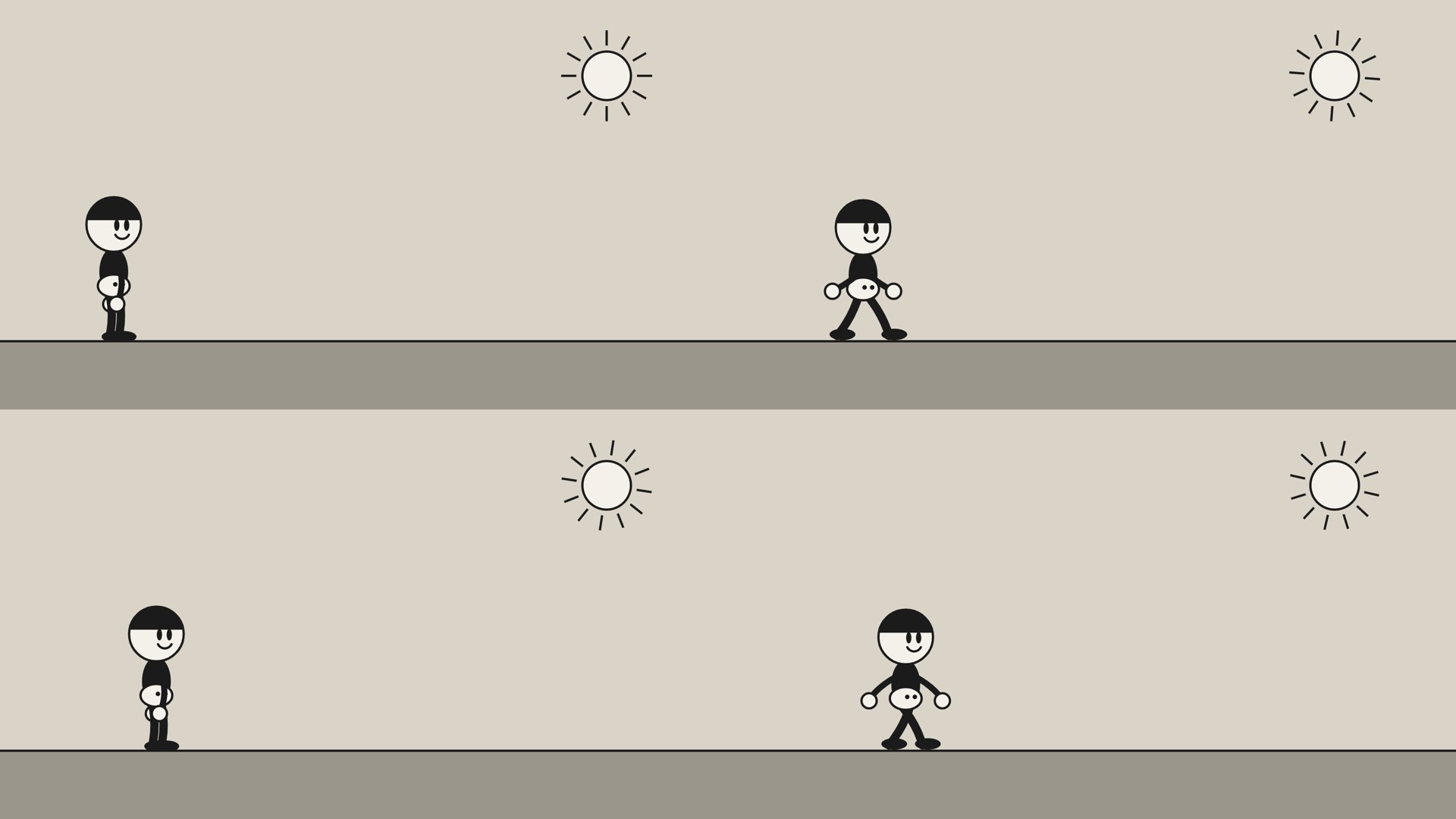
🧠 Quiz 8: what will this print?🧠 แบบทดสอบ 8: มันจะพิมพ์อะไร🧠 小测验 8:它会打印什么?
Pick an answer. Then the page shows which one is right and why, and you can run the program yourself.เลือกคำตอบ แล้วหน้านี้จะบอกว่าข้อไหนถูกและเพราะอะไร และคุณรันโปรแกรมเองได้选一个答案。然后这一页会告诉你哪个是对的、为什么,你也可以自己运行这个程序。
# Quiz 8: what will this print?
def speed(stride, step):
    return stride / step

print(speed(113, 0.5))✅ Right!✅ ถูกต้อง!✅ 答对了!
Not this one. The marked answer is the right one.ยังไม่ใช่ คำตอบที่มีเครื่องหมายคือคำตอบที่ถูก不是这个。标出来的那个才是对的。
speed(113, 0.5) hands 113 to stride and 0.5 to step, and return gives back 113 / 0.5. Dividing by a half doubles, so it is 226.0: 113 pixels a step, two steps a second. A / always gives a number with a decimal point.speed(113, 0.5) ส่ง 113 ให้ stride และ 0.5 ให้ step แล้ว return ส่ง 113 / 0.5 กลับมา การหารด้วยครึ่งคือการคูณสอง จึงได้ 226.0 คือก้าวละ 113 พิกเซล วินาทีละสองก้าว เครื่องหมาย / ให้ตัวเลขที่มีจุดทศนิยมเสมอspeed(113, 0.5) 把 113 交给 stride,把 0.5 交给 step,return 交回 113 / 0.5。除以一半就是乘以二,所以是 226.0:每步 113 像素,每秒两步。/ 总是给出带小数点的数。
what it printedสิ่งที่มันพิมพ์ออกมา它打印的内容
226.08 Refactor now and then · รีแฟกเตอร์เป็นครั้งคราว · 时不时重构一下
🇬🇧 English
Every few rounds, stop adding and tidy up. Each time Codex fixes one thing it adds code, and after a while the same lines are written in several places: in ours, the code of a hose, an arm or a leg, was written out four times. A refactor changes how the code is written and nothing that it draws. It makes the next change easier: a new character, a wave, a dance, built from parts you already have.
Refactor when you see the same lines in two places, before you add a new character, and whenever you are about to tell Codex do the same as kid(), but…
. Commit first, with git commit -am "before the refactor", so that git checkout world.js takes it all back if it goes wrong. Then ask, in a prompt that says what must stay the same and how to prove it:
🇹🇭 ไทย
ทุก ๆ ไม่กี่รอบ ให้หยุดเพิ่มของแล้วจัดให้เป็นระเบียบ ทุกครั้งที่ Codex แก้อะไรสักอย่าง มันจะเพิ่มโค้ด และไม่นานบรรทัดเดิม ๆ ก็ถูกเขียนไว้หลายที่ ในของเรา โค้ดของสายยางหนึ่งเส้น คือแขนหรือขา ถูกเขียนซ้ำถึงสี่ครั้ง การรีแฟกเตอร์ (refactor) เปลี่ยนวิธีเขียนโค้ด แต่ไม่เปลี่ยนสิ่งที่มันวาดเลย มันทำให้การแก้ครั้งต่อไปง่ายขึ้น เช่น ตัวละครใหม่ การโบกมือ การเต้น ที่สร้างจากชิ้นส่วนที่คุณมีอยู่แล้ว
รีแฟกเตอร์เมื่อคุณเห็นบรรทัดเดียวกันอยู่สองที่ ก่อนจะเพิ่มตัวละครใหม่ และทุกครั้งที่คุณกำลังจะบอก Codex ว่า ทำเหมือน kid() แต่…
คอมมิตก่อนด้วย git commit -am "before the refactor" เพื่อให้ git checkout world.js เอาทุกอย่างกลับคืนได้ถ้ามันพัง แล้วจึงขอด้วยพรอมต์ที่บอกว่าอะไรต้องคงเดิม และจะพิสูจน์อย่างไร:
🇨🇳 中文
每过几轮,就停下来不再加东西,整理一下。Codex 每改一处都会加代码,过一阵子,同样的几行就写在了好几个地方:在我们的代码里,一根"软管"(一条胳膊或一条腿)的代码写了四遍。重构(refactor)改的是代码的写法,它画出来的东西一点不变。它让下一次改动更容易:一个新角色、一次挥手、一段舞,都用你已经有的部件拼出来。
当你看到同样的几行出现在两个地方、在你加新角色之前、以及每当你正要对 Codex 说和 kid() 一样,但是……
的时候,就该重构了。先提交:git commit -am "before the refactor",这样如果出了错,git checkout world.js 能把一切恢复原样。然后用一段提示词来要求,说清什么必须保持不变、怎样证明:
not run by us: in the Terminal, in your repositoryเราไม่ได้รันเอง: ใน Terminal ในรีโพซิทอรีของคุณ我们没有运行过:在终端里,在你的仓库中
codex "Refactor world.js. This is a tidy-up, not a new feature: no picture may change. First run python3 refs/lannamation/kit/stills.py walk.html before.jpg 0 0.25 0.5 0.75 1.5 3. Then find code that is written more than once, such as the four hoses of the arms and legs, and give each job one small function with a clear name: hose(), shoe(), glove(), leg(), arm(), body() and head(). Keep every number, and the order in which things are drawn. Keep paper(pen, t) and kid(pen, x, y, t, look) as they are called now, so that walk.html does not change. When you are done, run the same stills.py command into after.jpg, then python3 same.py before.jpg after.jpg. If it does not say 0 changed, undo the part that changed a picture. Then tell me each function you made, and what it replaced."🇬🇧 English
Then check it yourself. same.py compares the two pictures, number by number:
🇹🇭 ไทย
แล้วตรวจเองอีกครั้ง same.py เทียบภาพสองภาพทีละตัวเลข:
🇨🇳 中文
然后自己再检查一遍。same.py 一个数一个数地比较两张图:
same.py
"""same.py - did a change to the code change the pictures?

    python3 same.py before.jpg after.jpg

Take stills before you refactor and after, with the same seconds, then give
both files to this one. A refactor only tidies the code, so every number in
the picture should be the same. Needs Pillow (python3 -m pip install pillow).
"""
import sys

from PIL import Image


def numbers(path):
    # a picture is three numbers for each pixel: red, green and blue
    picture = Image.open(path).convert("RGB")
    return picture.tobytes()


def main():
    before = numbers(sys.argv[1])
    after = numbers(sys.argv[2])
    if len(before) != len(after):
        print("The pictures are not the same size.")
        return
    changed = [i for i in range(len(before)) if before[i] != after[i]]
    share = 100 * len(changed) / len(before)
    print(len(before), "numbers,", len(changed), "changed:", round(share, 2), "%")
    if changed:
        print("Not the same: look at both pictures before you keep the change.")
    else:
        print("The same: the change did not move a single pixel.")


if __name__ == "__main__":
    main()
in the Terminal, in your repository: the stills before the refactor, the stills after it, and the checkใน Terminal ในรีโพซิทอรีของคุณ: ภาพนิ่งก่อนรีแฟกเตอร์ ภาพนิ่งหลังรีแฟกเตอร์ และการตรวจ在终端里,在你的仓库中:重构前的静帧、重构后的静帧,以及检查
python3 refs/lannamation/kit/stills.py walk.html before.jpg 0 0.25 0.5 0.75 1.5 3
python3 refs/lannamation/kit/stills.py walk.html after.jpg 0 0.25 0.5 0.75 1.5 3
python3 same.py before.jpg after.jpg
what they printedสิ่งที่มันพิมพ์ออกมา它们打印的内容
before.jpg: 6 frames at seconds 0, 0.25, 0.5, 0.75, 1.5, 3after.jpg: 6 frames at seconds 0, 0.25, 0.5, 0.75, 1.5, 39331200 numbers, 0 changed: 0.0 %
The same: the change did not move a single pixel.🇬🇧 English
Our refactor: nine functions where there were two, the hose written once instead of four times, and not one pixel moved. Compare a change that was meant to move the pictures, the walk of step 7:
🇹🇭 ไทย
การรีแฟกเตอร์ของเรา: จากฟังก์ชันสองตัวเป็นเก้าตัว สายยางถูกเขียนครั้งเดียวแทนที่จะเป็นสี่ครั้ง และไม่มีพิกเซลไหนขยับเลย เทียบกับการแก้ที่ตั้งใจให้ภาพเปลี่ยน คือการเดินของขั้นตอนที่ 7:
🇨🇳 中文
我们的重构:原来两个函数,现在九个;软管只写一遍,不再写四遍;一个像素也没动。对比一次本来就要让画面变的改动,第 7 步的走路:
python3 same.py first.jpg walked.jpgwhat it printedสิ่งที่มันพิมพ์ออกมา它打印的内容
6220800 numbers, 120168 changed: 1.93 %
Not the same: look at both pictures before you keep the change.
Show world.js after the refactorแสดง world.js หลังรีแฟกเตอร์看重构之后的 world.js
world.js
// world.js - the drawing functions of my cartoon world.
// The style is in STYLE.md: round heads, arms and legs like rubber hoses,
// big shoes, and only three colours. A page loads this file, then calls
// paper() and kid() inside its draw(t).

var INK = "#1b1b1b";      // outlines, shoes, hair
var CHALK = "#f4f1ea";    // faces, hands, shorts
var STONE = "#9a968c";    // the one grey: shadows and far things
var PAPER = "#d9d4c7";    // the background
var LINE = 6;             // every outline is this thick
var STEP = 0.5;           // seconds for one step

// The background: paper, the ground line, and a sun made of circles and lines.
function paper(pen, t) {
  pen.fillStyle = PAPER;
  pen.fillRect(0, 0, 1920, 1080);
  pen.fillStyle = STONE;
  pen.fillRect(0, 900, 1920, 180);
  pen.strokeStyle = INK;
  pen.lineWidth = LINE;
  pen.beginPath();
  pen.moveTo(0, 900);
  pen.lineTo(1920, 900);
  pen.stroke();
  // the sun turns slowly: 12 rays around one circle
  for (var i = 0; i < 12; i++) {
    var a = i * Math.PI / 6 + t * 0.3;
    pen.beginPath();
    pen.moveTo(1600 + 80 * Math.cos(a), 200 + 80 * Math.sin(a));
    pen.lineTo(1600 + 120 * Math.cos(a), 200 + 120 * Math.sin(a));
    pen.stroke();
  }
  pen.fillStyle = CHALK;
  pen.beginPath();
  pen.arc(1600, 200, 64, 0, 2 * Math.PI);
  pen.fill();
  pen.stroke();
}

// A rubber hose: a thick black line from x1, y1 that goes dx across and dy
// down, bent sideways by bend pixels in the middle.
function hose(pen, x1, y1, dx, dy, bend, width) {
  var x2 = x1 + dx, y2 = y1 + dy;
  pen.strokeStyle = INK;
  pen.lineWidth = width;
  pen.beginPath();
  pen.moveTo(x1, y1);
  pen.quadraticCurveTo(x1 + dx / 2 + bend, y1 + (y2 - y1) / 2, x2, y2);
  pen.stroke();
}

// A big black shoe, pointing forward from the end of a leg at x, y.
function shoe(pen, x, y) {
  pen.fillStyle = INK;
  pen.beginPath();
  pen.ellipse(x + 14, y - 4, 34, 15, 0, 0, 2 * Math.PI);
  pen.fill();
}

// A round white glove at the end of an arm.
function glove(pen, x, y) {
  pen.fillStyle = CHALK;
  pen.lineWidth = LINE;
  pen.beginPath();
  pen.arc(x, y, 20, 0, 2 * Math.PI);
  pen.fill();
  pen.stroke();
}

// A leg from the hip at x, y, swung forward by angle (radians).
function leg(pen, x, y, angle) {
  var dx = 120 * Math.sin(angle), dy = 120 * Math.cos(angle);
  hose(pen, x, y, dx, dy, 14, 22);
  shoe(pen, x + dx, y + dy);
}

// An arm from the shoulder at x, y, swung forward by angle, bent by bend.
function arm(pen, x, y, angle, bend) {
  var dx = 115 * Math.sin(angle), dy = 115 * Math.cos(angle);
  hose(pen, x, y, dx, dy, bend, 16);
  glove(pen, x + dx, y + dy);
}

// The body: a black oval, white shorts with two buttons. bob: how far the
// body is up in its step.
function body(pen, bob) {
  pen.fillStyle = INK;
  pen.beginPath();
  pen.ellipse(0, -175 - bob, 38, 64, 0, 0, 2 * Math.PI);
  pen.fill();
  pen.fillStyle = CHALK;
  pen.strokeStyle = INK;
  pen.lineWidth = LINE;
  pen.beginPath();
  pen.ellipse(0, -138 - bob, 42, 30, 0, 0, 2 * Math.PI);
  pen.fill();
  pen.stroke();
  pen.fillStyle = INK;
  pen.beginPath();
  pen.arc(4, -142 - bob, 6, 0, 2 * Math.PI);
  pen.arc(24, -142 - bob, 6, 0, 2 * Math.PI);
  pen.fill();
}

// The head: a white circle nearly twice as wide as the body, a black cap of
// hair, two tall eyes, a smile. y is the middle of the head.
function head(pen, y) {
  pen.fillStyle = CHALK;
  pen.strokeStyle = INK;
  pen.lineWidth = LINE;
  pen.beginPath();
  pen.arc(0, y, 72, 0, 2 * Math.PI);
  pen.fill();
  pen.stroke();
  pen.fillStyle = INK;
  pen.beginPath();
  pen.arc(0, y, 72, Math.PI * 1.05, Math.PI * 1.95);
  pen.closePath();
  pen.fill();
  pen.beginPath();
  pen.ellipse(8, y + 2, 7, 15, 0, 0, 2 * Math.PI);
  pen.ellipse(34, y + 2, 7, 15, 0, 0, 2 * Math.PI);
  pen.fill();
  pen.beginPath();
  pen.arc(22, y + 18, 20, 0.15 * Math.PI, 0.85 * Math.PI);
  pen.stroke();
}

// One kid, seen from the side, facing right. x, y is the point between the
// feet, on the ground. look.walk: true while walking. look.size: 1 is about
// 380 pixels tall.
function kid(pen, x, y, t, look) {
  var s = look.size || 1;
  var swing = look.walk ? 28 * Math.sin(Math.PI * t / STEP) : 0;   // degrees
  var bob = look.walk ? 8 * Math.abs(Math.cos(Math.PI * t / STEP)) : 0;
  var a = swing * Math.PI / 180;     // the legs swing this far
  var b = a * 1.8;                   // the arms swing 1.8 times as far
  var hipY = -120 - bob;
  var shY = -205 - bob;
  pen.save();
  pen.translate(x, y);
  pen.scale(s, s);
  pen.lineCap = "round";
  pen.lineJoin = "round";
  // from the back to the front: each arm swings against the leg on its side
  arm(pen, -8, shY, b, -26);
  leg(pen, -12, hipY, -a);
  leg(pen, 12, hipY, a);
  body(pen, bob);
  arm(pen, 8, shY, -b, 26);
  head(pen, -300 - bob);
  pen.restore();
}numbers() is a function that gives back a picture as bytes: three numbers from 0 to 255 for each pixel, red, green and blue. [i for i in range(len(before)) if before[i] != after[i]] is a list comprehension with a filter: the if at the end keeps only the places where the two pictures differ, and len() counts them. != means "is not equal to".
numbers() เป็นฟังก์ชันที่ส่งภาพกลับมาเป็นไบต์ คือตัวเลขสามตัวตั้งแต่ 0 ถึง 255 ต่อหนึ่งพิกเซล สำหรับสีแดง เขียว และน้ำเงิน [i for i in range(len(before)) if before[i] != after[i]] คือลิสต์คอมพรีเฮนชันที่มีตัวกรอง if ตรงท้ายเก็บไว้เฉพาะตำแหน่งที่ภาพสองภาพต่างกัน แล้ว len() นับมัน != แปลว่า "ไม่เท่ากับ"
numbers() 是一个函数,把一张图以字节交回:每个像素三个 0 到 255 的数,分别是红、绿、蓝。[i for i in range(len(before)) if before[i] != after[i]] 是带筛选的列表推导式:末尾的 if 只留下两张图不一样的位置,len() 数出有多少个。!= 的意思是"不等于"。
🧠 Quiz 9: what will this print?🧠 แบบทดสอบ 9: มันจะพิมพ์อะไร🧠 小测验 9:它会打印什么?
Pick an answer. Then the page shows which one is right and why, and you can run the program yourself.เลือกคำตอบ แล้วหน้านี้จะบอกว่าข้อไหนถูกและเพราะอะไร และคุณรันโปรแกรมเองได้选一个答案。然后这一页会告诉你哪个是对的、为什么,你也可以自己运行这个程序。
# Quiz 9: what will this print?
before = [1, 2, 3, 4]
after = [1, 9, 3, 0]
changed = [i for i in range(len(before)) if before[i] != after[i]]
print(changed)✅ Right!✅ ถูกต้อง!✅ 答对了!
Not this one. The marked answer is the right one.ยังไม่ใช่ คำตอบที่มีเครื่องหมายคือคำตอบที่ถูก不是这个。标出来的那个才是对的。
The comprehension keeps i, the place, not the number found there. The lists differ at place 1 (2 against 9) and place 3 (4 against 0). Places count from 0, so the first number is place 0. [0, 2] are the places where they agree.คอมพรีเฮนชันนี้เก็บ i ซึ่งคือตำแหน่ง ไม่ใช่ตัวเลขที่อยู่ตรงนั้น ลิสต์สองลิสต์ต่างกันที่ตำแหน่ง 1 (2 กับ 9) และตำแหน่ง 3 (4 กับ 0) ตำแหน่งเริ่มนับจาก 0 ตัวเลขแรกจึงอยู่ตำแหน่ง 0 ส่วน [0, 2] คือตำแหน่งที่ตรงกัน这个推导式留下的是 i,也就是位置,不是那个位置上的数。两个列表在位置 1(2 对 9)和位置 3(4 对 0)不一样。位置从 0 开始数,所以第一个数在位置 0。[0, 2] 是它们相同的位置。
what it printedสิ่งที่มันพิมพ์ออกมา它打印的内容
[1, 3]🧩 Part 3 — A skill · ส่วนที่ 3 — สกิล · 第 3 部分 —— 技能
🇬🇧 English
Your framework works. Now teach Codex to use it without you explaining it again every time. A skill is a folder with a SKILL.md in it: a name, a description of when to use it, and the instructions. At the start of a chat Codex reads only the names and descriptions of its skills, and it reads the whole SKILL.md only when a job matches.
🇹🇭 ไทย
เฟรมเวิร์กของคุณใช้งานได้แล้ว ตอนนี้สอนให้ Codex ใช้มันได้เอง โดยไม่ต้องให้คุณอธิบายซ้ำทุกครั้ง สกิลคือโฟลเดอร์ที่มี SKILL.md อยู่ข้างใน มีชื่อ คำอธิบายว่าควรใช้เมื่อไร และคำสั่ง ตอนเริ่มแชต Codex อ่านแค่ชื่อและคำอธิบายของสกิล และจะอ่าน SKILL.md ทั้งไฟล์ก็ต่อเมื่องานตรงกับมันเท่านั้น
🇨🇳 中文
你的框架能用了。现在教 Codex 自己用它,不用你每次都重新解释。技能就是一个文件夹,里面有一个 SKILL.md:一个名字、一段说明什么时候用它的描述,以及操作说明。每次对话开始时,Codex 只读各个技能的名字和描述;只有当一件工作和它对得上时,才会读完整的 SKILL.md。
9 Your skill: SKILL.md · สกิลของคุณ: SKILL.md · 你的技能:SKILL.md
🇬🇧 English
Put the skill in your repository, in .agents/skills/mycartoon/, so that it travels with the code: Codex looks in .agents/skills of every folder from where you start it up to the top of the repository. A skill for all the repositories on your Mac would go in ~/.agents/skills instead. You can write it yourself with vim, or ask Codex to write it from your files:
🇹🇭 ไทย
เก็บสกิลไว้ในรีโพซิทอรีของคุณ ใน .agents/skills/mycartoon/ เพื่อให้มันเดินทางไปพร้อมกับโค้ด Codex ดูใน .agents/skills ของทุกโฟลเดอร์ ตั้งแต่ที่ที่คุณเริ่มมันขึ้นไปจนถึงบนสุดของรีโพซิทอรี สกิลสำหรับทุกรีโพซิทอรีบนแมคของคุณจะอยู่ใน ~/.agents/skills แทน คุณเขียนมันเองด้วย vim ก็ได้ หรือขอให้ Codex เขียนจากไฟล์ของคุณ:
🇨🇳 中文
把技能放在你的仓库里,放在 .agents/skills/mycartoon/,这样它跟着代码走:Codex 会在你启动它的那个文件夹,一直往上到仓库顶层,每一层的 .agents/skills 里找。要给你 Mac 上所有仓库用的技能,则放在 ~/.agents/skills。你可以自己用 vim 写,也可以请 Codex 根据你的文件来写:
not run by us: in the Terminal, in your repositoryเราไม่ได้รันเอง: ใน Terminal ในรีโพซิทอรีของคุณ我们没有运行过:在终端里,在你的仓库中
mkdir -p .agents/skills/mycartoon
codex "Write .agents/skills/mycartoon/SKILL.md, a skill for making films with this repository. Its front matter has name: mycartoon and a description that says when to use it, and when not to (photos and paintings). The body says: read STYLE.md first; the loop (write a page beside world.js like walk.html, look at stills with refs/lannamation/kit/stills.py, fix, render with refs/lannamation/kit/render.py); the functions a film calls, and what each is for; and what never to do. Keep it short."
Show the first SKILL.md, as we wrote itแสดง SKILL.md ตัวแรก ตามที่เราเขียน看我们写的第一个 SKILL.md
.agents/skills/mycartoon/SKILL.md
---
name: mycartoon
description: Make a short cartoon in this repository's rubber-hose style with world.js. Write a draw(t) page, look at stills, fix, render to mp4. Use when asked for a cartoon, a scene or a new character in this style. Not for photos or paintings.
---

# A cartoon in my style

Read STYLE.md first. Every rule there has a number: keep it.

## The loop

1. Write the film as a page beside world.js. Copy walk.html: keep LENGTH,
   draw(t) and the switch rendering. In draw(t), call paper(pen, t) first,
   then draw the characters, the far ones first.
2. Look at it: python3 refs/lannamation/kit/stills.py NAME.html look.jpg 0 1 2 3
   Open look.jpg and compare it with STYLE.md. Fix what breaks a rule.
3. Make the video: python3 refs/lannamation/kit/render.py NAME.html NAME.mp4

## The functions

- paper(pen, t): the background, the ground at y 900 and the sun.
- kid(pen, x, y, t, look): one kid, feet at x, y. look.walk makes the kid
  walk; walk at 225 pixels a second. look.size: 1 is about 380 pixels tall.

## Never

- Copy a character, a drawing or a line from research/stills or refs/.
🇬🇧 English
Codex knows your framework only from what it reads. skill_check.py finds the functions of world.js that the skill never names:
🇹🇭 ไทย
Codex รู้จักเฟรมเวิร์กของคุณจากสิ่งที่มันอ่านเท่านั้น skill_check.py หาฟังก์ชันใน world.js ที่สกิลไม่เคยเอ่ยชื่อ:
🇨🇳 中文
Codex 只能从它读到的东西里认识你的框架。skill_check.py 找出 world.js 里技能从没提到名字的函数:
skill_check.py
"""skill_check.py - does your skill tell Codex about every function you wrote?

    python3 skill_check.py world.js .agents/skills/mycartoon/SKILL.md

Codex knows your framework only from what it reads. A function that SKILL.md
never names is one Codex may not find, and then it writes the same thing a
second time. This file lists the functions in world.js that the skill names
and the ones it leaves out.
"""
import sys


def functions_in(path):
    # every line that starts with "function name(" names one function
    lines = open(path).read().splitlines()
    return {line.split()[1].split("(")[0] for line in lines if line.startswith("function ")}


def main():
    functions = functions_in(sys.argv[1])
    skill = open(sys.argv[2]).read()
    named = {name for name in functions if name + "(" in skill}
    missing = functions - named
    print(len(functions), "functions in", sys.argv[1] + ";", len(named), "named in the skill")
    print("Not in the skill:", ", ".join(sorted(missing)) or "none")


if __name__ == "__main__":
    main()
in the Terminal, in your repositoryใน Terminal ในรีโพซิทอรีของคุณ在终端里,在你的仓库中
python3 skill_check.py world.js .agents/skills/mycartoon/SKILL.mdwhat it printed, for the first SKILL.mdสิ่งที่มันพิมพ์ออกมา สำหรับ SKILL.md ตัวแรก它打印的内容(第一个 SKILL.md)
9 functions in world.js; 2 named in the skill
Not in the skill: arm, body, glove, head, hose, leg, shoe
🇬🇧 English
Seven building blocks are missing. Without them, a request for a new character makes Codex draw its arms from nothing, and a fifth hose creeps back in. So the skill gets a section, Building blocks
, and then the check is clean:
🇹🇭 ไทย
ชิ้นส่วนเจ็ดชิ้นหายไป ถ้าไม่มีมัน เมื่อขอตัวละครใหม่ Codex จะวาดแขนของมันขึ้นมาจากศูนย์ แล้วสายยางเส้นที่ห้าก็แอบกลับมา สกิลจึงได้หัวข้อใหม่ชื่อ Building blocks
แล้วการตรวจก็ผ่าน:
🇨🇳 中文
少了七个基本部件。没有它们,要一个新角色时,Codex 会从零开始画它的胳膊,第五根软管就又偷偷冒出来了。所以技能里加了一节Building blocks
,检查就干净了:
.agents/skills/mycartoon/SKILL.md
---
name: mycartoon
description: Make a short cartoon in this repository's rubber-hose style with world.js. Write a draw(t) page, look at stills, fix, render to mp4. Use when asked for a cartoon, a scene or a new character in this style. Not for photos or paintings.
---

# A cartoon in my style

Read STYLE.md first. Every rule there has a number: keep it.

## The loop

1. Write the film as a page beside world.js. Copy walk.html: keep LENGTH,
   draw(t) and the switch rendering. In draw(t), call paper(pen, t) first,
   then draw the characters, the far ones first.
2. Look at it: python3 refs/lannamation/kit/stills.py NAME.html look.jpg 0 1 2 3
   Open look.jpg and compare it with STYLE.md. Fix what breaks a rule.
3. Make the video: python3 refs/lannamation/kit/render.py NAME.html NAME.mp4

## The functions

- paper(pen, t): the background, the ground at y 900 and the sun.
- kid(pen, x, y, t, look): one kid, feet at x, y. look.walk makes the kid
  walk; walk at 225 pixels a second. look.size: 1 is about 380 pixels tall.

## Building blocks, for a new character

Build a new character from these, so it keeps the style:

- hose(pen, x1, y1, dx, dy, bend, width): an arm or a leg with no joint.
- leg(pen, x, y, angle) and arm(pen, x, y, angle, bend): a hose with a shoe
  or a glove at the end.
- shoe(pen, x, y), glove(pen, x, y), body(pen, bob), head(pen, y).

## Never

- Copy a character, a drawing or a line from research/stills or refs/.
what skill_check.py printed thenสิ่งที่ skill_check.py พิมพ์ออกมาหลังจากนั้น之后 skill_check.py 打印的内容
9 functions in world.js; 9 named in the skill
Not in the skill: none{line.split()[1].split("(")[0] for line in lines if line.startswith("function ")} is a set comprehension: one name for each line that starts a function. line.split()[1] is the second word of the line, such as kid(pen,, and .split("(")[0] keeps what comes before the bracket, kid. named is the names whose name( appears in the skill, and functions - named, as in step 3, is what the skill leaves out.
{line.split()[1].split("(")[0] for line in lines if line.startswith("function ")} คือเซตคอมพรีเฮนชัน ได้ชื่อหนึ่งชื่อจากทุกบรรทัดที่เริ่มฟังก์ชัน line.split()[1] คือคำที่สองของบรรทัด เช่น kid(pen, และ .split("(")[0] เก็บส่วนที่อยู่ก่อนวงเล็บ คือ kid named คือชื่อที่ name( ของมันปรากฏในสกิล และ functions - named เหมือนในขั้นตอนที่ 3 คือสิ่งที่สกิลไม่ได้เอ่ยถึง
{line.split()[1].split("(")[0] for line in lines if line.startswith("function ")} 是一个集合推导式:每一行以函数开头的,取一个名字。line.split()[1] 是这一行的第二个词,比如 kid(pen,;.split("(")[0] 留下括号前面的部分,也就是 kid。named 是那些 name( 出现在技能里的名字;functions - named 和第 3 步一样,是技能漏掉的部分。
🧠 Quiz 10: what will this print?🧠 แบบทดสอบ 10: มันจะพิมพ์อะไร🧠 小测验 10:它会打印什么?
Pick an answer. Then the page shows which one is right and why, and you can run the program yourself.เลือกคำตอบ แล้วหน้านี้จะบอกว่าข้อไหนถูกและเพราะอะไร และคุณรันโปรแกรมเองได้选一个答案。然后这一页会告诉你哪个是对的、为什么,你也可以自己运行这个程序。
# Quiz 10: what will this print?
functions = {"kid", "hose", "paper"}
skill = "Call paper( first, then kid( for each kid."
named = {name for name in functions if name + "(" in skill}
print(sorted(functions - named))✅ Right!✅ ถูกต้อง!✅ 答对了!
Not this one. The marked answer is the right one.ยังไม่ใช่ คำตอบที่มีเครื่องหมายคือคำตอบที่ถูก不是这个。标出来的那个才是对的。
paper( and kid( are in the sentence, so named is {'kid', 'paper'}. Taking those from functions leaves hose, the one function the skill never names.paper( และ kid( อยู่ในประโยค named จึงเป็น {'kid', 'paper'} เมื่อเอาสองชื่อนี้ออกจาก functions จะเหลือ hose ซึ่งเป็นฟังก์ชันเดียวที่สกิลไม่เคยเอ่ยชื่อpaper( 和 kid( 都在句子里,所以 named 是 {'kid', 'paper'}。从 functions 里拿掉它们,剩下 hose,也就是技能唯一没提到名字的函数。
what it printedสิ่งที่มันพิมพ์ออกมา它打印的内容
['hose']10 A film from a prompt · หนังจากพรอมต์ · 用一段提示词做影片
🇬🇧 English
Start Codex in your repository and ask for a film in words. $mycartoon names the skill; without it, Codex picks the skill itself when the request matches its description.
🇹🇭 ไทย
เริ่ม Codex ในรีโพซิทอรีของคุณ แล้วขอหนังด้วยคำพูด $mycartoon คือการเรียกชื่อสกิล ถ้าไม่เรียก Codex จะเลือกสกิลเองเมื่อคำขอตรงกับคำอธิบายของมัน
🇨🇳 中文
在你的仓库里启动 Codex,用话来要一部影片。$mycartoon 点名用这个技能;不点名的话,当请求和技能的描述对得上时,Codex 会自己选它。
not run by us: type this in a Codex chat in ~/mycartoonเราไม่ได้รันเอง: พิมพ์สิ่งนี้ในแชต Codex ที่ ~/mycartoon我们没有运行过:在 ~/mycartoon 的 Codex 对话里输入这一段
$mycartoon Make a 10-second film: two kids walk in from the left, a big one and a small one behind. At second 5 they stop, and the big one waves at the sun. Show me stills of seconds 1, 5 and 8 before you render, then render it to wave.mp4.🇬🇧 English
Waving is a new animation, and the skill tells Codex to build it from the building blocks: arm(), with an angle that changes over time. It is the same work as step 7: ask, look, say what is wrong, and add the rule to STYLE.md. Our walk, made into a video by the kit's render.py:
🇹🇭 ไทย
การโบกมือเป็นการเคลื่อนไหวแบบใหม่ และสกิลบอกให้ Codex สร้างมันจากชิ้นส่วนที่มีอยู่ คือ arm() ที่มุมเปลี่ยนไปตามเวลา เป็นงานแบบเดียวกับขั้นตอนที่ 7 คือ ขอ ดู บอกว่าอะไรผิด แล้วเพิ่มกฎลงใน STYLE.md นี่คือการเดินของเรา ที่ทำเป็นวิดีโอด้วย render.py ของชุดเครื่องมือ:
🇨🇳 中文
挥手是一种新的动画,技能告诉 Codex 用基本部件来做:arm(),配上一个随时间变化的角度。这和第 7 步是同样的活:要、看、说出哪里不对,再把规则加进 STYLE.md。这是我们的走路,用工具包的 render.py 做成了视频:
python3 refs/lannamation/kit/render.py walk.html walk.mp4what it printedสิ่งที่มันพิมพ์ออกมา它打印的内容
looked over the film in 0 seconds: 0 blinked out, 0 popped
walk.mp4: 180 frames, 6.0 seconds of video
rendered in 19 seconds🇬🇧 English
Then keep your work on GitHub. git add . follows .gitignore, so the video, the stills and refs/ stay out:
🇹🇭 ไทย
จากนั้นเก็บงานของคุณไว้บน GitHub git add . ทำตาม .gitignore วิดีโอ ภาพนิ่ง และ refs/ จึงไม่ถูกเพิ่มเข้าไป:
🇨🇳 中文
然后把你的作品存到 GitHub 上。git add . 会遵守 .gitignore,所以视频、静帧和 refs/ 都不会被加进去:
not run by us: in the Terminal, in your repositoryเราไม่ได้รันเอง: ใน Terminal ในรีโพซิทอรีของคุณ我们没有运行过:在终端里,在你的仓库中
git add .
git commit -m "my cartoon world: a style, a walk and a skill"
git push
🇬🇧 English
A shortcut, for the Lanna kit itself. The kit has a skill of its own, lanna-cartoon, which makes a film from a story with the kit's people, places and creatures. film.py, in your clone of lannamation, gives it to Codex; python3 film.py vocabulary prints every name it knows.
🇹🇭 ไทย
ทางลัดสำหรับชุดเครื่องมือล้านนาเอง ชุดเครื่องมือมีสกิลของตัวเองชื่อ lanna-cartoon ซึ่งสร้างหนังจากเรื่องเล่า ด้วยผู้คน สถานที่ และสัตว์ของชุดเครื่องมือ film.py ในสำเนา lannamation ที่คุณโคลนมาจะมอบมันให้ Codex ส่วน python3 film.py vocabulary พิมพ์ทุกชื่อที่มันรู้จัก
🇨🇳 中文
给兰纳工具包本身的一条捷径。工具包有它自己的技能 lanna-cartoon,能用工具包里的人物、地方和生物,把一个故事做成影片。你克隆下来的 lannamation 里的 film.py 会把它交给 Codex;python3 film.py vocabulary 会打印出它认识的每一个名字。
in the Terminal, in your repositoryใน Terminal ในรีโพซิทอรีของคุณ在终端里,在你的仓库中
python3 refs/lannamation/maker/cartoon_maker_assets/film.py skill codexwhat it printedสิ่งที่มันพิมพ์ออกมา它打印的内容
wrote ~/.agents/skills/lanna-cartoon/SKILL.md
the agent needs this file beside it too: ~/mycartoon/refs/lannamation/maker/cartoon_maker_assets/film.py
start codex again, then ask it for a cartoon
🧠 Quiz 11🧠 แบบทดสอบ 11🧠 小测验 11
Pick an answer. Then the page shows which one is right, and why.เลือกคำตอบ แล้วหน้านี้จะบอกว่าข้อไหนถูก และเพราะอะไร选一个答案。然后这一页会告诉你哪个是对的,以及为什么。
Codex used the skill, but the waving arm bends at an elbow, and your style has none. What is the best next step?Codex ใช้สกิลแล้ว แต่แขนที่โบกงอที่ข้อศอก ซึ่งสไตล์ของคุณไม่มี ขั้นต่อไปที่ดีที่สุดคืออะไรCodex 用了技能,但挥手的胳膊在肘部弯了,而你的风格里没有肘部。最好的下一步是什么?
✅ Right!✅ ถูกต้อง!✅ 答对了!
Not this one. The marked answer is the right one.ยังไม่ใช่ คำตอบที่มีเครื่องหมายคือคำตอบที่ถูก不是这个。标出来的那个才是对的。
The fault is a broken rule, so name the rule and the building block that keeps it. A drawing made by hand is not code, so it cannot move with draw(t), and the skill is not broken: it needs one more rule to follow.ข้อผิดคือกฎที่ถูกละเมิด จึงต้องบอกชื่อกฎและชิ้นส่วนที่รักษากฎนั้น ภาพที่วาดด้วยมือไม่ใช่โค้ด จึงเคลื่อนไหวไปกับ draw(t) ไม่ได้ และสกิลก็ไม่ได้เสีย มันแค่ต้องมีกฎอีกข้อหนึ่งให้ทำตาม毛病出在一条规则被破坏了,所以要点名那条规则,以及守住它的那个基本部件。手画的图不是代码,没法跟着 draw(t) 动;技能也没坏,它只是还需要多一条规则来遵守。
🧭 What to do next · ทำอะไรต่อดี · 接下来做什么
🇬🇧 English
- Finish the face.
rules_left.pystill saysNo rule yet: eyes, mouth
: look at the stills for those, write the rules, and ask Codex for a face that can be happy, sleepy or surprised. - Give your world a place: ask Codex for a backdrop function, after reading how
refs/lannamation/kit/backdrops.jsdraws a village. - Research a second sample video for one thing only: a dance, a bird in flight, rain.
- Make a second character from the building blocks, and refactor again before the third.
- When you are proud of it, make your repository public, with an MIT licence, the way lannamation is.
🇹🇭 ไทย
- ทำใบหน้าให้เสร็จ
rules_left.pyยังบอกว่าNo rule yet: eyes, mouth
ดูภาพนิ่งเพื่อหาสองส่วนนี้ เขียนกฎ แล้วขอให้ Codex ทำใบหน้าที่ดีใจ ง่วง หรือตกใจได้ - ให้โลกของคุณมีสถานที่ ขอให้ Codex เขียนฟังก์ชันฉากหลัง หลังจากอ่านว่า
refs/lannamation/kit/backdrops.jsวาดหมู่บ้านอย่างไร - ค้นคว้าวิดีโอตัวอย่างเรื่องที่สอง เพื่อเรียนแค่อย่างเดียว เช่น การเต้น นกที่กำลังบิน หรือฝน
- สร้างตัวละครตัวที่สองจากชิ้นส่วนที่มีอยู่ แล้วรีแฟกเตอร์อีกครั้งก่อนสร้างตัวที่สาม
- เมื่อคุณภูมิใจกับมันแล้ว ให้เปิดรีโพซิทอรีของคุณเป็นสาธารณะ ด้วยสัญญาอนุญาต MIT แบบเดียวกับ lannamation
🇨🇳 中文
- 把脸做完。
rules_left.py还在说No rule yet: eyes, mouth
:去静帧里看这两样,写出规则,再请 Codex 做一张会高兴、会犯困、会吃惊的脸。 - 给你的世界一个地方:先读读
refs/lannamation/kit/backdrops.js怎样画一个村子,再请 Codex 写一个画背景的函数。 - 为一样东西再研究第二段样片:一段舞、一只飞翔的鸟、一场雨。
- 用基本部件做第二个角色,做第三个之前再重构一次。
- 等你为它骄傲了,就把你的仓库公开,用 MIT 许可证,像 lannamation 那样。