Taking website payments in Thailand without a credit or debit card
A practical guide for Chinese residents in Thailand who need to accept money online. Three families of payment rails, a visa-by-visa breakdown, NITMX cross-border QR, Thai compliance, and a working wire-up of WeChat Pay through Omise and 2C2P.
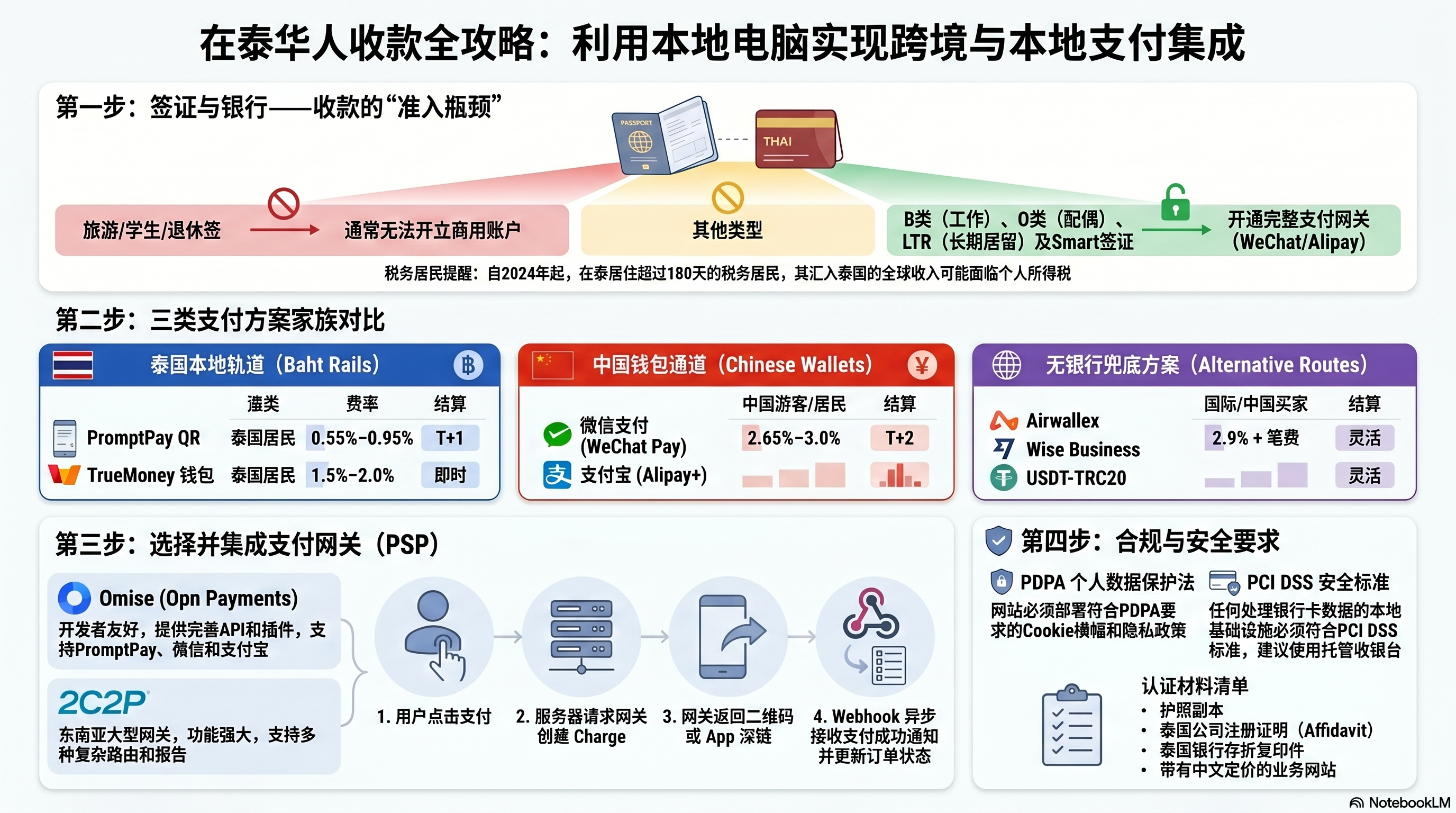
The three families of options
Pick a rail based on who your customers are and what ID you can present at sign-up. Most real-world setups end up combining a Thai-side gateway (for local buyers) with a Chinese wallet (for mainland buyers).
Thai rails
需要泰国银行账户For Thai-resident customers paying in baht.
Chinese wallets
面向中国客户For mainland Chinese buyers — your largest natural audience.
No-bank fallbacks
无银行账户If you can't open a Thai bank account yet.
Side-by-side comparison
| Method | Buyer | Setup difficulty | Typical fee | Settles to | Needs Thai bank? |
|---|---|---|---|---|---|
| PromptPay QR via Opn Payments (Omise) | Thai residents and Chinese tourists (NITMX cross-border, see below) | Low | 1.65% (Opn) · 0.8% Xendit · 1.0–1.5% Pay Solutions | Thai bank, T+1 | Yes |
| WeChat Pay via Omise / 2C2P | Mainland Chinese (in-app) | Medium | 1.65% storefront / 3.65% online (Opn) | Thai bank, T+2 | Yes (or via Airwallex) |
| Alipay+ via Omise / 2C2P | Chinese + 25 APAC wallets | Medium | 1.65% storefront / 3.65% online (Opn) | Thai bank, T+2 | Yes |
| TrueMoney Wallet | Thai residents | Low | 1.5–2.0% | TrueMoney → Thai bank | No (Thai phone only) |
| Wise Business | Anyone, by bank transfer | Medium | ~0.5% FX | Multi-currency Wise account | No |
| Airwallex | Anyone, incl. cards / WeChat | Medium | 2.9% + tx fee | Multi-currency Airwallex | No |
| USDT (TRON) via NOWPayments | Crypto-comfortable buyers | Low | 0.5–1.0% | Crypto wallet you control | No |
| PayPal CN | International | High in TH | 4.4% + fixed | UnionPay or CN bank | No |
KYC effort, visualised
How hard it is to onboard, given you have a passport and a Thai address but no Thai ID card.
Visa situation — the real bottleneck
Almost every payment setup above ultimately requires either a Thai bank account or a Thai business registration. Both are gated by your visa. Here's what each common visa actually unlocks for a Chinese national living in Thailand.
| Visa | Open Thai bank? | Register business? | Best payment route | Typical Chinese resident |
|---|---|---|---|---|
| Tourist / visa exempt | No (rare exceptions: Bangkok Bank with agent, large deposit) | No | Wise / Airwallex / USDT only | Short-stay traders, shopkeepers visiting from Yunnan |
| ED visa (Thai language / Muay Thai school) | Sometimes — Krungsri and Bangkok Bank with school letter, ฿20k+ deposit | No (work prohibited) | Personal PromptPay only — no commercial use | Younger Chinese students, language learners in Chiang Mai |
| DTV (Destination Thailand Visa, 5-year) | Mixed — some branches accept, some demand a work permit | Possible as sole prop, but legally grey for active work | Wise / Airwallex primary; PromptPay secondary if a bank approves | Remote-working Chinese freelancers, digital nomads |
| Non-Immigrant O (married to a Thai) | Yes — straightforward with marriage cert | Yes — spouse can co-own, work permit obtainable | Full Omise / 2C2P stack, WeChat + Alipay enabled | Chinese spouses of Thai nationals |
| Non-Immigrant B + work permit | Yes — easiest path | Yes — can fully own a Thai company within FBA limits | Full Omise / 2C2P stack | Employees of Chinese-owned companies in BKK / EEC |
| Thailand Privilege (Elite) visa | Yes — concierge service walks you through it | Possible, but Elite visa itself doesn't grant work rights — pair with work permit | Full stack via a Thai company; Airwallex while setting up | Wealthy Chinese investors, retirees, family-office staff |
| LTR visa (Long-Term Resident) | Yes — fast-tracked at participating banks | Yes — built-in digital work permit | Full Omise / 2C2P stack, lowest friction of any path | High-earning Chinese tech workers, wealthy globals |
| Retirement (Non-O / O-A / O-X) | Yes | Work prohibited — no commercial registration | Personal PromptPay only — passive / family transfers | Retired Chinese settling in Chiang Mai, Hua Hin |
| Smart visa (S / T / I / E) | Yes — BoI-backed | Yes — Smart-S includes startup work rights | Full stack; Smart-S founders go directly to Omise | Chinese tech founders, BoI-promoted investors |
| PR (Permanent Residence) | Yes | Yes — same as Thai national in most respects | Full stack, no constraints | Long-tenured Chinese residents (10+ years) |
Visa → payment route map
Common upgrade paths for Chinese residents
Path A · Solo nomad
DTVTourist → DTV (5-year) via remote-work or "soft power" (Muay Thai, Thai cooking) eligibility. Apply at the Thai consulate in Kunming or Hong Kong.
Unlocks a 5-year multi-entry stamp and improves bank-opening odds, but does not legally permit serving Thai customers.
Path B · Marriage
Non-OMarriage to a Thai national → Non-O visa. Spouse co-registers a sole proprietorship; you operate it under a work permit obtained through that business.
Most common path among Chinese running cafés, agencies and tour businesses in Chiang Mai.
Path C · Investor
Elite / LTRCapital-based: Elite (฿900k–5M for 5–20 years) or LTR Wealthy Global Citizen ($1M assets, $80k income). LTR adds work rights; Elite alone does not.
Best when you have funds and want zero hassle. Pair Elite with a Thai limited company for full commercial rights.
Path D · Founder
Smart-S / BoITech / startup route: Smart-S visa via dtsc.depa.or.th endorsement, or BoI promotion for an export-focused company.
Lowest fees on Omise (BoI companies often qualify for negotiated rates) and full work rights bundled.
Recommended stack
The NITMX shortcut — when PromptPay alone is enough
If your buyers are tourists from China (not residents transferring from a CN bank), you may not need separate WeChat Pay or Alipay+ activation at all. NITMX (Thailand's national payment switch) has a network-to-network partnership with Ant International (Alipay+), Tencent (WeChat Pay) and UnionPay that lets Chinese visitors scan a standard Thai PromptPay QR using their native domestic apps.
One QR, three apps
Display a regular PromptPay QR. Chinese tourists open Alipay or WeChat at home, scan, and pay — no separate Alipay/WeChat acquirer relationship required on your side.
Real-time FX
Buyer is debited in CNY at the live exchange rate; you receive THB. No FX margin to manage in your checkout flow.
Settlement banks
Cross-border settlement is officially routed through Bangkok Bank and Krungthai Bank. Open your acquiring account at one of them for the cleanest path.
When it isn't enough
For mainland Chinese buyers paying remotely (not in Thailand at the time of purchase), you still need Omise / 2C2P with WeChat Pay enabled, because NITMX requires a physical or geo-attested scan in Thailand.
Wire-up: WeChat Pay via Omise & 2C2P
Both providers expose WeChat Pay as a redirect / QR-source flow. Your server creates a charge, the gateway returns either a QR image (desktop) or a wechat:// deeplink (mobile), the buyer pays inside WeChat, and you reconcile via webhook.
Implementation
// npm i omise express
const express = require("express");
const omise   = require("omise")({
  publicKey: process.env.OMISE_PUBLIC_KEY,
  secretKey: process.env.OMISE_SECRET_KEY,
});

const app = express();
app.use(express.json());

app.post("/api/checkout", async (req, res) => {
  const { amountTHB, orderId } = req.body;

  // 1. Create a WeChat Pay source — amount is in satang (1 THB = 100)
  const source = await omise.sources.create({
    type:     "wechat_pay",
    amount:   Math.round(amountTHB * 100),
    currency: "THB",
  });

  // 2. Create the charge against that source
  const charge = await omise.charges.create({
    amount:      Math.round(amountTHB * 100),
    currency:    "THB",
    source:      source.id,
    return_uri:  `https://yoursite.com/pay/return?order=${orderId}`,
    metadata:    { orderId },
  });

  // 3. Hand back the QR image URL (desktop) and deeplink (mobile)
  res.json({
    chargeId:   charge.id,
    qrImageUri: charge.source.scannable_code?.image?.download_uri,
    deeplink:   charge.authorize_uri,   // opens WeChat on phones
    status:     charge.status,           // "pending" until paid
  });
});

app.listen(3000);
async function payWithWeChat(amountTHB, orderId) {
  const r = await fetch("/api/checkout", {
    method: "POST",
    headers: { "Content-Type": "application/json" },
    body: JSON.stringify({ amountTHB, orderId }),
  });
  const { qrImageUri, deeplink, chargeId } = await r.json();

  const isMobile = /iPhone|Android/i.test(navigator.userAgent);

  if (isMobile) {
    window.location = deeplink;            // → opens WeChat
  } else {
    document.getElementById("qr").src = qrImageUri;
    pollChargeStatus(chargeId);            // optional UX poll
  }
}
app.post("/webhooks/omise",
  express.raw({ type: "application/json" }),
  async (req, res) => {
    const event = JSON.parse(req.body);

    // Always re-fetch — never trust the webhook body for $
    if (event.key === "charge.complete") {
      const charge = await omise.charges.retrieve(event.data.id);
      if (charge.status === "successful" && charge.paid) {
        await markOrderPaid(charge.metadata.orderId, charge.amount);
      }
    }
    res.sendStatus(200);
  });
# pip install pyjwt requests flask
import jwt, requests, time, uuid
from flask import Flask, request, jsonify

app          = Flask(__name__)
MERCHANT_ID  = "JT01"
SECRET_KEY   = "YOUR_2C2P_SECRET_KEY"
ENDPOINT     = "https://sandbox-pgw.2c2p.com/payment/4.3/paymentToken"

@app.route("/api/checkout", methods=["POST"])
def checkout():
    body = request.json
    payload = {
        "merchantID":    MERCHANT_ID,
        "invoiceNo":     body["orderId"],
        "description":   body["description"],
        "amount":        body["amountTHB"],     # decimal
        "currencyCode":  "THB",
        "paymentChannel": ["WECHAT"],            # lock to WeChat Pay
        "frontendReturnUrl": "https://yoursite.com/pay/return",
        "backendReturnUrl":  "https://yoursite.com/webhooks/2c2p",
        "nonceStr":       uuid.uuid4().hex,
    }
    token = jwt.encode(payload, SECRET_KEY, algorithm="HS256")
    r = requests.post(ENDPOINT, json={"payload": token}).json()
    decoded = jwt.decode(r["payload"], SECRET_KEY, algorithms=["HS256"])

    # Hand back the hosted-payment-page URL — 2C2P shows the WeChat QR there
    return jsonify({
        "redirectUrl": decoded["webPaymentUrl"],
        "paymentToken": decoded["paymentToken"],
    })
@app.route("/webhooks/2c2p", methods=["POST"])
def c2p_webhook():
    token = request.json["payload"]
    try:
        data = jwt.decode(token, SECRET_KEY, algorithms=["HS256"])
    except jwt.InvalidSignatureError:
        return ("bad sig", 400)

    # respCode "0000" = success per 2C2P spec
    if data["respCode"] == "0000" and data["channelCode"] == "WECHAT":
        mark_order_paid(data["invoiceNo"], data["amount"])

    return ("", 200)
Activation checklist
- Open a Thai bank account on a Non-Immigrant visa (Bangkok Bank and Kasikorn are the most foreigner-friendly in Chiang Mai).
- Register either a sole proprietorship (ทะเบียนพาณิชย์) or a Thai limited company. Omise requires this; 2C2P will accept individuals for very small ticket sizes.
- Sign up at
dashboard.omise.coor2c2p.comand request WeChat Pay + Alipay+ activation. - Submit your business website with a working privacy policy, refund policy, and Chinese-language pricing page.
- Wait for Tencent's review (mediated by the gateway). Use Wise/Airwallex to invoice in the meantime.
Compliance — what the PSP actually checks
Below is the document and policy bundle Opn / 2C2P will demand before activating WeChat Pay or Alipay+. Don't treat this as paperwork — half the rejections at this stage come from incomplete bundles, not from the business itself.
Business documents
- Affidavit of company registration (issued within last 90 days)
- Articles of association / company by-laws
- Tax ID and VAT certificate (Por Por 20 / ภ.พ. 20)
- For foreign-owned entities: notarised or apostilled translations
- Recent utility bill or bank statement as proof of business address
KYC / AML
- Passport / Thai ID for every UBO holding ≥25% of the company (notarised for foreigners)
- Wet-ink signed ID + valid visa / work permit for all authorised signatories
- 3–4 months of bank statements showing transaction history
- Source-of-funds declaration if onboarding amounts are large
Website policies
- Privacy policy (PDPA-aligned, see below)
- Refund policy — Thai chargeback rules favour the consumer, so this is reviewed strictly
- Terms of service
- For WeChat / Alipay+: a Chinese-language pricing page
- Bilingual (TH + EN) recommended for trust
PDPA (Thailand's GDPR)
- Privacy notice stating what data, why, and retention period
- PDPA-compliant cookie banner — non-essential cookies blocked until consent
- Documented procedure to report breaches to PDPC within 72 hours
- Designate a contact for data-subject requests
PCI DSS v4.0.1
- TLS 1.2+ on every endpoint that touches checkout
- MFA on admin / dashboard logins
- Network segmentation + firewall in front of any cardholder data
- If storing card data: full PCI DSS certificate required
- Using Hosted Payment Page or dynamic-QR API: scope reduced to SAQ-A — gateway absorbs most of the burden
Pro tip — minimise your scope
Always integrate via the gateway's hosted page or redirect / QR-source flow rather than direct card-data API. You drop from a multi-thousand-control PCI DSS audit to a self-assessment questionnaire (SAQ-A), and the gateway becomes the "data controller" for the sensitive bits. This single architectural choice shortens onboarding by months.
Running this page inside a local AI-agent workflow (Ollama)
This static page is more useful when it's the front-end of a small local agent that can answer "given my visa and customer mix, which rail should I pick?" and then actually create the test charge. The whole loop runs on your laptop — no cloud LLM, no leaked merchant keys.
Architecture
Two processes, one network namespace. The browser talks to your local FastAPI worker; the worker talks to Ollama and the gateway sandboxes. No data leaves the laptop except the test API calls to Omise / 2C2P.
Why Ollama specifically
Bilingual by default
qwen3:8b handles Mandarin, Thai and English natively — important when your buyer is Chinese, your gateway docs are in English, and your bank forms are in Thai.
Tool-calling support
Ollama's /api/chat supports OpenAI-style tools arrays since v0.4. The agent loop is a plain while-loop around it — no LangChain required.
Keys never leave the host
Your Omise secret key, 2C2P merchant ID, even sandbox webhooks all stay on 127.0.0.1. Useful when you're testing inside Thailand where outbound traffic is monitored.
Cost: zero
Iterating on prompts and tool schemas with a hosted model burns money fast. Local inference makes the rapid-iteration phase free.
Wiring it up
# Windows / macOS / Linux — ollama.com/download
ollama pull qwen3:8b           # Chinese-friendly, ~5GB, tool-call capable
ollama pull llama3.1:8b        # fallback for English-only tasks

# Verify the server is running on port 11434
curl http://localhost:11434/api/tags

# Quick smoke test of tool-calling
curl http://localhost:11434/api/chat -d '{
  "model": "qwen3:8b",
  "messages": [{"role":"user","content":"What time is it?"}],
  "tools": [{"type":"function","function":{
    "name":"clock","description":"Return current time","parameters":{"type":"object","properties":{}}
  }}],
  "stream": false
}'
from typing import Any

FEES = {
    "promptpay":    {"pct": 0.0095, "flat_thb": 2, "settles_to": "thai_bank"},
    "wechat_pay":   {"pct": 0.0290, "flat_thb": 0, "settles_to": "thai_bank"},
    "alipay_plus":  {"pct": 0.0290, "flat_thb": 0, "settles_to": "thai_bank"},
    "truemoney":    {"pct": 0.0175, "flat_thb": 0, "settles_to": "truemoney"},
    "usdt_tron":    {"pct": 0.0080, "flat_thb": 0, "settles_to": "crypto_wallet"},
}

def lookup_fee(rail: str, amount_thb: float) -> dict:
    f = FEES[rail]
    fee = amount_thb * f["pct"] + f["flat_thb"]
    return {"rail": rail, "fee_thb": round(fee, 2), "net_thb": round(amount_thb - fee, 2)}

def pick_rail(visa: str, buyer_country: str, has_thai_bank: bool) -> dict:
    if not has_thai_bank:
        return {"rail": "wise_or_airwallex", "why": "No Thai bank, route through multi-currency account"}
    if visa in {"tourist", "ed", "retirement"}:
        return {"rail": "promptpay_personal", "why": "Commercial use forbidden — personal only"}
    if buyer_country == "CN":
        return {"rail": "wechat_pay", "why": "Chinese buyers; route via Omise WeChat Pay"}
    return {"rail": "promptpay", "why": "Default Thai-resident rail"}

def create_test_charge(rail: str, amount_thb: float) -> dict:
    # Calls Omise sandbox; returns QR + charge id (omitted for brevity)
    ...

TOOLS: list[dict[str, Any]] = [
    {"type": "function", "function": {
        "name": "lookup_fee",
        "description": "Compute the gateway fee and net amount for a given rail.",
        "parameters": {"type": "object", "properties": {
            "rail":       {"type": "string", "enum": list(FEES.keys())},
            "amount_thb": {"type": "number"}
        }, "required": ["rail", "amount_thb"]}
    }},
    {"type": "function", "function": {
        "name": "pick_rail",
        "description": "Recommend a payment rail given the merchant's visa and target buyer.",
        "parameters": {"type": "object", "properties": {
            "visa":           {"type": "string"},
            "buyer_country":  {"type": "string"},
            "has_thai_bank":  {"type": "boolean"}
        }, "required": ["visa", "buyer_country", "has_thai_bank"]}
    }},
    {"type": "function", "function": {
        "name": "create_test_charge",
        "description": "Create a sandbox charge and return the WeChat QR for preview.",
        "parameters": {"type": "object", "properties": {
            "rail":       {"type": "string"},
            "amount_thb": {"type": "number"}
        }, "required": ["rail", "amount_thb"]}
    }},
]

DISPATCH = {
    "lookup_fee":         lookup_fee,
    "pick_rail":          pick_rail,
    "create_test_charge": create_test_charge,
}
import json, requests
from tools import TOOLS, DISPATCH

OLLAMA = "http://localhost:11434/api/chat"
MODEL  = "qwen3:8b"
SYSTEM = ("You are a payments advisor for Chinese residents in Thailand. "
          "Use the provided tools rather than guessing fees or rails. "
          "Always answer in the user's language (Mandarin, Thai or English).")

def run_agent(user_msg: str, history: list[dict] | None = None) -> dict:
    msgs = [{"role": "system", "content": SYSTEM}, *(history or []),
            {"role": "user", "content": user_msg}]

    for _ in range(6):                              # tool-call budget
        r = requests.post(OLLAMA, json={
            "model": MODEL, "messages": msgs,
            "tools": TOOLS, "stream": False,
        }, timeout=120).json()

        msg = r["message"]
        msgs.append(msg)

        calls = msg.get("tool_calls") or []
        if not calls:
            return {"reply": msg["content"], "history": msgs}

        for call in calls:                            # execute every requested tool
            name = call["function"]["name"]
            args = call["function"]["arguments"]
            result = DISPATCH[name](**args)
            msgs.append({"role": "tool", "name": name,
                         "content": json.dumps(result, ensure_ascii=False)})

    return {"reply": "(tool budget exceeded)", "history": msgs}
# pip install fastapi uvicorn requests
from fastapi import FastAPI
from fastapi.middleware.cors import CORSMiddleware
from pydantic import BaseModel
from agent import run_agent

app = FastAPI()
app.add_middleware(CORSMiddleware, allow_origins=["http://localhost:8080"],
                   allow_methods=["*"], allow_headers=["*"])

class ChatIn(BaseModel):
    message: str
    history: list[dict] = []

@app.post("/chat")
def chat(body: ChatIn):
    return run_agent(body.message, body.history)

@app.get("/health")
def health():
    return {"ok": True, "model": "qwen3:8b"}

# Run with:  uvicorn server:app --reload --port 8000
const WORKER = "http://localhost:8000/chat";
let history = [];

async function ask(message) {
  const r = await fetch(WORKER, {
    method: "POST",
    headers: { "Content-Type": "application/json" },
    body: JSON.stringify({ message, history }),
  });
  const { reply, history: next } = await r.json();
  history = next;                // keep tool-call traces for grounding
  render(reply);
}

// Example user prompts the agent will resolve via tools:
//   "我有 ED 签证,想给云南朋友收 500 baht,应该用哪个?"
//   "Compare Omise WeChat fee vs USDT for 12,000 THB"
//   "Generate a sandbox WeChat QR for 99 baht"
Worker workflow — what actually happens on each user question
Running it end-to-end
# Terminal 1 — the LLM
ollama serve

# Terminal 2 — the agent worker
uvicorn server:app --reload --port 8000

# Terminal 3 — serve this HTML page
python -m http.server 8080

# Open http://localhost:8080/thailand_china_payments.html
# The chat widget bottom-right talks to localhost:8000, which talks to localhost:11434